๐ฏ Master your media universe with one smart remote!
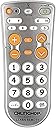
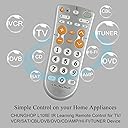
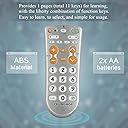
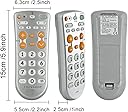
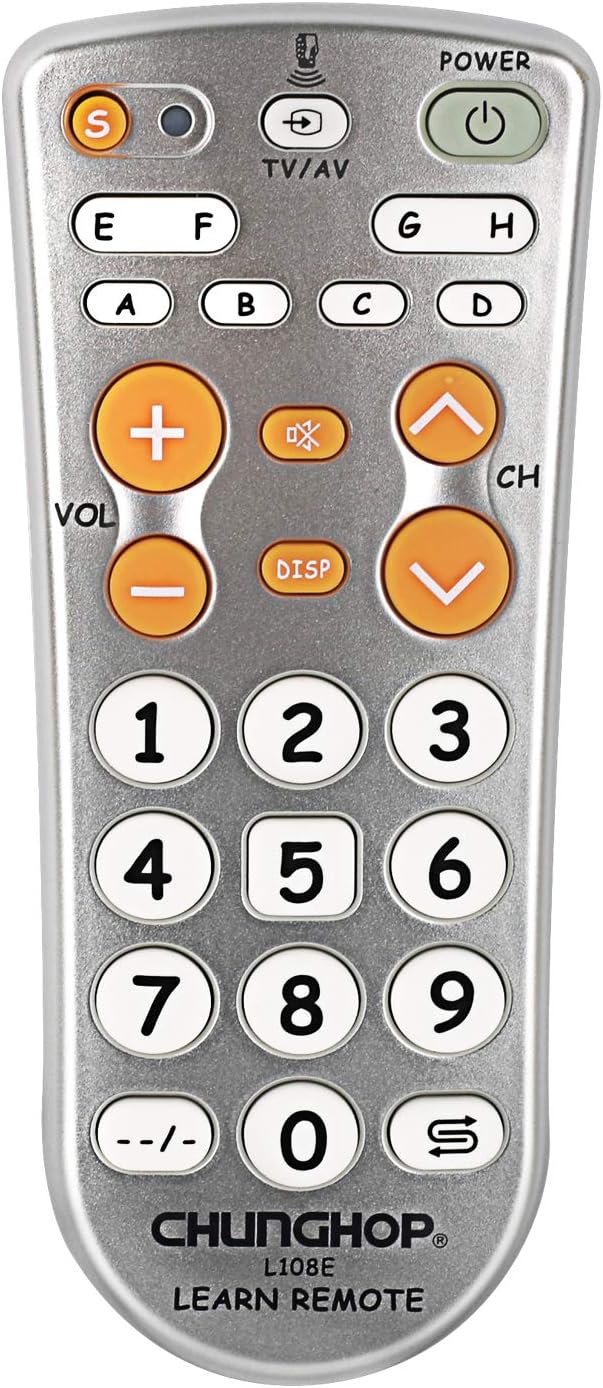
The CHUNGHOP L108E is a universal learning remote control designed to replace multiple remotes by copying IR signals from your existing devices. It supports TVs, satellite boxes, DVD players, cable, CD players, air conditioners, and VCRs. Featuring an intelligent chipset, it offers a reliable operational range of over 8 meters and permanent memory that retains settings even after battery replacement. Its large buttons and ergonomic design ensure comfortable, easy use.


| ASIN | B07BSWLXBM |
| Additional Features | Universal |
| Battery Type | AA |
| Best Sellers Rank | #255,195 in Electronics ( See Top 100 in Electronics ) #20,915 in Remote Controls (Electronics) |
| Brand | CHUNGHOP |
| Button Quantity | 28 |
| Color | Silver |
| Compatible Devices | VCR |
| Connectivity Technology | Infrared |
| Controller Type | Button Control |
| Customer Reviews | 3.8 out of 5 stars 69 Reviews |
| Manufacturer | CHUNGHOP |
| Max Number of Supported Devices | 1 |
| Maximum Number of Supported Devices | 1 |
| Maximum Range | 8 Meters |
| Model Name | L108E |
| Model Number | L108E |
| Special Feature | Universal |
| UPC | 604213246219 |
M**N
Perfect design for simple IR replacement remote
Works wonderful on my HT receiver that the volume button wore out. Super easy to program and the instructions were clear. Solid feel and works every time. Large buttons work much better than the original remote. No brainer for the price.
W**T
Did not work as replacement for existing remote controls
I bought two of these devices and had the same result with both of them. Everything seems normal during the programming steps. But they did not work for any of my devices - not TV, not cable box and not for several other devices.
T**3
It's goofy looking but it's cheap and it works.
I knew going into it that this remote would be cheap looking, it's light, and the silver finish on plastic never holds up over time. Having said that, it's dirt cheap, all buttons can be programmed, and it works... which is all I needed it to do. I'm using it as a backup for an expensive HDMI matrix box that came with a credit card remote. You need the remote to run the box, and those remotes have even shorter lives. I figured the chance of being able to get a replacement later is pretty much zero, so I've copied the remote into this thing and use this as the daily having stored the original. 100% happy with it for that purpose, thus the 5 stars. Having said that, I'd pay twice as much for the same thing with a better black finish and no goofy logos. It's ugly. It's also very simple in arrangement with big buttons so it'd be a good "simple" replacement option for folks that need bigger buttons than most chiclet size buttons oem remotes have these days.
E**L
Works, but looks like it was designed by a five year old from 1995.
Pros: - You can set any button to do anything you want. You just press the learn button, then expose it to an infrared signal, when it picks up the signal the red LED flashes, you press the button on here to save it to a button. Cons: - You need a way of generating the IR signals for it to learn from. This means you need a working remote with strong batteries so the IR signal comes through loud and clear. - It takes patience to program, sometimes it captures a partial signal so it looks like it worked, but in fact didn't capture so you have to test each key you programmed to make sure it captured the signal correctly. - The design looks like crap, and I am being very kind about it. The font on the front is Comic Sans! "Designed by Vincent Connare Comic Sans MS is a sans-serif casual script typeface released in 1994 by Microsoft Corporation. A casual, non-connecting script inspired by comic book lettering, Comic Sans intended for use in informal documents and children's materials." Yep... this is probably one of the dumbest looking remotes I've ever held. 0/10 for design. Everything about this screams "designed by a five year old from 1995" All said, it works as advertised: you can program any button to be any button on any remote. I set the volume buttons to match the volume buttons of my sound bar, and the channel button to match the channel buttons on my TV. Now I can control both with the same ugly remote. There are 28 buttons on this ugly remote, and you can set them any way you like. Yeah, if you wanted, you could set the volume up button to make the volume go down... anything you want will work. Note: my Vizio TV's remote's IR output was very weak, even with fresh batteries. Even the TV had a hard time picking it up, so that's way I wanted this, unfortunately it had a hard time picking up the signal too. I took the Vizio TV remote apart and powered it with an external 3.3V DC power supply to make it overdrive the LED. It actually worked! With the higher voltage this remote picked up the signals just fine and I was able to program it. ...COMIC SANS ... ugh.
C**E
Simple learning remote
This remote is pretty basic, but reliable. Programming is simple using an original remote, but sometimes needs a couple of attempts to get a button to take. Once they're set they stay programmed. The buttons don't repeat. Most remotes will repeatedly send the signal if you hold a button, but this one only sends one signal per button press, so it's hard if, for example, you want to quickly turn up the volume a lot.
M**.
Surprisingly Simple and Useful
I don't write many reviews, but figuring that many potential buyers were as skeptical as I was, I felt it important to point out this interesting fact: IT WORKS GREAT! Not that you would think all would be well from the product description or the baffling selling points on the packaging. Carry on bravely, though, as the internal instruction sheet is intelligible and opening the plastic clamshell is about the most difficult part of the effort. It took me only a few minutes to reproduce the key buttons I needed to control an Epson projector, a Sony sound bar, an LG plasma TV, a Cambridge Audio integrated amp and a Marantz home theater amp. You put this universal remote in programming mode, press one button on each remote and, in about two seconds, the two buttons now do the same thing. And then you move on to a new pair of buttons and repeat; the universal remote will stay in programming mode so if you know what you want to do, setting up several button pairs per minute is easy-peasy. I had what turned out to be a useful idea if you have access to a copier . . . lay the remote on the glass and make a paper copy of the button layout. Then use a pencil and (probably) an eraser to optimize your result. This may not be necessary if you are just making a clone of a current remote, but in my case where I was using this to reduce the need for FIVE different remotes, it took some thought to figure out the optimum button configuration. There are a few things to note. Not surprisingly, if the original remote is RF (radio frequency) rather than IR (infrared), nothing's going to happen. And attempts to copy my Tivo remote (set in IR mode) didn't work and I don't know why. Finally, my Cambridge Audio amp needed a separate key devoted to "on" and another devoted to "off," even though it's a single button on the original remote. So if you find you can turn some piece of equipment after transferring the on/off button but can't turn it off with the same button, you probably need to devote on button to each power state. Overall, though, it's fantastic. I have, over the years, used very upscale/expensive programmable remotes from Yamaha, Harmony, Philips and others, and have also used the Harmonys at pretty much every cost level. And I've also used a dozen "enter the code" universal remotes. They all have merit, but in the situation where you want to quickly copy a few important keys from each of several remotes, nothing is as easy to set up and as easy to use as this thing. If this sounds like your situation, risk the purchase. I was dubious, but neither the low cost nor strange appearance kept this from being exactly what I needed to most easily handle day-to-day control of a rather complicated system.
T**H
A Nice Little Big-Button Remote With Learning Capability
I really like this Chunghop L108E remote. For a long time, I have wanted for our guest bedroom a small, big-button remote with LEARNING capability, so that I can teach codes to the remote on a button-by-button basis. But I have never seen a big-button remote with button-by-button learning capability, until I saw and purchased this remote (which has worked out perfectly for my needs). The information offered about this remote on its Amazon page is somewhat sketchy, as is the extremely short instruction sheet that comes with it, so I offer a few comments below that might possibly be helpful to others. SOME INFORMATION ABOUT THE REMOTE: 1) Unlike most after-market remotes, this remote does NOT contain any pre-programmed information for any TV, cable box, or other device such as a TV or cable box. Therefore, you cannot simply enter a 4-digit code and then have all of the buttons on the remote suddenly be capable of operating your particular device. Instead, every button on this remote must be separately and independently programmed from or more separate remotes, button by button. (Consequently, as one aspect of this, if you have lost a remote and are looking for a replacement, don't buy this remote, because you would need to have the lost remote in hand in order to program this remote). 2) Most aftermarket remotes have two or more "device" buttons where, for example, you press a "TV" button and a group of buttons then control your TV, or you press a "Cable" button and then that same group of buttons switches over and controls your cable box instead of the TV. But this remote does not have any such "device" buttons. Instead, aside from the Set button, all of the buttons are effectively equivalent for programming purposes, in that each button can learn one and only one IR code. (This includes the "A" through "H" buttons, which have no special capabilities, and are merely extra general-purpose buttons). In other words, aside from the Set button, this remote has 28 buttons, so the remote can learn a maximum of 28 IR codes. As one aspect of this, you cannot program this remote in a manner so that pressing just one button causes the remote to emit a series of two or more different IR codes (e.g. one code to turn on your TV and then another code to turn on your cable box). 3) The instructions do not disclose any way to erase all programming and thus reset the remote to its factory condition. Nor do the instructions disclose any way to erase just one button. On the other hand, if a button has already been programmed and you want to change it, you can simply reprogram that button, without any need to first erase it. 4) The IR codes that you program into this remote are stored in non-volatile memory so, even if the batteries are removed for a long time, the remote won't forget what you taught it. 5) This remote can only learn infrared (IR) codes from other remotes, and not radio frequency (RF) codes. (Thus, for example, it can't learn RF codes from the remote for a Roku device). PROGRAMMING THIS REMOTE: 1) As with any learning remote, before trying to teach this remote any IR codes, it is advisable to put brand new batteries into this learning remote, and also into the teaching remote. 2) When programming most learning remotes, you first press a button on the learning remote, and then a button on a teaching remote. But with this Chunghop remote, the opposite is true. You first press a button on the teaching remote, and then a button on this learning remote, as explained below. 3) Put this learning remote and the teaching remote head to head on a flat surface with their IR emitters facing each other, about 1-3cm apart. 4) To enter the programming mode, press and hold the Set button on this remote for about 2 seconds, until the red LED comes on and stays continuously on. 5) Press and hold a button on the teaching remote until the LED on this learning remote starts blinking slowly, and then release the button. Next press a button on this learning remote and hold it while the LED begins flashing quickly and then until the LED stops blinking and stays continuously on, and then release the button. 6) Optionally, to program additional buttons on this remote, repeat Step 5 as many times as needed. 7) When finished with programming, press and release the Set button to exit the programming mode. The LED will go off.
S**N
THE WORSE REMOTE I'VE EVER PURCHASED!
If you want to waste your time trying to program this remote you have the right item. Trying to program this remote almost everyday has led to nothing. THE WORSE REMOTE I'VE EVER PURCHASED!
J**R
Easy to program !
Great quality for the price. Works really well and very easy to program .
F**R
Not always effective
Could not sync with my Samsung TV
P**.
Works perfectly!
I finally found a perfect solution for my family room so no more questions on how to use multiple remote controls all at the same time. No more weird and messy settings! The only small limitation of these programmable remote controls - they cannot send a sequence of the codes by one button - usually to toggle the power of the both TV and a streaming box - but this feature becomes a nightmare after you were too quick and one of the devices left on so with your next push of this button you will get one your device on and another off and vica versa. So for me this is good there is no way to combine the codes on one button!
Trustpilot
3 weeks ago
1 month ago