


📡 Turn your PC into the ultimate HDTV command center!
The Hauppauge WinTV HVR-1265 PCI Express Hybrid TV Tuner Card lets professionals stream, pause, and record high-definition digital and analog TV directly on their Windows PC. Supporting up to 1080i resolution, it connects via PCIe x1 or x16 slots and includes WinTV software for scheduling and playback. With broad channel compatibility and robust customer support, it’s the perfect upgrade for multitasking millennials who demand premium TV flexibility at their fingertips.

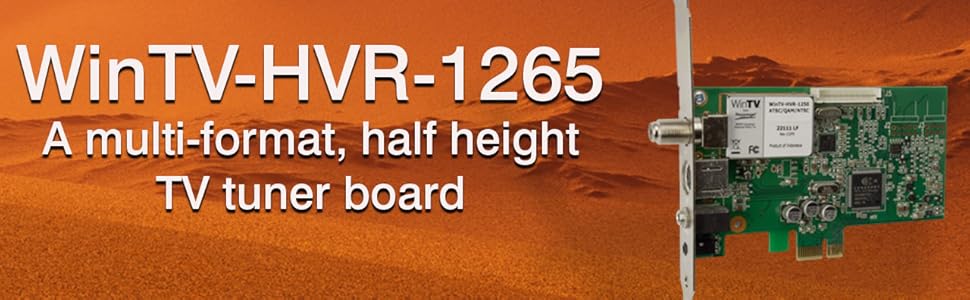


| ASIN | B0014YFC18 |
| Analog Video Format | NTSC |
| Antenna | Television |
| AntennaDescription | Television |
| Best Sellers Rank | #198 in Internal TV Tuner & Video Capture Cards |
| Brand | Hauppauge |
| Built-In Media | WinTV-HVR-1265, IR remote control, IR receiver cable, WinTV v10 application (download) |
| Color | Green |
| Compatible Devices | Personal Computer |
| Connectivity Technology | PCI Express |
| Connector Type | PCIe half height with full height bracket |
| Customer Reviews | 4.1 out of 5 stars 496 Reviews |
| Global Trade Identification Number | 00785428011967 |
| Item Weight | 16 ounces |
| Manufacturer | HAUPPAUGE |
| Mfr Part Number | 1196 |
| Model Number | 1196 |
| Number of Items | 1 |
| Tuner Type | NTSC |
| UPC | 785428011967 |
| Unit Count | 1 Count |
| Warranty Description | 2 years |
A**M
Great Tuner, great customer service
I've been looking at buying a TV Tuner for my computer for a long time and settled on this one because of the price/features. I put this into my computer, drivers installed through Windows 7 automatically immediately (64 bit). I then installed WinTV7 from the CD it came with and set up TV signal. It found all of my analog channels no problem (I just get basic cable with channels 2-78). Then I tried configuring for Digital/clear QAM channels just to see what would happen (I don't get digital on any of my TVs, including my HDTVs besides like 5 HDTV channels that EVERYONE gets in my town such as NBC [news channels]). The tuner found about 40 unencrypted digital channels that work completely fine! Comparing the Digital channels to Analog, there is definitely a big difference in quality. However, I prefer using Windows Media Center. When I tried finding the digital channels in that, it didn't work. However, I still prefer using Media Center because the guide is a lot easier to use and recording is easier. CAUTION: do not buy this tuner for the remote. The remote I received did not work at all. I found a $2 replacement for the remote which was an app for my ipod touch called InControl. Works great. If the remote had worked, this would have been 5 stars. (SEE UPDATE BELOW) Pros: -easy to install/use -works in Windows 7 -works with 64bit OS -picks up a good signal of the channels -recordings are the same quality as live tv -works in Media Center -turned my PC into TiVo for $50 Cons: -remote doesn't work (See update below) -occasionally channels will have static and be a little flaky (but this is more likely the cable I have plugged into it than the card) -digital wouldn't work in WMC Conclusion: Regardless of the remote that doesn't work,(see update below) this was well worth the money. It installed without a hitch, works great in Media Center, and now I can record all the shows that I like and never have time to watch when they are on TV. If you are someone like me that likes a few TV shows but don't have the time during the week when new episodes air to watch it, this is perfect for you. It is the cheapest TV Tuner you will find, but still works well for the function of watching live TV or recording. ------------Update 7/14/2011--------------- (changed from 4 to 5 stars because of this) I contacted Hauppauge customer service about the remote not working. After a few emails back and forth trying to troubleshoot, when we determined we thought it was a faulty IR Receiver cable, the guy sent me a new one, free of charge, no shipping costs either. Arrived 3 days later. Plugged it in. Now I have the remote working in both WinTV7 AND in WMC! Great customer service
M**0
Great Bang for Your Buck!
So far I LOVE this product. The only reason why I didn't give it five stars is because I just got this a few weeks ago and I want to make sure it lasts for more than a couple of months. After reading the reviews, I decided to give it a shot because of the good price. Most of the reviews on it were very good, with some reviews being pretty bad. I realize that we all have different types of computers, Mac and PC, Old and New, Windows XP and Windows 7, etc..Before I give my full review let me say that I have a PC that is about a year old with 4gb memory and 1tb hard drive. It has an Athlon Quad Core processor and Windows 7. I also live in a large metro city, which I'm told may play a factor in how many channels you can get and the kind of antenna you may need. If any of you have a similar PC and live in a similar city than I hope my review helps. Setup was pretty simple with only one issue (stated below). I connected a basic rabbit ears antenna that I had for over five years and was ecstatic that it picked up all of the channels that my basic digital tv box gets. The HD channels were surprisingly very crisp. I love the fact that you can click the rewind button if you have to leave the room for a moment. This eliminates the need to record the program if you don't want to. I'm not sure if the rewind option is available on every channel, but on the the movies and shows that I've watched the option worked fine. Recording is very simple, but be prepared to use up a bunch of hard drive space when recording a show under the "Best" quality. 1 hour shows can go up to 5gb in size. You'll have to lower the quality if you want a smaller size file. I haven't tried the remote that came free and still haven't tried the tv guide feature that's available through online so I won't comment on those but I have used the S-Video slot and hooked it up with my baby cam. It comes with an AV adapter to plug in the S-Video slot and connects to the cam without a problem. Now i can do some work while my son is sleeping and have a minimized screen on my computer so that I can make sure he's fine and see when he wakes up. Windows 7 Users This tuner DOES work with Windows 7. I was a little nervous because I read some users saying that it did not. The issue that I had, and I'm guessing they might have had the same issue, was when I first installed the pci card and turned on my pc, the windows message screen popped up saying the driver did not install. I turned off my pc and tried it again with the same result. I was just about to call Hauppauge tech support when I decided to install the software anyway. Problem gone! Software loaded and driver showed up as recognized by windows. Comcast/Infinity Users With a few steps this tuner DOES work with your Comcast cable box. It DOES NOT work if you try to connect the tuner with the coax cable that comes out of your wall and set it up through "Digital QAM". All you'll get is a few hundred encrypted channels that you won't be able to see. The trick is to connect your cable box directly to your tuner. Now I know that Comcast offers online cable through their internet but if you're someone like me who only has Comcast TV, then that option is not for you. Here is the steps that I got from Hauppauge tech support: Got to Start Menu -> All Programs -> Hauppauge WinTV folder -> Advanced Options folder -> Empty Channel Database icon These steps completely clear the channels that you already have and takes you to the "Device Setup Wizard" on WinTV. You then check the "Analog Tv" option and click Next twice until the tuner starts to scan for channels. As soon as it picks up just one channel click Stop. Click Next until it closes the setup wizard. Click on the TV icon and then...Viola!! With that one channel you can now watch cable with your Comcast remote. On Demand works too! The only issues I have right now with this is that it takes a second or two longer when changing the channels or navigating through ON Demand and the Guide channel. This is a little annoying but well worth the aggravation. *PS* I tried all of this with the basic Comcast box and not with the HD box. I also don't have any premium channels (HBO, Showtime, etc.) so I can't be for sure that it works the same with them but I'm assuming you will get similar results. **PS** Do not expect to get a clear answer when calling Comcast. Best thing to do is call Hauppauge tech support. I called Comcast twice from a friend's phone pretending to be a new customer who needed to speak to tech support before I signed up with their service. After a few basic questions I casually brought up the fact that I had a tuner and was wondering if I could connect the cable box to my tuner. The first tech said that they would have to send me a "special box" that their technician would have to install. The second tech said that without Comcast internet the technician that comes to install my Cable TV will not even touch my computer because they don't want to be liable if something damages my PC.
K**T
Works!
7/30/2010 Update: Just upgraded this tuner to five stars!! Installed Windows 7 Professional 64 Bit recently, and now this tuner works perfectly with Windows Media Center!! Works Wonderfully and I completely prefer media center over the win 7 software that comes with the tuner, especially since I recieve updated listings of the all programs. Works more like a DVR now. Very happy with this purchase. Tuner, Remote and software work fine, picks up all the local digital atsc stations over the air with my attic mounted antenna. Everything comes in clear and it picks up all channels available which is about 45 (all free). I have been using the software (wintv7) that came with the tuner, and that works good. (Previous Old News: I have been unable to get it to work on Windows Media Center with Windows Vista 64 Bit, it says that "no tuner is found". I have reinstalled, loaded the windows driver pack for the it etc, but it still is unrecognized by my windows media center for some reason. Oh well, it still works with the wintv 7 software it came with, so no biggie.)
R**N
One of the Best Internal TV Cards ever.
I bought this for my Windows 7 - 64 bit Computer which has an NVIDIA GeForce GTX 1070 & 16GB of Ram. It was an easy installation and the HVR-1265 provided me a great picture, which was amazing since the Cable Wires are over 30 years old in my apartment building. I've been using it for over 4 months and it continues to work great. The Remote Control that came with the product was a disappointment (See the picture in one of the other reviews) I've been using Hauppauge Video Cards for many years now, still got them. I stumbled across the IR32 Remote Control driver and noticed it was the same as the one I used with my HVR-1600, therefor maybe the old Remote Control will work on this new Card, well, It does. I tried recording a TV show and it worked flawlessly. I used the .mp4 format as recommended by someone in one of the other reviews. So far, this is one of the best Internal TV Cards I've ever bought and I'm glad I bought it. Some of the factors that may have contributed to this is that this Card uses a PCI Express interface, I am using a better Video Card, and I have plenty of RAM. I am using a direct Cable TV wire (not Digital) and scanned for 125 analog stations, not tested on Digital channels. I am not using a Cable Box.
B**E
It would have been 5 Stars
The product works as expected. Setting up can be an annoyance. It turns out my Dell PCIe x16 slot did not like the TV card and took several attempts to get it to work. Swapped my sound card so TV card can use PCIe x1 and worked flawlessly. Not sure if it was a hardware issue on my PC even though I have the latest FW. The sound card works fine in the PCIe X16 slot. I gave this product 3 stars because I waited 5 days to hear back from Hauppauge Inc. Their technical support is not very good and still waiting for them to respond as I wrote this review on12/8/23. Also annoyed that their Voice Mail has a message from 2020 regarding Covid-19 and responses are only through chat or email. Tried the chat they sent me to email. Customer support is lacking in this department. I also learned later that the Windows 10/11 drivers are not needed if you are using the latest WinTV software as it has the latest drivers. Maybe they should note this on the website. Frustrating!!!! Only if they responded I would have avoided this confusion. With all this confusion of info on the internet, I decided to move on and try something else and set up a return with Amazon. The process was flawless. Decided to give it one more try before returning and I decided to install WinTV and it worked. I then canceled the return and tried it out. Great product and well thought out. The software is good and very happy now that it works. Highly recommend it, but don't recommend contacting them. Thank you for reading, Benjamin
D**O
Very Disappointed
Yet another "Good, the bad, the ugly" model, but I'm a BIG Eastwood fan so I'm running with it so here goes: The Good: Packaging, I was pleased with the contents of the product and was pleasantly surprised about the adapters it came with. (In particular the low profile adapter) The Bad: Software interface isn't all that great. (Geez guys, even putting tool tips on the action buttons would be a huge improvement from a usability standpoint) The Ugly: Unfortunately a lot of ugly going on here. I'll start with the installation. If you do buy, don't bother with the CD installer it comes with. Download their latest stuff from their website. (But make sure you keep the disc though or they'll charge you 10 bucks for the latest drivers & software.... sheesh) Ok, so installed the board just fine, booted up the PC and installed their drivers from their CD. Drivers installed fine and Windows (Windows 7 btw), found the new hardware... so far so good. Drivers done, I installed the the WinTV 7 software. At the end of the installation I run WinTV which starts in setup mode to search for channels. So it finds all the channels available, I click "Next" and my entire PC freezes. I mean TOTAL lock up. No mouse, ctrl+alt-del, etc. From this point on, reboot after reboot, I tried getting the software to run but it freezes the PC every time. So I navigate to their website and sure enough new drivers and software available. So I'm finally able to get the WinTV software to work with the updated drivers & software. But to my disappointed, the HDTV channels are jerky and freezes. Completely not watchable. While watching the the non-HD channels the CPU and memory is excessively high. Also, just when I though the PC freezing problem is over, every time I wake my PC up from Sleep mode it completely freezes up... My PC isn't brand new, a few years old, but this card was first produced in 2004. I certainly expected much better than this. As other reviewers have stated, I'm following suit and returning this card in pursuit of a better solution.
D**M
No problems with linux mythtv (except remote control)
Works out of the box with linux mythtv (fedora 18), although I couldn't get the remote to work (but I knew that before I bought the tv card after reading buyer comments on Amazon and Newegg). I get all 150 hd channels over the air (antenna) in the LA area -- free! And with mythtv I can record or pause any program (need to subscribe to schedule direct -- $2 a month, versus $15 with tivo). It helped me create a tremendous media center. Coupled with roku and Plex Media Server (free app) I can send recorded movies to any tv in the house -- without any wires (center must be on wifi network along with the rokus) To control mythtv you can use mythmote, an android app, which is free, on a phone or android tablet. Or with some tinkering you can get Adesso "remote" sold on Amazon to work well with mythtv (costs about $21; I didn't have any luck with Anker mini bluetooth keyboard: couldn't get myth to record with it and juice went out of battery in about 15 minutes after being fully charged). Thank God for open source (apps and linux) and rokus! Love you, Linus, Stallman (GNU) and all of you open source programmers! America is much better off because of your selflessness and altruism!
W**T
Works fine in Vista with satellite box
I bought this card for one purpose: To put SD TV from my office satellite box in a window in Vista. It works fine for that. But I would echo what others have said: Only after installing the newer drivers from Happauge's Web site. Upon initial install, the unit offered only herky-jerky, unwatchable video. The new driver took care of that. Since I live in an area with no direct OTA digital or sd tv channels, I'm using it exclusively with a DirecTV basic satellite box. So I can't speak to the efficacy of the tuner, or, for that matter, the remote control, which is superflous to me because I simply tune channels with my sat box. But it does provide smooth, pretty sharp SD TV to my Dell Latitude 2.2 gig dual core with 8 gigs ram and 256 MB ATI video card. Note that to hook up the unit with a satellite box, your box needs a video out (such as S-video) and audio out jacks to feed into the card. Note also that this card will NOT give you HD channels through a sat box, as it has no HDMI or composite inputs. But I didn't expect that for the price, and HD TV in a small screen window seems sort of a waste. The WinTV app is a little annoying, but it works OK. I tried to set up this card through Windows Media Center, but the setup wizard would hang everytime it tried to link the tuner to a Media Center remote, and I don't have a Media Center remote. Dumb, with no workaround apparent. The software does recognize the tuner, however, for those of you who do have the full whiz-bang Media Center setup. Also, the audio from the card through my onboard PC audio system is excellent. Overall, I'm pleased that I can junk my clunky old office TV for fifty bucks or so.
H**S
Wonderful TV tuner
My old one bit the dust - literally, the dust build up in the computer (caused my old tuner to short out on the board). It wasn't working one day so I looked at the board and sure enough a burn mark was there and lots of dust - It could also have been a lightning surge from the antenna or some other power surge. The replacement works flawlessly, can't do without these cards.
S**N
¡Magnifico producto!
Antes que nada, cabe aclarar que yo deseaba un sintonizador de tv ATSC/capturadora de vídeo análoga para PC, específicamente de conexión USB, sin embargo los modelos disponibles de este mismo fabricante están sobre los 3k (MXN) por lo que este artículo que es PCI al bajar de precio no dude en adquirirlo. Como dato curioso y que no todos están al tanto es que este dispositivo puede insertarse en cualquier ranura PCI Express ya sea x1 (pequeño), x4 (mediano) y x16 (grande) que son las más comunes. Es una pena que esta marca haya dejado de comercializar sus productos en México, ya que el último producto que pude comprar aquí en el país fue un WinTV USB del 2004, el cual funciona perfectamente, sin embargo ya no es compatible con sistemas operativos recientes. Bueno, cumplió mis expectativas, lo cual era de esperarse. Sintoniza perfectamente las señales abiertas ATSC y graba su contenido en formato nativo de transmisión junto con su audio alterno y sus subtítulos (en caso de estar disponibles), algo que me es muy útil es que tiene entradas de señal analógica (Compuesto y S-Video) para lo cual me permite hacer captura de vídeo de reproductoras de vídeo-casetes para transferir vídeo a medios digitales. Algo que me sucedió al instalar el software (que debe descargarse desde Internet) es que el código de activación indica que es para la versión 8 de WinTV, sin embargo al instalarlo indica que se actualizo a la versión 8.5 y hay que hacer descarga de esta otra versión, pero para este momento está disponible la versión 10 de WinTV por lo que decidí instalarlo y activar la licencia con el código que venía en la hoja amarilla dentro de la caja de la versión 8 y lo acepto. Un detalle a tener en cuenta es la ausencia de controles para ajusta los colores de los canales, aunque tal vez se debe al tipo de codificación de la señal, y el hecho de que al realizar grabaciones de vídeo bien sea de fuente digital o análoga, los archivos resultantes son en formato Transport Stream (extensión .ts), que al menos en mi caso funciona perfectamente con mi editor de vídeo.
A**R
Amazing product! Needs to work on their program though.
This product works great! The program it comes with I still haven't quite figured out fully as I had just been using ti for the past 8 hours. The channels display by numbers but you can't see what station it is.It also generated 275 channels for my scan, but only 60 of them actually work. I had to write down on a piece of paper the channels that didn't work go back into the listing and then remove them. Extremely tedious and time consuming. But, I did not pay for the program as the program comes free with the TV Tuner so I won't rate lower for that issue.. Being in Canada, the guide program it comes with will not generate anything for me. I 'm running windows 7 Ultimate, with that being said this product does work with windows media center, where that will generate a tv guide where you can select the channels right from the guide, record your live t.v. as well. I currently don't own an actual t.v. which was the reason for me purchasing this (free cable in my rent), but the adapter it comes with to hook in your RCA cables works amazing as well. Been playing my Xbox 360 through there as well. I would give it a 5 start rating if it actually came with a user manual for win TV 7, I feel there's a lot to do within the program that can make using it more enjoyable.
R**L
Fijense bien al abrirlo
El producto venia sin numero de activación y así no se puede usar
K**L
Works perfectly
I had a WinTV-HVR-1600 which I was happy with but then I upgraded to a new PC that does not have a PCI slot so I needed a new card that is PCIe. The 1265 fit the bill and it performs even better (I am able to get more channels using the same antenna).
Trustpilot
1 month ago
2 months ago