Desertcart purchases this item on your behalf and handles shipping, customs, and support to Croatia.
๐ฅ๏ธ Elevate your workspace, command your day with VIVOโs premium monitor arm!
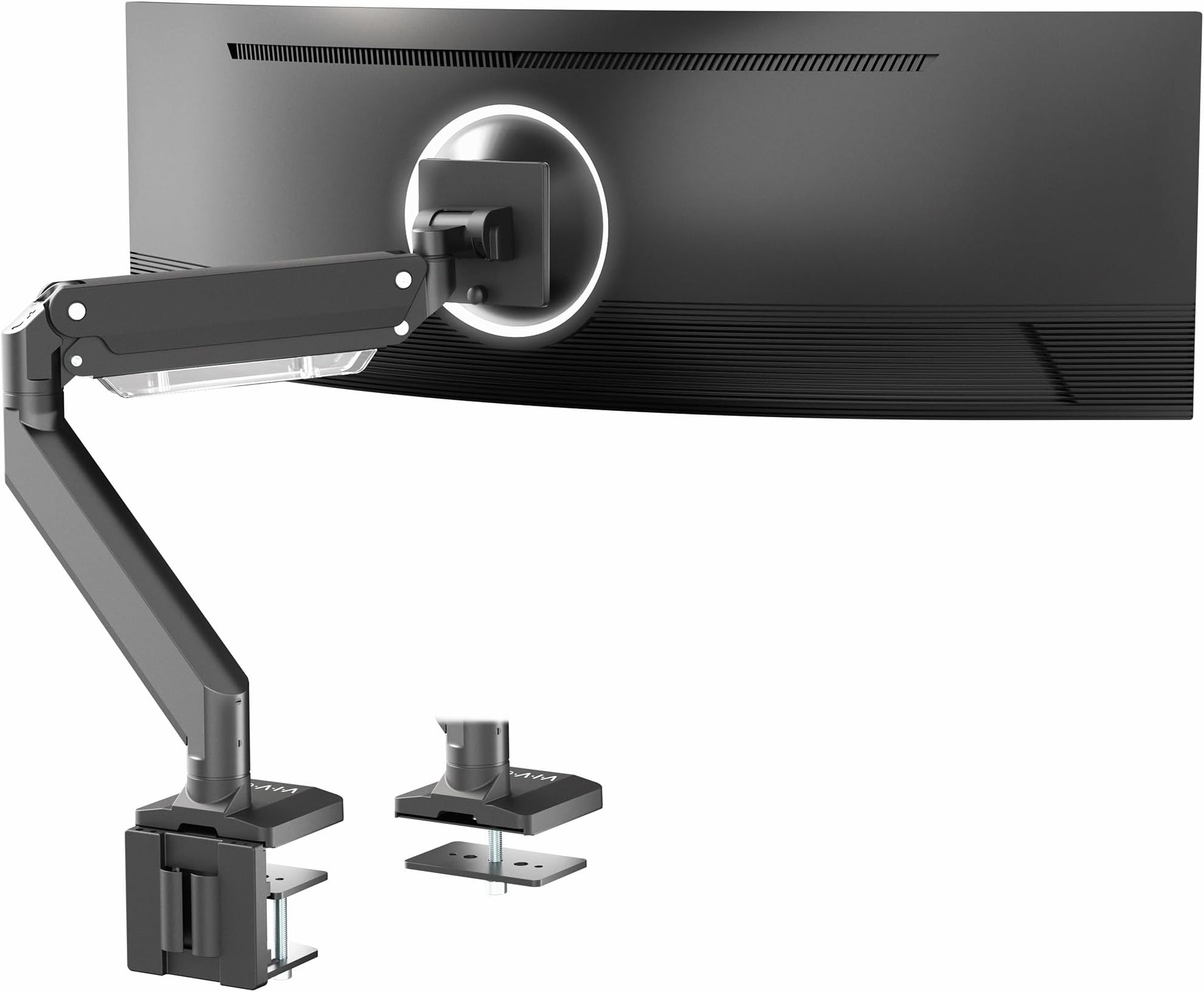
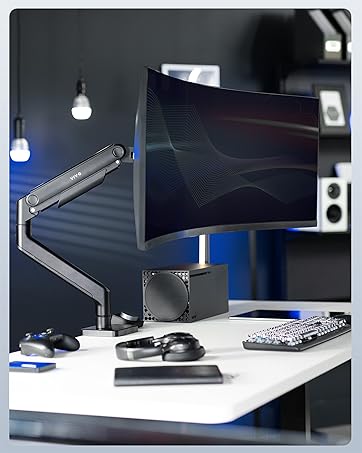
The VIVO Premium Aluminum Monitor Arm is engineered for ultrawide screens up to 49 inches and supports monitors weighing up to 33 lbs. Crafted from durable aluminum, it features a pneumatic spring for smooth 13-inch height adjustment, 180ยฐ swivel, 45ยฐ tilt, and 180ยฐ rotation. Its quick-release VESA bracket (75x75mm & 100x100mm) and integrated cable management deliver a clean, ergonomic setup. Compatible with desks up to 3.3 inches thick via clamp or grommet mount, this heavy-duty arm transforms your workspace into a sleek, flexible command center.


| ASIN | B07L8MLTGS |
| Best Sellers Rank | #92 in Computer Monitor Arms |
| Brand | VIVO |
| Color | Black |
| Compatible Devices | Monitor |
| Customer Reviews | 4.3 out of 5 stars 1,882 Reviews |
| Enclosure Material | Aluminum |
| Global Trade Identification Number | 00818538024173 |
| Item Weight | 12.7 pounds |
| Manufacturer | VIVO |
| Material | Aluminum |
| Maximum Tilt Angle | 45 degrees |
| Maximum-Supported Screen Size | 49 inches |
| Mfr Part Number | STAND-V101G1 |
| Minimum-Supported Screen Size | 17 inches |
| Model Number | STAND-V101G1 |
| Mounting Type | Tabletop Mount |
| Movement Type | Articulating |
| UPC | 818538024173 |
| Warranty Description | 3 Year Warranty |
O**E
This monitor extender by VIVO is the best purchase I made
I was looking to make room on my desk after adding a 34-inch curved monitor to go with my 49-inch monitor. At first, I had them sitting side by side, but my neck started hurting because I had to look to the far left and right to see both screens completely. I decided to buy a monitor arm extender to stack my monitors to avoid looking far left and far right, so here is what happened. I initially bought another brand that cost around $70 that would support my 49-inch monitor, but once I received it and took it out of the box, it was very complicated to assemble because, one, the directions were not clear, and two, it had a lot of pieces that seemed very overwhelming. After assembling it, it seemed very lightweight, not sturdy at all, AND I was limited in the rotation angles, which I was not happy with, so I returned it. I decided to pay the heftier price for this VIVO monitor extender, and I want to say I'M SO HAPPY I DID! Instead of using it for my 49-inch monitor, I decided to use it for my 34-inc curved monitor so I could stack them. 1. You can tell as soon as you take it out of the box, IT'S QUALITY AND VERY STURDY. 2. It was super easy to assemble as the instructions were very clear, and it didn't have 100 pieces to assemble. 3. You can angle this in so many ways! From up, down, left, right, horizontally, vertically, in an angle, you name it, you can angle it! This allowed me to adjust the monitor to sit perfectly on the top center of my 49-inch monitor with no weight from the 34-inch monitor being on the 49-inch monitor. I added a picture to show that the 34-inch monitor is barely touching the 49-inch. While it may cost a bit more, IT IS 100% WORTH IT! I now call this my command center and have a lot more room on my desk. I would highly recommend this arm extender!
G**M
Sturdy, mounts easily, holds the weight without a problem
The VIVO mount is excellent! I was concerned about mounting to my desk, but the existing clamp system is extremely sturdy and a large (2x3 inch) pressure plate for under the desk distributes the weight and has proved very effective - no wiggles or wobbles - even when adjusting the monitor! Installation took about an hour and all tools except a philips screwdriver were included (you need this to attach your monitor to the mounting plate. The only thing I needed help with was hooking the monitor to the mount - but that was just me being nervous - you can do this as a one person job without any real trouble. The system for adjusting the spring tension to the weight of your particular monitor works just as described, the tension for each different adjustment make this easy to tune just the way you like it. We used this for a 34-inch Dell monitor, and it works perfectly. My wife and I can each adjust the monitor exactly as we wish and it is not problem to set it back when needed. We are highly pleased with this and would recommend it.
B**S
Still up after a year
I waited a long while to write this review. I highly recommend this monitor arm. It comfortably held up my acer x34 ultra wide and now holds my lg ultra gear ultra wide. For the past year. No sag, level, easily adjustable and easy to install without opting to drill through my desk.
C**N
Hard to work with but will do the job
I use this with a 32inch ASUS monitor that weighs about 15 pounds. Using an Allen wrench, you control the angle of the mount for the monitor by having to hold and twist the tightness of it at the same time - I highly reccomend not doing that with the monitor attached. Additionally, you have to tighten a screw for the arm of the desk mount while also holding the arm as well. This takes some effort and carefulness. However, after figuring this out, the arm is strong and easily supports my 15 pound monitor. The arm moves very well and functions flawlessly. Pros: Quick assembly Fluid movement Good variety of angles for monitor Decent build quality Cons: Tightening screws is very hard on the hands Metal plate used to help keep arm with desk flush easily falls off
D**.
Great monitor, especially for the price (+49" Odyssey G93SC & Magnus Pro XL Desk info)
The monitor I am using is the SAMSUNG 49" Odyssey G93SC Series OLED (27.80 lbs). There are different versions of this type of monitor, with minor variations in the back mount. I read all of the reviews where people said this monitor arm would fit the G9, and during installation, those statements came into question. If you take the factory monitor mount off of this monitor, you cannot directly connect this VIVO Premium Monitor Arm straight to the monitor as is. You will need the black metal wall/VESA mount that comes with the Odyssey monitor. I received my monitor about a month ago and, luckily, held on to it. With this part in hand, installation is rather easy. As others have noted, there is some sagging taking place with this monitor once installed. I've tightened (greatly, as it seemed to have too much torque) the specific bolt that manages this articulation, and the sagging is no longer present. We will see how this holds over time. I will update this review if I have future issues with sagging. I live rather close to a railroad, so the slight vibrations will really put this bolt to the test. We will see. The movement of the arm could be better, but for the price, this is great. To any who has purchased or plans to purchase the SecretLab Magnus Pro XL Desk, this monitor arm definitely fits this desk. During the extensive research of building my office, this was a concern I saw all over the internet. I bit the bullet and purchased this monitor arm without knowing for sure if it would fit or not, a sacrifice for my fellow computer nerds that paid off. Currently, SecretLab does not have a monitor arm for sale that can support a monitor of this weight, but that is supposed to change soon, according to their website. Please do note that you will come across some installation issues when installing this monitor arm to the Magnus Pro XL; luckily, I am here to walk you through that process. *kiss face emoji* The cable management tray is not too shallow to initially place the monitor arm, but it is too shallow to tighten the bolts on the bottom of the clamp to ensure your arm doesn't slide around. There are at least two ways to tighten the bolts; I know this because I mounted the arm in the center of the desk, fastened the bolts through a rigamarole process, and then realized that the monitor arm needs to sit several inches to the left to properly center the monitor on the desk. The second go around, I found a quicker way that involved tools that didn't come included. Below are both of the methods I used. How to tighten the clamp on a Magnus Pro XL Desk WITHOUT extra tools:: - You will need to remove the two screws on each side of the desk that hold the cable management tray in place (4 screws total). Then you make your way to the remaining four screws on the bottom of the desk that hold the cable management tray in place. You DO NOT need to completely remove these screws; only loosen each screw a couple of turns, and the tray will sag enough to allow you to get the Allen wrench inside to tighten the monitor arm clamp bolts. Don't make my mistake; ensure that your monitor is positioned on the desk where you want it before tightening these bolts. You don't want to have to do this again. I moved mine 5-6 inches to the left of the center. The center can be found by looking at screw placements on the inside of the cable management tray. Once the bolts are tightened, tighten the 4 screws on the bottom, and reconnect the 4 screws that go on each side. How to tighten the clamp on a Magnus Pro XL Desk WITH extra tools:: - Take a Dremel tool or any other saw/torch/etc., and cut the Allen wrench to a shorter length. I've included a picture of how short I cut my Allen wrench. This method is 100 times easier than the first. I gave this monitor arm an overall rating of 5 stars, mostly because of the price. As for Sturdiness, I gave this monitor arm 4 stars due to some crucial parts being plastic, Easy to assemble got 4 stars, and Range of motion got 4 stars. I would recommend buying this monitor arm, though if you have the patience, the SecretLab Ultrawide Monitor Arm should be available soon; that one will likely be a better quality and also look better.
R**M
False Tilt Numbers, not +/- 45 and doesn't hold a 23lb! monitor without tilt sag.
Why lie about your basic specs! I got this arm specifically because of +/-45 tilt, but that's not the real numbers, not even close. +53 / -27 those are the actual tilt numbers, they even only add up to 80 total degrees of tilt, not the 90 advertised. Add in the fact that you have to tightening down the tilt so much to stop it from sagging forward, that it locks the screen in place, completely negating the spring assisted tilt adjustment. I have to get the allen wrench out every time I want to adjust the tilt, which is fairly often for me. Viewing angle with glasses and glare reasons. I am using a 49" super ultra wide but it only weights 23lbs, lighter than a lot of other 49" screens, and is specifically list as compatible with this stand. For the price it would be a perfectly fine stand IF! they didn't lie all over the listing and misrepresent the product. It may not have worked for my case but then I would know what I was getting, and not have to go through the trouble of boxing this back up and returning it. The actual gas spring assist of the arm height is the only thing that works as shown, but that could be because my screen weights 70% the rated strength of the arm. Seeing as they lied about the tilt numbers, I have seriously doubt it would hold even close to the full weight they suggest. Just stop lying in your product listings! How hard is that?
J**S
Built like a tank and gets the monitor high enough
I was looking for a monitor that I could use primarily for work but also allow me to rotate and lift the display for use with my exercise bike. This arm definitely accomplishes both of these tasks. I also didn't have Ergotron level money to purchase a monitor. I have a Dell S3220DGF which is a 32in curved display that requires about 17lbs for a display mount. I tried 2 other monitor arms before "splurging" on this one. The other 2 were not sturdy enough despite listed weight capacities that my monitor fell within or did not allow for the monitor to be placed high enough. This arm is HEAVY DUTY, you can feel how substantial it is when putting it together, very high quality. Also the clamp design is really smart as it allows the metal to flex some (increasing clamping force) while maintaining a large clamping area. It does this by using 2 thick bolts and a plate that can pivot on top of the bolts. Simple design that is very effective. I absolutely think you can tighten the up/down tilt adjustment enough to hold bigger/heavier monitors. Saying that, if you do so, you will probably lose the ability to tilt your big monitor without loosening the adjuster first. Possible improvements for future iterations: 1. For monitor arms that are "Heavy Duty" I would think some type of ratcheting or locking tilt mechanism would be used to ensure there is no drooping of very large monitors over time. It would be really cool if you could use an allen wrench to change the tilt of the monitor. 2. The slide in clip for the VESA mount could be easier to insert and remove from the arm. 3. Some type of internal cable routing or conduit for the down tube. The clips are better than nothing but not super clean. Another option would be to slightly increase the space between the pole clamp and the stationary arm to allow cables to go down the main pole without risking damage to the cables. I was so pleased with this monitor arm that I then purchased another Vivo arm to hold my laptop with a separate AVLT laptop holder.
J**R
Supports a G9!!
I was about to finally pull the trigger on getting the really expensive competitor to this arm - however, after reading the reviews I decided to give this VIVO arm a chance. So glad I did -- works really well with a Samsung G9. All of the tension points need to be adjusted as other reviewers have already mentioned. However, I don't think the tightening was all that bad -- except when it came to the forward tilt. This one, you have to set the monitor up at the forward tilt angle (not left/right tilt, but tilt that adjusts the forward facing angle) to exactly how you want it and then crank that little tensioner till it cries - or you do - whatever comes first. So I'm not able to change the forward tilt of the monitor without messing with the tension. I don't plan on doing that ever. EVERY thing else works super well - up, down, swivel, left, right, etc. Excellent build quality -- especially for the price! Once everything is adjusted, it does feel very solid. Word of caution - this installation is a two person job. Don't mess around - it is FAR easier with two people - especially when it comes to tightening the tilt tension. One person can hold the monitor at the right angle and the other can crank away. It would be awesome if they could engineer a way to get the tilt to work with a G9 - even if the cost needs to increase or if there is a special part to be purchased. G9 owners - don't hesitate - this is the one you're looking for.
R**R
Amazing mount for the price, though installation was a bit tricky.
Its an amazing mount for the price - not many in the 100usd range that are rated to hold up ultrawide monitors. This was the only option I could find that was heavy duty enough to hold my 38 inch monitor. While the monitor weight was much lower than the capacity of this one, I didn't want to risk going cheap, given the monitor is already expensive and this is going to be the only thing holding it up. Installation was a bit tricky, as the manual was limited in illustration and surprisingly no videos online for installation tutorials. While getting the thing together was easy enough, it was only after I mounted the whole thing did I realize that the base is slightly offset from the center (the monitor mount and base do not align in a fully pushed back position). It can align, but that brings the monitor forward which is not ideal. I didn't want to have the base offset or the monitor misaligned to my desk, so decided to move the base to one side completely (It actually ended up looking better that way). Outside of the installation, everything else seems to be good quality, solid metallic arms and good cable management using the trays under the arms. There is also slots available to store the keys to adjust tension in the arms. The only thing I couldn't figure out was if it is supposed to be easy to move the monitor around, as I had to tighten the tension quite a bit to keep the monitor in place and to stop it from dropping down (tension has to be greater than the weight). I suspect a bit more adjustment would have made it more movable (can move but needs a bit of effort and 2 hands). I dont move the monitor, so this doesn't affect me too much.
A**N
Supports the Samsung CRG49 Super Ultrawide with no issues.
Bought this since it was a LOT cheaper than the typically recommended ErgoTron HX arm, and was pleasantly surprised to find that it can hold up my Samsung 49" display with no issue. Been using this arm since June 2021, no sagging or droop issues. Had to crank the tightness on the swivel head where it connects to the monitor though, but after tightening it, the arm holds up with no sag over time. The in-built cable management is also pretty okay, but the bottom piece is a slide-on cover instead of being screwed on like the top piece is. Can be a bit of a pain in the ass to slide back on if you have a lot of cables running through it.
F**O
Worth every penny!
I am super glad I went with the more expensive option this time. For my first setup, I tried a cheap arm and it was a total pain to adjust and keep steady. This VIVO arm is the best I could ask for itโs sturdy, smooth, and holds my monitor perfectly. If you want a frustration-free setup, this is the one to get.
S**M
Good, but some manufacturing porblem
Good arm and sturdy for a 9kg monitor. Good mounting. The only problem is the the thing that sits between arm and monitor needs to be screwed in but it was poorly manufactured wich made the install take 3hours to fix the screw hole. If there where no manufacturing problem i would put 5/5
A**N
Parfait pour G9 !
Super pratique et solide, il tient parfaitement le Samsung G9 !
Trustpilot
2 weeks ago
1 month ago