๐ถ Elevate Your Audio Experience!
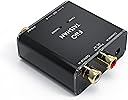
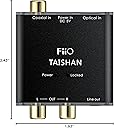
The D3 (D03K) Digital to Analog Audio Converter is a high-performance device that converts coaxial or optical digital audio signals into analog stereo output. It supports a wide range of sample rates up to 192kHz/24bit, ensuring exceptional sound quality. The device features a Cirrus CS8416 digital receiver chip and comes with a 6ft Micca optical Toslink cable, making it a complete solution for audiophiles seeking to enhance their listening experience.
| ASIN | B005K2TXMO |
| Best Sellers Rank | #954,866 in Electronics ( See Top 100 in Electronics ) #937 in Digital-Analog Converters #1,772 in Signal Converters |
| Brand Name | Fiio |
| Customer Reviews | 4.6 4.6 out of 5 stars (2,845) |
| Global Trade Identification Number | 00741360330993 |
| Interface | Coaxial |
| Item Dimensions L x W | 2.43"L x 1.93"W |
| Item Weight | 4 Ounces |
| Manufacturer | FiiO |
| Maximum Supply Voltage | 5 Volts |
| Mounting Type | Cable Mount |
| Number of Channels | 2 |
| Number of Pins | 9 |
| UPC | 741360330993 887467454849 |
L**S
Airport Express, FiiO, and high-end Audio System - Impressions
I have used Airport Express audio as an input to my audio system occasionally for several years, but I never gave it a serious evaluation for quality, other than noting it seemed "very good". For serious listening, we always tossed in a CD. Arrival of an iPad (with Airplay) in the living room, where the audio system resides, caused me to take a closer look at the potential for good audio with digital input from the Airport Express. I have a large iTunes collection, but never played much of it through Airport into the big audio system. My questions were: How good is Airport Express audio output when mated to my own above-average audio system (~$3000 speakers, $1000 two-channel stereo amp, high-quality cables, excellent CD player, large listening room)? Does using a DAC such as this FiiO improve the audio output from Airport to the above system? The answer I arrived at in my testing is that the Airport Express (using the older rectangular N model for this test) delivers excellent audio output from its integrated DAC, and using the FiiO D3 as an optical DAC between the Airport and audio amplifier does not noticeably improve or worsen the results. Every system will be different; there are huge variables in equipment interfaces, listener taste, and perception of final audio output. My system is very accurate and "neutral". My main test was playing a classic audiophile evaluation CD (Herbie Hancock, "River - The Joni Letters" - a great album, BTW) directly from a high-end CD player into the amplifier, and playing the same audio from a 320kbps mp3 rip of the CD through iTunes to the Airport Express, then either directly from the Airport to the amplifier, or through the FiiO to the amplifier. With this setup, I did blind A/B testing, shifting the amp input back and forth from the CD input to the Airport input. Neither I nor others could tell the difference, or call one source better than the other in audio characteristics. Both sounded great. The audio direct from the Airport seemed to have minutely less definition than the optical out from Airport to FiiO to amp -- but it was so small as to be a questionable perception. No one could reliably distinguish the CD to amp versus the Airport to amp, switching back and forth while playing the same album. I also ran several other CDs, including opera, vocals, classical, and rock. Results were much the same. Ears vary in accuracy; mine are better than average; I am sensitive to distortion and definition - but I make no claim to "audiophile golden ears". Different equipment combinations will offer different results. A "cheaper" or less accurate system may actual display more difference in the perceived quality between the Airport audio direct, and Airport via FiiO DAC audio. My end result: I left the FiiO in the system, running the optical from Airport to FiiO, and audio output from the FiiO to the amp. If the FiiO dies, I will toss it and just plug the audio cable into the Airport - and be satisfied. Of course, most of the mp3 files in my iTunes collection are of lower quality than the "highest quality" mp3 files I used in this test. However, it is clear that on my system and with my ears, a very good mp3 rip (320kbps, Apple lossless, or a FLAC rip) played via iTunes and Airport Express is NOT distinguishable to me from the CD player input. BTW, I also test the same CD, in a FLAC rip, via VLC, running through Airfoil to the Airport Express. Same excellent results. Conclusion: If you using Airport Express to drive a good audio amp, using the FiiO D3 as a DAC between the Airport and amp is unlikely to improve or worsen the final audio output. For less than 30 bucks, you too can spend an evening figuring this out.... Addendum, May 2017. After several years of frequent use, this is still working great. This gets an A+ from me, and I changed the rating to five stars.
T**N
Optical to stereo
This is a very good device, as long as you understand what it does. It is a digital to analog (stereo) audio converter. It is not capable of decoding surround sound. No 5.1/7.1/Dolby/DTS signal, only 2-channel stereo. YOU CANNOT USE THIS TO PLAY DVDS ON AN XBOX. I bought it primarily to play my Xbox 360 slim via a computer monitor that supports no sound, so I have to use a separate audio cable in addition to the HDMI. Unfortunately Microsoft crippled the RCA cable so that it blocks the HDMI connector, so I can't get both audio and video in my setup. One solution is this FiiO box, which converts optical audio into plain RCA. In order to connect a headphone, you still need a cable that is male RCA on one end, and female headphone jack on the other. Such a cable is easy to get anywhere. You also need an optical toslink (fiber optic) cable, which is included in the product. Here's how to use this device with the Xbox 360 slim: - In the Xbox, go to Settings / System / Console Settings / Audio / Digital Output, choose Digital Stereo. - Remove the protective plastic caps from both ends of the fiber optics cable. Plug one end to the Xbox, the other one to the FiiO. - Flip the FiiO switch down (optical mode), connect the power adapter and the headphone. You'll be able to play games, but not DVDs. The problem is that the FiiO box is unable to deal with surround audio, and all you'll get is loud noise. I never play DVDs on my Xbox, so I can live with it, but make sure you understand this limitation before you buy. If all you get is noise while playing games, you haven't set up the Xbox correctly, you need to switch it to Digital Stereo, instead of Dolby. Of course the FiiO D3 also works with the Playstation 3, although you don't necessarily need it, because the Sony RCA cable works just fine. Here's how to configure the PS3 for the FiiO D3: - Settings / Sound Settings / Audio Output Settings / Optical Digital. - Make sure to uncheck Dolby, DTS and everything that is not 2 Ch. Unlike the Xbox, the PS3 can play DVDs and Blu-ray very well via the FiiO D3. You'll get correct audio, as long as your console is configured as I suggested above. If you plan to use other devices, such as Blu-ray player, etc., make sure you can output pure 2-channel stereo signal for the FiiO. No stereo surround, no 5.1 surround, no Dolby, no DTS. Otherwise you'll just get random noise. You might draw the conclusion that the FiiO doesn't work, when in fact it is just a limitation. Sound quality is great for gaming. I haven't used the FiiO to listen to music. If you're serious about movies, get a home theater. But if you want to play console games via a computer monitor and stereo headphones or speakers, this is a relatively inexpensive solution that works well. It is pretty small and seems to be very well made. The power adapter is modern and doesn't get hot. There's no on/off switch or volume control on the device.
S**.
Works perfect with Apple TV on Zone 2
I have an ONKYO receiver in my living room with the "zone 2" feature. This means that I can hook up a pair of speakers anywhere I want, and power them separately from the speakers in my living room. So I bought a pair of Insignia outdoor speakers from my friend. Virtually brand new, never used, I payed $40 for them. The speakers were $80 at Best Buy, so I was feeling pretty lucky. After I hooked up the outdoor speakers in my backyard, (mounting and wiring) I hooked them up to the "Zone 2" input on the back of my home theater receiver. And I'm going to note that the "Zone 2" feature ONLY works with analog inputs. That means no digital inputs, unfortunately. So my hopes of hooking up my Apple TV 2, to the "Zone 2" speakers in my backyard, were let down. Then I found out about this digital to analog converter. I received it in the mail, hooked it up, and it works excellently. I did have to use the digital wire I already had, cause the one that came with the product, didn't connect for some reason. The ends were very tight. But everything works fine EXCEPT for when I have the "Zone 2" speakers powered, I'll turn on the Apple TV from my iPhone while in the backyard, and this really loud static noise will come from the speakers for about 5 seconds. It's REALLY loud, but after that, the music plays fine. So I just make sure to turn on the Apple TV BEFORE I turn on the "Zone 2" speakers.
Trustpilot
2 days ago
1 month ago