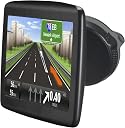
๐งญ Navigate smarter, travel farther, and never miss a turn!
The TomTom VIA 1505M is a sleek 5-inch portable GPS navigator featuring premium maps of the US, Canada, and Mexico. It offers over 1 million miles of mapped roads and free lifetime map updates, ensuring you always have the latest routes. Its bright touchscreen and Fold and Go EasyPort mount combine style with convenience for professional travelers on the move.
| ASIN | B004MYFTEW |
| Additional Features | includes_lifetime_map_updates |
| Are Batteries Included | Yes |
| Audio Output Mode | Stereo |
| Battery Average Life | 3 Hours |
| Best Sellers Rank | #621,426 in Automotive ( See Top 100 in Automotive ) #47 in Powersports GPS Units |
| Brand | TomTom |
| Built-In Media | Integrated Mount, USB cable |
| Compatible Devices | Smartphone, Tablet |
| Compatible with Vehicle Type | Car |
| Connectivity Technology | USB, Wi-Fi |
| Control Method | Touch |
| Customer Reviews | 3.6 out of 5 stars 717 Reviews |
| Display Type | LCD |
| Global Trade Identification Number | 00636926048767 |
| Human-Interface Input | Touchscreen |
| Item Weight | 7.7 Ounces |
| Manufacturer | TomTom Incorporated |
| Map Types | Road |
| Memory Storage Capacity | 4096 MB |
| Mfr Part Number | 1EN5.019.01 |
| Model Name | VIA 1505M |
| Model Number | 1EN5.019.01 |
| Model Year | 2011 |
| Mounting Type | Windshield Mount, Dashboard Mount |
| Operating System | Windows |
| Resolution | 480 x 272 |
| Screen Size | 5 Inches |
| Special Feature | includes_lifetime_map_updates |
| Supported Satellite Navigation System | GPS |
| Touch Screen Type | Capacitive |
| UPC | 636926048767 |
| Unit Count | 1.0 Count |
| Vehicle Service Type | Car |
| Warranty Description | 1 year |
E**N
Best gps ever
I decided to get this gps for severeal reasons. I do not have a smart phone and thought getting a gps system would be cheaper than swtiching to one in the long run. Also I knew I wanted a gps with lifetime updates so that i would not have to pay $50 a year for updates. And for this price, it was well worth it. I was so excited when I got this gps. It came on the day it said it would and is in perfect condition. I plugged it in for a couple minutes and then it turned on and I could use it right away! There are many things that I love about this gps. For one, the graphics are awesome! My boyfriend is great with these kind of things and he was even impressed on how great they are. Also it has favorites that you can add for example your work address or family members. The night vision is great too. So when you drive at night the light isnt so bright and distracting. I have checked that everything is accurate and it is! The speed it shows is right on, it will even show if you are going over the speed limit! (if you set it to). Also it knows exactly when you turn or how far you are from the location you are going to. I am taking this gps to Omaha, NE next weekend and have no worries about getting lost (anymore.) From where I am from, Omaha is a BIG city. I used to get lost just getting to my mom's house! But this gps is so accurate, all I have to do is put in her address and it will take me right to her.Even though this is my first gps, I will probably never buy anything but TomTom now! And I would recommend this to all my friends and family.
H**Y
If You Enjoy Hassles, Buy this Unit!!
***UPDATE*** 9/3/2012 Despite all the trouble with TT's nonexistent customer service, I had hopes that the device itself would work well. I started a three week road trip (why I bought a GPS) and the first day was a very complicated 600 mile route. The device worked flawlessly and brought me to my destination without incident. When I got to the motel, I turned off the TT and brought it inside so I could plug in the next day's route. When I tried to turn it on, nothing...completely dead. I tried everything...plugging it into my laptop; going inside the car to plug it in. (I had it plugged in the car the whole trip, btw). Went to the website for help. Could find nothing except that the site demanded the serial number. Since the device was dead, it couldn't recognize the device. Well, TT does not have a serial number on it...in fact, not even the model number is labeled anywhere on the device, go figure that! Tried calling their support line...couldn't get thru and what was even more aggravating was the fact that their connection kept cutting me off so I would have to call back and get at the end of the line again! I decided that even in the unlikely event that I could get a hold of support and get a fix for the problem, I could never trust the device again. I threw it on the ground and stomped it to pieces. Now I have no GPS for the rest of my trip. Should I get a Garmin? Their reviews aren't exactly glowing either................ After spending a huge amount of time comparing this TomTom with Garmin, I made the regretable mistake of buying the TomTom. The unit allegedly comes with lifetime maps. There is a certificate in the box that has a code on it that authorizes the lifetime maps. Well, I went to the website. TomTom has the most user unfriendly and confusing website I have ever experienced. After jumping thru endless hoops, it would not accept my code. After contacting their "customer service" (which must be in an English unfriendly country), they let me know that my code was invalid. Since then, I have been going thru more endless email exchanges trying to get a valid code, with no success. I still have not received a valid code and I would return this to Amazon except I stupidly threw out the box. Do NOT make my mistake. I don't know if Garmin is any better, but I guarantee that you will hate dealing with Tom Tom. Also, my computer is now infected with Tomtom: whenever I start my computer it automatically goes to tomtom's website; and periodically their website will pop up. Extremely annoying. TomTom stopped responding to emails so I tried their phone number. Surprise, surprise...I waited 45 minutes on hold and still could not get through. **UPDATE (8/16/12): Finally, finally, TomTom relented and gave me a valid code. I went to their website with fingers crossed and it actually downloaded the map.**** I have yet to use the unit...it might be okay, but I have a bad taste in mouth with the customer service. To Amazon: please do not offer products that are not supported by competent customer service.
C**H
A very good GPS for the price
I just got this GPS and I'm very happy with it. It replaced a much older TomTom unit and the larger screen and excellent software are a joy to use. Had some problems activating the lifetime maps feature on the TomTom www page, but their customer service people were VERY helpful. TomTom's www page has troubles interacting with Macintosh computers and I solved mine by simply using a Windows 7 box (a Dell) to download my first free map update. This is the only reason I initially rated the device as a "4 stars". I give it five stars for its function in my truck. I'll bet you will, too. Update May 11, 2013: Just got my first free map update from Tom Tom using my Mac laptop with no troubles at all, so my initial problems must have been due to problems with the default settings in "My Tom Tom" as I downloaded and installed it. I'm now completely convinced that this is a truly superior GPS for its price (now $117 at Amazon). I suggest that you buy it.
S**B
Tom Tom Frustrations
++++++++++++++++++++++ Edit: managed to get the original device working without the help of official support. The star rating has been upgraded from one to three stars. Final verdict is this is probably a decent GPS for an average user. It has a reasonable interface and some good features. If you have issues with the unit you are kind of on your own. No great support options. Ok for the money. ++++++++++++++++++++++ Wow terrible product. Open it I followed the instructions to get "MyDrive Connect" then get some updates that it installed to the device and now it says "ANTI THEFT" and I can't do anything with it. Called the 866-486-6866 Customer Service number and they offered no technical help they told me to return it. I am super unimpressed, the device has no hard reset options or any way to go into the system via windows and try to manually correct a corrupt tom tom os. It's all neatly packaged away from the consumer. Previous Tom Tom systems would allow the storage drives to mount to the os and you could fix them if something like this happens. It looks like TOM TOM wants to control the device via "MyDrive" so it acts as a network device instead of mountable storage and you can't actually do anything to help yourself should it break like mine has. It should be noted that "My Drive" gives you no factory reset tool or anything, it will simply tell you if you need updates. Super useful. I am returning this garbage. =============================================================== Important note for new Tomtom models like VIA, Start20/25, Go1xxx - please read! Post Number:#1 ยป Postby Downunder35m ยป Tue Jan 17, 2012 3:43 pm Since there are new postings popping up with questions like : Can I install... on my VIA, Go1000 ... I will tell you on which models nothing like "crack", "hack", "activate", "copy" or "patch" can be applied : GO LIVE 800 Series GO 1000 Series GO 2000 Via Series PRO 7100/7100 TRUCK PRO 7150/7150 TRUCK PRO 9100 PRO 9150/9150 TRUCK Start 20/25/40/45/50/55/60 Series Blue & Me TomTom 2 LIVE Sony XNV TomTom Connect and all models with similar/upcoming names To speak in correct and noob-free terms: The above models and all other/upcoming models based on Navcore 10.xxx/11.xxx/12.XXX use a modified Linux filesystem, {{which can not be accessed by the user other than using the "MyDrive" application for PC/Mac.!!!}} This means neither is it possible to copy/install any files to these models, nor is it possible to patch these Navcores. (Note: It is basically possible to patch the installation files before they are installed on the device, but it is still useless until there is a way to access the filesystem from the PC/Mac) [size=85] [size=100]Update (based on info from the guys at opentom.org): These new models use a USB over Ethernet connection. So on any fully equipped PC they should show up in your network or as a new network. You can also use the Linux console for access - at least for the Start20, but that involves soldering inside the guts of your device and is not really an option. After you install MyDrive the first time you should find a content file inside C:\Documents and Settings\User\Local Settings\Application Data\TomTom\HOME3\cache There is some added data for every 100kb of data but a Linux script can correct that: [/size][/size]#!/bin/bash #clear content: removes the extra bytes from content1 so you can extract the #content using cpio. The clear file is "dest.dat" DEST=dest.dat SOURCE=src.dat TMP=tmp.dat rm $DEST rm $SOURCE rm $TMP #the 29 first byte are not included in the 100KB + 20B format tail -c +29 content1 > $SOURCE while [ -s $SOURCE ]; do head -c 102400 $SOURCE >> $DEST tail -c +102421 $SOURCE > $TMP mv $TMP $SOURCE ls -l *.dat done; [size=85]Now it can be unpacked for example by using cpio -i -d < dest.dat The root file system can now be mounted or unsquashed using unsquashfs When the device is connected to the PC you have an active ethernet connection with ports 21, 22 and 80 open. If you use the SSH connection you need the certificate located in c:\Program Files\MyDrive\Resources\TT_root_sign_cert crt.dat It seems so far the only acces is to [noparse][...] [Please Register or Login to download file] [Please Register or Login to download file] [Please Register or Login to download file] [Please Register or Login to download file] [Please Register or Login to download file] [Please Register or Login to download file] [Please Register or Login to download file] [/noparse] but it might be start and give others users with more knowledge some help.
R**X
Good value but updates challenging
I come from the UK and wanted a GPS for trips to both the USA and Canada. I chose this model because for a bargain price it offered maps of the whole of North America, including the promise of free updates. Having read about other people's experiences in updating the maps I decided to use the GPS straight from the box. The installed maps were only a few months out of date and I planned to update them back in the UK ready for a second trip to the States in the Spring. The Via 1505M exceeded my expectations. It does take a little while to locate satellites but always managed to do so by the time I had input my destination. The user interface is very intuitive, the screen is clear except in direct sunlight and the vocal directions are clear and audible. It saved me the cost of obtaining a lot of separate paper maps. It was pretty good at identifying points of interest including a range of stores and restaurants. Not all the information is accurate: it was defeated by one-way streets in Brooklyn; speed limits are not always accurately recorded and the camera warnings may not always be right. However, I was not looking for perfection. In my experience you should not take a GPS too literally. They are very good driving aids but they aren't a substitute for common sense. Bearing in mind other reviewers' reports, I approached the map update with trepidation. I downloaded and installed the My TomTom software without difficulty on a Windows XP PC. I use the Firefox browser and cannot vouch for the reliability of other browsers. The TomTom system recognised that my ISP was in the UK but it was easy to change my country to the USA. As it happens I doubt whether this makes any difference because the system appears to identify the individual GPS. I registered without difficulty and input the lifetime maps code, which the system accepted. I started the download. This was scheduled to take about 2 hours with a visible countdown of progress and time. I assumed that the download would be a separate operation from the install and update. I left the PC running. When I returned the download had stopped; there seemed to be nothing in the cache and nothing to install. The GPS appeared to be unchanged. I tried again. The download time was substantially reduced - to about 80 minutes. In fact, it would seem that the download and installation are a seamless and continuous process with little scope for user intervention. The user's role is limited to making sure that the computer and GPS are switched on throughout. Glitches seem inevitable. However, my second attempt was successful. The GPS screen defaulted to my "home address" in the USA rather than my last destination, which it had been showing before the update started. I can't be certain that the GPS is functioning normally until I return to the US later in the year. However, all does seem to be well. The only significant disappointment with this GPS is that it is not possible to back up the maps or to install any others e.g. maps of Europe. These functions are in the pipeline apparently, but are not available now. If you buy this GPS make sure that it has the maps you need. For the time being you will not be able to change them. Amazon's delivery service was as good as ever.
S**N
Perfect screen size, refreshed interface, and comprehensive stats in navigation window
Large, bright screen and refreshed interface that will still be familiar to Tomtom XL users. Navigation has been perfect so far with a large lane-assist database. One of my favorite features is that it displays almost all information I could want by default including arrival time, time until arrival, miles until arrival, speed, speed limit, and current time. On my garmin, I could only choose 4 of these items to display on-screen. Overall, the VIA series is not necessarily worth the update from XL (unless you don't have lifetime map updates with your XL) as the interface is essentially the same but with a refreshed look. But if you are looking for a new GPS, look no further. One huge advantage is that with the lifetime traffic version (which I did not get since I don't think it is accurate enough at this time), there are NO ADS. This is crucial. All garmins with lifetime traffic include on-screen advertisements that are displayed when the vehicle is not moving or has no GPS signal (such as in a tunnel). The time when a car is stopped at a red light or stop sign is the safest time to consult the GPS, but Garmin obscures the map with ads at this crucial time while Tomtom does not. My only complaint is that lifetime map updates are not yet available as part of the MyTomtom software. One map update is available as part of the 6-month guarantee, but the lifetime maps should be added to the software sometime in the future (make sure to save the promotion code in the box for when it does become available). Once it is updated, free safety camera warnings will also be made available.
M**L
Via 1505M not really that much different. TomTom still can not provide map updates...
I have several TomTom gps units already and purchased this TomTom Via 1505M as an replacement/upgrade for one of my older units. These are my thoughts on the unit compared to my older TomTom units The screen is dimmer than some of my other models but it is just readable in direct sun light. The new menu system is a bit easier to utilize but it is really just a rearrangement of buttons and info displayed. Think of it as a TomTom ease interface with all the options/settings restored and a bit more info displayed. Routing is the same so far. Web site lists ECO routes available on unit but it is not listed anywhere unless you enable it under the planning menu by default or have unit ask every time then you can select. Unit main body and screen is thinner than say my XXL 540S but since the mount is permanently attached to the VIa 1505M it is actually thicker overall. I hope the mount does not break or fail since it is part of actual case of gps. It does announce which side of the road destination is on but so far it is only 50 percent correct. Website based software for unit is truly not at a consumer functional level. Virtualy all the nice customizations and data you are used to getting from TomTom home is not available for the Via line. It did recognize my unit and installed a software update but it reports the Via 1505M 865.XXXX maps as current even though all my other TomTom units are using newer 870.XXXX maps. The unit does not download the GPS quickfix data like the others which results in a much slower satellite lock when first powered on. You can not backup the existing files on the unit. The GPS does not mount as a drive like the older units so you are unable to gain access to files manually. The website has an internal server errors when trying to add the lifetime maps code. The graphics on the website overlap text on the page and are generally misaligned on the page. IE9 - Google Chrome - Opera Verbiage straight from TomTom: [...] "This FAQ applies to GO 1000 series, GO LIVE 800 series, Via series, Start 20 series, Blue & Me TomTom 2 LIVE, Sony XNV. It is currently not possible to buy new maps." Overall the GPS unit itself is a fine device, routing is on par with other TomTom units and during driving I could be using any other TomTom unit I have and not really know the difference except for lane guidance. It has a newer interface, older maps and very little else from MYTomTom website support. I do not regret buying or want to return the unit but I would like to make others aware of the state of services for this unit. Update 7-24-11 Down graded to two stars.... Tom Tom continues to be unable to provide any means to update the already older map on the Tom Tom VIA 1505M. Customer service will respond with many suggestions to try but in the end the software is unable to install a newer map. The Tom Tom user forum is loaded with upset customers who are being stalled, mislead and generally mistreated by Tom Tom and their inability to deliver what they are selling. This unit may be sold with lifetime map updates but if you can not install a newer map then it does not matter. It may be time to avoid Tom Tom and look at Garmin or other. Update 8-11-11 Down graded to one star.... TomTom issued an update to the gps software at beginning of August. I had hoped this would cure the inability to download maps etc. Sigh..... No such luck but it did allow the software to explain to me via a new screen when booting up that my map is over 6 months old and I should purchase a newer map. Complete failure to deliver on TomTom's part.
C**N
Worked like a champ!
This is the first and only GPS Navigator I have ever owned. We used it on a recent vacation trip and were very much pleased with it. We entered our final destination, a stop at a BBQ place we wanted to visit on the way and it worked like a champ. It has a place you can press if you want it to repeat directions (say if you have the radio up too loud, or someone is talking). It was easy to hook up to my Windows 7 computer to update maps, etc. and using it on the road was easy to figure out. There is a back button which comes in handy if you push the wrong screen. I probably said "This thing is cool!" 10 times on our trip! The price was good, and I'm very satisfied.
A**R
Fabulous Features and options. You'll enjoy it.
Amazing product with a lot of features helping u while driving. have alot of functions such as 1. over speeding alerts 2. speed camera alert 3. find a parking lot near you Thank you Amazon and TOM TOM for such an amazing product .
B**A
TOM TOM MODELO VIA 1505 M ME HA FUNCIONADO
GRACIAS A LAS EVALUACIONES QUE LEร DE OTROS CLIENTES, FUE POR EL QUE ELEGร ESTE PRODUCTO EN ESTE MODELO. HASTA AHORITA ME HA FUNCIONADO MUY BIEN. LA ENTREGA FUE HECHA EN EL TIEMPO PREVISTO POR AMAZON
P**J
POI not detailed enough
Saw it on sale so I quickly purchased it to replace my aging Garmin Nuvi 265WT. Used it on the weekend for a trip, not sure if I want to keep it: Pros: - 5" screen, bigger than the old 4.3" Nuvi - Split screen and lane-assist function is nice - Comes with Lifetime Maps update (but only until Tomtom does not support this model anymore?) - Clear voice guidance. It constantly reminding you which lane to stay on, when to turn etc, but not excessively annoying. We chat a lot while we drive, so constant reminders are good Now the bad: - Touch screen is not sensitive. Sometimes have to press hard and slow when entering address. But still slightly better than the Nuvi. - Battery life: Surprising bad? It's fully charged, and then about an hour later it's in red already? - POI not detailed enough: That's my biggest issue with this unit. When using the Nuvi, we can enter, e.g., the hotel full name such as " Best Western xxxxxxx" and the Nuvi will find it; or if we just enter "Best Western", it will show a list of Best Western with detailed name so we can choose the correct one. With this unit, the database does not have the full detailed information, so if we enter the full name, it will not yield any result. If we enter "Best Western", it will then show a long list of "Best Western", with no address, just distance. So we need to punch in the address instead of POI. Unless I am missing something. If this is how it is, I might have to return it because it is very inconvenient. Also, there is a micro sd slot, it's where you insert the charger. When I put in a 8GB card, the unit format it but only shows 4GB space. So remember to first format the card with SDFormatter, then insert the card. Let the unit reformat the card, and it will show the correct space.
S**8
Good unit for the price
Typical Tomtom quality. Is good. As a lower priced device it is what is expected. There is no traffic receiver but helps out on general navigation. Only thing I have noticed it is a bit sensitive to satellite locking. I could be driving on a sunny day and open sjy and I see the unit trying to aquire the satellites. Very odd. I don't have issue with my othe Tomtom devices. The locking does happen fairly quickly so not really an issue. Updates over the internet work well too.
I**2
always know where you're going
works great
Trustpilot
2 days ago
1 month ago