Buy anything from 5,000+ international stores. One checkout price. No surprise fees. Join 2M+ shoppers on Desertcart.
Desertcart purchases this item on your behalf and handles shipping, customs, and support to Croatia.
⚡ Label like a boss — fast, sharp, and professional every time!
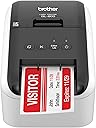
The Brother RQL-800 is a renewed high-speed thermal label printer delivering professional-grade black and red labels at 300 dpi. With a rapid print speed of 93 labels per minute, an automatic cutter for banners up to 3 feet, and USB connectivity, it’s designed for efficient, versatile labeling in offices, clinics, and events. Compact and easy to use, it supports Brother DK pre-sized and continuous tapes, including postage printing, making it a must-have for organized professionals.


| ASIN | B07MRGX4VL |
| Additional Printer Functions | Print Only |
| B&W Pages per Minute | 93 |
| Best Sellers Rank | #9,107 in Amazon Renewed ( See Top 100 in Amazon Renewed ) #256 in Renewed Office Products #340 in Desktop Label Printers |
| Brand | Brother |
| Built-In Media | Labels |
| Color | White |
| Color Depth | 1 bpp |
| Compatible Cartridge | [Brother thermal cartridges] |
| Compatible Devices | Laptops, PC |
| Control Method | Touch |
| Customer Reviews | 4.2 4.2 out of 5 stars (158) |
| Dual-sided printing | Yes |
| Duplex | auto |
| Global Trade Identification Number | 00012502599333 |
| Hardware Interface | USB |
| Ink Color | Black, Red |
| Item Dimensions D x W x H | 8.4"D x 4.9"W x 5.6"H |
| Item Type Name | RQL800 |
| Item Weight | 2.4 Pounds |
| Manufacturer | Brother International |
| Maximum Copies Per Run | 9999 |
| Maximum Copy Resolution Black and White | 300 dpi |
| Maximum Copy Resolution Color | 300 x 600 dpi |
| Maximum Copy Speed Black and White | 93 ppm |
| Maximum Media Size | 4 x 6 inch |
| Maximum Print Resolution Black and White | 300 dpi |
| Maximum Sheet Capacity | 100 |
| Maximum print Resolution Color | 300dpi |
| Model Name | Renewed Model: RQL800 |
| Model Number | RQL800 |
| Model Series | RQL |
| Number of Licenses | 1 |
| Other Special Features of the Product | Energy Star |
| Paper Size | 8.5 x 11 |
| Print media | Labels |
| Printer Connectivity Type | USB |
| Printer Output Type | Monochrome |
| Printer Type | Thermal |
| Resolution | 300 x 300 |
| Specific Uses For Product | Label printing, Package labeling, Envelope labeling, File folder labeling, Name badge printing, Postage printing, Home use, Office use, School use |
| Total Usb Ports | 1 |
| UPC | 012502599333 |
| Warranty Description | 2 year manufacturer |
| Warranty Type | limited warranty |
| Wattage | 204 watts |
T**O
Tengo una clínica y esta impresora Brother QL-800 me ha sido muy útil. Es rápida, fácil de usar y permite imprimir etiquetas claras y profesionales para todos los productos y documentos de mi clínica. La configuración fue sencilla y el tamaño compacto no ocupa mucho espacio en mi escritorio. Sin duda, ha facilitado mucho la organización diaria. La recomiendo totalmente para cualquier negocio o clínica que necesite imprimir etiquetas de manera eficiente.
M**G
Really pleased
Once you download the app and make it work, it is easy to use. I used it to print name tags for an event! Keep in mind it only comes with two rolls of tape (a small and a big one) so plan accordingly
N**O
Very Good
I don't understand why this got so many negative reviews. I almost buy the china brand with better reviews. My print is refurbished but it work perfectly. Yup, the Brother website is old and confusing, they need to redesign it. You just download 1 app and it automatically download others.
C**N
Fast printer
Small learning curve to get going with this but prints very quickly once the free software is downloaded. I'm just using it to help organize storage totes, but theres a lot more functions such as barcoding and more. Wish I could get it to work with my iphone
D**Z
Have to build your own database to save labels. Unable to successfully do this.
Great construction and easy to install. However, am apparently not savvy enough to set up a database to save my labels. Why didn't Brother do that? Why didn't they include a compatible database? Downloaded software and drivers and followed steps recommended by other users. Most suggestions total failures because Brother has also changed and moved venues.
J**L
Nice labels but software not as easy as Dymo450.
I don’t have it configured properly Im sure. If I called support it might be as easy to use as the dymo 450 I use at work.
D**G
Poor print quality
It does print in red and black but the printing was not dense. Price is high for what it does. Software is cryptic
C**E
Good value
The software for this is not the best use friendly version of anything I have ever used but once you spend a little time with it you will find there is a lot offer the end user. The label maker itself is very good and prints quickly and reliably with great print quality. I would purchase this again.
R**Z
Muy fácil de usar. Se puede. Usar diferentes medidas de etiquetas. Me sirvió para mis productos en una farmacia.
V**A
Muy buen producto hay infinidad de usos, muy recomendable, o adquiri el seguro de protección, nunca está de más.
L**N
Muy buena impresora y muy aguantadora la utilizo en una bodega que imprime muchas etiquetas por día y no se rinde
C**A
un poco lento la adquisicion, pero llego todo bien!!
A**A
Funciona excelente, llego bien y rápido... es Reacondicionada y no traía cd de instalación, aún así funciona perfecto y de forma fácil...
Trustpilot
4 days ago
5 days ago