Buy anything from 5,000+ international stores. One checkout price. No surprise fees. Join 2M+ shoppers on Desertcart.
Desertcart purchases this item on your behalf and handles shipping, customs, and support to Croatia.
🎨 Elevate your art game—precision, speed, and freedom in one sleek tablet!
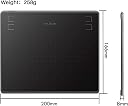
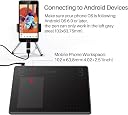
The HUION HS64 is a compact, battery-free graphics tablet featuring 8192 levels of pen pressure sensitivity and a 266 PPS report rate for smooth, accurate drawing. Compatible with Windows, macOS, Linux, and Android (via OTG), it offers 4 customizable shortcut keys and a portable 6.3x4 inch active area, making it ideal for professionals and creatives who demand mobility without sacrificing performance.


| ASIN | B07NY457J4 |
| Active Surface Area | 6 inches x 4 inches |
| Best Sellers Rank | 6,063 in Computers & Accessories ( See Top 100 in Computers & Accessories ) 17 in Graphic Tablets |
| Box Contents | Quick Start Guide |
| Brand | HUION |
| Brand Name | HUION |
| Colour | Black |
| Compatible Devices | Desktop, Laptop, Android Smartphone |
| Connectivity technology | USB |
| Country of Origin | China |
| Customer Reviews | 4.4 out of 5 stars 1,640 Reviews |
| Display Type | LCD |
| Item Weight | 258 Grams |
| Manufacturer | HUION |
| Manufacturer Part Number | Huion |
| Model Name | HS64 |
| Model Number | Huion |
| Model name | HS64 |
| Native Resolution | 5080 LPI |
| Network Connectivity Technology | USB |
| Operating System | Windows 7 or later macOS 10.12 or later Android 6.0 or later Linux |
| Operating system | Windows 7 or later macOS 10.12 or later Android 6.0 or later Linux |
| Pressure Sensitivity | 8192 Levels |
| Pressure sensitivity | 8192 Levels |
| Product Features | Lightweight, portable |
| Screen Size | 6.3 Inches |
| Special feature | Lightweight, portable |
| Specific Uses For Product | Drawing, design, electronic signature, 3D modeling, animation, gaming, online education, remote work |
| Target Audience | Students, Teachers |
| Unit Count | 1.0 count |
E**A
ITS CUTEEE AND IT WORKSSSSS
VERYYYYYY cute and good.
P**S
Can't fault this tablet. It's excellent.
I have to say that I am more than impressed by this tablet. It works right out of the box with the standard driver's that are already built into Windows. However, if you download and install the software, it gets even better. Everything from buttons and scroll wheel on the tablet, to the two buttons on the stylus are all configurable. What's even better is that you can set up different configurations for different software. This makes it so easy to swap between, for example, Blender and Photoshop. In the past I have thrown away 3 different Wacom tablets because none of them could handle multiple monitors properly. This Huion just takes all that in its stride. It doesn't mess up your mouse settings, either, which other tablets sometimes do. In use, the tablet is accurate, with no jitter, and very responsive. The pen is cordless and needs no batteries or charging. It is pressure-sensitive, which takes sketching in paint programs to a different level. If you've ever tried to draw accurately, or write with a mouse, you'll now how difficult that is. This tablet opens up a whole new world of graphical input, and it's not expensive.
A**.
Good for everyday use, though occasional responsiveness issues
This drawing tablet works well for general use such as note-taking and basic digital writing. The pen is comfortable and battery-free, which is convenient for everyday use. However, I noticed that the pen occasionally becomes slightly less responsive, especially during faster writing or more detailed input. It is not a major issue for casual use, but it can feel a bit frustrating when trying to write quickly or during more demanding tasks. Overall, it is a good entry-level tablet, suitable for study and light creative work, but not ideal for fast or professional-level input.
C**T
Works on Mac with no issues.
Bought to replace an older model and as before works perfectly on my Mac. Took a little while to work out how to get the scroller working for brush size but got there in the end. Not having to charge the pen is a real bonus unlike my old one. Perfect size even with a big screen. Makes masking/selecting in LR/Photoshop a breeze. Good support on website as well.
A**N
Worth the money 💰
Very good, very good quality it's worth the money. The only thing I dontlike is that the pen is very light, which can be positive but I liked the pen to be heavier
D**A
great product for the price but Windows Ink doesn't work
First, I think given how cheap the product is, this tablet is a pretty good choice. It would cost me over £80 but I purchased the tablet for less than that. I don't have much experience with tablets by whatever they have in offer seems to work as expected, apart from Windows Ink. The tablet worked out of the box, but drivers are required for further customisation. I tested the product on Adobe Fresco, Blender, Affinity, and didn't see any issue. I did not notice any delay with the pen and tilt is an excellent addition, which I did not even expected to have. The tablet can map either entire or part of the screen. Switching to another monitor is possible but there is a significant issue (see next paragraph). The pen seems very sensitive and easy to customise the pressure. Now, here are following reasons for 3 stars out of 5: customisation buttons seems too soft, the main program ask for permission to open up every time I boot computer, Windows Ink is not fully functional and only works on one screen. With Windows Ink on, cursor start flickering on the other monitor, which renders this tablet unusable with two monitors. If Windows Ink is off, everything works but then pressure is disabled. This is not a trivial problem. Hopefully they will sort drivers out in future. I would recommend the product for entry level art and just see how it feels to draw on pen tablets, but the tablet might not be suitable for more professional work.
D**S
Great tablet for price!
Great tablet, but you'll need a glove if you're left handed.
T**M
Great purchase
I bought this as drawing pad but it's so superior to a touchpad that I use it for all functions. It makes using the laptop such a breeze. I chose one which had excellent reviews in regards to its accuracy, and tbh it hasn't let me down
D**I
Support Linux : 100%
Pour faire simple : cette Inspiroy 2 L est la meilleure tablette graphique que j'ai pu utiliser jusqu'ici sur Linux, en particulier pour son support Linux 100% effectif (ici, sur Fedora 38). D'autres ayant déjà décrit ici tout le bien qu'ils pensaient de la tablette en elle-même, je ne vais aborder que le support linux. 2 "pilotes" possibles : driver en .deb pour Ubuntu, ou en tar.xz pour le reste du monde. 2ème option retenue pour moi, c'est un script bash qui s'occupe d'installer d'autres scripts bash, l'UI, la udev rule etc. Temps total d'install : 5 min (et je compte le redémarrage de la machine). Tout fonctionne, y compris les groupes de boutons et leur customisation/réassignation. /!\ Attention toutefois si vous avez des configurations résiduelles d'autres marques ou d'anciens périphériques. Pensez à écarter ces fichiers de votre système (cela a interféré avec la tablette, et je n'avais pas de clic gauche avec la pointe du stylet !). Idem si vous utilisez le pilote Nvidia avec le script nvidia .run : pensez à le réinstaller également. En ce qui me concerne, cette tablette est un coup de maître de Huion. Well done !
L**A
Tableta gráfica, buena, bonita y barata
La tableta la pedí el jueves y el sábado temprano ya estaba en casa, estéticamente es muy bonita, es fácil de manejar y conectar, al igual que la instalación del driver para Windows, y para iniciar en el dibujo digital esta genial, muy recomendable
A**R
Stop overthinking — just get it!
As a former active Wacom user for over 10 years, I can confidently say that Huion is in no way worse — and in some aspects, even better. It offers excellent usability and build quality. The drivers work reliably (unlike Wacom). If you're choosing a graphics tablet and feel that paying $300+ for a well-known brand is too expensive, I highly recommend giving Huion a try.
D**I
Great Drawing Tablet
This is a great drawing tablet, for both beginners and experienced artists. It's easy to connect and setup, the pen sits nicely in your hand and it works flawlessly. You can use it with any software you like for a bunch of uses, like drawing and 3D art. I recommend this tablet to anyone who is looking for a great entry-level product!
V**Z
Excelente producto y buena relación calidad/precio
Compré esta tableta digital porque me estoy iniciando de manera profesional en el mundo del 3D en específico en la escultura digital, la compré sin mucha fe honestamente y me sorprendió lo buena que es (NUNCA HE TENIDO OTRAS NI TAMPOCO LAS HABÍA USADO) la primera impresión para mi al usarla fue su velocidad de respuesta y usabilidad, es muy fácil usarla y agarrarle el truco por primera vez. Trae varias puntas de repuesto para el lápiz, el lápiz no usa batería. También trae una pequeña pinza para sacar la punta del lápiz y un adaptador USB a Tipo-C en caso de que lo necesites usar. La app es bastante sencilla e intuitiva y está en español e inglés. En términos generales es muy buena. Pros: -Para iniciarse o para temas más pros pero buscando algo accesible es perfecta -Trae repuestos para el lápiz y el lápiz no usa baterías Contras: - El cable que usa para conectarse al pc es bastante regular de calidad igual que los conectores. Nota: Que el cable de conexión sea fabricado de materiales de baja calidad no quiere decir que sea malo, no te llevarás la tableta al desierto o a un safari en Australia, estará en tu escritorio sin moverse la mayor parte del tiempo así que no lo veo tan mal el detalle. Dejé una tarjeta de bus para que puedan comparar o ver el tamaño real de la tableta.
Trustpilot
1 day ago
2 days ago