Desertcart purchases this item on your behalf and handles shipping, customs, and support to Croatia.
📊 Elevate your equations—where precision meets style!
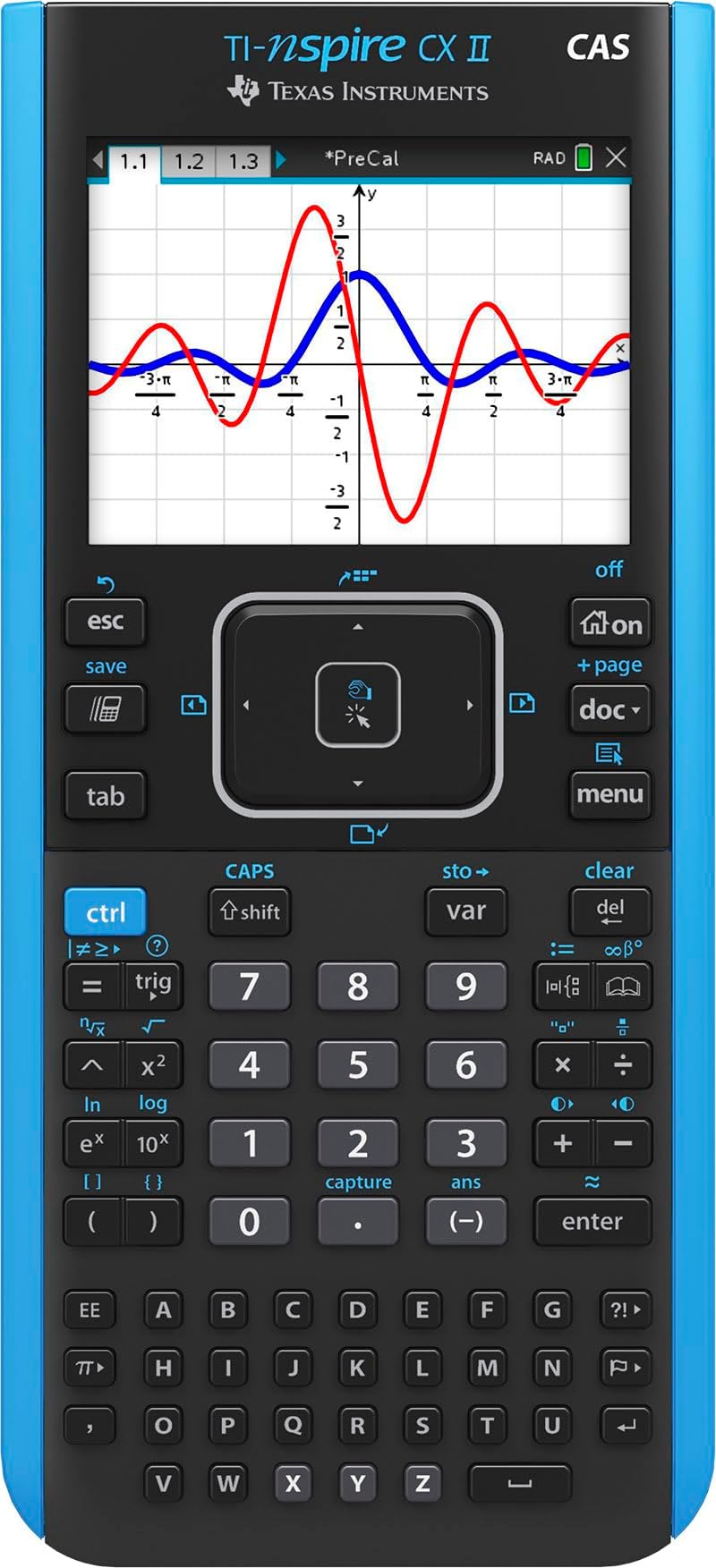
The Texas Instruments TI-Nspire CX II CAS is a top-tier graphing calculator featuring a vibrant 320x240 pixel color display, a rechargeable battery lasting up to two weeks, and bundled student software for enhanced graphing and coding. Its lightweight, slim design and customizable graph styles make it an essential tool for advanced math, science, and engineering students, approved for major exams like AP and IB.


| ASIN | B07RL7HM5V |
| Best Sellers Rank | #2,299 in Office Products ( See Top 100 in Office Products ) #4 in Graphing Office Calculators |
| Brand | Texas Instruments |
| Calculator Type | Graphing |
| Color | Black |
| Compatible Devices | Laptop |
| Customer Reviews | 4.7 out of 5 stars 9,403 Reviews |
| Display Type | LCD |
| Enclosure Material | Plastic |
| Global Trade Identification Number | 00033317208449 |
| Item Dimensions L x W | 7.59"L x 3.62"W |
| Item Type Name | Graphing Calculator |
| Item Weight | 9.12 ounces |
| Manufacturer | Texas Instruments |
| Mfr Part Number | NSCXCAS2/FC |
| Model Name | TI-Nspire CX II CAS |
| Model Number | NSCXCAS2/FC |
| Number of Batteries | A batteries required. (included) |
| Number of Items | 1 |
| Number of Packs | 1 |
| Power Source | Battery Powered |
| Screen Size | 3.5 inches |
| UPC | 033317208449 |
| Unit Count | 1 Count |
| Warranty Description | 1 year limited warranty, 1 year manufacturer, education.ti.com/warranty |
C**R
Engineering student Must Have
I bought this for my husband while he was in college for Mechanical Engineering. It has a lot of great features. The functions can be a little confusing at first if you have never used this type of calculator before, but the instruction manual is helpful with navigating its functions and capabilities, along with YouTube videos. The accuracy of it is spot on. The adjustable brightness is convenient, especially for late night study sessions or homework procrastination. It is pretty lightweight considering that it is a graphing calculator. For comparison, it is not significantly heavier than any of the other Texas instrument calculators. The price is definitely fair in comparison to other graphing calculators, and it is worth it for this one considering its durability and purpose.
Z**A
Calculus must-have
Top calculator of all time
J**E
Best Calculator I've Ever Used
I'm a college student, studying for a degree in Economics. Needless to say, my life these days is all about maths. For the past couple of years I'd been using the TI 84 Plus CE which, although it's a pretty good graphing calculator all in all, has it's issues, but I is the recommended calculator for all the classes I've taken so far. So, imagine my surprise when I found out about the Nspire calculator series. The TI Nspire CXii CAS is an extraordinary tool. It can factor polynomials, calculate complex equations giving the answer in terms of i, and graph in 3D. That's right...Z-axis! The CAS in the calculator's name stands for Computer Algebra System. It allows you to solve polynomial equations in any number of variables and give answers in terms of those variables. That's right! You don't need numbers! One of my favorite upgrades is in the graphing feature. In the TI 83/84 series, if you wanted to trace a graph to a point of interest that was not in you current viewing window, you needed to leave the graph and go to a separate page where you needed to reset the viewing window to include your point of interest, then you had to navigate back to the graph and calculator would redraw it often very slowly. The Nspire CXii, on the other hand, allows you to make adjustments to the screen from a pop-up menu that comes up while you're still in graphing mode. And, if you don't want to bother with that, you can use the track pad to pick up the screen and move it, or you can just trace your chosen graph in either direction and when you reach the edge of the screen, it moves the screen to match your movements. You can also split the screen to view your table of values while looking at your graph! I'm still discovering all the things I can do with this calculator and I'm sure I'll continue to discover much more as I advance to higher levels of maths. There are entire apps dedicated to geometry, statistics, trigonometry, and more. Also, apparently there is a whole set of science tools witch can plug into the calculator to give you data on a wide range of things; heat, speed, velocity, etc. So much good stuff. Ok, now for areas that could use improvement. First, there is set of educational software that you can download and access for free when you purchase the calculator. Unfortunately, the software is only compatible with Windows or iOS. I, like many students, am a Chromebook user. Not making their systems compatible with Chrome OS is, in my opinion, an epic fail. I contacted their customer service department and suggested that improvement as well as a cloud computing option for those who want to access the tools from any computer. I was told that they passed my ideas on to their product development department. All in all, though, this is a great calculator! I'm sure I'll get several years of enjoyment out of it as I work toward my degree. It's way more intuitive and easier to navigate than the TI 84. That said, if you're like me, you'll need some help to get started. There's a pair of books by Lucas Allen in the Kindle store that really jump-started my understanding and enjoyment of the TI Nspire CXii CAS. I highly recommend reading them.
T**S
Great for higher level math. Useless for high school, though!
I’m a math major in college and if you’re planning on going into any math-based field, this is the only calculator that’s a reasonable price and does EVERYTHING. My review for math people: I used this starting in calc ii. For calc ii, it does improper integrals, double integrals, indefinite integrals (the TI-84 doesn’t do indefinite or improper). Pretty sure it can do some infinite series and sequences (but I think only problems that don’t evaluate to a number?). In physics, I loved using an inspire because it will solve systems of equations (mainly useful for when I did kinematics). For calc iii this calculator will graph in 3D and you can plug and chug any formula. For diff eq, this calculator will solve them and systems of differential equations and it will give you exact answers, which most calculators won’t do. For linear algebra, there’s nothing better. It’s super easy to select matrix size and do literally anything. The UI on this model is nicer than the previous model, but other than that there’s no difference (I was using the previous model before getting this one). For non-math people: I’ve seen a lot of high schoolers (or high school parents) buying these. DON’T buy this calculator if you’re in high school. I pretty much guarantee you won’t be able to use it because it comes with CAS (computer algebra system). No teacher in their right mind would allow their math student to use one of these in class—it’s just cheating. If you want something that’s better than the TI-84 and have money to burn, get this without the CAS. Also, you won’t be able to use any TI-nspire on standardized tests with college board (except I think AP Stats?). You can use the one without CAS on the ACT, but not this one. If you are planning on doing college math (beyond calculus—this isn’t really useful until at least multi variable calculus), it might be worth the investment. There is a little bit of a learning curve, but Google will be your friend. It’s really not as complicated as it seems. I found it way more intuitive than the TI-84.
E**N
Great for Electrical Engineering
The TI-Nspire is an AMAZING tool as an Electrical Engineering student it makes life 10 times more easier. The battery life is great and I only have to charge every now and then. There are lots of tutorials online for doing things, but this calculator can do tons of things especially in the complex region which is especially of use with transfer functions, impedances, etc... and is allowed in a lot of my exams.
B**Y
Can be complex
Taking Calculus, Physics, and Chemistry this semester and this calculator is amazing. So far has been able to do everything ive needed it to do as far as graphing, logorithms/natural logs, displaying multiple equations on one screen... im sure i have not even discovered the full potential of this calculator. Only reason I am not giving it a 5 star review is it can be complex and everything I've been able to do so far was from invested time of playing with it. It has a bar code to scan but doesnt seem to take you to an I structures guide or seem to work. It also didnt come with a hard copy of instructions. Unless you're already familiar with the tool, it can be hard to use.
E**C
Read this about the battery "issue" with this calculator
I bought this calculator and it was opened, but I decided to keep it after I was given an option for a discount sent to my account. All in all, it does exactly what I was expecting. Excellent display, much more rapid graphing than my TI-89 Titanium, multi-color, you name it. The touch pad does seem to be a bit too sensitive, but it's a graphing calculator, not the Mars Rover. Although there are other reviews out there that discredit the battery, there's more to the battery than what I've read. You must charge it for several hours first. I updated the firmware, and charged it for about 5 hours and it keeps the charge. Note: The charge icon won't go in increments of 1, it will jump to, say, 25%, then a while later it'll be at, say, 75%, then eventually 100%. So with MY unit here, it doesn't appear to be a battery issue, it's more of a sensitivity issue with the battery % indicator.
W**3
OP Calculator
This, my friends, has everything a calculator needs, and more. Like, way more. Once you learn how to unleash it's true potential, you will never want to return to other calculators. It comes with every function you might need, makes it's math in really fast times, the color is nice, the batteries have high duration, and overall has a great quality in everything. I used it for some medium things, but I saw engineers taking it to another level. I have it after all these years ans it has proven to have a great durability. Totally recommend it.
A**S
Garantia de Qualidade
Produto de excelente qualidade.
Y**I
Amazing
Just what’s you’d expect it to do
S**L
A Game-Changer for Students: Texas Instruments TI-Nspire CX II CAS
The Texas Instruments TI-Nspire CX II CAS is an outstanding graphing calculator that has truly enhanced my learning and problem-solving experience. The vibrant color display makes graphs and charts easy to read and interpret, while the powerful CAS functionality allows for advanced algebraic and calculus computations right at my fingertips. The included student software for PC and Mac is a fantastic bonus, providing a seamless way to explore concepts and complete assignments both on and offline. The calculator’s intuitive interface and responsive buttons make navigation smooth and user-friendly, even during complex calculations. I highly recommend this calculator for students and professionals who need a reliable, feature-rich tool for math and science courses. It’s definitely worth the investment!
P**I
Great
Great calculator, it arrived quickly and the packaging was not one of those nearly impossible to open so first impressions were good. The calculator feels light which I am not a big fan of, but I generally baby my calculators so it won't be an issue. I am a professional, not a student, and I have similar calculators. I am not the biggest fan of the document-like approach for the calculator, and I'd rather have some of the more used functions with an assigned button rather than accessing them with menus (even trig functions) rather than the dedicated keypads with all letters. The calculator is very fast and responsive, but the touchpad is slightly annoying to use. I also have the HP Prime, it's direct competitor in terms of features, and so far I enjoy the Prime a bit better; but I like the vector handling of the CX II better than the Prime, so I have both at my desk. The battery life is good, but I honestly wish I could also use conventional batteries like the older TI Nspire (non CX) did, to ensure this calculator will last me a lifetime (I still have both an HP 50G and a TI 89 Titanium purchased in 2005 and 2006 I believe, both working great). Considering the TI 84 Plus CE is at this price range, I think the price of this calculator is very competitive. I'd recommend it over the TI 84 Plus CE, but not ovet the HP Prime. Eventually I plan to install KhiCAS on it, and see if I like it better, but as far as I know it's the 2nd best modern calculator out there, but this is subjective as I have seen people who love the document-like setup and the menus and cleaner looks vs a more conventional look. I will update this review after a few more months of usage
P**Z
Muy buen precio.
Escelente producto, funciona muy bien.
Trustpilot
1 month ago
2 months ago