

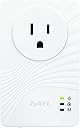


ZyXEL 200 Mbps Fast Ethernet Powerline Wall-Plug Adapter (PLA4111)
Product ID: 13400697
⚡200 Mbps Speed
🎥QoS Streaming
🔌Plug-and-Play
⚡ Power Up Your Connectivity!
The ZyXEL 200 Mbps Fast Ethernet Powerline Wall-Plug Adapter (PLA4111) is a compact and efficient solution for enhancing your home network. With plug-and-play convenience, it offers seamless streaming with QoS technology, an AC pass-through outlet, and an embedded noise filter to ensure optimal performance.
| Brand | ZYXEL |
| Item model number | PLA4111 |
| Item Weight | 9.6 ounces |
| Product Dimensions | 5.91 x 3.94 x 4.72 inches |
| Item Dimensions LxWxH | 5.91 x 3.94 x 4.72 inches |
| Color | White |
| Manufacturer | ZYXEL |
| ASIN | B00D7GF4XC |
| Is Discontinued By Manufacturer | No |
| Date First Available | June 5, 2013 |
A**R
Increased our network speeds considerably!
We've got somewhat of a high tech house with many different items that use network capabilities (several computers, TV related gear, game systems, etc.) WiFi is fine for some of it but I found that there were enough dropped signals to make it annoying to use as the only option. Several years ago we tried using an early Powerline ethernet solution from Asoka, the Asoka Pluglink 9650 85mbps Ethernet Adapter 2pc LOT Pair with Cables . We had three of them. One was connected to our router and two were in different parts of the house...both connected to ethernet switches which then fed into different devices, including our WiFi router. Overall I was very happy with the performance we got from them. Never lost connection and speeds were quite tolerable.That was several years ago though...since then we've added more devices needing access and my speed expectations had increased beyond what the Pluglink could handle. So when one of the Pluglinks started to fail, I looked around for something better and landed on these.I've only had them for a few days but Wow! I have the same setup as before, with three of these adapters around the house, feeding into ethernet switches. Using speedtest.net with the Asoka ones, I was getting right about 2Mbps down and about 2Mbps up. With these ZyXEL units that's jumped to around 15Mbps down and around 5Mbps up. I have not tested speeds within the home network so I can't really give numbers one that but I can tell it's much better! We have an HDHomerun (which is a device that sends our antenna TV signal out over our home network so that it can be accessed by any computer in the home). Before, we'd often lose that signal or it would get really jerky...no more with these ZyXEL adapters. Even the HD channels stream perfectly.There was nothing to setting them up...just plug them into the wall and plug the cables into the bottom. If you want to use the encryption option, you simply push the button on the side of each unit, they pair up and now the signal is encrypted between each adapter. I don't know how likely it is that the signal is traveling outside of our house but I figured, it's got the ability to be encrypted so I might as well use it.So anyhow, totally happy with them so far. Very fast and you have a much more solid connection that just relying on WiFi.
C**R
First pair died, and now the second is dead too
Update 061714: After working with tech support and trying everything suggested, I RMAd the two original adapters I purchased. Two new, or new to me anyways, adapters showed up. I performed the WPS setup and saw amber/red color on the homeplug LED from the start. The support software says I'm getting 9 Mbps on the connection speed. The PS4 showed a similar if not less speed. I've tried pairing them, tried the WPS setup over and over again, and even tried a couple of the setup methods listed here in the review section...nothing works. With the WPS setup, it should be plug and play. I don't know what or if I am doing wrong, but I can't get these to work for the life of me. The first pair worked great for a few months, now they are just another piece of electronics I'm going to have to recycle. Very disappointed.Update 012714: I began working with online tech support, via email, for the issue I encountered. Only received two emails over a couple of days. I tried the two suggestions that were presented with the same bad results on my end. I never heard anything after the second email, so down to one star it goes. Need to check the warranty to see if I can't possibly come out ahead here. Very disappointing.Update 011314: Adapters suddenly stopped working. The home LED light is blinking red, and the configuration utility shows the transmit and receive rates, when available, as only 9. These adapters had been working flawlessly since installation. I use them to hardwire my PS3/PS4 to the internet, and the signal had been great until tonight. Blinking red LED, and then the remote adapter goes into low power mode. The local adapter, at the source of the internet, seems fine, the two just can't connect anymore. The only new piece of tech in the house, as of last night, is a sonos bridge and play 3 speaker, but neither of them were plugged into an adapter. I'm very frustrated at this point, and I'm knocking my rating down unless this gets worked out.I have been looking at Powerline adapters for a long time, and now that they have come down in price a little, I took the plunge. I purchased these primarily to get a wired connection to my PS3 and web enabled TV. I got the pass through style because I didn't want to lose both outlets, but that didn't quite work out as I planned.For me they were plug and play; no pairing required. I plugged one in near my computer, connected an ethernet cable, plugged the second adapter in near my PS3 and connected a second ethernet cable. Done! I performed the encryption steps by pushing the two buttons on each adapter, so I hope that worked out. I immediately turned on my PS3 to check the connection speed with the network connection test function on the PS3. The speeds were about the same as what I was getting with an N bridge. Curious. Anyway, I then proceeded to install the utility program on the included disk. I'm not exactly sure what it does as the adapters function on their own, right out of the box. Perhaps the utility program will be more useful in the future if I add more adapters. I understand you can also check the speed between the two devices, but you have to make sure they are communicating. By that I mean they will go into a sleep mode if not actively being used, and they will not show up on the utility program's list. This could make someone crazy thinking their adapter wasn't working, so don't fall for this if you don't see the MAC address of your adapters show up.I tried some online gaming via the PS3, and had a few hickups that I'm not sure I can attribute to the adapters. I was playing a beta version of a game, so it could have been the game. I'll test out another online game later on and report back if I have issues. When you run the network connection test on the PS3, the download and upload speeds come with an asterisk next to them stating that the speeds are approximate. Knowing this I plugged a laptop into the adapter and ran an online speedtest. The download and upload speeds were identical to the N Wifi I get with my iphone 5, ~56 Mbps and ~9 Mbps with a ping around 40 ms. These values are about the same as my wired connection at the computer, without the powerline, except I get a ping of about 11 ms there. So that seems like it's working very well.The pass through function wasn't as helpful as I had hoped, especially in this day and age of large power plugs. The adapters basically block the top free plug from being used by any three pronged power plug, or any larger two pronged. The ideal setup seems to be the pass through adapter, a power strip plugged into the adapter, and then the ethernet cable. It's not horrible, but it's not what I had anticipated despite the info staring me in the face all over the internet. I knew they would be bulky, it just slipped my mind.Pros:Quick and easy, plug and play.Pass through provides a substitute plug for the one it occupies.Provides the starting point for a whole house powerline wired network, future expandabilityCons:Big, they basically block the top plug on a two plug outlet.I have yet to encounter stability issues, so I will definitely update my review if I do. They seem to work as designed. I look forward to future expandability for a network attached camera or an N extender. Recommended.
M**.
i recommend reading the tutorial in the reviews
Really tricky to set up... i recommend reading the tutorial in the reviews!! Works great ... very stable signal!!
T**S
I cannot say if this is better than other make/model
I cannot say if this is better than other make/model, but these ZyXEL Powerline thing work well.I have 4 different types (mini, switch/hub, Wifi, and standard) and all work enough well, at least for my usage.In one application. 4 IP cameras of 1MP to 3MP are connected via a pair of these to a NVR.I use another one to connect a laptop to the NVR and pull images from NVR, too.Highly useful to test the setup before to decide the permanent network wiring.If wiring is too difficult, we would use this, permanently.
J**E
great product
Loved this product.. using it for 6 months + and no issues... for some reason it works with my d link adapter also
L**F
Excellent product
I plugged it in and it just worked. I wish all tech was that easy! It partially blocks the upper wall outlet, but the pass-thru works seamlessly.
V**C
So far so good!!
I live in an old house and I had doubts these would work considering the wires are over a 100 years old. My main router is on the second floor on the opposite side of the house, and the other powerline is in the basement. The powerlines are probably 25-30 meters appart and I am able to get the full connection speed my ISP provides. I also connected a second router to the powerline and everything works great! It exceeded my exspectations.
Trustpilot
2 days ago
2 weeks ago