Buy anything from 5,000+ international stores. One checkout price. No surprise fees. Join 2M+ shoppers on Desertcart.
Desertcart purchases this item on your behalf and handles shipping, customs, and support to Croatia.
❄️ Keep your cool, stay ahead — silent power for the savvy pro
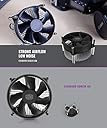
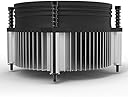
The i50 CPU Cooler is a compact, high-performance air cooler designed for Intel LGA 115X sockets, delivering efficient heat dissipation with a 92mm low-noise fan spinning at 2000 RPM. Its slim 60mm profile fits tight spaces like HTPCs and All-in-One PCs, while aluminum extrusion fins and pre-applied thermal grease ensure optimal thermal transfer. Operating quietly at 28 dBA and providing 34 CFM airflow, it’s engineered for professionals seeking reliable, unobtrusive cooling with easy installation and long-lasting durability.
| ASIN | B07QNP4V84 |
| Air Flow Capacity | 34 Cubic Feet Per Minute |
| Best Sellers Rank | #9,821 in Electronics ( See Top 100 in Electronics ) #115 in Audio & Video Power Cables |
| Brand Name | Toptekits |
| Compatible Devices | Desktop, Server |
| Cooling Method | Air |
| Customer Reviews | 4.5 4.5 out of 5 stars (1,284) |
| Item Dimensions L x W x H | 1.38"L x 3.74"W x 3.74"H |
| Item Weight | 150 Grams |
| Manufacturer | Toptekits |
| Material Type | Aluminum |
| Maximum Rotational Speed | 2000 RPM |
| Model | i50 |
| Noise Level | 28 Decibels |
| Number of Items | 2 |
| Part Number | i50 |
| Power Connector Type | 3-Pin |
| UPC | 794604606651 |
| Unit Count | 1.0 Count |
| Voltage | 12 Volts |
| Wattage | 2.04 watts |
R**P
Works perfectly!
Was easy to install and my CPU temperatures are looking good!
L**S
Missing Link for MSFS Desktop Rig
For context, I have been working with a circa 2019 Dell Inspiron 3670 mini tower desktop with the goal of running Microsoft Flight Simulator 2020 in VR mode with an Oculus Quest 2. The starting configuration was a disaster in that regard, but after some upgrades (NVIDIA GeForce GTX 1650 Super, 32 GB RAM, NVMe SSD, USB-C 3.1 card, Core I7-9700F processor), I thought I had the system whipped into shape. Until I tried a daylight overflight of Manhattan in a Diamond DV20 Katana (don't do that IRL, by the way), the system got super busy for 15 minutes straight, and the temperature spiked up to 90 degrees C, whereupon thermal throttling kicked in and my flight ended very badly indeed. After some research, I decided to try the i70c as a drop-in replacement for the stock Dell CPU cooler. The reason I chose that particular model is that it was the only option available with a 4-pin PWM connection and had the screws needed to attach to the stock Dell backplate already installed on the motherboard. It truly was a drop-in replacement - the screws fit perfectly, the pinout on the PWM connector was a match to the motherboard, the BIOS recognized it without a hiccup, and even at full throttle MSFS for over an hour, kept the CPU temperature at or below 85 degrees C, which was exactly what I needed. By the way, I did remove the stock thermal paste that came with the cooler and used Thermal Grizzly Kryonaut instead - it might not make that much difference but I prefer that brand. The only reason I didn't give it five stars across the board is that it does produce a noticeable amount of fan noise under load - I haven't measured it but would estimate 45-50 dB, dead quiet by gaming system standards but still a bit noisier than your average desktop. Small price to pay for a capable MSFS rig. Bottom line - if you own a recent model Dell and need a cooler upgrade, don't believe the rubbish you see on Google about fan incompatibility and definitely ignore the YouTube videos suggesting hacksaw-required mods to your case to shoehorn a ridiculously large cooler that will probably break your motherboard in two. Pay attention to your cooler fan pinout and backplate, get this, and you won't be disappointed.
S**T
Great looking fan, Excellent Cooling
Excellent fan and color option for those LED lighting / Visual appealing computer builders. It's also quiet running. I have one in a new build as well as 2 more 120mm case fans. For testing of noise level, I left my tower on all night a couple of nights and slept though easily non-disturbed. My system also has 6 full sized Hard drives (mechanical) so even with that added noise, I'm still pleased. I'm fairly sure these Cooler Master fans are dedicated to keeping the noise level down for those whom prefer a quality build that's "non-disruptive" during a college kids homework time (if they use a desktop that is) or even for a gamer - however gamer, from what I understand like the sound quality of their games as well. The trick to maintenance, is simple. Keep the internals of your desktop clear of hair, dust, etc. I've seen some pretty bad ones in my days that have increased the noise level of peoples personal desktop computers. Some whom have cats or dogs around should probably open their cases carefully and with a finger hold the fan blade from spinning and give a few blasts from those air canister products to clear dust and hair from particular areas. It's highly recommended to have a professional do it for you (for those whom have never done such a thing) as doing something wrong may be an expensive disaster. There are many options to consider - static discharge, electrical current, and more. I'd recommend people with pets to (at least) after clearing out their PC (if in bad shape) to have the thermal paste replaced and even those whom smoke cigars or cigarettes (ever seen the windshield of a smokers automobile?) to properly clean other mechanical parts or circuitry to keep the board and computer safe. They do have some neat filters that you can get to place over venting areas (different connecting options) to help prevent pet hair and dust bunnies from infiltrating your tower case but not completely. However, those massive server farms people may have seen on television or a movie are pretty well built to keep dust out - built with massive micro-filtration systems and all that. Seek out a Geek Squad worker and have them clean out your desktop and replace the thermal paste on your CPU (removal of the Computers Processor is required - do not do this yourself if you never have!) professionally. Once it's done, if you are a pet owner, I'd suggest reopening the case under normal usage after 3 months and inspect how much accumulation of dust has acquired. From there, make logical decision to clean out your computer a couple times a years. It does not take that long in the right setting. *** A smoker can can TAR to build up *** A pet owner can have a massive build up of pet hair and may cause overheating and cooling issues *** Owners of laptops also should take measures to do the same (Laptops are much more difficult to clean out, but not impossible). Compressed air canisters, in most cases, is enough to clear out a laptops venting and cooling mechanics.
T**A
Great investment
It works really good right investment
D**D
Easy to install. Priced right.
Excellent. EASY to install. And it does include thermal paste.
D**?
Super quiet, significantly better than a stock Intel cooler
I bought this as a replacement for the stock intel cooler that came with my i3 9100 processor. It is significantly quieter than the intel cooler. It runs most of the time at a much lower RPM and keeps the processor cool. it fit perfectly on a B365 motherboard. It comes with thermal paste pre-applied. I had a hard time finding a good demonstration video for installation. You must use the included bracket which inserts on the backside of the motherboard. It screwed down nice and tight to the bracket.
J**R
Much more quiet than a stock cooler.
Seems to bee cooling a 65w cpu just fine. Be aware that the contact area is about the size of a dime! May be slightly better at cooling than a stock cooler but is much more quiet.
M**.
Seem light duty though works fine.
Works good though wish I bought I70. Description of difference between i30 AND i70 doesn't exist.
R**M
منتج مابي اقوله ان سيء بس بالمرة ماينفع للمعالجات المتوسطة لان حرارتهم ترتفع بقوه المروحة ماتقدر تتحمل المعالج ابرد درجة توصلها ٦٠ بدون ماتشغل شي!! اذ شغلت لعبة او برنامج ثقيل ع المعالج طبيعي تشوف الحرارة ف التسعينات وحيل طبيعي ١٠٠ لاتخاف
U**R
It was simple and easy to install. The temps are under 80 degree celsius under load. But I am suspecting that it could be lower with a better thermal paste. Which is what I am considering to change in the future
じ**や
大袈裟にデカイのを付ければそりゃ冷えるよねだけど オーバークロックする訳でも温度弄る訳でもなく CPUのオマケでついてくるアレよりは静音で良い物ってのでコレ。 3世代前の骨とう品wだからか中国から届いたけど ちゃんと未開封新品で安心した。 付属グリスはふき取ってMX4。 同条件でIntelオマケより3~4℃下がって音も静か。 大満足。
S**N
Super easy to install, very quite, and does the job!
A**.
Easy to install
Trustpilot
2 weeks ago
1 month ago