


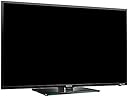
Hisense 40H4C 40-Inch 1080p Roku Smart LED TV (2015 Model)
Product ID: 14128882
Details
- Screen Size40 Inches
- BrandHisense
- Display TechnologyLED
- Resolution1080p
- Refresh Rate60
- Special FeatureFlat
📺40-Inch Display
🔄60Hz Refresh Rate
🔌3 HDMI Ports
📺 Elevate Your Viewing Experience—Join the Smart TV Revolution!
The Hisense 40H4C is a 40-inch 1080p Roku Smart LED TV that combines sleek design with smart functionality, featuring a 60Hz refresh rate and multiple connectivity options, making it an ideal choice for entertainment enthusiasts.
| ASIN | B00U0GZR34 |
| Additional Features | Flat |
| Aspect Ratio | 16:9 |
| Audio Input | RCA |
| Brand | Hisense |
| Built-In Media | Stand, TV |
| Color | Black |
| Connectivity Technology | Built-in Wi-Fi |
| Control Method | App |
| Controller Type | Remote Control |
| Customer Reviews | 3.8 out of 5 stars 250 Reviews |
| Display Refresh Rate in Hertz | 60 |
| Display Technology | LED |
| Global Trade Identification Number | 00855788005040 |
| Hardware Interface | HDMI, USB |
| Internet Applications | roku tv |
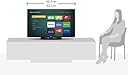
| Item Dimensions D x W x H | 7.4"D x 35.9"W x 22.6"H |
| Item Weight | 18.7 Pounds |
| Manufacturer | Hisense |
| Mfr Part Number | 40H4C |
| Model Name | 40H4C |
| Model Number | 40H4C |
| Model Series | H4C |
| Model Year | 2015 |
| Mounting Type | Wall Mount |
| Number of Batteries | 2 AAA batteries required. (included) |
| Number of Composite-Video Inputs | 1 |
| Operating System | Roku OS |
| Parental Control Technology | V-Chip |
| Refresh Rate | 60 |
| Resolution | 1080p |
| Response Time | 8 Milliseconds |
| Screen Finish | Flat |
| Screen Size | 40 Inches |
| Signal Format | Over-the-air, Streaming |
| Size | 40" |
| Speaker Description | Built-in speakers |
| Special Feature | Flat |
| Total Number of HDMI Ports | 3 |
| Total USB 2.0 Ports | 1 |
| Total Usb Ports | 1 |
| Tuner Type | ATSC |
| UPC | 855788005040 |
| Video Encoding | AVC |
| Voltage | 120 Volts |
| Warranty Description | Limited warranty |
| Warranty Type | Limited |
| Wattage | 70 watts |
| Wireless Technology | Wi-Fi |
L**H
Way better than I expected. Love it.
Got it at a great Black Friday price of $279. Even the regular price is a steal. Have paid more for much less sophisticated TVs. Ordered it Saturday, got it on Tuesday. It worked great right out of the box. Love having the built in Roku interface. I have Apple TV boxes in 2 rooms. They are fine but don't have Amazon yet so I have to stream my Prime content to them from my laptop or phone via Airplay. Works fine, but requires extra steps and leaves my wife struggling to get back to the DVR when I fall asleep watching Amazon stuff on our bedroom TV. The Roku interface has Netflix, Amazon, Hulu, etc. built in and getting back to the DVR only takes a couple of clicks on the remote. There is a "home" button plus dedicated buttons for Netflix, Amazon and a few others, so navigating it is dead simple. Love that. Took a bit of time activating all the apps like HBO GO, Showtime, etc that I also get through Direct TV plus Netflix, Amazon and a few others. Not a big deal, but it would be nice if they could all be activated at once through Roku, instead of having to go to different pages and enter the on-screen codes for each, but it's a small gripe and not a reflection on the product. Everything works that way so it is handy to have a computer, pad, or smart phone near the TV if you plan on setting up several of the streaming apps. I have a dual band (2.4 and 5GHz) wireless router. Both bands are hidden, private networks. It couldn't (and shouldn't have) found my networks when it scanned WiFi. I put in my SSID and password but it wouldn't log onto the 5GHz band. It easily logged onto the 2.4 GHz band once I entered that SSID and password. I live in an urban area crowded with many WiFi routers, but still, streaming quality is excellent on the 2.4GHz band. Everything connects fast, buffering time barely noticeable and streaming quality is excellent. The FF and REW buttons give chapter thumbnails on Amazon (maybe others) which makes navigating streamed content almost as easy as using my Genie DVR. Even has a 7 second "what did he say" replay button. Brilliant! Works much better than the phone, pad and computer apps. That came as a very pleasant surprise to me. I thought the factory default settings yielded an excellent picture. If your personal preferences differ, tweaking the settings is very easy. IMO, it looks wonderful and doesn't come off like a cheap, budget TV at all. I bought it for our guest room but I'm tempted to put it in the master bedroom. I have a 10 year old 42' Panasonic plasma monitor that I love in our bedroom, but I'm seriously tempted to put the Hisense in its place. Never thought I would feel that way about an LED TV, but this thing is making me think long and hard about it. It is so easy to use and the streaming apps work so well that the Panny might get relegated to the guest room. Tough choice, but it illustrates how much I like the Hisense. It performs much better than I expected it would. Based on my experience so far, I would highly recommend this TV. It performs like a champ, looks great and is a fantastic bargain.
A**R
Good for your budget, still good for your entertainment.
I bought this TV for my folks, previously they had a Westinghouse 32" LED HD one, which was still in pretty good shape, but it was time for a change, so we put this one in the main living room and move the old one to their personal room. The Roku TV OP looks nice and simple, and the remote controller is so easy to use, perfect for my not too tech-savy parents, but still powerful enough. We had tried cablebox, netflix and ps3, and so far everything looks good. Sound is not amazing, but fine enough, and the quality of the picture with some tinkering is fair on the eye. Also, it starts really fast! So I will really recommend this one in general.
K**R
Hisense Customer Service is a Joke
I purchased the Hisense 40H4C television on Black Friday 2015. The TV arrived on 1 December and was unpacked and set up immediately. First up, connecting it to my wifi system so I could begin streaming with the ROKU TV feature that was included in the TV. Sadly, I was unable to access the streaming feature as the TV kept generating the following error message: “Software update failed” during the setup process, which could not be cleared with repeated attempts. I immediately called the Hisense service center at 888-935-8880 and discussed my problem with the service center representative. He apologized for the problem and said I would be called by someone in technical support within 48 hours. This was 1 December. On 7 December (over 144 hours later), I called the service center again to inform them I had not been contacted by Hisense to resolve my problem. The service center representative apologized and said I would be contacted within 48 hours to address the problem. 48 hours came and went without a call from Hisense, so I called them again on 9 December. Again, the service center representative apologized and told me I would definitely receive a call within the next 48 hours. Yet again, 48 hours came and went with no call from Hisense, so I called them back on 11 December and was told the problem would be elevated to Sr. Management and I would absolutely receive a call from them on Monday, 14 December to address this issue. Well… today is 16 December and still no call from Hisense, which is unbelievable. So here I sit over two weeks after having hooked up this TV and I still cannot get the ROKU TV feature to work, or stream any TV for that matter due to this problem. In this day and age, it is inconceivable a company would treat a customer this way, given the myriad of TV choices on the market today. So all you TV shoppers out there, beware of this company – Hisense. If you have a problem with your TV, you are on your own to correct the problem (or just live with it) as their customer service is a total joke.
S**G
Very Good TV at an Excellent Price
Summary: overall I like this TV very much and think it was a great price. The only reason I didn't give it 5 stars is a few minor things I don't like about the interface (lack of input selection buttons on the remote, and what I consider a flaw in the power on options). This is my first HDTV, and so far, I really like it! I did a lot of research before buying this TV, and this one met all my criteria: - it fits on my existing TV stand (TV's center base is 18.25" wide x 6.75" deep); - it's true HD (1080 p); - it has 3 HDMI inputs plus the integrated Roku (one less separate remote to deal with and one less item to make space for on the TV stand); and - it was a great price (I paid $232 for "Used - Like New", which was actually a brand new, unused TV with very slightly damaged packaging). The picture is beautiful, and to my non-audiophile ears, the sound is very good. The set-up was very easy, with clear instructions. There are control buttons (on/off, channel up and down, volume up and down, mute, and input) on the side of the TV, which I consider a plus, even though I don't imagine I'll be using them unless I lose the remote control. The remote control is a Roku remote and is very similar to the remote I had for the Roku 2 I used with my old TV. This Hisense/Roku remote adds a Power On/Off button, and volume up/down and mute buttons. There are no number buttons to go directly to a channel, but as long as I keep cable, I'll have my cable remote for that. However, if I decide to cancel cable and start using an antenna and a streaming service like Sling, I'm a little concerned that I may find it cumbersome to have to go through some interface to change channels. There are 4 pre-programmed buttons on the Hisense/Roku remote: Netflix and Amazon (both of which I'll use a lot), and Rdio and Vudu (neither of which I currently have any use for). It would be nice if there were either an option to program these buttons yourself, or pre-programmed input buttons to go directly to a specific HDMI input (in my case Cable Box and DVD Player), instead of having to go through the Home screen first. If you don't want the TV to always power on to the Home screen, you can go to Settings/System/Power/Power on and choose where you would like it to turn on to: "Home screen", "Last used TV input", or your specific HDMI inputs (in my case, "Cable box" or "DVD player"). I have mine set to "Last used TV input", but unfortunately, this doesn't work like I would like it to. It apparently only considers things plugged into an HDMI as true "inputs". If the last thing you were watching was on Netflix or Amazon or something else directly through the Roku TV, that doesn't count as the last used input; the TV will instead power on to whatever HDMI-run device you were using before you started streaming something through the Roku. I would say I watch cable about 45%, stream from the Roku about 50%, and watch DVDs about 5% of the time, so for me the TV powers on to the cable box about 95% of the time (whether I was last watching cable or streaming through the Roku). From an engineering standpoint, I guess I understand why "Last used TV input" works this way, but it's just not how I want it to work, so I'll have to decide if I prefer that or would just rather have to go through the Home screen every time I turn on the TV. Aside from these minor input issues (on the remote and in the power on options), I think this is a very good TV at an excellent price.
J**Y
An excellent budget TV for your den or (wo)(hu)man cave
As a connoisseur of cheap products, I can say that I was pleasantly surprised by this TV. Hooking it up was a cinch. The picture is vibrant, bright, and there are excellent viewing angles. Usually when buying among the cheapest of a particular product, you sacrifice things like polish, refinement, and style...but I have to say the Hisense 40H4C makes no compromises. I primarily use the TV for gaming on my PS4, and it does very well. Colors pop, there is not much input lag at all (especially with the reduced input lag mode turned on), and the default contrast and white balance is very good for games. There is a little bit of graininess to the picture. I've only noticed this in static pictures (loading screens, PSPlus profile pictures etc.) so I think it's probably just the result of scaling smaller images up to fit the space. The Roku apps like Netflix and whatnot all work as you expect them to, though the Netflix app in particular is a little laggy on input. It made entering my password slightly frustrating. Also browsing through titles in Netflix is a little jerky. But I think probably this is specific to the Netflix app, as I've not experienced it elsewhere.
W**L
Very pleased with this
I haven't left reviews as often as I'd like. This one calls for a review. What you see and read is what you get for a phenomenal price! I've had this a few months and was doubtful it would last as long or have some sort of problem that was unsatisfactory for me. Nope. It's solid and reliable and beautiful. The implanted Roku is fantastic too! Why would anyone buy anything but this-when you think about it! For those that haven't found out how to change the color or brightness settings- just go to the home screen and press on the little upper right star-like logo on the remote.. It opens up all the TV setting possible. Very easy. Enjoy this.
A**N
The picture quality is good, no problems connecting
The picture quality is good, no problems connecting, etc. The sound varies per channel but the options allow you to change the sound quality in show. However, we are having a problem with the TV freezing. The only way to get it to reset is to unplug it. Not sure what the problem is, but if it continues, I will be returning it.
A**R
Great Full HDTV at a great price
I have had TV and cable for almost a month. Excellent screen resolution and color (using "normal" setting). Good sound (using "high treble" setting). Roku works as expected. Immediately recognized 5 mHz 802.11 AC network (Synology 1900 AC router). YouTube, Amazon and broadcast network apps stream well (Bright House Networks Lightning 50 -- 50 Mbps). No issues recognizing cable box on HDMI1. No issues with cable channels or cable guide. Currently using two remote controls one cable company supplied control for cable TV box and the TV control for everything else.
Trustpilot
3 weeks ago
1 month ago