


Desertcart purchases this item on your behalf and handles shipping, customs, and support to Croatia.
🚀 Upgrade your Wi-Fi game with the stealthy power of Cudy WU650!
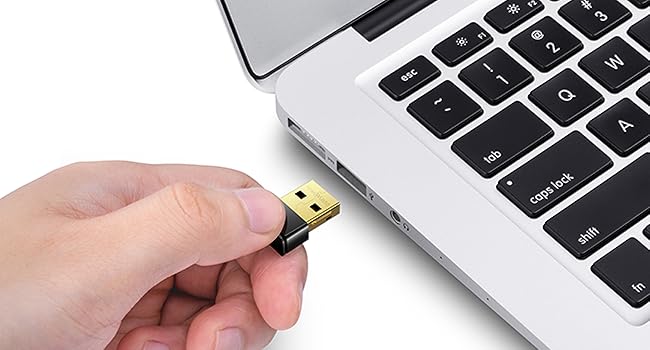
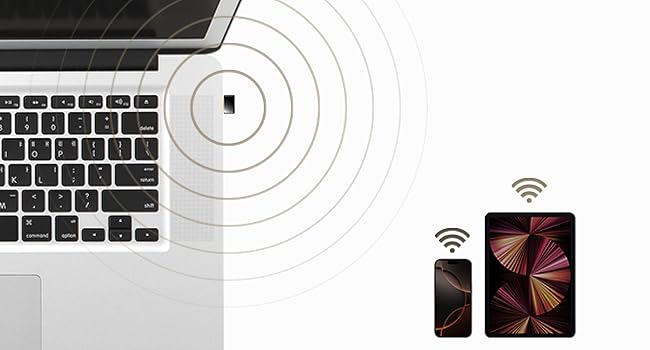
The Cudy Wi-Fi 5 Nano USB Adapter WU650 delivers fast dual-band AC650 speeds (433 Mbps on 5 GHz and 200 Mbps on 2.4 GHz) in an ultra-compact form factor. Featuring WPA3 security, driver-free installation across Windows, macOS, and Linux, and beamforming technology for enhanced signal focus, it’s the perfect travel-friendly upgrade for any laptop or desktop seeking reliable, secure, and high-performance wireless connectivity.






| ASIN | B07RN44SHW |
| Best Sellers Rank | #59 in USB Computer Network Adapters |
| Brand | Cudy |
| Built-In Media | Installation Guide, WU650 |
| Color | 650Mbps Nano WiFi USB Adapter |
| Compatible Devices | Desktop, Laptop |
| Compatible Operating System Family | Linux, MacOS, Windows |
| Customer Reviews | 4.3 out of 5 stars 6,177 Reviews |
| Data Link Protocol | IEEE 802.11a , IEEE 802.11ac, IEEE 802.11b , IEEE 802.11g, USB |
| Data Transfer Rate | 650 megabits_per_second |
| Hardware Interface | 802.11 ac/b/g/n, USB 2.0 |
| Item Dimensions L x W x H | 0.82"L x 0.59"W x 0.28"H |
| Item Highlight | 433+200Mbps Wireless Network Card, Support Win XP, 7, 8, 8.1, 10, 11, macOS 10.5-10.13, Linux 4.19-5.x, Mini Size |
| Item Weight | 2 g |
| Manufacturer | Shenzhen Cudy Technology Co., Ltd. |
| Mfr Part Number | WU650 |
| Minimum Required Operating System Version | Windows XP |
| Model Number | WU650 |
| Number of Items | 1 |
| Product Dimensions | 0.82"L x 0.59"W x 0.28"H |
| UPC | 731717225904 |
| Unit Count | 1 Count |
| Warranty Description | 2-Year Warranty |
A**N
Works in Linux (Specifically Armbian)
Haven't tested whether it gets the advertised speeds because I don't really need those and likely never will. This is connected to a Banana Pi M4 Zero to act as the upstream wifi (internal wifi is configured as hotspot/AP). For that purpose, it works great. Plug and play and was immediately detected. Seems to be using a Realtek chipset internally. Linux bananapim4zero 6.12.58-current-sunxi64 #3 SMP Thu Nov 13 20:34:41 UTC 2025 aarch64 aarch64 aarch64 GNU/Linux Bus 003 Device 002: ID 0bda:c811 Realtek Semiconductor Corp. 802.11ac NIC Here's the output if "iw phy" since these are nice to know before buying in case you need specific wireless capabilities for your project. Wiphy phy1 wiphy index: 1 max # scan SSIDs: 9 max scan IEs length: 2304 bytes max # sched scan SSIDs: 0 max # match sets: 0 Retry short limit: 7 Retry long limit: 4 Coverage class: 0 (up to 0m) Device supports AP-side u-APSD. Supported Ciphers: * WEP40 (00-0f-ac:1) * WEP104 (00-0f-ac:5) * TKIP (00-0f-ac:2) * CCMP-128 (00-0f-ac:4) * CMAC (00-0f-ac:6) * GCMP-128 (00-0f-ac:8) * GCMP-256 (00-0f-ac:9) * CCMP-256 (00-0f-ac:10) * GMAC-128 (00-0f-ac:11) * GMAC-256 (00-0f-ac:12) * CMAC-256 (00-0f-ac:13) Available Antennas: TX 0 RX 0 Supported interface modes: * IBSS * managed * AP * monitor * P2P-client * P2P-GO Band 1: Capabilities: 0x1862 HT20/HT40 Static SM Power Save RX HT20 SGI RX HT40 SGI No RX STBC Max AMSDU length: 7935 bytes DSSS/CCK HT40 Maximum RX AMPDU length 65535 bytes (exponent: 0x003) Minimum RX AMPDU time spacing: 16 usec (0x07) HT Max RX data rate: 150 Mbps HT TX/RX MCS rate indexes supported: 0-7 Bitrates (non-HT): * 1.0 Mbps * 2.0 Mbps * 5.5 Mbps * 11.0 Mbps * 6.0 Mbps * 9.0 Mbps * 12.0 Mbps * 18.0 Mbps * 24.0 Mbps * 36.0 Mbps * 48.0 Mbps * 54.0 Mbps Frequencies: * 2412.0 MHz [1] (16.0 dBm) * 2417.0 MHz [2] (16.0 dBm) * 2422.0 MHz [3] (16.0 dBm) * 2427.0 MHz [4] (16.0 dBm) * 2432.0 MHz [5] (16.0 dBm) * 2437.0 MHz [6] (16.0 dBm) * 2442.0 MHz [7] (16.0 dBm) * 2447.0 MHz [8] (16.0 dBm) * 2452.0 MHz [9] (16.0 dBm) * 2457.0 MHz [10] (16.0 dBm) * 2462.0 MHz [11] (16.0 dBm) * 2467.0 MHz [12] (16.0 dBm) (no IR) * 2472.0 MHz [13] (16.0 dBm) (no IR) * 2484.0 MHz [14] (disabled) Band 2: Capabilities: 0x862 HT20/HT40 Static SM Power Save RX HT20 SGI RX HT40 SGI No RX STBC Max AMSDU length: 7935 bytes No DSSS/CCK HT40 Maximum RX AMPDU length 65535 bytes (exponent: 0x003) Minimum RX AMPDU time spacing: 16 usec (0x07) HT Max RX data rate: 150 Mbps HT TX/RX MCS rate indexes supported: 0-7 VHT Capabilities (0x03c00022): Max MPDU length: 11454 Supported Channel Width: neither 160 nor 80+80 short GI (80 MHz) +HTC-VHT VHT RX MCS set: 1 streams: MCS 0-9 2 streams: not supported 3 streams: not supported 4 streams: not supported 5 streams: not supported 6 streams: not supported 7 streams: not supported 8 streams: not supported VHT RX highest supported: 434 Mbps VHT TX MCS set: 1 streams: MCS 0-9 2 streams: not supported 3 streams: not supported 4 streams: not supported 5 streams: not supported 6 streams: not supported 7 streams: not supported 8 streams: not supported VHT TX highest supported: 434 Mbps VHT extended NSS: not supported Bitrates (non-HT): * 6.0 Mbps * 9.0 Mbps * 12.0 Mbps * 18.0 Mbps * 24.0 Mbps * 36.0 Mbps * 48.0 Mbps * 54.0 Mbps Frequencies: * 5180.0 MHz [36] (13.0 dBm) * 5200.0 MHz [40] (13.0 dBm) * 5220.0 MHz [44] (13.0 dBm) * 5240.0 MHz [48] (13.0 dBm) * 5260.0 MHz [52] (13.0 dBm) (radar detection) * 5280.0 MHz [56] (13.0 dBm) (radar detection) * 5300.0 MHz [60] (13.0 dBm) (radar detection) * 5320.0 MHz [64] (13.0 dBm) (radar detection) * 5500.0 MHz [100] (13.0 dBm) (radar detection) * 5520.0 MHz [104] (13.0 dBm) (radar detection) * 5540.0 MHz [108] (13.0 dBm) (radar detection) * 5560.0 MHz [112] (13.0 dBm) (radar detection) * 5580.0 MHz [116] (13.0 dBm) (radar detection) * 5600.0 MHz [120] (13.0 dBm) (radar detection) * 5620.0 MHz [124] (13.0 dBm) (radar detection) * 5640.0 MHz [128] (13.0 dBm) (radar detection) * 5660.0 MHz [132] (13.0 dBm) (radar detection) * 5680.0 MHz [136] (13.0 dBm) (radar detection) * 5700.0 MHz [140] (13.0 dBm) (radar detection) * 5720.0 MHz [144] (disabled) * 5745.0 MHz [149] (13.0 dBm) * 5765.0 MHz [153] (13.0 dBm) * 5785.0 MHz [157] (13.0 dBm) * 5805.0 MHz [161] (13.0 dBm) * 5825.0 MHz [165] (13.0 dBm) * 5845.0 MHz [169] (disabled) * 5865.0 MHz [173] (disabled) * 5885.0 MHz [177] (disabled) Supported commands: * new_interface * set_interface * new_key * start_ap * new_station * set_bss * join_ibss * set_pmksa * del_pmksa * flush_pmksa * remain_on_channel * frame * set_channel * connect * disconnect WoWLAN support: * wake up on anything (device continues operating normally) software interface modes (can always be added): * monitor interface combinations are not supported Device supports SAE with AUTHENTICATE command Device supports scan flush. Device supports randomizing MAC-addr in scans. max # scan plans: 1 max scan plan interval: -1 max scan plan iterations: 0 Supported TX frame types: * IBSS: 0x00 0x10 0x20 0x30 0x40 0x50 0x60 0x70 0x80 0x90 0xa0 0xb0 0xc0 0xd0 0xe0 0xf0 * managed: 0x00 0x10 0x20 0x30 0x40 0x50 0x60 0x70 0x80 0x90 0xa0 0xb0 0xc0 0xd0 0xe0 0xf0 * AP: 0x00 0x10 0x20 0x30 0x40 0x50 0x60 0x70 0x80 0x90 0xa0 0xb0 0xc0 0xd0 0xe0 0xf0 * AP/VLAN: 0x00 0x10 0x20 0x30 0x40 0x50 0x60 0x70 0x80 0x90 0xa0 0xb0 0xc0 0xd0 0xe0 0xf0 * P2P-client: 0x00 0x10 0x20 0x30 0x40 0x50 0x60 0x70 0x80 0x90 0xa0 0xb0 0xc0 0xd0 0xe0 0xf0 * P2P-GO: 0x00 0x10 0x20 0x30 0x40 0x50 0x60 0x70 0x80 0x90 0xa0 0xb0 0xc0 0xd0 0xe0 0xf0 Supported RX frame types: * IBSS: 0xd0 * managed: 0x40 0xb0 0xd0 * AP: 0x00 0x20 0x40 0xa0 0xb0 0xc0 0xd0 * AP/VLAN: 0x00 0x20 0x40 0xa0 0xb0 0xc0 0xd0 * P2P-client: 0x40 0xd0 * P2P-GO: 0x00 0x20 0x40 0xa0 0xb0 0xc0 0xd0 Supported extended features: * [ RRM ]: RRM
L**O
Works fine
Nice little unit. I use it to help boost my wifi reception. So tiny, it can get lost in the laptop bag... but eventually I find it! :)
E**S
Works well for an old desktop across the house
I have an old Desktop in a room across the house that I originally had a decent USB 3 WiFi dongle in, which broke due to children. On a whim and going for cheap, I purchased this dongle to give it enough life for basic Internet use. For a simple quick fix for WiFi on a device, it's a cheap and quick solution. Windows 11 24H2 supported it without having an Internet connection, so whatever drivers are bundled with Windows proved to work enough to get online. I plugged it in, and WiFi was available. Even after connecting, I didn't have to update the drivers. Speeds seem acceptable for such a small device within this price range. For it's size, I was plesently surprised that it was able to reach the AP several rooms away. I was worried that due to the antenna being in a small compact area it would be less capable, and I am sure it is, but not noticable.
M**K
Works with Bazzite
Worked out of the box with the stable release of Bazzite (kernel version 6.17.7). Drivers are in the kernel as far as I'm aware so I didn't have to worry about that. Consistently was able to get 80-100 Mbps speeds, which is honestly great for ten bucks. Highly recommend if you're looking for a usb wifi adapter for Linux.
R**R
Fixed my laptop's no WIFI problem
My relatively new laptop stopped recognizing any WIFI signal at all, just out of warranty. I went to youtube and performed all the suggestions to try to make it work without any luck (I now suspect something wrong with the internal WIFI antenna). My laptop sat without much use for months. I was about to take it in for repair until I found that this USB WIFI dongle exists (and for only about $12+) . It was easy to install. I used the CD ROM provided with a USB external drive to install the driver as per given instructions (there is also an option to download the driver from the internet, but I would have had to have another working computer). It was only a 3to4 easy step process and my WIFI is now working as well as before. I can even stream HD video as well as before. I'm sure repairing it would have cost much more. Only downside I see is that I have one less USB port open now.
M**L
“Not Mac Compatible.”
False advertisement, it says in the description that this product is compatible with all windows, all McIntosh and all Linux devices. Then when you get it in the mail, it only works on macOS 10.6 and macOS 10.15. Mac doesn’t make any devices that are operating on that system anymore. The iPad Air that came out in 2011 had macOS 10.5 software on it all the new Apple products are running Tahoe 26.5.1 if you’re ordering those to Hughes on a Mac device that was manufactured after the year of 2015 this will not work for you. This must be an old device because it’s only compatible with ancient software
M**E
Works on Linux
I like these for troubleshooting WiFi. They work right out of the box with no driver installation on both Windows and Linux. They are not the fastest connection you’ll most likely see 250mps on a fast connection. Good for people who need a solution for a laptop with a bad network card or a desktop with no room for a pcie card.
R**E
Good upgrade for 19-year-old notebook PC
I’m trying to “upgrade” an old Dell Inspiron 1520 notebook PC from about 2007 my Dad just had laying around. It has a WiFi adapter built in but it’s not very good. I wanted to upgrade it before trying to upgrade from Windows 7 to either Windows 10 or Linux Mint. Normally I’d just get another WiFi card to put in, but I can’t find one that looks exactly like it and also has AC. So I decided to just get this USB instead. The Dell has 4 USB-A ports so taking one up wasn’t a big deal. It was cheap and it was detected by Windows 7. The PC has an optical drive so I was able to install the drivers from the included CD. Seems to work fine after that, and wasn’t very involved. The small form factor is also nice as it doesn’t stick out too far, less than the PC’s power cord, and less than my mouse’s wireless transceiver dongle. 👍🏽
Trustpilot
2 months ago
3 weeks ago