Buy anything from 5,000+ international stores. One checkout price. No surprise fees. Join 2M+ shoppers on Desertcart.
Desertcart purchases this item on your behalf and handles shipping, customs, and support to Croatia.
⚡ Stay connected, stay ahead — WiFi that moves as fast as you do!
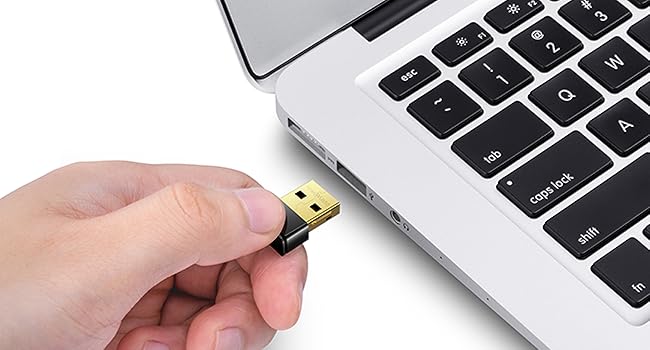
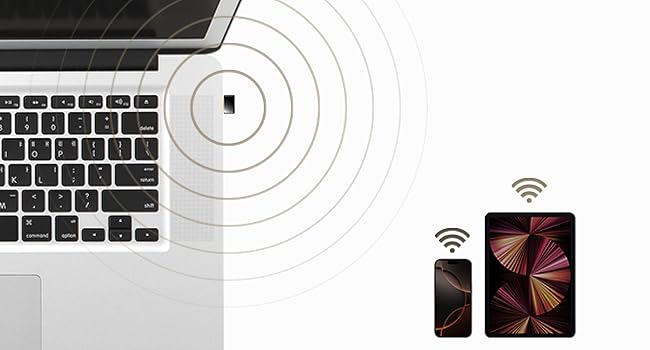
The Cudy AC 650Mbps USB WiFi Adapter delivers ultra-fast dual-band wireless connectivity with speeds up to 433Mbps on 5GHz and 200Mbps on 2.4GHz. Its nano-sized design ensures portability without sacrificing performance, compatible with a wide range of operating systems including Windows, Mac OS, and Linux. Featuring Soft-AP mode, it can convert wired connections into WiFi hotspots, making it an essential tool for professionals seeking reliable, high-speed internet on the go.


| ASIN | B07RN44SHW |
| Best Sellers Rank | #28 in USB Computer Network Adapters |
| Brand | Cudy |
| Built-In Media | Installation Guide, WU650 |
| Color | 650Mbps Nano WiFi USB Adapter |
| Compatible Devices | Desktop, Laptop |
| Compatible Operating System Family | Linux, MacOS, Windows |
| Customer Reviews | 4.3 4.3 out of 5 stars (6,140) |
| Data Link Protocol | IEEE 802.11ac, IEEE 802.11b, IEEE 802.11g, IEEE 802.11n, USB |
| Data Transfer Rate | 650 Megabits Per Second |
| Hardware Interface | 802.11 ac/b/g/n, USB 2.0 |
| Item Dimensions L x W x H | 0.79"L x 0.59"W x 0.31"H |
| Item Weight | 2 Grams |
| Manufacturer | Shenzhen Cudy Technology Co., Ltd. |
| Mfr Part Number | WU650 |
| Minimum Required Operating System Version | Windows 10 |
| Model Number | WU650 |
| UPC | 731717225904 |
| Warranty Description | 2-Year Warranty |
A**N
Works in Linux (Specifically Armbian)
Haven't tested whether it gets the advertised speeds because I don't really need those and likely never will. This is connected to a Banana Pi M4 Zero to act as the upstream wifi (internal wifi is configured as hotspot/AP). For that purpose, it works great. Plug and play and was immediately detected. Seems to be using a Realtek chipset internally. Linux bananapim4zero 6.12.58-current-sunxi64 #3 SMP Thu Nov 13 20:34:41 UTC 2025 aarch64 aarch64 aarch64 GNU/Linux Bus 003 Device 002: ID 0bda:c811 Realtek Semiconductor Corp. 802.11ac NIC Here's the output if "iw phy" since these are nice to know before buying in case you need specific wireless capabilities for your project. Wiphy phy1 wiphy index: 1 max # scan SSIDs: 9 max scan IEs length: 2304 bytes max # sched scan SSIDs: 0 max # match sets: 0 Retry short limit: 7 Retry long limit: 4 Coverage class: 0 (up to 0m) Device supports AP-side u-APSD. Supported Ciphers: * WEP40 (00-0f-ac:1) * WEP104 (00-0f-ac:5) * TKIP (00-0f-ac:2) * CCMP-128 (00-0f-ac:4) * CMAC (00-0f-ac:6) * GCMP-128 (00-0f-ac:8) * GCMP-256 (00-0f-ac:9) * CCMP-256 (00-0f-ac:10) * GMAC-128 (00-0f-ac:11) * GMAC-256 (00-0f-ac:12) * CMAC-256 (00-0f-ac:13) Available Antennas: TX 0 RX 0 Supported interface modes: * IBSS * managed * AP * monitor * P2P-client * P2P-GO Band 1: Capabilities: 0x1862 HT20/HT40 Static SM Power Save RX HT20 SGI RX HT40 SGI No RX STBC Max AMSDU length: 7935 bytes DSSS/CCK HT40 Maximum RX AMPDU length 65535 bytes (exponent: 0x003) Minimum RX AMPDU time spacing: 16 usec (0x07) HT Max RX data rate: 150 Mbps HT TX/RX MCS rate indexes supported: 0-7 Bitrates (non-HT): * 1.0 Mbps * 2.0 Mbps * 5.5 Mbps * 11.0 Mbps * 6.0 Mbps * 9.0 Mbps * 12.0 Mbps * 18.0 Mbps * 24.0 Mbps * 36.0 Mbps * 48.0 Mbps * 54.0 Mbps Frequencies: * 2412.0 MHz [1] (16.0 dBm) * 2417.0 MHz [2] (16.0 dBm) * 2422.0 MHz [3] (16.0 dBm) * 2427.0 MHz [4] (16.0 dBm) * 2432.0 MHz [5] (16.0 dBm) * 2437.0 MHz [6] (16.0 dBm) * 2442.0 MHz [7] (16.0 dBm) * 2447.0 MHz [8] (16.0 dBm) * 2452.0 MHz [9] (16.0 dBm) * 2457.0 MHz [10] (16.0 dBm) * 2462.0 MHz [11] (16.0 dBm) * 2467.0 MHz [12] (16.0 dBm) (no IR) * 2472.0 MHz [13] (16.0 dBm) (no IR) * 2484.0 MHz [14] (disabled) Band 2: Capabilities: 0x862 HT20/HT40 Static SM Power Save RX HT20 SGI RX HT40 SGI No RX STBC Max AMSDU length: 7935 bytes No DSSS/CCK HT40 Maximum RX AMPDU length 65535 bytes (exponent: 0x003) Minimum RX AMPDU time spacing: 16 usec (0x07) HT Max RX data rate: 150 Mbps HT TX/RX MCS rate indexes supported: 0-7 VHT Capabilities (0x03c00022): Max MPDU length: 11454 Supported Channel Width: neither 160 nor 80+80 short GI (80 MHz) +HTC-VHT VHT RX MCS set: 1 streams: MCS 0-9 2 streams: not supported 3 streams: not supported 4 streams: not supported 5 streams: not supported 6 streams: not supported 7 streams: not supported 8 streams: not supported VHT RX highest supported: 434 Mbps VHT TX MCS set: 1 streams: MCS 0-9 2 streams: not supported 3 streams: not supported 4 streams: not supported 5 streams: not supported 6 streams: not supported 7 streams: not supported 8 streams: not supported VHT TX highest supported: 434 Mbps VHT extended NSS: not supported Bitrates (non-HT): * 6.0 Mbps * 9.0 Mbps * 12.0 Mbps * 18.0 Mbps * 24.0 Mbps * 36.0 Mbps * 48.0 Mbps * 54.0 Mbps Frequencies: * 5180.0 MHz [36] (13.0 dBm) * 5200.0 MHz [40] (13.0 dBm) * 5220.0 MHz [44] (13.0 dBm) * 5240.0 MHz [48] (13.0 dBm) * 5260.0 MHz [52] (13.0 dBm) (radar detection) * 5280.0 MHz [56] (13.0 dBm) (radar detection) * 5300.0 MHz [60] (13.0 dBm) (radar detection) * 5320.0 MHz [64] (13.0 dBm) (radar detection) * 5500.0 MHz [100] (13.0 dBm) (radar detection) * 5520.0 MHz [104] (13.0 dBm) (radar detection) * 5540.0 MHz [108] (13.0 dBm) (radar detection) * 5560.0 MHz [112] (13.0 dBm) (radar detection) * 5580.0 MHz [116] (13.0 dBm) (radar detection) * 5600.0 MHz [120] (13.0 dBm) (radar detection) * 5620.0 MHz [124] (13.0 dBm) (radar detection) * 5640.0 MHz [128] (13.0 dBm) (radar detection) * 5660.0 MHz [132] (13.0 dBm) (radar detection) * 5680.0 MHz [136] (13.0 dBm) (radar detection) * 5700.0 MHz [140] (13.0 dBm) (radar detection) * 5720.0 MHz [144] (disabled) * 5745.0 MHz [149] (13.0 dBm) * 5765.0 MHz [153] (13.0 dBm) * 5785.0 MHz [157] (13.0 dBm) * 5805.0 MHz [161] (13.0 dBm) * 5825.0 MHz [165] (13.0 dBm) * 5845.0 MHz [169] (disabled) * 5865.0 MHz [173] (disabled) * 5885.0 MHz [177] (disabled) Supported commands: * new_interface * set_interface * new_key * start_ap * new_station * set_bss * join_ibss * set_pmksa * del_pmksa * flush_pmksa * remain_on_channel * frame * set_channel * connect * disconnect WoWLAN support: * wake up on anything (device continues operating normally) software interface modes (can always be added): * monitor interface combinations are not supported Device supports SAE with AUTHENTICATE command Device supports scan flush. Device supports randomizing MAC-addr in scans. max # scan plans: 1 max scan plan interval: -1 max scan plan iterations: 0 Supported TX frame types: * IBSS: 0x00 0x10 0x20 0x30 0x40 0x50 0x60 0x70 0x80 0x90 0xa0 0xb0 0xc0 0xd0 0xe0 0xf0 * managed: 0x00 0x10 0x20 0x30 0x40 0x50 0x60 0x70 0x80 0x90 0xa0 0xb0 0xc0 0xd0 0xe0 0xf0 * AP: 0x00 0x10 0x20 0x30 0x40 0x50 0x60 0x70 0x80 0x90 0xa0 0xb0 0xc0 0xd0 0xe0 0xf0 * AP/VLAN: 0x00 0x10 0x20 0x30 0x40 0x50 0x60 0x70 0x80 0x90 0xa0 0xb0 0xc0 0xd0 0xe0 0xf0 * P2P-client: 0x00 0x10 0x20 0x30 0x40 0x50 0x60 0x70 0x80 0x90 0xa0 0xb0 0xc0 0xd0 0xe0 0xf0 * P2P-GO: 0x00 0x10 0x20 0x30 0x40 0x50 0x60 0x70 0x80 0x90 0xa0 0xb0 0xc0 0xd0 0xe0 0xf0 Supported RX frame types: * IBSS: 0xd0 * managed: 0x40 0xb0 0xd0 * AP: 0x00 0x20 0x40 0xa0 0xb0 0xc0 0xd0 * AP/VLAN: 0x00 0x20 0x40 0xa0 0xb0 0xc0 0xd0 * P2P-client: 0x40 0xd0 * P2P-GO: 0x00 0x20 0x40 0xa0 0xb0 0xc0 0xd0 Supported extended features: * [ RRM ]: RRM
V**D
Best Price
Inexpensive and works perfectly. Great product.
E**S
Works well for an old desktop across the house
I have an old Desktop in a room across the house that I originally had a decent USB 3 WiFi dongle in, which broke due to children. On a whim and going for cheap, I purchased this dongle to give it enough life for basic Internet use. For a simple quick fix for WiFi on a device, it's a cheap and quick solution. Windows 11 24H2 supported it without having an Internet connection, so whatever drivers are bundled with Windows proved to work enough to get online. I plugged it in, and WiFi was available. Even after connecting, I didn't have to update the drivers. Speeds seem acceptable for such a small device within this price range. For it's size, I was plesently surprised that it was able to reach the AP several rooms away. I was worried that due to the antenna being in a small compact area it would be less capable, and I am sure it is, but not noticable.
M**M
USB WI-FI
Works great and is very fast, great product!
C**S
Connected in minutes
Bought the CUDY for a Linux (Xubuntu) machine. Plugged it in and the Xubuntu was online minutes later. Cant beat the simplicity and reliability at this price point. Maybe others will question signal strength or even heat produced by dongle, but I've not found reason to even worry.
M**E
Works on Linux
I like these for troubleshooting WiFi. They work right out of the box with no driver installation on both Windows and Linux. They are not the fastest connection you’ll most likely see 250mps on a fast connection. Good for people who need a solution for a laptop with a bad network card or a desktop with no room for a pcie card.
B**E
Highly Unrecommended
Adapter does not work and causes an issue in both of my PC's. Once it's put in it starts to work and connect to wifi, but then it goes into a restart loop. It says the system encountered a problem and needs to restart, then starts gathering data and restarts. Then does the same thing again and again. I had to power it down myself once as it wouldn't fully start back up. Highly UNrecommended.
L**R
Instantly connects to wifi!
Quick next day delivery - work out the box - no installation requirements, just plug in and immediately connects to wifi. This was used on my Dell Desktop Computer.
Trustpilot
1 month ago
2 days ago