Desertcart purchases this item on your behalf and handles shipping, customs, and support to Croatia.
✏️ Unlock your digital masterpiece with precision and ease!
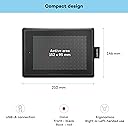
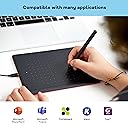
The One by Wacom Pen Tablet is a compact, USB-powered drawing tablet featuring a battery-free pen with 2048 pressure sensitivity levels. Compatible with Windows, macOS, and Chromebook, it offers a natural pen-on-paper feel in a sleek black and red design. Ideal for professionals, students, and educators, it supports seamless remote collaboration and creative workflows with easy plug-and-play setup.


| ASIN | B07N525974 |
| Active Surface Area | 6.0 x 3.7 inches |
| Best Sellers Rank | 8,232 in Computers & Accessories ( See Top 100 in Computers & Accessories ) 23 in Graphic Tablets |
| Box Contents | Ergonomic 2048 pressure sensitive battery-free pen |
| Brand | Wacom |
| Brand Name | Wacom |
| Colour | Black |
| Compatible Devices | Desktop, Laptop, Tablet |
| Connectivity technology | USB |
| Customer Reviews | 4.5 out of 5 stars 6,844 Reviews |
| Display Type | LCD |
| EU Spare Part Availability Duration | 5 Years |
| Global Trade Identification Number | 04949268621052 |
| Item Dimensions L x W | 14.6L x 21W centimetres |
| Item Weight | 250 Grams |
| Manufacturer | WACOM |
| Manufacturer Part Number | CTL-472-N |
| Model Name | CTL-472-N |
| Model Number | CTL-472-N |
| Model name | CTL-472-N |
| Native Resolution | 1920x1080 |
| Network Connectivity Technology | USB |
| Operating System | Windows, macOS |
| Operating system | Windows, macOS |
| Pressure Sensitivity | 2048 Levels |
| Pressure sensitivity | 2048 Levels |
| Product Features | Shortcut Key |
| Product Warranty | 2 years |
| Screen Size | 21 Centimetres |
| Special feature | Shortcut Key |
| Specific Uses For Product | Designing, Drawing, Editing, Painting, Teaching |
| Target Audience | Teacher |
| Unit Count | 1.0 count |
A**R
Better Than Perfect
My artistic intentions have always been sadly restricted by a lack of tools and talent. The free Krita digital art software and £35 for this Wacom tablet have resolved the former and even make up for some of the latter. Seriously, while creating my first digital 'painting' following Bob Ross's "Mystic Mountain" episode (yes, the illustration is my first attempt) I spent more time learning which brushes and settings were most appropriate in Krita than setting-up the graphics tablet. Apart from adjusting the pressure-sensitivity to find what was most comfortable for me and changing my mind about what I wanted the pen-buttons to do the tablet itself was a simple matter of plugging it in. As a caveat - it's just as well that everything was so simple as there is no printed or PDF manual and the only help - from the Wacom website - is not at all clear. This is, of course, an older piece of hardware and their cheapest but I would still have liked something easier to understand. It remains true, however, that the biggest obstacle to understanding the hardware that I had was in understanding how little there was to understand - it really is very, very, simple to install and operate and works extremely well. Alas, I think I still lack the talent to benefit from it fully but it has already been well worth the money and I'm very happy with this device.
T**S
can recommend
I bought the Wacom One Pen Tablet twice, one for my daughter and one for my niece (both 15yo) and they are both thrilled with it! It’s easy to set up, light, fast, quick for drawing and simple to start using. A great choice for teenagers just discovering digital art and even suitable for professionals since Wacom is a trusted, reliable brand. Excellent value for money I highly recommend it!
D**H
Great little tablet - worth the money. Drivers the weak point
I wanted a little tablet for photo editing on my Mac. Neither mice not trackpads are great for pixel-perfect image manipulation. I thought I'd try the small One and return it if I needed something bigger. Actually the size is a real bonus - it's large enough for very accurate pen control, but small enough that you're not waving your arm around like an orchestra conductor. I thought I was going to want a larger tablet than this, but actually the size is perfect. I've used many tablets over the years and use huge ones at work daily. For the low price this doesn't seem to have any drawbacks compared to the larger ones, for anybody who isn't a professional graphic designer. My only negative comments are: there's no upright pen holder, the device uses Micro USB rather than USB-C, and the drivers took a bit of installing, with two reboots before everything was happy. Also, the Wacom Mac drivers require permanent keyboard logging access, which I presume is so that they can monitor modifier keys when the app isn't in the foreground - but actually I don't want any app having full keyboard access for security reasons, so there should absolutely be an option for the drivers to work without full keyboard access for those who care about security rather than unwanted functionality.
D**I
I bought this as an upgrade and I'm super impressed!
I've been using a Wacom Bamboo tablet for about 7 to 8 years now for digital art and photo editing, unfortunately it died about a week ago, I highly recommend getting this tablet if you're looking for a reasonably priced upgrade. It's really simple and easy to use, it feels amazing when you're using it and the drawing window is the whole tablet which I was surprised at due to my old tablet being much larger than this one and only having a small window size. I would also like to add that this tablet could also be very good for playing games like osu. If I was to think of a downside to this tablet the one thing I could say is the pen feels like it could easily break if you put force on it, feels a little bit cheap but that's nothing to worry about unless you throw your pen across your room because you can't draw a straight line c
M**N
Great pen tablet
This pen tablet surprised me with its great functionality, it has a sleek design and the accuracy on it with the pen isn’t bad either. You just plug it into your device and you’re good to go.
B**E
Won't suit everyone or certain applications
Firstly, it did what it claimed and seemed well made but didn't do what I wanted and I returned it. The software, which has to be downloaded and installed, worked. The options were limited though - eg there was no way to adjust the scroll rate and I found it unintuitive that you moved the pen up to scroll down. Obviously, when we say 'scroll down' we are expecting the page to move up but the action is to move the scrubber down. There is no option to reverse this movement. I was expecting that it would take some getting used to absolute positioning after a mouse but that didn't cause much difficulty. I did find it difficult to co-ordinate tip presses and button clicks, and the hover height but that would probably improve with practice. The big problem was that I wanted to use this with CAD software which, on a mouse, required simultaneously depressing scroll wheel and right button to do 3D rotations. The pen on this tablet has only two buttons. One defaults to 'scroll' and the other to 'right mouse button'. It would be difficult to consistently depress both anyway because of their position but when you do it wasn't registered or recognized. There was no option in the software to define simultaneous button actions. So it didn't work for me.
A**R
szdfcgvh
works amazing on my Chromebook , but is a bit weird on our MacBook. easy to use, pencil has nice grip, can plug it into just about any device you can think of, and is overall great.
H**H
Good budget drawing tablet.
I didn't want to spend too much to get some light PDF annotation done on my laptop. I was looking through my options when I found this little powerhouse. Built out of solid matte plastic, I don't think any drops can harm it. The pen included is battery free, meaning seamless connection and no time wasted charging batteries. The pen glides well across the surface, whilst the slight matte texture means you can still write neatly. Pretty premium aesthetic, definitely good for office use for signing digitally. Tracks well even when I lift up the pen a good distance, so I can always see the cursor onscreen showing where my pen is. I regret not buying the bigger version, but no doubt this is so much more than I needed to begin with.
G**G
Great quality tablet
The tablet is really well built. Doesn't feel cheap which I was looking for as it was quite expensive compared to others. Pen is comfortable. Might not be applicable to most but there is a minimum size to the tablet area with the supporting Wacom tablet drivers, ~30mm x 30mm, not sure the exact measurement. You can get around this by using other tablet drivers.
V**A
Ottima tavoletta grafica per principianti e non solo
Ho acquistato questa tavoletta grafica come soluzione economica e devo dire che mi ha davvero sorpreso. Nonostante il prezzo contenuto, è molto funzionale e facile da usare. Perfetta per chi si avvicina al mondo del disegno digitale o per chi cerca uno strumento semplice ma efficace. La configurazione è stata rapida e senza problemi, e la sensibilità della penna è davvero buona per il suo costo. La risposta al tocco è precisa, e anche se non è un prodotto di fascia alta, offre un'ottima esperienza di disegno. Ho usato la tavoletta per illustrazioni e fotoritocco e non mi ha mai dato problemi. Inoltre, è compatibile con diversi software, il che la rende versatile e adatta sia per chi inizia che per chi ha già esperienza. La superficie è abbastanza grande per lavorare comodamente, ma non è troppo ingombrante, quindi risulta anche pratica da portare in giro. In sintesi, una tavoletta grafica molto utile e performante per chi non ha bisogno di una soluzione professionale costosa. Consigliata a chi cerca qualità a un prezzo accessibile.
C**E
Very Good! Good price, works flawlessly!
I use this produkt for digital art, gaming (OSU) and occasionally just as an input device for my cursor. I've owned its bigger brother for four years now, traveled across the world with it and it hasnt had any issues. Light, portable (you could stow it anywhere), no parts that could break off or get damaged. Performance wise its got no latency, which really improves artistic and gaming life. The pressure levels are quite sensitive (adjustable) so you have lot to play with. Obviously since it doesnt have a screen it may feel a bit weird at first to use, since we've gotten so accustomed to our smartphones, but it give you a reliable work surface that has a nice feel to it and you dont have your hand in the way, which means better overview of your screen. The pen itself is very light and need no batteries or charge, works anytime. I havent had to change the tip either in four years. Lost my old one recently, the new one feels just like it. It is cheap and i would recommend it to anyone looking for a gift for someone who is just starting out with digital art. My younger siblings all loved it, so you could get your kid to be creative while in front of the screen. TL;DR: Easy to use, take it anywhere with you, very reliable.
C**N
One of the best if not the best tablet for osu!
Let me start by saying I got an xppen for my birthday before ordering this one. It was a disaster, the pen was so big and fat I could barely hold it, let alone use it for more than 30 minutes at a time without my hand hurting. It was so bad I ended up switching back to mouse for a month or so before i eventually gave in and ordered this one. This is a great tablet through and through, great buld quality, a nice comfortable size and no built in hardware smoothing. Nothing bad I have to say about this tablet really
C**L
Yeni başlayanlar için harika.
Çizim yapmaya yeni başlayanlar için harika bir ürün. Bilgisayarda başka amaçlar içinde kullanılabilir. Fotoğraf editlerken de epey işime yaradı. Kalemin ucuna değil de ekrana bakarak çizim yapmak en başta bir garip geliyor ama kısa sürede alışıyor insan.
Trustpilot
2 weeks ago
1 month ago