🎮 Elevate your desk game with pro wireless speed and style — never miss a keystroke or a beat!
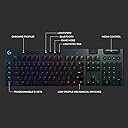
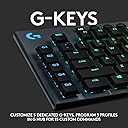
The Logitech G915 Lightspeed is a premium low-profile mechanical keyboard featuring ultra-fast 1 ms LIGHTSPEED wireless connectivity, 30 hours of battery life, and fully customizable per-key RGB lighting with LIGHTSYNC technology. Built with aircraft-grade aluminum alloy, it offers a sleek, durable design and versatile multi-device support via Bluetooth and LIGHTSPEED. Programmable macro keys and dedicated media controls make it a powerhouse for both professional productivity and immersive gaming.


| ASIN | B07NY9ZRZG |
| Additional Features | Backlit |
| Antenna Location | Gaming |
| Best Sellers Rank | #2,988 in Video Games ( See Top 100 in Video Games ) #245 in PC Gaming Keyboards |
| Brand | Logitech G |
| Built-In Media | G915 Lightspeed Wireless RGB Mechanical Gaming Keyboard, LIGHTSPEED USB Receiver, USB Cable, USB Extender, User Documentation |
| Button Quantity | 104 |
| Color | Black |
| Compatible Devices | Gaming Console, PC |
| Compatible Operating System Family | Windows |
| Compatible Tablet Computer Models | AAUB P30, ACEPAD A130, ACEPAD A140 |
| Connectivity Technology | Bluetooth, USB |
| Customer Reviews | 4.3 out of 5 stars 2,229 Reviews |
| Enclosure Material | Aluminum |
| External Testing Certification | ANATEL: 56361803229; 56371803229; |
| Global Trade Identification Number | 00097855142597 |
| Hand Orientation | Ambidextrous |
| Item Dimensions L x W x H | 18.7"L x 5.91"W x 0.87"H |
| Item Type Name | Keyboard |
| Item Weight | 1.65 Grams |
| Keyboard Backlighting Color Support | RGB |
| Keyboard Description | Wireless |
| Keyboard Layout | QWERTY |
| Language | English |
| Manufacturer | Logitech |
| Mechanical Keyboard Switch Model | logitech_romer_g_tactile |
| Mfr Part Number | 920-008902 |
| Model Name | G915 Wireless Mechanical Gaming Keyboard (Tactile) |
| Model Number | 920-008902 |
| Number of Keys | 104 |
| Number of Sections | 1 |
| Power Source | Battery Powered |
| Processor Count | 1 |
| Recommended Uses For Product | Gaming |
| Special Feature | Backlit |
| Style Name | G915 |
| Switch Type | Tactile |
| Theme | gaming |
| Total USB 2.0 Ports | 1 |
| UPC | 097855142597 |
| Unit Count | 1.0 Count |
| Warranty Description | 2 Year Limited Hardware Warranty |
A**.
$250 well spent. nearly best in class for all features
First, why is that 1-star review complaining about the price still there and has so many upvotes. It is not even a verified purchase. I tried the linear and tactile version. Picked the tactile version because I got used to it quicker and appreciated the actuation feedback, which the linear version lacks. Linear is the quietest, but the tactile version is reasonable. You will not bother anyone. I picked this over the apple magic keyboard and corsair mk2 rapid fire. I will include my use case, specs/features, pros, and cons. Since covid, I work from home. I am a software developer, game a bit (3-10 hours) a week, and write a few reports as part of my job a week. The key caps are matte black and soft, which delivers a very nice feel. If you barely tap the keys, you can slide right across them. I do not eat near my keyboard, but the key caps are pretty good at resisting finger grease/oil. Touch typing will help with this as well. I have a 15inch work mac. I did not mind the butterfly keys, but this is better beyond comparison. The "LightSpeed" connection over usb does its job. I usually have the usb plugged into my gaming pc and use bluetooth for my work mac. I can transtition between the two just by touching the lightspeed/bluetooth buttons on the keyboard. The layout for mac is different, but i got used to it pretty quick. Being able to use one keyboard for mutiple machines at the touch of a button is incredible. You only need to get used to one keyboard, which greatly improves your typing. I use the macros keys for gaming. game changer. The dedicated media keys are a must have for me now. The volume scroll rod is smooth and the rolling distance matches the change in volume. The keyboard has a brushed metal (probably aluminum) finish. Feels very durable, dense, and premium. Under regular light, dust is very visible. The keyboard pacing is good and no fatigue after all day. The full keyboard is big. 19 inches x 6 inches. good luck finding a soft case for this. I have to use 3 micro fiber cloth to cover this thing when i am away. The keyboard has the back legs. One raises it 4 degress, the other 8 degrees. To me, the 4 degrees is not noticeable. The mechnical switch is visible and almost above the actual board. This contributes to its slim profile. I really wish there was a wrist wrest, so I could get a consistent hand posture and feel. 5 macro keys down the left. full row of function keys, must have for gaming. total of 12 soft rubber-ish buttons for stuff like media, macro controls, and wireless connectivity. Full RGB per key back light only over lightspeed. The backlight customization is limited over bluetooth. I usually have the backlight off... cause i do not look at the keyboard. I really could care less about keyboard rgb. There is a battery and capslock light indicator. Battery life is great. since i do not have the back lghts on, it exceeds the advertised 30hrs. Oh, I also just walk away when i am done working and it just takes one key press to wake up the keyboard and connect. Near seemless reconnection. The included cable is also nice. Mesh/braided. My desk looks a lot cleaner now with a wireless keyboard and wireless mouse. I used a cheap $20 keyboard+mouse combo from amazon at home for a long time. At work i have the macbook pro's butterfly keys and apple's full magic keyboard. I bought the corsair mk2 rapid fire linear, but did not like the lack of actuation feedback. The cheap keyboard cannot compare at all... Mac's butterfly takes sometime to adjust. If you like it you can really fly on that keyboard. The magic keyboard has a little bit more travel than the butterfly, but I still prefer the mechanic tactile feel and media keys of this g915. The 15inch mac build has a 90 degrees hard edge finish. When i type and rest my arms, my wrist will rest on the hard edge and after a while it bothers me and leaves a mark. This is why i like wrist rests. Pros: almost everthing i said above -fast reconnecting, and swapping between bluetooth and lightspeed -very good build quality, materials, looks, layout, functionality, and useability -full rgb with Logitech GHUB software -great battery -slim, low profile -nearly best in class for everything it does -logitech ghub software is surprisingly good for keyboard customization Cons: not much, very preference based -19"x6". traveling with this not the best. Will not fit most desk keyboard trays. make sure you have the desk space. -The SHIFT+NUM (~!@#$%...)_+) are not backlit. They are printed on the keys. -No wrist rest... like come on even the $20 combo has a wrist wrest. The mk2 also had a wrist wrest. -price (based on your value and opinion) I felt like i need to address the 1-start review on this item that has 300+ votes complaining about the price. This is one of the few wireless (dual connection), real mechanical switches, full dedicated media keys, with macros that features great build quality with a slim profile. I literally use every feature this keyboard offers. Using only one keyboard for my work mac and gaming pc just make that $250 worth it.
Z**E
love love love
I've never been so glad to go wireless, and this keyboard reinforces that (along with the g903 wireless mouse I bought with this). Right off the bat, I highly recommend this keyboard. Starting with the battery life, this keyboard is insane with it. 100% at the beginning of the day to 74% at the end of it, it is truly exciting. I will be doing a lifespan test, since I was just charging overnight out of habit, but now I'm curious to know. Keep in mind, I've been using my pc 24/7 lately, and it still uses 26% of the battery the whole day. (UPDATE: The keyboard lasts 3 to 4 days long on a single charge, it's pretty dang good) Design wise, this keyboard is beautiful. Very minimal, clean cut, square edges, well lit and very bright keys with a ton of color variance. If you like a clean setup, this is definitely the way to go. The volume rocker is super convenient and surprisingly very accurate. It's also a super light keyboard that is also super thin. Did I mention this keyboard has a high aesthetic? I have the tactile keys, and I love it. Quick, responsive, and quiet, I don't have to listen to my friends complain about how loud my keyboard is anymore! I don't care too much about ergonomics, but I will say this keyboard sits really low, with only 2 settings of angle adjustment. I'm sure some will hate the ergonomics, I don't really mind it. Response time because it's wireless... what response time? I push a key, the pc picks it up right away. Logitech's whole "lightspeed" wireless program is quite literally lightspeed. I cannot discern the response time of this keyboard to a wired one, it's great. I can't help but gush about this keyboard, I'm absolutely in love with it. One of the few cons I have, and it's a nitpick for sure, are the low profile keys, and it's not even a con anymore? I had to get used to it since I had a traditional mechanical keyboard (razer blackwidow ultimate), but once I did, the keyboard feels great. Another nitpick is that I hit the space key on accident a lot. That's seriously my con with this keyboard. But I will take accidentally hitting my space bar because of the super thin edge around the keyboard over a bulky board anyday. All in all, I highly recommend it. Beautiful, sturdy, quality. Everything about this was well done to me, and I love it
W**T
Wireless is better
The Logitech G915 keyboard is an absolute gem, and it's completely transformed my computing experience. From its weighty metal design to its customizable RGB lighting and long-lasting battery life, it's a keyboard that truly stands out. The first thing that struck me about the G915 is its weighty metal construction. This keyboard feels incredibly solid and well-built. The premium materials give it a sturdy, durable feel, making it not just a tool for work and gaming, but also a centerpiece on my desk. The feedback from the linear keys is exceptional. The keystrokes are smooth and precise, and the low actuation force ensures that I can type or game for hours without experiencing any finger fatigue. It's an absolute joy to use, and it has greatly improved my typing speed and accuracy. The fully customizable RGB lighting is a visual treat. With the G915, I can create the perfect lighting scheme to match my mood, my setup, or just for fun. The options are limitless, and it adds a personal touch to my workspace. Wireless capability is a game-changer in terms of aesthetics. It makes my desk look cleaner and more organized without the clutter of wires. Plus, there's no perceptible input lag, ensuring that my keystrokes are instantly registered. This is crucial for both work and gaming. The only real downside I've found is the lack of a specifically designed wrist rest for the G915. The keyboard is slightly larger than a full-sized one, which makes finding a compatible wrist rest a bit of a challenge. I ended up settling for the Logitech MX palm rest, but it's not the best fit and could be more comfortable. In conclusion, the Logitech G915 keyboard is a true standout in the world of keyboards. Its weighty metal design exudes quality, the linear keys offer an outstanding typing experience, and the RGB lighting adds a touch of personalization. The wireless capability is a convenience, and the absence of input lag is a massive plus. The only thing that would make this keyboard perfect is a dedicated wrist rest designed for it. Nevertheless, if you're looking for a top-tier wireless keyboard that excels in both performance and aesthetics, the G915 is an excellent choice.
J**N
Very pleased, not a hint of key chatter. Terrible manual.
TL;DR: I like it. It works exactly as intended, and that alone is a huge upgrade for me. Minor preference differences do not take away from the fact that I feel this is a very good product that I can see using for as long as it lasts. However, LG could use more focus on clear setup/documentation, they pretty much dropped the ball in that regard on this keyboard. 20 something years as a fan of a "misspelled sharp tool" company that specialized in gaming mice, roughly two years ago I purchased a "black venomous spider" V3 keyboard. Bottom line, it was a key chatter laden nightmare with numerous other issues (like the ARGB lighting not functioning correctly, onboard memory never working), that the company completely weaseled its way out of resolving. You never know the value of a properly functioning keyboard until you have to press the delete button an unnecessary 10+ times simply typing out a normal sentence, not to mention the impact on gaming. Last week I finally had the disposable funds for the G915 (full size), while it was on sale here on Amazon. 3 days of use, and I cannot believe how nice it is to just have a keyboard that works as expected. All keys, not a hint of chatter. Mind blowing as this alone was, I also noticed that the ARGB keys would keep their colors through long sessions of use, would remember the colors after a system reboot, all kinds of nifty "works as intended" feels compared to the nightmare the old keyboard was causing. (I also like how the rechargeable battery appears replicable. Are we seeing a return to consumer focused common sense, finally?!) I feel crazy, because really I just have a correctly working keyboard, and that alone is making me ecstatic. Cons? Four, but 3 are quite minor and/or preference based. The fourth one did cost a star. First, like others I feel a bit baffled that LG left the small handful of keys as not addressable RGB. It makes no sense as those keys function as either on or not on. The color is not important to the function, but here we all are with yellow and white keys at the top of the keyboard, unable to be recolored. Very minor and not all all important to the function, but it was an unnecessary error in my mind that takes away from the user's aesthetic choice. And that's the whole point of ARGB. Second, this keyboard is definitely low profile, meaning it goes out of its way to be as flat as it can. This takes some adjustment with physical hand placement, but all keyboards usually do. The keys are also aligned aggressively with the bottom edge of the keyboard; where most keyboards have a bit of a bezel between the spacebar row of keys and the palmed edge, this keyboard has somewhere in the area of 3 or 4mm. I do feel this is less ergonomic, and I feel this makes the keyboard slightly less desirable when used on a lap (i.e. home theater computer) vs on a desk. That said, this kind of user awkwardness will likely resolve with use and familiarity. Third, lighting of secondary symbols for keys, completely nonexistent on this keyboard. If its dark enough in your environment, and you don't remember that the "&" is "7," you'll likely need to turn a light on to find it. I will probably miss that on rare occasion. Perhaps there is an aftermarket solution. Finally, LG included a single 3" x 3" double sided slip of paper as the instruction manual. I normally wouldn't mind this if it had a big QR code or something similar on it, but instead it was a tiny pictographic charades exercise, with literally no instructive words to go with the tiny illustrations. If the illustration made sense at first glance, I might be on board, but only after understanding this specific keyboard's layout/functions would those make sense. Hidden on the back of the paper slip at the bottom with the "necessary legalese" is indeed a URL to LGs website for support, which I missed it the first time. This is part of the out of box user experience, and this was a failure. Proper setup instructions should not require any hunting for information and limited confusion. -1 star. Not much else to say I think. I haven't used the macros or special programmable function keys, those are not important to me. As a working as expected, functional, responsive wireless gaming keyboard, I am happy so far. Edit: Months in, and I really am very satisfied with this purchase. With my normal usage scenario (6hrs+ per day), I have to charge perhaps once every two weeks to keep this thing charged. Keeping the ARGB dimmed at around 20-40% GREATLY extends this sucker's charge duration. I have played with macro creation in GHub, and while I wouldn't call it intuitive, it certainly got the job done. I still would recommend this keyboard to just about anyone.
A**M
Solid Keyboard
Pros: -Fast typing due to tactile low profile key caps -Sleek design with a thin profile -Practical buttons and controls -Quiet Cons: -Price -RGB lighting First of all I love this keyboard, I'm using it daily and it's such an upgrade from my previous keyboard. Typing feels so smooth and is relatively quiet. I use the volume slider more than I thought along with the programmable buttons. The price is slightly high to me, I justify it since I use it daily and I needed an upgrade. Also, The RGB lighting was a bit finicky. I was able to navigate it and set it to my preference eventually. Overall 5/5 for me, I recommend this if you can justify the price for yourself and/or need an upgrade from your current keyboard.
M**S
June 2024 update: NOT RECOMMENDED. 1st review: Nice keyboard with a glaring flaw.
UPDATE JUNE 2024: I bought two of these G915 KBs in September of 2023. I am not using these computers for work, and though I am active on a couple of social media platforms, I would not classify me as a heavy user. Nonetheless, the black plastic mask that coats the transparent keycap through which the keyboard lighting shines has begun to flake of on two of the keys. See the images. I contacted Logitech warranty support and they offered to send replacement keycaps. Though it took a lengthy exchange of emails and more than two weeks, Logitech DID send me the replacement caps. Not included were keycaps for the NUM pad, but I didn't need those. I replaced the flaking keycaps. To Logi's credit, they sent replacements. BUT...this should never happen on a gaming keyboard, especially one as expensive as the G915. I used a couple of G910s for YEARS with no such problem, and the keycaps on those look better than the ones on the G915s after les than a year. For my primary KB I have switched to a Roccat (now Turtle Beach) Vulcan II Max. Unless my G915 was manufactured during a cycle where defective materials were used, I can expect to have the same problem again in a year or two with the same or other keys. Manufacturers are always looking to make products with cheaper materials or processes and to charge more for them. Sad. I have been a Logitech customer for many, many years, but the trend with their products is not good. 1st review, now updated: LIKE: I have used the wired G910 for years and have loved it. The per-key color assignments, keycap design and the rich colors that do not bleed out under and around the keys made for an excellent keyboard. I bought the G915 to replace this favorite keyboard to gain the wireless function and to reduce the desktop footprint size. I love the aluminum deck and the smaller footprint. I'm glad the G915 has standard key placement. Being able to use either the RF dongle OR Bluetooth is nice, allowing me to instantly switch the keyboard from my desktop to my laptop or even to my phone. The charge lasts. It's at 74% after several long days of use. I bought the TACTILE key version, and I like it fine. The keyboard automatically picked up my key color assignments I had set for the G910 from the GHUB software that controls both models. DISLIKE: (1) Unlike the keycaps on the older wired G910, Logitech has failed to illuminate the symbol keys that share keys with the primary letters and numbers. This seems absurd; if you need illumination, you need ALL the characters illuminated. This is a glaring, inexplicable flaw in my opinion, and it's especially aggravating on a keyboard that costs $200+. (2) The charging port is Micro USB, which is both unfortunate and hard to understand since their MX Keys wireless keyboard features the newer and better USB-C port. Even the MX Master 3s mouse uses USB-C. Overall, I like this keyboard enough to replace the G910 with it. But it's twice the price (the G910 is discontinued) and the two mentioned design flaws are bothersome. If I didn't need to replace the G910, I would not keep it. On a related matter, the 1st example of this keyboard I received had obviously been repackaged and returned. The seals were broken, and the interior packaging was very sloppily replaced. There was even a clump of someone's long blond hair stuck to the tape that had been used to reseal the box. I immediately processed a return and ordered a replacement, which arrived today. I'm not paying $200 for a kb that's been round-tripped.
A**A
Excellent Keyboard
I purchased this keyboard a month ago, so I cannot attest to it's long-term durability yet. I am transitioning over from a decade old wired keyboard that had cherry MX blues. That one was finally wearing out after completing a Masters degree program and most of a doctoral program along with thousands of hours of gaming. I was a little worried when switching because my previous board was also excellent. I am glad to report that my concerns were not justified. This keyboard is just as comfortable to use and the key activation feels AMAZING. The ability to assign over a dozen MACROS is a definite time-saver. I have already drafted a half-dozen papers and gamed for about 50 hours. The software is extremely easy to use and assigning RGB on an individual key basis is neat. The battery typically lasts 5 days with frequent use. I am working from home 3 or 4 days a week and use it when working from home. I enjoy the more subdued sound and tactile feedback I receive when typing compared to my old clicky MX. The volume control knob is positioned perfectly for rapid use in-games. There is no perceivable latency when using the keyboard in wireless mode. The board is also extremely easy to clean, which is not the case with many keyboards. I prefer not having a wrist-rest, but I can see some people disliking the keyboard for not having one. The keyboard also does not have the capability of USB passthrough, which I never used on my old keyboard. I can understand how other users may want that feature though and would prefer a different board with taht feature.
T**.
Amazing keyboard
My favorite keyboard currently out there. The keys feel great, the maco buttons are a bonus, and the customizable RGB is great. My only issue with these is that they are not super durable; the keyboard will bend if it is dropped especially on the edges. Additionally, the volume wheel is kinda annoying. I use this keyboard on my lap, and if anything accidentally touches the volume wheel, it messes with your volume. Aside from that, I recommend this keyboard to everyone I know.
M**S
Elegante , Suave y comodo
No puedo opinar mucho del producto porque tengo poco con él, pero algo que siempre buscaba es que no fuera tan pequeño para mi mano, pero me resulta cómodo al escribir, no es ruidoso al momento del clic, la verdad el sonido es bajo que no es nada molesto Me concentraba en un producto inalámbrico y eficiente y puedo decir que cumple su función, la pila le dura bien, bajando 50% del brillo del teclado, sin querer estoy adquiriendo los productos Logitech, pero me gustan sus productos Es un producto bueno para el gaming lo he probado en COD y no tengo ninguna queja, el teclado es suave al momento de presionar, pero no quiere decir que hagas clic sin querer, en generar es buen teclado, responde muy bien al momento de jugar se conecta por Wireless y conectar la TV u otro dispositivo por Bluetooth Mis contras personales por el momento es que es muy caro el producto, quizá existan algunos productos similares que brinde casi todas las prestaciones que tiene este teclado, anteriormente adquirí un producto Corsair y era muy bueno, pero lamentablemente salió defectuoso y tuve que regresarlo y decidí comprar este producto y hasta ahora me esta gustando, todo este texto ha sido escrito con el teclado y puedo decir que siento fluido y cómodo , hay personas que les gusta sentir teclado duro y una tecla grande, este teclado es todo lo contrario, es suave y liviano
I**R
Excelente teclado
Pontos positivos: - Resposta rápida - Design bonito e bons materiais de construção - Bateria duradoura (dura >5 dias se vc usar o brilho em 50%) - Totalmente personalizável (App Logitech) Pontos negativos: - Não é ABNT - O barulho ao pressionar as teclas é perceptível (a proposta deste teclado não é ser silencioso) - As Teclas da Logitech na lateral direita podem gerar "estranheza" no início.
L**A
Excelente teclado, se siente premium.
Hola esta reseña es con tan solo 3 días de uso. En general el teclado se siente, luce y suena genial a mi gusto personal. La calidad del aluminio con magnesio y el peso que tiene el teclado lo hace sentirse con una estructura robusta. El teclado solo viene en formato ingles americano, por ende tener en cuenta que la tecla de "ENTER" es corta y que no cuenta con la tecla Ñ, y aunque le coloques un layout de español México en windows tener en cuenta que físicamente no podrás escribir los signos de menor que "<" y mayor que">" por lo que tendrás que escribirlos en codigo ascii o cambiar el layout en windows a ingles americano, eso por si te gusta programar. También he visto review en donde no recomiendan quitar las teclas ya que las patas son frágiles, y se rompen facil, eso es un punto negativo pero es común ya que no esta pensado para cambiar los caps , es un switch de bajo perfil en el caso de Logitech lo llama GL y en mi caso es la versión Táctil. La iluminación del teclado es genial. por el momento ha pasado 3 días pero no lo he tenido que cargar ahorita el software marca que le queda el 60% de batería, la verdad es que no uso la luz al 100% esta el 80% ya que a mi no me gusta que brille a todo lo que da, simplemente me gusta que brillen mas las teclas ASDW que como gamer entenderán. También lo que ayuda a que la batería dure mas es que el teclado el minuto que no tiene algún presión de tecla, este se apaga y cuando presionas cualquier tecla se reactiva muy rápidamente. En juegos la verdad es que no tengo ningún problema, lo he probado con el cable y wireless y el tiempo en MS del famoso input lag es menor a 8ms y en MMORPG eso es vital para meter las skill y Crowd Control. Definitivamente si quieres darte el lujo, lo vale, lo único que le pondría el pero es el precio, el costo es de unos 250usd, sin embargo en Amazon estuve casando el precio y lo compre por 3,800 me parece un precio aún alto pero mejor que pagar los 5k. También lo he visto uno en 3199 aquí mismo en amazon llegue tarde aquella vez. Espero que les sirva. Les dejo un vídeo para que vea el teclado.
A**N
What a great upgrade
Computers right? I mean, when you rid yourself of the shackles of being cooped up to a desk, they are the ultimate entertainment machine. Don't believe me? Well, what console can you use controllers for XBOX, Dreamcast, SNES, Genesis, Wii, Gamecube, Playstation 1, 2, 3, 4 and 5, XBOX 360, XBOX One or the new Series X/S? Let alone any racing wheel setup as simple or complex as you want, a full plane cockpit, a mouse/keyboard, a plethora of flightsticks, whatever arcade joysticks you like, plus all the custom stuff. But the desk and the wires right? I've been on wireless gear for quite a while, as for the past 10 years, my PC/Laptop has been connected to a TV and I operate on a couch, desks are for working, unless of course I'm working from home. Having been using a basic 10 year old Logitech keyboard, it was time for an upgrade. I was ready for an upgrade, and decided I wanted a mechanical keyboard. I was considering the Logitech G613, but the lack of a backlight killed it for me, though even a simple white backlight would have led me to save the 200$ and go with that one. That said...this keyboard is premium quality top to bottom. If you are a mechanical snob and fret over switches, well the keys could be hit or miss, but if you've been tooling around with a membrane keyboard all your life, this is nothing but glory. The satisfying snap of the keys when they bottom out and that instant feedback when your keystrokes register are fantastic. As a keyboard that sits on my lap, I was primarily concerned with the lack of a wrist rest, and it's largely no big deal due to the low profile of the unit itself. It would have been nice to have....something, but I think I'm going to have to make my own custom lap pad, with an inset area to sink a rest in, as just about every wrist pad is going to be too thick to comfortably position my hands. This is probably my biggest complaint. The battery life is good so far, even with the RGB illumination, but that will decrease it. Keep it dim or off and you have a pretty solidly performing device, that you may have to charge every week or two (lights on). Having a mini USB cable instead of the USB C connection is a bit of a bummer, it would have been nice to just be able to throw my phone cable into the board and use it while charging, but that's just a small niggle. The illumination options are good, and GHUB allows you to download more. I'm still figuring out the ins and outs of the software. There are 5 macro keys on the left. I have not much use for these as of now, but maybe I will start to adapt to having them, i've just never really had macro keys, and have never really used, them. Despite reviews critical about the volume roller, I've found that while there is a lack of real tactile feedback, the volume meter on screen reacts instantly. If you have a slower computer I can see where it might show a delay, but that will largely come down to being a windows issue, maybe a LITTLE bit more resistance on it would have been nice, just to feel like I'm using a volume knob. I was initially worried that the floating keys would feel flimsy, but compared to any membrane board I've ever used, they are in place and have a nice satisfying clack to them. I didn't get the clicky keys as they seem like they would be extremely annoying. The tactile has a nice natural thwack to them when you hit key bottom, with an audible click of the key bottoming out, without a tinny click that sounds to me, to be engineered in, and not a natural consequence of the technology. I cannot comment on how the linear keys feel. I do a mix of typing and gaming and this keyboard is a great balance for both. I also can't live without a number pad, but there is a tenkeyless option if you would rather not have it.
F**O
Excelente no geral e bateria longa
Produto muito bom, já uso há 2 meses e estou achando um ótimo teclado all around. Fora a bateria que, sem luzes rgb, dura mais de 1.100 horas. Ainda estou com mais de 80% da primeira carga com 2 meses de uso. E com as luzes ligadas, tem diferentes niveis de brilho, além de apagarem depois de alguns minutos sem uso, se ligando com um novo toque. Excelente teclado para uso do dia a dia (games/trabalho/navegação em geral)
Trustpilot
1 week ago
3 weeks ago