Buy anything from 5,000+ international stores. One checkout price. No surprise fees. Join 2M+ shoppers on Desertcart.
Desertcart purchases this item on your behalf and handles shipping, customs, and support to Croatia.
🚶♂️ Track Every Step, Own Every Moment!
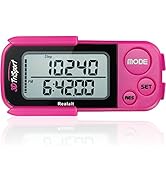
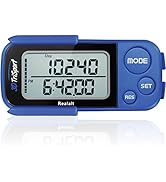
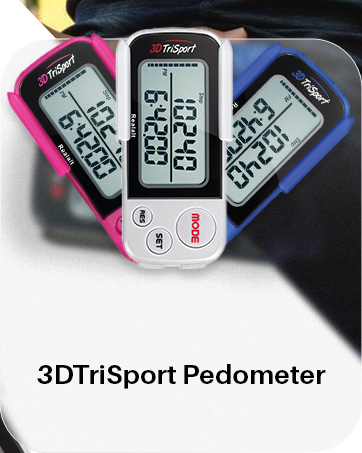
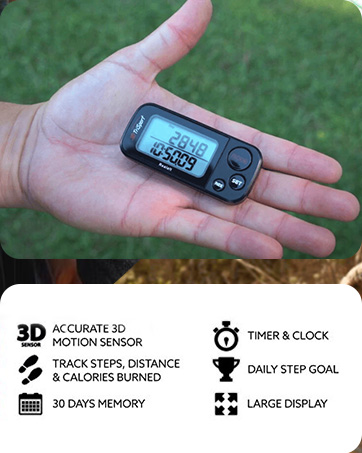
The Realalt 3DTriSport Pedometer combines cutting-edge 3D Tri-Axis Sensor technology with a user-friendly design to deliver highly accurate step counting and distance tracking. With a large display, 30-day memory, and a year-long battery life, it’s engineered for seniors, beginners, and fitness enthusiasts who want reliable data without the fuss of apps or charging. Complete with a clip, lanyard, and easy setup guides, it’s the perfect companion to elevate your daily activity and stay motivated.


| ASIN | B00MWHUOSM |
| Battery Average Life | 12 months |
| Battery Description | CR2032 button-cell battery |
| Best Sellers Rank | #1,917 in Sports & Outdoors ( See Top 100 in Sports & Outdoors ) #4 in Pedometers |
| Brand | Realalt |
| Brand Name | Realalt |
| Color | Grey |
| Compatible Devices | No Bluetooth or Smartphone connections required |
| Customer Reviews | 4.1 out of 5 stars 12,099 Reviews |
| Display Size | 1.7 Inches |
| Included Components | 1 x Realalt 3DTriSport Pedometer (battery included), 1 x Waist Clip, 1 x Lanyard, 1 x Mini Screwdriver, 1 x User Guide |
| Item Dimensions L x W x H | 3"L x 1.4"W x 1"H |
| Item Type Name | Pedometer |
| Item Weight | 1.37 Ounces |
| Manufacturer | Realalt |
| Manufacturer Part Number | RTS01 |
| Material | Acrylonitrile Butadiene Styrene (ABS) |
| Material Type | Acrylonitrile Butadiene Styrene (ABS) |
| Model Number | RTS01 |
| Product Dimensions | 3"L x 1.4"W x 1"H |
| Screen Size | 1.7 Inches |
| Sensor Type | "3D Tri-Axis Sensor" |
| Size | One Size |
| Team Name | Realalt |
| UPC | 820103550253 |
| Unit Count | 1.0 Count |
| Warranty Description | 2 years Manufacturer Warranty |
S**G
Accurate, well made, and a great value.
I have been using fitness trackers since 2012. I have had 2 1/2 trackers before the 3DTriSport. The first two were the same: Fit***, the first model out. I lost the first and then the second. The clip holder did not hold the device securely, or the two that I had, did not, and failed. They were accurate. The second was a Yam** E510 which just stopped working two weeks ago. It did not have a holder, and came with a very short lanyard, which I could not figure out its use. I did not have any problems programming either of these. I purchased the 3DTriSport based upon reviews, discounting those which had a programming problem. Right after I ordered I received an email from a customer support rep, giving me instructions, a training video and a telephone number to call if I had problems. The item arrived and the blister pack opened easily. Included was a clip holder and a two part lanyard, and instructions (I must have three sets right now. Programming was easy. The only mistake I made was in pulling out the plastic battery protector which started the clock. Thus was easy to correct. The clip holder seems robust and I have clipped it to my t-shirt collar, sock, pocket while exercising at my gym and it stayed put. I have placed the small part of the lanyard on the tracker and sometimes connect it to the longer portion and wear it around my neck while on a treadmill. That way it is easier to compare the distances on each. Now, the most important part: accuracy. I have tracked distance on a treadmill and the 3DTriSport about 7 times. It has never deviated by more than 0.02 miles. This is accurate enough for my needs. I have also tracked distance from my house to my gym and compared to Google Maps to the TriSport and again, never more than 0.02 miles difference. I also found that it tracks walking on stairs as well. This in accurate, well made, and quite a value for its price.
E**D
Solid simple pedometer with a couple bells and whistles
Great little unit if you need 30 days of memory and auto daily reset. No extraneous WiFi or pairing with your phone which is a plus for simplicity. And it's fairly intuitive to navigate the menu without messing anything up.
S**K
Great product, except... revised
I bought this pedometer in July of 2023 and really like using it. It's easy to set up, accurate enough for me and I like that it has a clock. Only recently did the battery die, which I think is a nice length of time for a battery. The problem is that I can't unscrew the battery compartment. I thought it was me, so I had my (adult) son try. He said the screw just kept spinning and never progressed out of the hole. After a year and five months, I'm sure there is no recourse with the manufacturer, so I'll just throw it away. Should I buy a new one and just make sure the battery case is accessible right away? Should I just use my phone? I haven't decided. Very disappointed. I upgraded my rating to 4 stars because the same day that this review was posted, the company reached out to me through Amazon Marketplace and offered a full refund which is already showing up on my bank statement. Great customer service! And I liked the pedometer enough that I went ahead and ordered a new one.
C**L
Love it!!
I've had my pedometer for about a week and am very happy with it. It was pretty easy to set up and seems pretty accurate. Much better than I had imagined. I would like to share a quick story. On the day I received it, I set it up and clipped it to my waist and couldn't wait to use it at work. I'm a nurse and walk a lot during my shift. At some point during the night, I had to use the facilities and thought, "just watch this thing fall in the toilet". So, of course, that is exactly what happened. Almost as if I willed it. Fortunately, the water was clean, so I grabbed it up as quick as I could, rinsed it in the sink, rubbed a little soap on it, rinsed it again and followed that up with a couple alcohol wipes. Then a couple more cleaning wipes. I could see water sloshing around the screen, and it was just doing its own thing, resetting steps, or not counting them at all. The clock even stopped so the time was off. I was pretty upset with myself, figuring I just wasted money and would probably not be able to return it since it was my fault. I shoved it in my pocket and tried not to dwell on it for the rest of my shift. In the morning, as I was walking the car and decided to take a look at it to see if it was working at all. The screen was a little fogged but the water seemed to have drained out. It also seemed to be counting my steps. I put it back in my pocket and went home thinking maybe if it dries out more... I am happy to report that it is now working perfectly. I could not be happier. This is a quality product at a great price. I would not hesitate to rate this 5 stars and buy again in the future. Access to support is a big plus as well. Thank you very much!!
L**S
*** DO YOURSELF A FAVOR AND DON'T BUY THIS!!! IT DOESN'T WORK!!! ***
*** DO YOURSELF A FAVOR AND DON'T BUY THIS!!! IT DOESN'T WORK!!! *** I started using this unit when I received it. Over the next 4 months, I wore it 24/7, but could never seem to reach my daily step count goals. I was really getting discouraged. On Monday, 04/13/2026, I decided to stop feeling sorry for myself and increase my step count. I would only allow myself 20 minutes to an hour before I made myself get up and walk for between 2 and 5 minutes. By the end of the day, I was closer than I had ever been to my daily goal, but it kinda looked like it stopped counting at that point. A family member asked me to download the Step Counter-Pedometer app for my Android phone so we could work towards our step count together with the app. I downloaded and configured it that night just before I went to bed. The next morning, I grabbed my phone started carrying it around the house with me for the next hour. At the end of the hour, I compared the two. My phone app had logged 3 TIMES the number of steps in the same period. So I was being systematically ROBBED by this unit. I've now removed this unit and use my app exclusively. *** DO YOURSELF A FAVOR AND DON'T BUY THIS!!! IT DOESN'T WORK!!! ***
R**R
Good product. Like it. But it has some snags.
Bottom line, as the subject says, it's a good product. I like it. But it has some snags. There are definitely pros and cons to this one. I don't like to just say Love it and buy it, or Hate it and avoid it, etc. I want to give useful information. This is a bit of a complicated review, so read through it if you want the full story. This product has a number of what I'd call design flaws, small ones, that prevent me from giving it 4 or 5 stars. But, if you can work around those, it's a nice product. I plan to keep it, and use it. I've been doing a fair amount of pedometer research and reading lots of reviews. I'm specifically looking at things without wireless BlueTooth or WiFi or smartphone linkage. Or, things where those can be turned off. I don't want RF EMF radiation, nor dependence on a smartphone or tablet, nor Apple or Google tracking what I do. This meets that criteria. A few words about portable pedometer design. This applies to even expensive units. There are a number of design trade offs that come into play. Older units used a mechanical pendulum as a sensor. That had some advantages and disadvantages. New units use a solid state sensor, which also has advantages and disadvantages. Solid state sensors should last longer and be more robust, but may have accuracy problems under certain conditions. You want the pedometer to accurately read your steps when you're exercising. From reading, it looks like most are pretty good at that. BUT, you also want them not to count steps when you are, for example, driving, or cycling, or sitting, or washing your hands, etc. Many units, including expensive popular brands, have problems with these types of things, which can greatly inflate the step count. Calorie counting. You're joking, right? OK, you're not joking, but there are severe limitations on portable devices. Accurate calorie counting requires a treadmill, heart rate monitor, and oxygen / carbon dioxide monitoring - like in a health clinic. You cannot do that with a portable device. These devices make very rough estimates based on your weight, maybe age, maybe height, maybe gender, and maybe heart rate. Take the numbers with a big grain of salt. I have observed two major display styles. There could be more. The display design affects everything else. First is a pixel type display like a smartphone or tablet, but smaller. These can display anything that the space allows. They usually stay off until they're touched or triggered. Devices with those displays usually eat batteries quickly and need recharging every few days or weeks. The second type of display design is an LCD display somewhat reminiscent of old digital watches. These are generally always on, but they can only display whatever was pre designed into the structure. The behavior of this type of product could be changed in firmware, but the display cannot be changed without a hardware revision. Batteries on these usually last a long time and may only need replacing every year or so if they're not rechargeable. Lets talk about this specific pedometer. Some of what I mention is also mentioned in other reviews. This one uses an LCD display and a button cell non rechargeable battery. It has no wireless and produces no RF EMF radiation. It does not require a smart phone to use. This device does not have a back light. Packaging: Yes, this thing comes in a blister pack like you see in retail stores. Yes, you have to carefully cut it apart and try not to slice your fingers. It's not better or worse than other similar products. It comes with the pedometer, a belt clip, a lanyard, and a mini screwdriver. Nice touch but whether I'll find the screwdriver in a year is up for debate. Fortunately I have some small tool kits. Your first battery is already installed. Yes, the belt clip could be better. It should be longer, and it should wrap around the edge of the belt. It does not. Trying to pull the device out of the clip will pull the clip from your belt. Trying to unclip the clip may make you hit the buttons. If you have the unit clipped in front of you, sitting down may dislodge it. Make sure you ALSO attach the lanyard to your clothing in case the clip comes loose. I think they should have a hole for a lanyard on both ends, in case you'd rather rotate the device 180 degrees to have the buttons away from the belt clip hinge. I will note that fixing the button placement issue is not trivial IF they wanted to keep it right hand dominant. There are design trade offs. Display: The numbers are nice, big, and clear. The other icons / labels ... ARE NOT. They're way too small. As I said, this type of display cannot be fixed in firmware, it must be a hardware revision. But, it needs revising. I am middle aged, with bifocals. I can read normal books and magazines in a room with medium bright lighting. I CANNOT read the non numeric labels on this pedometer with it on its lanyard 1 ft from my face in moderate lighting. Maybe I could out in the sun. I'm nearsighted, so I can remove my glasses and get the device closer, but I shouldn't have to. That wouldn't work for my wife, who is farsighted. The non numeric labels are the only way the device can communicate non numeric data. There are 16 non numeric labels on the screen including the PM indicator. By the way, they also need an AM indicator. This is a beef I have with almost all digital clocks. They need to make the main numbers A BIT smaller, and make the labels TWICE as large. Also, these labels occur in the shadow of the bezel around the screen. This also makes them harder to read. Setup: Whew. Some reviewers say setup is impossible. It's not. Some say it's easy. It's not. It's in between. But, it could be MUCH easier. I'm a geek. I read instructions. This comes with good instructions. And, they have setup videos and customer support to help. That's all great. But, this could have been a much better design from the start. You can only get into setup from Step mode. THAT'S RIDICULOUS! If you press and hold setup, it should go into setup no matter what mode you're in. Some of the setup sub sections are non obvious based on what is, or is not on the display. Read the instructions. Watch the video. BUT, you shouldn't have to. The 10 second auto timeout for kicking you out of setup is too fast. It should be 20 seconds. You first set the 12 / 24 hour mode. Easy. Hit set each time to go to the next mode. Then, you set the seconds on the clock. When you press a button, it resets the seconds to zero. OK. But, you cannot just sit and wait until your wall clock moves around to zero, because the pedometer will time out and throw you out of setup. So, you must keep zeroing the seconds every 5 seconds to stay in setup mode UNTIL your wall clock says zero. Then hit set to do the hours, then minutes, then month, then day, then year. It's not obvious whether you're doing month then day or day then months or even that you're doing a date at all. See the instructions. Then the display goes blank except for a very small IN or CM which is flashing. What they're wanting you to do is set either imperial or metric units. Fine. But, it's very non obvious from the display what you're doing. You have to remember the instructions. Then, either the IN or CM (presumably) will remain on and some numbers turn on. They want you to select your stride length. Again, it's non obvious. Then LB or KG turns on and some numbers and they want you to select your weight. Then, you can set your step target. Step Target Setup: This is easy to set BUT, the step increment changes dynamically. From 100 to 900 it increments by 100. From 1000 to 9000 it increments by 1000. I don't like that. I'd rather see increments of 100 all the way up to 10,000 steps. From 10,000 to 990,000 it increments by 10,000. Personally, I think 99,999 steps should be plenty. With a 25" stride, that would be 39 miles in one day. Whereas, 990,000 steps is 390 miles. I doubt most people need that as a step target. You can hold the increment and decrement buttons to cycle faster. By, the way, there needs to be + and - legends on the buttons, and the + needs to be on the TOP button, not the bottom one. It would also be nice if there were auxiliary button labeling to show how to access the history. I probably won't remember that and probably won't be able to find the manual later unless I download it. Accuracy: Phantom Readings: You want the device to register steps when you're taking steps. But, you don't want it to read steps when you're not taking them, when you're driving, cycling, going to the restroom, working around the house. This pedometer waits until you've done 10 steps to start counting, and those 10 steps do count. But it tries to eliminate most phantom readings. Some people say this one counts up in the car, and I have another unit that does that. This one didn't do that on a short 10 minute drive. But, it may do so on longer drives. This unit has a reset button you can use to reset your daily numbers. I plan to do that before doing actual exercise. If you exercised twice in a day and use the reset button, your totals may be off. You can decide for yourself if you want the unit counting steps while you shuffle around your house. Know that if you're taking a few steps at a time then stopping, it won't be accurate. Also, if you're doing something that repeatedly shakes your body without taking steps, it won't be accurate. That's true of any pedometer with this type of phantom step reduction. This device goes to sleep when not in motion. So, you can save battery by not wearing it all the time if you don't need it. See the disclaimer above about calorie counting. By the way, for those not familiar with it, Kcal is the same as the calories you see on food containers in the USA, etc. So, don't let the Kcal label on the screen freak you out. This device does not account for gender, age, height, nor heart rate. Personally, I don't care, and put minimal credence on the calorie counter. So, there you go. A neat pedometer with pros and cons. I think the pros outweigh the cons. I plan to keep and use the device. Would I give it to another geek with good eyes who's willing to read the instructions and fiddle with it a bit? Yes. Would I give it to a senior with just OK eyes without programming it first? No. Would I give it to a senior with just OK eyes if I did program it first? If they're willing to tinker a bit while using it, maybe so. If they just want super simple, maybe not. Ron
R**O
Very good product
Very accurate and use it every day, the calorie counter lets me know if a can cheat on my diet.
A**K
Best Pedometer for Team Pedometer Challenge!
My team at work is doing a pedometer challenge and we chose this pedometer for ease of setup and use. It is quite accurate on the step counts, the clip stays secure but also comes with a handy lanyard. It is lightweight and easy to read. Our team puts in our numbers weekly so it's really nice that this pedometer stores up to months of step data! This pedometer is not waterproof and manual (no app), but it is perfectly functional for gym and daily walking.
S**H
Product review in the first week of use
Pretty good if one is looking only for simple step counting. Useful since often a sport's watch is kept aside and normal wrist watch is used. The prodcut does what it says. Good built.
G**.
Excelente
Excelente funcionamiento, fácil de configurar
R**N
Life of product
Review shall be after 1year
A**R
Realalt 3DTriSport Walking 3D Pedometer review
Excellent device, easy to setup and shows great info.
E**H
Works great
I got sick of mucking around with fitbits and stuff that needed to sync with an app etc - this is back to basics and works great. I've been using it every day for months and have had no problems. Motivates me to get my steps in. Seems to be pretty accurate. I turned the unit around in the clip housing opposite to how it arrived, because I kept bumping the Mode button whenever I tried to squeeze the clip open. But if you just take it out and turn it around, the problem is solved.
Trustpilot
1 month ago
2 months ago