


⚡ Power through your print jobs with speed and style!
The HP LaserJet Pro M521dn is a monochrome multifunction laser printer designed for busy professionals who demand speed, volume, and efficiency. With 42 ppm print speed, automatic duplex printing and scanning, and a large 1,100-sheet input capacity, it streamlines high-volume office workflows. Its 3.5" color touchscreen and HP Web JetAdmin support simplify management, while energy-saving features reduce operational costs. Ideal for mid-sized teams needing reliable, high-quality black-and-white printing.


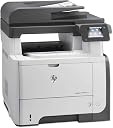


| ASIN | B00BBLG75Y |
| Additional Printer Functions | Scan |
| B&W Pages per Minute | 42 ppm |
| Best Sellers Rank | #365,019 in Office Products ( See Top 100 in Office Products ) #508 in Laser Computer Printers |
| Brand | HP |
| Built-In Media | printer^cd^cables |
| Color | Black, grey |
| Compatible Devices | Laptops, PC |
| Control Method | App |
| Controller Type | Android |
| Customer Reviews | 3.9 3.9 out of 5 stars (136) |
| Display Type | LCD |
| Dual-sided printing | Yes |
| Duplex | Yes |
| Global Trade Identification Number | 00042111839247, 00804993452590, 00887111015891 |
| Hardware Interface | USB 2.0 |
| Ink Color | Black |
| Item Type Name | HP Laserjet Pro MFP M521dn Printer, (A8P79A) |
| Item Weight | 52.7 Pounds |
| Manufacturer | HP |
| Maximum Copies Per Run | 42 |
| Maximum Copy Resolution Black and White | 1200 dpi |
| Maximum Copy Speed Black and White | 42 ppm |
| Maximum Media Size | 8.5 x 14 inch |
| Maximum Print Resolution Black and White | 600 dpi |
| Maximum Sheet Capacity | 42 |
| Model Name | M521dn |
| Model Number | A8P79A |
| Model Series | Laserjet Pro MFP |
| Number of Drivers | 2 |
| Number of Ethernet Ports | 1 |
| Number of Trays | 1 |
| Other Special Features of the Product | Auto Document Feeder |
| Output sheet capacity | 42 |
| Paper Size | 8.5 inch x 14 |
| Print media | Envelopes, Paper (plain), Transparencies |
| Printer Connectivity Type | Wi-Fi |
| Printer Output Type | Monochrome |
| Printer Type | Laser |
| Processor Count | 1 |
| Resolution | 1200 x 1200 |
| Scanner Type | Document |
| Specific Uses For Product | business, personal |
| Total USB 2.0 Ports | 1 |
| Total Usb Ports | 1 |
| UPC | 042111839247 887111015891 889899378021 804993452590 779184029526 |
| Warranty Description | 1 YEAR WARRANTY. |
| Warranty Type | Limited Warranty |
| Wattage | 760 watts |
P**L
Works great for our real estate office of 40 agents
Works great for our real estate office of 40 agents. The scanning is a little slower when compared to a high power $4000 model but certainly is sufficient for normal business operations. on the downsize, there apparently is no automatic wireless function like many of the better models. This requires to be plugged into the Wi-Fi for inclusion on the network. Not a big inconvenience but dictates the placement must be near the WIFI. We set up over 40 names and email for scanning to the agent's unique emails. Overall - great value and good quality.
J**O
Low cost for the feature set
Had a copier go belly up. Got this for the accounting dept and they like it. Small enough to have close by, top sheet feeder for copy, fax (we don't use the fax) and scan to email, we got the additional tray. Prints fast for the dough with good clean print. Spend $10k plus for a new copier of under $1k for this. This! everytime. If I have a complaint it is the number of screens you have to go through to scan to an email even if the address is in the address book.
M**K
Great Printer once it was installed right
It did not want to work properly after plug and play, needed to contact HP who solved the problem within 5 minutes. The phone number was included with the documentation, which was a pleasant change. I had to change the settings to a manual install instead of smart install, then the plug and play worked great. This printer does not appear to have wireless capability or eprint as compared to what is showing on the HP website, which is maybe why it is discounted so heavily. I have a color printer set up for that so I did not research this extensively. i would recommend this printer. it is extremely fast on start up and printing I don't agree with the other reviews that complained about a cheap touch panel or slow printing. My only complaint is with the drop down single sheet feeder. The extension that holds the paper is extremely cheap feeling and is very clumsy to retract and return. not a smooth operation it sticks like crazy. I have found that just dropping the door down and not using the extension works ok with standard size paper but not legal. Have used this for 2 weeks will return with a review if anything changes
J**L
DONT BUY THIS PRINTER
NOT A GOOD OR REALIABLE PRINTER-AND I HAVE 7 HP PRINTERS WITH NO PROBLEMS THIS ONE STARTED FREEZING AFTER @31 DAYS -I HAVE TO TURN IT OFF & ON-I AM PAST THE 30 DAY RETURN POLICY. CUSTOMER SUPPORT IS NO GOOD-THEY KEEP SAYING DO A HARD RESET AS THIS IS A COMPLICATED PROBLEM. THEY NEED TO STUDY THE MANUEL. THEY SAY I DON'T UNDERSTAND THE COPIER. ALL I WANT TO DO IS MAKE COPIES-THE CUSTOMER SUPPORT ALSO TRIES TO BLAME EVERYTHING ON ME. I HAVE BEEN DOING THIS FOR 30 YEARS AND KNOW HOW TO MAKE A COPY-I NEVER HAVE HAD ANY PROBLEMS EXECPT WITH THIS PRINTER. I BOUGHT THE EXTENDED WARRANTY BUT THEY WILL NOT HELP AS THE MANUFACTURES WARRANTY IS STILL IN PLACE.
S**A
Beefy beast of a printer!
The HP LJ PRO M521dn is a workhorse of a printer. The printer is quite beefy with a meaty paper tray that holds 500 sheets. There are certainly lowered priced and smaller HP MFP printers but chances are that they will not take abuse by a workgroup. The M521dn is easy to configure and connects in a multitude of ways. Printing is quick, crisp, and clear. The HP toner lasts a long long time. This is an excellent printer for a workgroup.
T**Y
Works great besides if you are looking at using it for scanning
Overall this printer and fax component are great. Unfortunately scanning is horrible. It doesn't matter if you have a couple pages or 50 pages it will constantly jam and take you 25 minutes to successfully scan a couple pages. It is actually quite frustrating as everyday I have to scan at least one large document.
B**T
Just bought my 5th, buying a 6th soon
I have 5 of these in office environments, the oldest being about 3 years old. I will soon be purchasing a 6th. My users are very picky and I do not get any calls about these printers malfunctioning. Based on other reviews I've read, these users need to update their firmware and make sure they keep it up to-to-date. A lot of their issues could be solved this way. Also, make sure you are using the latest drivers and proper drivers for your machine and OS. Purchasing aftermarket or refurbished toner (do not confused refurbished TONER with INK) saves us a lot of money and the print quality and yield is the same or better. My only complaint would be the inability to scan to 2 network folders at the same time and the latest interface could be a little better (too many menus to scan to email in my opinion.)
C**N
Poor quality scanner
I bought this printer after going through two Brother MFC printers. I thought upgrading to HP would ensure the printer lasted more than the 2-3 years the Brother printers worked before dying. While the HP had great print quality, we had problems with scanning from the the document feeder on two different HP printers. The first one wouldn't scan unless we cycled the printer off and on several times. We returned that one and the second printer had the same issue, plus the document feeder made a very loud noise after scannsning. We never had these kind of issues with Brother and they were must faster than the HP. So I returned the second HP and bought a Brother MFC-L6700DW which I am waiting to receive. I suppose I will just have to replace the Brother after 2-3 years as that seems to be their lifespan.
G**G
Ordered for a smaller office (15 people). Has been a great printer, scanner, copier and fax machine. Next to faxing, scanning to networked PC's is the most common use. The duplex scanning for two sided originals is especially handy. Very good quality printing. The control panel is a little short of completely intuitive when you need to do more than something really basic. One minor drawback is the Flatbed Copy/Scan will not take a full legal page. Everything else is fantastic. Set up was easy, toner replacement is typical HP easy, reliability is typical HP - it just keeps running without breaking down. Unbelievably good deal compared to Canon, Xerox and other offerings which start at 2-3 times the price.
C**N
Excelente máquina, sólo veo que subió de precio muy rápido
J**E
superior product compared to my existing hp laser printer.but WiFi is not working.supplier deliver was beyond satisfaction. I am thankful to the supplier who delivered it with utmost care a big thanks to him
G**.
Es buena impresora para una oficina mediana, hemos tenido problemas de que la impresora se bloquea sola, pero nada que prenderla y apagarla no resuelva. Los cartuchos originales son obscenamente caros, estamos hablando de que la impresora promedia los 8000 pesos y los cartuchos estan en 4 y 6 mil pesos, contra encontrarlos remanufacturados por 600 pesos pues es un mundo de diferencia. Lo malo es que el software te castiga cuando utilizas cartuchos no originales, no dudo ni tantito que al poner un cartucho no original la impresora le informe a HP que le puse tal cosa y me cancelen la garantia, pero de verdad HP TOMEN NOTA! ES TONER! no inventen! me saldria mas barato a los dos cartuchos comprar una impresora nueva sean mas consientes con el planeta!
P**R
We use it in an office of 5 people and it does a great job.
Trustpilot
1 week ago
1 month ago