We remain fully operational. Our teams are working around the clock to ensure your deliveries continue safely.

DOWNLOAD THE APP


Customer Services
Copyright © 2025 Desertcart Holdings Limited
DOWNLOAD THE APP
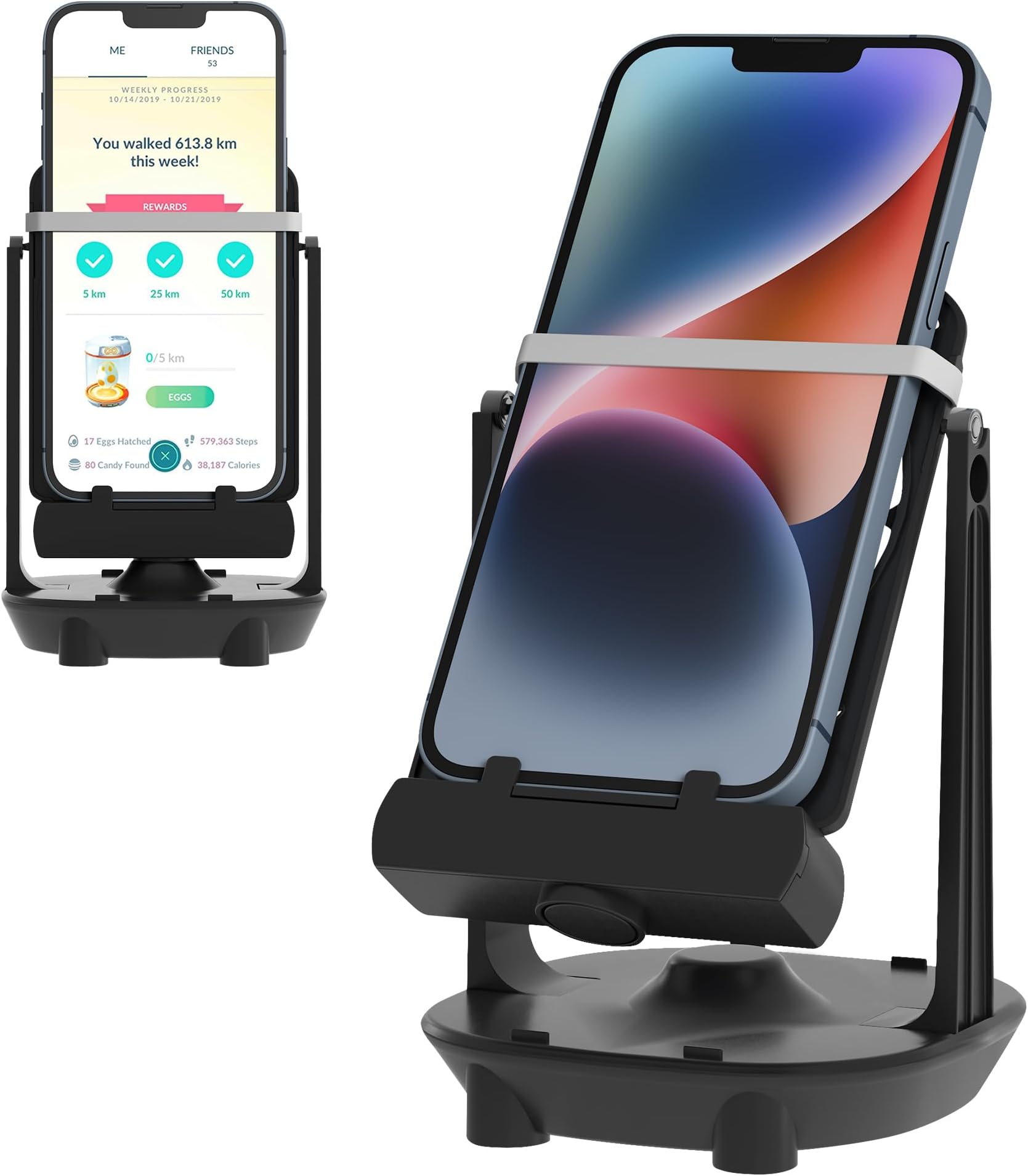




🚶♂️ Step up your game—quietly, efficiently, together!
The Seltureone Phone Swing is a sleek, USB-powered device designed to boost your step count by gently swinging your phone(s) up to 7.2 inches. Featuring a whisper-quiet metal wheel mechanism, it supports two phones simultaneously, making it ideal for Po-ke-mon GO Plus and pedometer apps. Easy to install and multi-functional as a phone holder, it’s the perfect accessory for millennial pros who want to maximize productivity and social step challenges without the noise or hassle.


| ASIN | B07Y1WJGD6 |
| Adjustable Length | No |
| Antenna Location | Desk |
| Best Sellers Rank | #170,543 in Cell Phones & Accessories ( See Top 100 in Cell Phones & Accessories ) #1,962 in Cell Phone Portable Power Banks |
| Brand | Seltureone |
| Color | Black |
| Compatible Devices | Smartphones |
| Compatible Phone Models | Pedometers, Poke Ball Plus, Samsung Galaxy Note 10 |
| Customer Reviews | 4.2 4.2 out of 5 stars (989) |
| Enclosure Material | Plastic |
| Fastening Type | Clip Holder |
| Form Factor | Gimbal |
| Item Weight | 50 Grams |
| Manufacturer | Seltureone |
| Mfr Part Number | BAZ036A_X1 |
| Mounting Type | Tabletop |
| Number of Items | 1 |
| Style Name | Minimalistic |
| UPC | 611830794283 |
| Unit Count | 1.0 Count |
D**M
This thing works - once you can get it to work!!
I gave this thing 5-stars but would have only given it 4.5 --- point deduction is for trial-and-error process to actually get stePs to start counting. I understand that getting steps to work might be phone dependent, but it required a bit of web sleuthing to get the answers. But nOw that it *is* counting steps - it's worKing for real, and it's spectacular. Here we go... ORDERING I chose this onE because it was described as the quietest (it is super quiet) and also because it can accommodate a second phone (it can). Great value for what you get, it was a PriMe purchase, and it even arrived a day early (I'm in a metro suburb). Comes in a box, and arrived in a padded envelOpe. OUT OF THE BOX So, it's actually very straight-forward to sNap the two arms into the base, and then to get the platform slotted into the arms. If you've played with LeGo -nay, Duplo even!- you can do this. Just don't try to jam things together because it is plastic after all. The worst part of the set-up is the rubber band they give you to secure your phone to the platform - it's a thick flat band like for asparagus bunches. DO NOT USE this included band. Not only is it tOo strong/tight (and will most likely make the platform awkwardly disconnect from the arms), but it's hard to move gently if it's covering a part of the scrEen that you need to access/swipe. I used one of those fabric-covered hair-ties and now the phone slides in and out EASILY. The enerGy to power the swinging is via a DC-to-USB cord (or AC?). It's not a standard technology socket in the base (like microUSB or Type C). This means that if you lose/damaGe the cord, then you're out of luck - you definitely do not have this cord sitting around your house lol. Having a USB-end is nice so tHat it's not a proprietary wall-wart, and also you can plug it into your laptop (works!) and into a battery bank (works!). Finally, some padded feet are included to keep it from sliding around while it's swinging. Time to set up = less thAn 5-minutes. IN MOTION After getting your app to start counTing steps (will get into that next), you just give it a push and it swings on it's own. IT. IS. QUIET. I was really surprised. The metal bearings/wheels that make contact with the plastic slots on each arm is a simple but effeCtive set up. Once in motion, it basically sounds like the ticking of a wall clock. GET TO STEPPIN' OK, it really sHouldn't be this hard to set up the "software" to start counting steps. I read the Q&A here, went on youtubE, and finally put together a mish-mash of what I found, and now it works a charm. I use the device with an older Samsung Galaxy S6. How I made it work on this andRoid phone: START WITH PHONE IN HAND 1. download Google Fit app, and set up Fit account (pro tip: make your height over 7-feet tall) 2. open your on-the-go app that needs steps 3. turn Adventure Sync on-off-on, just to make sure it's ENABLED when you close the app (don't forget to do whatever you need to do that benefits from steps...) 4. close out of app (DO NOT SIGN OUT) 5. go into phone settings, choose Apps 6. go to game app settings, then a. Force Stop, and b. Clear cache 7. open Fit app 8. tap "+" icon to Start Walk Workout 9. turn off WIFI and any data 10. turn off GPS 11. secure phone onto platform (I place phone upside down per internet recommendations) 12. give it a push 13. steps *should* start within 5-seconds, but note that there is a lag 14. once steps start, go do something productive 15. Stop the "workout" in Fit, check your totals - EDIT > Save the workout data!!! 16. Turn on Data (wifi/cell) and GPS 17. Open game app [**make sure you don't have the game app on another device!**] 18. it will take a moment for Fit to sync with the game; you'll know if your plan hatches properly **EDIT > Note, from my experience: if you are using the walker with a second device (Phone B), note that the on-the-go app needs to be closed on all devices before saving the workout and getting the steps to register on the walked device (B). You can place device (B) in walker and go use pogo on other device (A), but you can't have pogo open on two devices when trying to register steps - close pogo on A before taking phone B off walker ACCOUNTS I have my kids' account logins for the game on this same phone. I can go into each of their accounts, go through the steps above, and get the steps to work for their game accounts. The same workout doesn't register for all three accounts, so you have to do one workout for one account, switch accounts, and then start the next workout. GOTTA GO - LAST WORDS I have let it swing overnight when connected to the wall. Nothing gets hot, no wear showing on bearings after a week, steps racked up. If you use this thing daily, it will be a good investment. While I would never recommend using this thing as a substitute for getting some fresh air with a healthy walk in the park, during COVID-19 you're not allowed to do much outside. Lastly, I want to give a big shout out to the Amazon drivers still delivering goodies during the pandemic to keep all of us from going crazy. THANK YOU!!
K**S
Works great
Gets the job done and holds up to constant usage.
T**H
It works well, but it can get noisy without some tweaks
This little unit has been great for piling on the step counts for my phones. The swing platform can hold 2 phones at a time, although it's a bit of a tight fit on one side with the phone cases I have (Spigen Neo Hybrid for iPhone). I can secure an iPhone 8 Plus in its case behind the grooves in the platform, but I have to angle it slightly and jam it down with a little force to get it behind the notches that hold the bottom of the phone to the platform. On the other hand, my iPhone 11 Pro in its case is perhaps a millimeter too thick for that side, so I always have to put it on the slightly wider slot of the platform. I've been using this swing now for about 6 months and have noticed one of the plastic support arms that hold up the swing has become a bit loose where it snaps onto the base compared to when I first got it. It still holds up the swing just fine, but I might try gluing the arm to the base to secure it better to give the swing more stability. The only significant complaint I have is that the swing was getting pretty loud. It would click as it swings back and forth - sometimes that clicking is fairly quiet (although still annoying to the more noise-sensitive people in my household), but other times it can be louder than the ticking of the seconds hand in a big clock. It took me some time to figure out what was ultimately causing the noise. I opened up the base and taped down the unit in the center that runs the electrical current against the magnet in the swing. Then I made sure to secure the phones behind the notches on the swing platform. While I think those 2 steps helped reduce some minor creaking, I opened up the base of the swing platform and realized the ball bearings used as weights would occasionally shift as they swung back and forth and then click as they knocked against each other. To fix this, I went "high-tech" and jammed some paper in there to eliminate the wiggle room for the bearings (as shown in the picture). Now the swing is pretty silent, and I can run it all night without keeping anyone up.
S**Y
Only worked once
It worked great the single time we could get it to swing. After that, the device no longer seemed to get power and would only swing for a short while before stopping. We've tried multiple different plugs to connect the USB cord to (since it doesn't come with one) after the first one worked the size time and no success.
S**L
A must have for true Pokemon Go junkies.
I love this simple little machine that works away each night hatching eggs and helping evolve Pokemon that require walking. I haven't missed a weekly 50km bonus yet. I love what it does but treat it very gently as the rocker part especially the pins that sit in the cradle are delicate. If it was a bit more substantial I'd feel better. There will come a time the 2 rubber bands that hold my monsterous sized phone in place will need to be replaced but that's no big deal. Overall, BUY IT but don't manhandle it.
E**I
Funziona alla perfezione, nessun problema con l'alimentazione ne con i supporti. Arriva con una banda elastica di riserva e confermo che non da nessun problema al cellulare nonostante il magnete alla base dello stand. Unica pecca è che se ci si usano due cellulari la velocità di oscillazione, e quindi l'efficienza, diminuiscono di un 10/15%. L'ultima specifica è alquanto ovvia ma può risultare utile.
J**É
Fonctionne très bien pour l’utilisation que j’en ai, comme je voulais ! Top
N**E
Ich muss sagen, ich hab nicht daran geglaubt das es funktioniert. Aber ich nutze es seit über einer Woche, meistens über Nacht. Und es funktioniert sehr gut. Nächsten Morgen Pokemon starten, zack Eier fertig und mein "Kumpel Pokemon" hat auch ordentlich Bonbons gefunden. Ich nutze das Gerät sogar mit zwei Geräten gleichzeitig. Mit einem älteren Handy wo ich einen Pk Account drauf habe und mein normales Handy ( Galaxy S9+ und Galaxy Note 20 Ultra). Ich hatte befürchtet das meine Handys zu schwer sind. Aber es funktioniert auch mit beiden sehr gut
O**Z
Definitivamente hice una compra impulsiva. Vi que este aparato, con la misma mala calidad, está mucho más barato en otros sitios. No tiene suficiente fuerza para un solo teléfono, pensé que con dos se equilibraría porque así se anunciaba pero resultó peor. El cable empezó a hacer un falso después de un mes de uso a pesar de que nunca muevo esa cosa de su lugar, y a veces no me doy cuenta de que oscila tan poco que no está contando nada. 389 pesos a la basura.
J**O
I have the S24 Ultra and it does not count the steps. Ive left it rocking for hours and nothing. Edit: It started to track my steps. It works great!
Trustpilot
2 months ago
1 month ago