๐ฎ Control Your Entertainment Like a Pro!
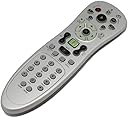
The MediaGate HA-IR01SV Remote Control is designed for Windows Vista users, offering a stylish silver finish and ergonomic button control. With a maximum range of 10 meters and infrared connectivity, it ensures a seamless multimedia experience from a distance.
| ASIN | B00123UGWQ |
| Additional Features | Ergonomic |
| Battery Type | AAA |
| Best Sellers Rank | #815,068 in Electronics ( See Top 100 in Electronics ) #77,791 in Remote Controls (Electronics) |
| Brand | Azend Group |
| Button Quantity | 15 |
| Color | Silver |
| Compatible Devices | Windows Media Center Device, Television, Multimedia Device |
| Connectivity Technology | Infrared |
| Controller Type | Button Control |
| Customer Reviews | 4.0 out of 5 stars 51 Reviews |
| Global Trade Identification Number | 00887510208528 |
| Item Weight | 1 Pounds |
| Manufacturer | Azend Group |
| Maximum Range | 10 Meters |
| Mfr Part Number | HA-IR01SV |
| Model Name | HA-IR01SV |
| Model Number | HA-IR01SV |
| Number of Buttons | 15 |
| Special Feature | Ergonomic |
| UPC | 887510208528 956257181149 853634001659 |
M**L
Like people say,buy it for the IR receiver!.Remote?..eh
If you have a HTPC,or are currently "building" one,this IR receiver should be included for sure.My advice is,buy this remote strictly for the IR receiver(fyi the other MCE remote w/ the "mouse pad" IR receiver -will NOT work like this one)then buy the URC WR7 Universal Remote Control to use it with.If you plan on doing 99% of your entertainment needs through your pc,then you can actually tuck away your components,and just have the IR receiver visible for function-which is what I did.Basically, it'll cost around $40 for a pretty quality IR/Universal remote set up like this.(I HIGHLY recommend the URC WR7 btw)Now,there WILL be times that certain things may not respond so well with the remote (such as navigating your home screen,or minimizing programs,right clicking,left clicking,etc.) for that,I have a cheapo little keyboard w/ a touchpad-which uses a SEPARATE IR sensor which is kind of a bummer,I was hoping it'd work with this one too.I have no real opinion on the remote itself,except I CAN say,the first/one day using it,everything seemed to work fine (but WHY is there no "CLOSE" button like the others?!) One other thing I had noticed, was when pressing the Windows button,it would only open WMC when it felt like it,and also, it really DOES feel cheaply made.But like I said,with THIS remotes IR receiver+URC WR7 Universal Remote Control=NICE!! works perfect with XBMC & WMC.
P**G
works better than expected
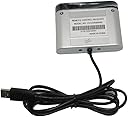
This remote gets the job done, but there are a lot of buttons that I don't use, either because I don't need them or because they don't do anything on my system. It is easier to contol Windows Media Center with this remote with the arrow buttons than with a wireless mouse. This device is one of my larger remote controls, and appears to be inexpensively constructed, but it has held up well since I bought it some months ago. The USB IR sensor has a long cord that allows me to place the small IR sensor directly in front of my chair in the cabinet with all my AV components. My cabinet is under my TV and away from my computer, which is off to one side. The IR sensor has an LED that blinks when any IR remote control button is pressed, verifying the operation of any remote control.
T**1
Nice remote, good platform support.
This replaced my old remote (same model, older) which didn't want to work on the USB3 ports of my new HTPC. That said, it seems to work well with Ubuntu 14.10 even without LIRC, I just needed to setup a file in /etc/rc_keymaps/ for the remote to work with Kodi. This is probably one of the better remotes for use with an HTPC being windows or otherwise (I'm using Ubuntu 14.10 + Kodi). It has in my opinion one of the best layouts for MCE remotes out there, I've used several. It would be nice to see the description and title adjusted to include a better detailed description. This remote should work with MCE versions to current windows. It also is a common remote for other home theater pc applications as well. It's well supported in Linux, though you may need to do custom mapping depending on your application. The one this replaced was several years old, but the play button stopped working after less than a year, thankfully the pause works as a play+pause for my use.
K**K
Kodi/ XBMC
It always just works for Kodi/ XBMC. I have noticed that all the keys work as expected in the Linux flavors, but Kodi on Windows 10 some of the buttons don't work. Never invested the time to get them working as you can get around with them. The back button works, the video, music, etc. across the top of the remote does not. I utilize the Raspberry Pi for this now, so I only use on windows PC as Kodi machine. I wouldn't normally use a windows PC for this task, but it is always on anyway (PlayOn Server) and seemed wasteful not to use it. It's great to have a remote opposed to keyboard, mouse, or phone app. I have used for openElec on Raspberry Pi, Kodibuntu, and windows (7,8,10).
C**B
buy for the receiver, but expect a low quality remote
The receiver works great and I still use it without issues paired with a harmony smart remote. The actual remote isn't great - its cheaply made and the buttons start deteriorating quickly. Mine was unusable after a year. Recommended buy for the receiver at a cheap price or if you expect to use it only very lightly. (without kids ever touching it)
J**N
Worked great prior to exploding...
I have been using MS Media Center PCs and remotes since 2005 and generally I get 2-3 years out of a remote. They are replaceable and get knocked around, so I expect to have to buy a new on now and then. My old remote made it past the 3 year mark and stared to chew through batteries, so I purchased this unit as a replacement. Whilst I have no beef with: the price I paid, the seller's policies or shipping time, I am unhappy to report that I got less than 6 weeks functionality out of this particular device and now it is dead and I need to buy another one (and it won't be this unit). My wife was in the living room, watching TV and this remote was in her hand. I heard it pop from three rooms away and my wife screamed and dropped it. I came running and when I got there it was HOT to the touch, smoking and a white liquid was coming out of it. Luckily my wife was not injured, so I picked it up off the carpet and placed it into an empty steel sink, so that no matter what it decided to do next, no one else would get hurt and nothing else would be damaged. I checked it again after 20 minutes and it had cooled off. The liquid on it had solidified into a white, chalky film and when I took out the batteries (the ones that came with it), they tested fine via a multimeter. They also work in the old remote. I contacted the seller, but as I was past my return / exchange date, there was nothing they could do. They did not offer to get me in touch with the manufacturer and didn't seem offput by the fact that it had self-destructed. MY damaged remote was Model # HA-IR01SV(TSHA-IR01) and Serial # 10001167 for reference. I hope your works better than mine did!
S**.
worked well and then broke
worked for a week and now it wont respond. hopefully i can get a hassle free exchange.
R**B
Media Center Remote - A++
Perfect compliment to the PC-based home entertainment system. Behaves just like the remote controls that come with Linksys Media Center Extenders, so it is familiar to those using these extenders. If you're looking for a remote for your PC apart from Media center, look elsewhere. This is a tool to be used to control MC features only. Installs (on Win 7 64-bit) with absoloutely no drama and is ready to use in seconds. Great value for the price.
Trustpilot
3 days ago
2 weeks ago