Buy anything from 5,000+ international stores. One checkout price. No surprise fees. Join 2M+ shoppers on Desertcart.
Desertcart purchases this item on your behalf and handles shipping, customs, and support to Croatia.
🎧 Drive Your Sound, Own the Road!
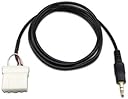
The Goliton AUX 3.5mm Cable Replacement is a 2-meter long, matte-finished audio cable designed exclusively for 2006 and newer Mazda vehicles with external CD changer ports. It provides a reliable, plug-and-play connection for MP3 players and phones, delivering high-quality sound without engine noise interference. Ideal for millennials seeking a sleek, hassle-free upgrade to their car audio experience.
| ASIN | B006FFCONA |
| Best Sellers Rank | #393 in Car Audio & Video Input Adapters |
| Brand | Goliton |
| Color | black |
| Compatible Devices | Cellular Phones, MP3 Player |
| Connector Type | Auxiliary |
| Customer Reviews | 4.3 4.3 out of 5 stars (1,605) |
| Finish | Matte |
| Item Dimensions | 4.72 x 3.94 x 0.39 inches |
| Item Weight | 0.02 Pounds |
| Manufacturer | Goliton |
| Mfr Part Number | E-EMTU-MAUX |
| Model Number | E-EMTU-MAUX |
| Number of Items | 1 |
| Number of Ports | 2 |
| Package Quantity | 1 |
| Power Plug Type | No Plug |
| Specific Uses For Product | Mp3 Phone |
| Unit Count | 1 Count |
B**X
Mazda 6 2008 - easy install, great sound
I'll list the good, the bad, and some installation tips. The price of the product is unbeatable, especially since as we've seen with the iphone 5, your iphone integration unit can quickley become obsolete. Just a simple line-in. Works for everything. The sound quality is pretty good. I think a cd sounds better but that's to be expected. But there is no audio feedback from the engine, even when using a basic audio cable extension. The only negative I had was that the cable is a tad short - but that really depends on where you want it coming out. I ran mine through the center armrest box. The cable stretched the whole way, but only had about 4 inches of slack once it entered the bottom of the armrest. If you run yours through your glove compartment or just out the side of the center console (near your legs) you'll be fine. I didn't notice a sound quality difference when I added an extension to mine coming through the armrest. As for installation tips, these will only apply to the 2008 Mazda 6, though I'm sure other Mazda6s of that generation will be similar. Here's a list of tips. 1) Use the GTA car kits video on youtube as a guide. 2) When taking off the 4 front-facing screws that hold in the radio, make sure you get the correct bottom 2 screws. Because I'm tall, I didn't see the actual 2 lower screws and instead unscrewed 2 screws that were holding in the large plastic piece that makes up the armrest. After yanking on the radio for a while and questioning my strength and manhood, I found the correct screws. 3) That being said, if you partially remove that large plastic piece (same piece that makes up the armrest) it actually makes threading the cable much easier. You'll need to remove 5 additional screws (besides the 2 I mistakenly removed). 1 one each side near the driver's and passenger's legs. 1 in the middle near the hand brake, and 2 inside the armrest. Also, disconnect the armrest power outlet. You don't need to take it all the way out, just loose enough at the front so you can thead the audio cable down from the back of the radio. 4) At the bottom of the armrest box you'll need to make the hole bigger to help the cable fit through. The holes are actually a little plastic drain. Just punch out a little bit of the plastic with a lockblade and thread the cable through. 5) To make sure my short cable won't ever fall back down inside, I zip-tied the 4 inches of slack that I had to the little plastic drain at the bottom of the armrest box. It's solid. It sounds complicated but it isn't, trust me. If you are even a little mechanically inclined (like, you set up a Big Lot's bookshelf once) you'll be totally fine. It sounds like there's some improvisation and ghetto-rigging involved, but it's very straightforward. It doesn't take long and it's well worth the effort and money savings. The hardest part is threading the cable down from the radio. Just get a flashlight, stand on your head if you have to, and look for a clear path.
C**.
Why did I wait so long?
Note: This review is for a 2006 Mazda 3s. I can't believe how many years I used lousy FM transmitters to play audio from my i-devices. This cable is well worth the money but there are few things you should know. 1. The cable The cable is about what you would expect. It is made of 3 wires with a stereo plug on one end and a proprietary connector on the other. No frills. It is about 2 ft. long, and a little stiff. You wouldn't want to let this cable fall to the floorboard of your car and step on it. It probably won't take serious abuse. So if your car is a miniature chaos universe, this cable probably will have a short life. I took the precautionary step of adding a little super glue to the back of the white connector, so the wires don't come loose. I don't know if this is an absolute requirement, but 15 minutes now is better than buying another cable in the future. The stereo connector is fairly standard, soft rubber around a stereo plug. I have a fairly tough case on my iphone, and this plug was blocked by the size of my case's stereo hole. I used a sharp pocket knife to whittle the rubber down until it fit. Not a negative for the cable, more a negative for my phone case. 2. Install Install on my Mazda was easy. I won't explain it here. If you can shop on Amazon you can go to YouTube and figure out how to remove your stereo. If you have satellite radio or a CD changer, you may be sacrificing their functionality to use this cable. I had neither, so it was not an issue. I ran the cable behind my AC controls and out the ash tray. I drilled a hole in the tray itself and pulled the cable through. I now can tuck it away nice and neat, when I need to. The ash tray plastic is hard, so a drill bit rated for metal is the way to go. 3. Function To use the cable, pres the "Media" button on the stereo. Push play on your device and enjoy your music. The the cable WILL NOT allow you to control your device. That should be obvious, since there are only 3 wires inside the cable and over half of the ports in the white connector are empty. Changing songs will be done on the device as well as controlling the "master volume" for the device. I turn the volume all the way up on my device and do the finer adjustments using the stereo itself. 4. Quality So long as you are playing high bitrate MP3's the audio quality is comparable to a CD. If you have an Android device, maybe you can play FLAC files? If you can, the audio quality would be almost equal to a CD. Either way it is better than using an FM modulator. I play both music and podcasts and they both are infinitely better than the old transmitter days. So that's it. A simple cable, that is a much cheaper option than buying a new stereo. Buy it.
D**W
Buy it. But buy a ground loop with it too.
Bought this a few weeks ago. Wired into my stereo and fished through the car to have it come out of the center console. Worked great. First issue was a slight buzz or static sound when the charger's connected at the same time as the aux. Second was that the aux cord that connects to the stereo is actually a little flimsy. After a few weeks the music would play out of one speaker or another or not at all or perfectly depending on how the aux is connected to the phone. Can only blame myself for maybe being too careless with the cord. Looked online over the buzzing and you can buy something called a ground loop to rid yourself of the buzzing while charging. You plug the ground loop like you would your phone and have another aux cord run from the loop to the phone. Think of it as an extension between two aux cords. Aux is included with ground loop btw so good deal. Ordered that as well as another aux to stereo cord since mine had broken and figured that I can leave the ground loop and aux to stereo cord in my console and run another aux which I'll consider a disposable one from the console to my phone. That was if I mess up the aux again I can just get another aux and connect it back to the ground loop and avoid having to take apart my stereo again. It's a good product. You just have to do your best to make it last for you. 10/10 would recommend.
R**N
Le câble est livré dans un sachet. Il s'adapte parfaitement sur le connecteur libre de l'autoradio d'origine de ma Mazda 5 de 2007. Le démontage de l'autoradio se fait a l'aide d'un tournevis cruciforme et ne prends que 5 min. Tuto disponible sur Youtube. Le son du téléphone devient alors accessible sur l'entrée Média (Aux) aussi bien en musique (Spotify) que téléphone (son de l'appel dans les hauts parleurs). Mon tél est un Oppo Reno 2 (Android)
D**O
Funciona bien. Mi coche es un mazda 3 sportsedan del 2007 y no he tenido ningún problema. Además en Youtube hay vídeos donde explican como instalarlo tu mismo. El problema es que es un poco trabajoso porque hay que desmontar algunas cosas del salpicadero del coche pero eso no es culpa del cable. Además la longitud del cable está muy bien permitiéndote colocar el móvil en el asiento del conductor tranquilamente.
R**N
Mega fast delivery. Fitted to my NC MX5 in twenty mins as suggested by other purchasers without removing the header unit. You do need nimble fingers and be quite flexible to get your head up behind the glovebox to see. I recommend you tape this harness to an existing loom just in case it gets accidentally pulled as the wires leading into the plug are quite fine. Works perfectly well , good audio quality. Cheap and very effective modification. Very pleased :-) cable length is very good too. I recommend you remove the aerial lead to fit the plug then re fit. Best 10 quid I've spent for a while!
マ**ニ
アクセラ BK5Pにて装着しました。MEDIAボタンを押しAUXの表記もされ、音質も問題なく、、AUXのみの為、配線のわずらわしさもなくスマートです。敗戦は中央のドリンクホルダーの四角の場所から出しました。灰皿から出すか悩みましたがこちらにしました。 他社製品、純正品より安いのでオススメです!
A**T
Did exactly what was advertised. My Mazda3 now has aux functionality. Great adition.
Trustpilot
1 week ago
2 months ago