🎨 Elevate Your Artistry — Create Boldly, Work Smartly!
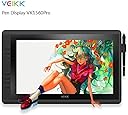
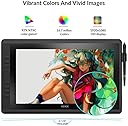
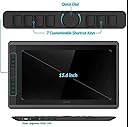
The VEIKK VK1560 is a sleek, portable 15.6-inch graphics drawing tablet featuring a vibrant 1920x1080 Full HD display with 94% Adobe RGB color accuracy. It includes a battery-free passive pen with 8192 levels of pressure sensitivity for precise, lag-free input. Designed for professionals and creatives, it offers 7 customizable shortcut keys and a scroll dial for enhanced workflow efficiency. The adjustable stand ensures ergonomic comfort, while compatibility with Mac and Windows systems and popular design software makes it a versatile tool for illustrators, architects, and digital artists alike. The package includes all essential accessories, making it a complete, ready-to-use creative solution.
| ASIN | B07DJ9XS4C |
| Box Contents | 1 x Pen Display, 1 x Passive Pen, 10 x Replacement Nibs(4 soft,6 hard,1 pen remover inside), 1 x Pen Pocket, 1 x USB Cable, 1 x Quick Guide, 1 x Drawing Glove, 1 x HDMI Cable, 1 x Power Adapter, 1 x Power Cable, 1 x DP to HDMI Cable, 1 x Cleaning Cloth |
| Brand | VEIKK |
| Brand Name | VEIKK |
| Colour | Black |
| Compatible Devices | Personal Computer |
| Connectivity technology | HDMI , USB |
| Customer Reviews | 4.4 out of 5 stars 41 Reviews |
| Display Type | LCD |
| Manufacturer | VEIKK |
| Manufacturer Part Number | VK1560 |
| Model Name | VK1560 |
| Model Number | VK1560 |
| Model name | VK1560 |
| Native Resolution | 1920x1080 |
| Network Connectivity Technology | HDMI, USB |
| Operating System | windows 10/8/7 |
| Operating system | windows 10/8/7 |
| Pressure Sensitivity | 8192 Levels |
| Pressure sensitivity | 8192 Levels |
| Product Features | Portable |
| Product Warranty | 1year |
| Screen Size | 15.6 Inches |
| Special feature | Portable |
| Specific Uses For Product | Painting, Animation, Drawing, Designing |
| Target Audience | Teacher |
| UPC | 601707033744 601707033713 |
A**P
An amazing tablet for an unbeatable price!
This VEIKK drawing tablet is essentially on par with a cintiq in my opinion, but at a MUCH more affordable cost! Included: -the drawing tablet with attached adjustable stand -a drawing & smudge-free glove -screen cleaning cloth -battery-free drawing pen -nib remover ring -extra nibs -a drawing pen case that holds the nibs, nib remover ring, and drawing pen for portability -screen protector already applied, just needs a peel -hdmi cord -usb cord -power adapter & cord -mini display to HDMI adapter -quick start guide -driver software download card Set Up: Super easy to set up and quickly get drawing! All you have to do is download the appropriate driver software for your computer, install and plug everything into the right spots! If it doesn’t turn on automatically, there’s a small power button on the back. Review: I really love the quantity and quality of everything I’m getting from this buy! You get so much for the price and I’d argue even more than what comes with a cintiq and they’ve even thought ahead with the hdmi adapter! The set up was super easy I was really surprised! I’m a hobby-level novice at drawing digitally, so I expected a bit of a challenge, especially with my Mac, but, thankfully, that wasn’t the case at all! It’s really lightweight and the adjustable stand is a lifesaver! I would say that the stand is probably my favorite part! Most tablets don’t come with one, so that’s usually an additional purchase (and usually takes up more space on the desk); However, because this comes with one it really saves money and is super convenient! It’s really great to be able to adjust to whatever level is comfortable for wherever you’re sitting. Mine is usually sitting around a 45 degree angle and I find that’s the most comfortable spot for my eyes and wrist as I draw! The hotkeys on the side are super helpful with any drawing program and it’s really easy to change the settings on them. The dial makes it super convenient to change brush/tool size in any art program and I also loved how easy it was to calibrate the pen and screen so that there wasn’t any offset! Overall, really amazing product for the price and I’m so glad I finally have a drawing tablet that doesn’t break the bank!
J**T
Great tablet!
I've been using this tablet for a little bit now and I am extremely impressed! It's a tad smaller than my old 21 inch screen tablet but I'm really growing to like the smaller size. Everything is easier to reach and I find the clarity of the screen to be a bit sharper as well. Setting up the tablet was a breeze. After plugging things in I downloaded the drivers off the website and had it running in less than 5 minutes. Tweaking stuff via the drivers is easy and well explained. Only thing I tweaked was the color temperature to match that of my other screens but other than that everything was great out of the box. The tablet comes with a pen that doesn't require charging. It's rubberized and feels sturdy. The buttons on the side are extremely positive with a satisfying click. It also comes with a bunch of extra nibs and a nib tool all in a nice handy case that you can store the pen in if you choose to do so. The screen is a nice 1920x1080 and looks sharp. Colors really seem to pop, moreso than any other screen I've used. It's also got a semi matte finish to it that gives a little bit of resistance to the pen which really improves the drawing experience. There's very little distance between the drawing surface and the actual screen which really improves accuracy of the pen. The tablet also comes with 8 customizable buttons on the side. One button being a scroll wheel with a very nice click to it when you turn it. The buttons themselves have a slight rubber feel to them to give a softer feel to them. The scroll wheel is very versatile as you can click it to change between customizable hotkeys. Really nice for changing brush sizes or between layers. On the opposite side you've got the built in pen holder which makes keeping track of the pen much easier. The stand in back seem really solid. I'm left handed so in order to use the side buttons I had to turn the tablet upside down but the stand seems like it was made for this as it works just fine like this. The driver software even allows you to rotate the display to the correct orientation. Overall I'm extremely happy with this tablet. It's got a lot of features for the price I paid and I can feel like it's gonna last me quite a while!
D**S
Great Tablet: Very light and compact
This tablet is super light and was easy to set up. I was so excited to try it out, and I was happy with the results! With the tablet being such light weight, I found I couldn't put too much pressure on it with out it sliding, which was fine as not a lot of pressure is needed for the tablet to register the pen. The screen itself is great and HD, my drawings really seemed to pop when I was finished, and my friends loved it as well! The pen glides across the screen easily so you can be precise with your strokes. It has a very solid weight to it, and fit nicely in my hand too. The pen was very comfortable as well, I have arthritis and I could see myself spending a lot of time on a piece and not be in pain afterwards. The shortcut buttons make it incredibly easy to shift through different settings making complex drawings easier than ever! I've had it for a few weeks and I can't imagine switching back to my old drawing monitor. I really like this tablet, it's perfect for my needs and I love that is small enough to store in my desk, and ready for me to use when I'm feeling creative! If I had to recommend a tablet, it would be this one!
N**S
Nice Cintiq alternative for Entry level to Professional artists
The VK 1560 fills a gap in the tablet monitor market quite nicely. I am a professional artist with 7 years of experience and have primarily used Cintiqs or Intuos as my daily use tools. The VK is lightweight which makes it comfortable to use while in your lap, and is compact enough to fit in a backpack for mobile working. After having worked on the VK 1560 daily for a week, I am tempted to replace my aging Cintiq 21UX's spot as my main tablet monitor. For the sake of organization, I'll breakdown each major point below. Build Quality: Overally, the VK 1560 is built fairly sturdily. It has a very rugged plastic housing while left panel has a nice rubberized coating that feels good to the touch. The customizeable buttons depress with a nice clickiness. The 4-function wheel also has a very nice tactile scroll, making adjusting brush sizes extremely accurate. Mine came with a screen protector preinstalled which seems to be oil-phobic which is a nice touch and makes keeping the screen clean very easy. The pen holder on the right side is a nice touch as I am prone to losing my pen quite often. My only real complaint is that there are no VESA mounts on the back and no way to remove the included stand as far as I can see. Software: NOTE: before installing the VK drivers, make sure you completely uninstall any and all tablet drivers you currently have installed as they will conflict with the VK Drivers. If you plan on reverting back to Wacom Cintiq drivers, make a system restore point before you install the VK Drivers. Installation was pretty straight forward and easy. VK's tablet software is fairly basic but includes everything that you would expect from Wacom. Custom setups for individual software. You can adjust pressure curves, assign every button, pen buttons, and adjust screen mapping. The only time I ran into an issue was when calibrating. If I attempted to calibrate the tablet while a second monitor is active, the calibration points would appear on my second monitor regardless of which order I set the monitors in Windows. This was fixed by only having the VK 1560 active and I was able to calibrate. Pen/Drawing experience: The VK does in fact have a slight amount of parallax, but can easily be mitigated by calibrating it properly. The center of the screen, although, is perfectly accurate. The pen has a good ergonomics, being more comfortable to use that the stock pen that comes with Wacom tablets. Despite the fact that there is no eraser as I am accustomed to, it was an easy enough adjustment to make. The pen comes in its own carrying case, while a nice touch, has REALLY large and ugly writing on it which makes it feel cheap. The pen also comes with 8 extra nibs. 4 are a softer rubber and 4 are harder plastic. The softer nibs sort of emulate a pencil on rough paper. While the overall drawing experience is better than what I expected, there is an issue with line jitter and pen precision. With no smoothing, pen jitter can be pretty bad when making slow strokes. With a smoothing of around 5-10% in photoshop, I no longer experienced jitter. As far as pen precision goes, I never found it to be too large of an issue but it definitely can be noticeable while making small strokes. The pen has a very very small deadzone. In practice, however, it was less noticeable. Overall: The VK 1560 is a pretty strong entry in the market, with VEIKK being a relatively new company into the scene. I look forward to see what they'll bring to the table moving forward and I highly recommend this tablet to anyone that needs a potentially mobile solution.
A**R
Great tablet for a great price!!
This drawing tablet is great for artists wanting to start drawing digitally and don’t want to pay a fortune for a graphics tablet. Inside the box comes the graphics tablet, three cables ( the power cord, usb cable, and hdmi cable), a case with the pen and extra pen nibs (hard and soft), a mini display port adaptor, an artist glove, and instructions on where to download the driver. Once the driver is installed, changing the calibration, pen pressure and express key settings are easy. There are seven express keys, as well as a dial key. This tablet is a great size—not too small and not too big. The tablet can stand up at almost 90 degrees or lay flat on the table. The stand is attached to the tablet, which is nice when you start out, but you won’t be able to attach an arm to the tablet in order to get it off your desk and out of the way. Also, when I was drawing on the tablet, it seemed to shift backwards and I would have to move it back to position. This could be due to the surface of my desk. What’s really nice about the VK1560 is that it has a place to insert the pen into the tablet itself. I haven’t seen this before with other tablets, which makes this aspect very nice. The pen comes with 8192 levels of pressure sensitivity, which is standard for graphics tablets. You also do not have to charge the pen, like you do with other graphics tablet. Like I said before, if you are starting out in digital art, the VEIKK VK1560 15.6 inch Pen Display LCD IPS Graphic Display tablet is for you.
Trustpilot
2 weeks ago
3 weeks ago