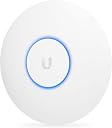
🚀 Elevate your WiFi game with pro-grade coverage and style!
The Ubiquiti UniFi AP-AC Lite is a compact, dual-band wireless access point delivering up to 867 Mbps on 5 GHz and 300 Mbps on 2.4 GHz. Powered via PoE for easy ceiling or wall installation, it offers enterprise-level reliability and free lifetime firmware updates, making it a top choice for professionals and savvy home users seeking seamless, scalable WiFi coverage without the premium price tag.
| ASIN | B015PR20GY |
| Best Sellers Rank | #612 in Computer Networking Wireless Access Points |
| Customer Reviews | 4.7 4.7 out of 5 stars (2,648) |
| Date First Available | September 23, 2015 |
| Is Discontinued By Manufacturer | No |
| Item Weight | 6 ounces |
| Item model number | UAP-AC-LITE |
| Manufacturer | Ubiquiti |
| Product Dimensions | 6.3 x 6.3 x 1.24 inches |
A**R
Cannot say enough great things about these WAPs!
There are not enough good things I can say about these access points. It deserves more than 5 stars. I chose this AP over the Pro primarily due to the price. I would consider the Pro you need to insert the WAP along an existing network run or need a network run near where the WAP terminates. Otherwise, the performance of the 2x2 radio on the AP is more than sufficient for most installations where cost and a working WiFi network are the primary concern. I started with this access point about 3 years ago by installing 2 of these in my home. I went from a two mid-level TP-Link router/APs configured to be used as APs and I had nothing but issues for years, to using two of these APs with zero since switching. The only reason I ever have to power cycle these APs is to install a firmware update, or the power went out for an extended period of time. They are that rock solid / reliable / stable. At a previous job, after an unnecessary amount of pleading with my manager, I was permitted to install 3 of these APs in the office. We went from having constant issues with the WiFi and poor coverage, to no reported issues. For a side job, I installed 3 of these for a business that was very dependent on WiFi for the 30+ wireless devices they used for their operations throughout the day. The issues they had previously had with their 3 home-grade router/wireless devices went away overnight, dramatically simplified their network setup, and they have been very happy for 2+ years with no WiFi issues! Detecting a pattern yet? These WAPs are nothing short of amazing. They cost as much as a decent mid-level router/wireless device, but offer better coverage and many more features over a standard router/wireless combo. All without having to hack and install open source firmware. Ubiquiti regularly release firmware updates to improve performance, stability, and address security vulnerabilities. All firmware updates are provided free of charge, and do not require a monthly/yearly subscription like many vendors are doing these days. They also support their devices with firmware updates for many years. Even their "legacy" products still have current firmware updates as of March 2021. It's refreshing to see a company support their products, and in turn their customers, for many years without gouging them for support or forcing obsolescence by abandoning the software on perfectly good hardware. When the AP is installed on the ceiling or a wall, it looks like nothing more than another smoke detector if the status LED is turned off in the management settings, though I like to leave the status light on in most cases to know if the access point is powered on and working. I have also seen some "installations" where the AP is setting on a shelf, but this doesn't seem to affect performance much if at all. If there is a "con" to the UniFi line of products, it is that there is a bit of a learning curve to figure out how to install and use the UniFi management portal software and configure the devices, but any network or systems administrator shouldn't have too much trouble getting everything up and running in a matter of an hour or two at most. It is best to install the software on a server that is always on. You may also consider installing the controller on a Raspberry Pi, or you can use the Cloud Key as the controller. Though the controller is not necessary to use the WAPs after they are configured, it is advisable to keep the controller running to quickly make configuration changes, and you get a large amount of visibility into the connected devices, signal levels, data sent/received and also provides logs that can be used to troubleshoot issues. I continue to preach the greatness of these access points, and all of Ubiquiti's products really, to anybody that will listen. The price to performance ratio is out of this world in my opinion, and you can easily spend 4 to 10 times the money on the big guys' equipment, and get very little more to show for the money besides the name, and maybe a few specialty features which all home and almost all small/medium business just don't need.
R**N
Really great ceiling AP!
If you know what you're doing, and are comfortable doing some slightly advanced network management, this is one of the best ways to get WiFi out there. Even for home users like me, it's a fantastic setup and works super well, so you don't need to be an enterprise user with a large company building to use this. This is an access point only, remember, so you'll also need a router for this to connect to. I paired it with a Ubiquiti EdgeRouterX and couldn't be happier. It's rock solid, doesn't fail or need rebooting, and blankets a pretty large area with high speed WiFi. It's powered by Power-over-Ethernet (PoE), so you only run one Ethernet cable through the ceiling to the AP. the EdgeRouterX has a PoE port itself, so it is able to power the AP all on its own, saving a power adapter. One of my favorite features is the ability to turn the LED off. By default, this thing has a glowing blue ring which isn't too bad during the day, but at night, it's like a blue flashlight shining down on the the floor. It was bright enough to cast shadows, and seemed totally unnecessary. But thankfully, the software has a simple checkbox for keeping the LED on or off. Uncheck, and it's totally dark now. Perfect. This isn't a simple plug-and-play setup, though, so unless you are already knowledgeable with networking setups, or if you are comfortable googling things, then this isn't the setup for you. But if you know even a little bit about what you're doing, then this is a great way to go. Plus, you can add more of them down the road and have multiple APs broadcasting the same network. I'm already thinking about putting another one in my garage to extend the WiFi range. Totally recommended.
B**E
Adopt New Ubiquity UniFi Wireless Access Point Pro AC (Unifi AC Pro Lite) to AWS Controller. Range is around 400 FT on the 5Ghz
UPDATE 1/19/2016 - I now have 10 of these in a AWS Controller: How-To: Adopt New Ubiquity UniFi Wireless Access Point Pro AC (Unifi AC Pro Lite) to AWS Controller Easy- With DNS Server. - Set a CNAME Record to point "unifi" to AWS External Static IP. - Wait for replication / reboot switch if needed. OR Hardware: Switch - Generic auto DHCP / Unmanaged. - Connect to Internet Computer - Connect to Switch POE / LAN Injector - Connect One to Switch other to Device - Plug in power cord. Software: Download "Putty" from Internet on Computer - http://www.chiark.greenend.org.uk/~sgtatham/putty/download.html (putty.exe) is what I used. aka PuTTY SETUP: Run the exe - Choose SSH Download the Ubituiti Device Discovery Tool: https://chrome.google.com/webstore/detail/ubiquiti-device-discovery/hmpigflbjeapnknladcfphgkemopofig?hl=en - This is a Chrome Extension - You will need Chrome installed on your PC. Run the tool - It will scan and give you an SSH Address for your device. Mine Changed from the default 192.168.1.20 to 192.168.0.115 Enter the IP listed in putty - The username and password defaults are ubnt / ubnt -NOTE: You may need to install a local controller on your system - Adopt and Upgrade the Firmware depending on the default that is installed on your device before this if below does not work. It connects Enter: syswrapper.sh restore-default Your Device will reboot and PuTTY will lose it's connection Close the PuTTY Window and Re-open PuTTY and Reconnect - Be sure to click the SSH box in PuTTY. Login with ubnt/ubnt Next you want to connect to the mca client Type: mca-cli It will return : "Unifi#" Now issue the set-inform command with the IP address of your Unifi controller. XXX.XXX.XXX.XXX is examle of your controller IP (Example: 53.3.12.123) - for AWS use your Enternal Static IP. set-inform http://XXX.XXX.XXX.XXX:8080/inform The AP should connect to the controller within a few seconds and you are set. If not power off and on the AP. If not Restart you local system that had the AWS used to upgrade firmware - to turn off controller on that system. If it still does not show in AWS controller: Pin Pick the Reset button on the device. Restart PuTTY - and login to device like before - ubnt / ubnt type: info This will return the device information and config. Check the set-form address If incorrect - re-do the set inform command. set-inform http://XXX.XXX.XXX.XXX:8080/inform At this point check your AWS controller - Make sure the refresh is set to 15 seconds at the top of the page. You should see the device pop up in there. Perfect. Range is around 400 FT on the 5Ghz. Keep in mind most of the computers and laptops and cell phones still need the 20 Mhz band. The setup was a pain at first, tried setting up and finding the IP. These devices come in DHCP mode, however you can not configure them from the DHCP address. So if your using a 192.168.0.0/24 address you will have issues - however, I found that connecting it to a 192.168.1.1 DHCP network I could configure it just fine. (Using the USG from ubiquiti) Also these do not like to communicate (for setup) through pretty much any router I tried. I didn't have a edgerouter from ubiquiti, i feel if i did maybe it would have had less of a hard time setting these up. Directly connecting into the USG solved a lot of the configuration issues, just a pain that the device needs you to disconnect your network and directly connect the LAN from a USG to set these up, inside an environment that doesn't run 192.168.1.0/24 Once you get the AWS Cloud Controller to see these, it's really easy to configure and move sites. I'll most likely buy these again, just now that I know what to do it shouldn't take so long. FYI: A Local Controller(4.6.7) had no problem picking these up with DHCP - but we use AWS Controller. Firewall port 10001 needs to be open to configure via unifi discovery tool. (Chrome Required) LINK HERE: https://chrome.google.com/webstore/detail/ubiquiti-device-discovery/hmpigflbjeapnknladcfphgkemopofig?hl=en The default IP for SSH is 192.168.1.20 If you can't get the IP to load, you need to change around how the device is connected to the internet. - Your Router is blocking something. - Directly connect it to your USG.
E**S
Ojo, solo es access point, requieres conservar tu router e instalar un software controlador en tu pc o mac para poder configurarlo. Ya tengo un par de estos ( uno en casa y otro en la oficina ). Excelente cobertura, 2.4 y 5 Ghz ( 5 Ghz es ideal para áreas muy saturadas aunque la cobertura es menor). Muy flexible, se pueden configurar varias redes alambicaras que serán servidas por el acces point. POE ( trae un inyector POE en la caja ) por lo que lo puedes ubicar a donde sea que llegue un cable ethernet.
D**N
Aparelho supriu e bem a minha necessidade. Me surpreendeu!!! Vale a pena!
E**S
Cet équipement ne peut fonctionner seul, il a besoin d'un controleur (matériel ou logiciel) pour être configuré initialement. Certaines fonctions comme l'identification au portail nécessite également l'usage du controleur. Les dernières versions intègrent la compatibilité avec la norme PoE standard ce qui fait que nous ne sommes plus contraint à utiliser l'adaptateur passif fourni initialement par Ubiquiti pour faire fonctionner la borne. Les deux sont permis ! Entre la qualité de conception (matériel et logiciel), les fonctionnalités, le prix … les solutions unifi sont de très loin les plus adaptées pour étendre des réseaux wifi à moindre cout sans, concession sur la qualité … Ce n'est pas le best du best mais le rapport qualité / prix / fonctions reste imbattable ! Du super matos !
G**K
Good product. Controller web interface is nice. Lot of options. Firmware upgrades are easy. Passive POE is support is an added benefit. Only thing I have not checked is the availability of ubiquity service centres in India, Bengaluru.
G**O
Jetzt auch gutes Internet im oberen Stockwerk, schnell montiert!
Trustpilot
2 months ago
2 days ago