🚀 Elevate your workspace with panoramic clarity and color — see more, do more!
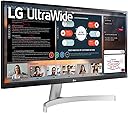
The LG 29WN600-W is a 29-inch UltraWide WFHD IPS monitor featuring a 2560x1080 resolution, 99% sRGB color accuracy, and HDR10 support. Designed for professionals and casual gamers alike, it offers a 5ms response time, AMD FreeSync, and a sleek 3-side borderless design. Ideal for multitasking, content creation, and immersive viewing, this silver monitor combines style and performance to enhance productivity and entertainment.


| ASIN | B0876DBCBX |
| Adaptive Sync | FreeSync |
| Additional Features | Anti Glare Screen, Ultrawide Screen, Wall Mountable |
| Aspect Ratio | 21:9 |
| Best Sellers Rank | #22,108 in Electronics ( See Top 100 in Electronics ) #612 in Computer Monitors |
| Brand | LG |
| Brightness | 250 Candela per Square Meter |
| Built-In Media | 2 x HDMI,1 xDisplay port |
| Color | Silver |
| Color Gamut | 0.99 |
| Compatible Devices | Televisions |
| Connectivity Technology | Auxiliary, DisplayPort, HDMI |
| Contrast Ratio | 1000:1 |
| Customer Reviews | 4.6 out of 5 stars 3,991 Reviews |
| Display Resolution Maximum | 2560 x 1080 Pixels |
| Display Technology | LED |
| Display Type | LED |
| Hardware Connectivity | DisplayPort, HDMI |
| Has Color Screen | Yes |
| Image Contrast Ratio | 1000:1 |
| Item Dimensions D x W x H | 6.3"D x 32.4"W x 16.3"H |
| Item Type Name | LG UltraWide Monitor |
| Item Weight | 4.2 Kilograms |
| Manufacturer | LG Electronics |
| Model Name | 29WN600-W |
| Model Number | 29WN600-W |
| Mounting Type | Seat |
| Native Resolution | 2560x1080 |
| Number of Component Outputs | 2 |
| Picture Quality Enhancement Technology | [NI] |
| Pixel Pitch | 0.26 |
| Power Consumption | 25.5 Watts |
| Refresh Rate | 75 Hz |
| Resolution | FHD 1080p Ultra Wide |
| Response Time | 5 Milliseconds |
| Screen Finish | Matte |
| Screen Size | 29 Inches |
| Screen Surface Description | Matte |
| Shape | Flat |
| Specific Uses For Product | Business, Multimedia, Personal |
| Total Number of HDMI Ports | 2 |
| Total USB 2.0 Ports | 2 |
| Total Usb Ports | 4 |
| UPC | 719192637467 |
| Viewing Angle | 178 Degrees |
| Voltage | 240 Volts |
| Warranty Description | Limited: 1 Year Parts & Labor |
A**N
Good monitor for the new Mac Mini M1
I bought this monitor to use with my new Mac Mini M1. I had no problem at all pairing it. Literally just connected it to the Mac Mini, turned it on, and it worked. I use outside speakers (connected to the Mac Mini) instead of the speakers on the monitor. From what I can tell, the monitor's speakers seem functional, but nothing special. I can't figure out how to raise or lower the volume on the monitor. So, I just ignore the monitor's speakers and use my own. I use this for work. I can't really comment on how it holds up as a gaming monitor. For my purposes, the overall picture quality is fine. Videos look fine on it. It has plenty of room to have multiple applications open at the same time. However, if you're a Mac laptop user who's used to the retina display quality on your MacBook, you'll notice that the text on this monitor isn't quite as crisp and clear as what you're used to with a Mac's retina display. But it's not enough to be a deal breaker. If anything, this monitor is a good placeholder while you save up to buy a fancier monitor. If I have any criticism it's that I don't know if this monitor has any controls to change the brightness, etc. or how to use those controls if they do exist. I turned it on. It worked. That's about all I know. The monitor came with a DVD of the owner's manual (not very helpful because who still has a DVD drive in this day and age?). Other than a small booklet showing you how to assemble the monitor's base and connect the monitor to a computer or AV system, there wasn't any other instructions on how to use the monitor's controls (if they do exist) or change the settings. I have no idea how to use any of the features like splitting the screen etc. that are mentioned in the sales pitch above. Overall, I'm very happy with this purchase. It's a great big sturdy monitor with lots of visual landscape for a very cheap price. It's a great deal!
D**S
It has worked flawlessly for 9 months. Works well for research on multiple sites at once
It is of good quality. The picture is bright, the colors are true. I use it mainly for family history research, and I love the width which allows me to research from two sites and go back and forth. I have no difficulty reading words and ancient handwriting, it has good resolution. I have not used it for gaming, so I can't report about that. I use the stand that came with it and it holds it well and at a straight angle.
D**E
Works great with Mac Mini M1 over HDMI
I was having endless issues with my previous Dell 29" ultrawide monitor on my new Mac M1 Mini - flickering, refusing to wake from sleep, fuzzy text, displaying in YPbPr color space instead of RGB. Nothing seemed to work to fix it (this Dell monitor worked perfectly over DisplayPort with my old Mac Mini i7 BTW). After researching it, the M1 seems to be very picky about ultrawides in general, and so I took a chance on this LG to replace it I'm happy to say that it's nearly flawless now. The picture looks great at 2560x1080 75Hz, super sharp text and vibrant colors. I am running it through a CKL dual HDMI KVM, switching between a Win10 PC and the Mac Mini, and this monitor looks great on both Windows and MacOS. The only slight lingering issue is the LG takes a bit longer than expected to wake up on the Mac, maybe 5-10 seconds. The Dell took about a minute of flashing and flickering and unplugging and re-plugging to wake up, so it's miles better, but it's still a bit sluggish. I blame MacOS for that though, Apple released a statement saying ultrawides have issues so I wouldn't let that discourage you from the LG. Overall, super happy with the monitor, picture quality is great, build quality is great, price is right.
S**L
good for office use
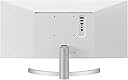
The widescreen monitor is great for office use. easy on the eyes. Does not really have a huge footprint. Its height is slightly less than that of a 24" 16x9 monitor. You can have a webpage open on one side and a spreadsheet on the other which comes in super handy when filling out reports. I do wish it came with a higher adjustable stand but the stand it comes with is at best functional. Display is crisp and clear. Color levels are fine to me out of the box as I am used to a LG screen as my home desktop monitor is an older LG IPS led screen with similar response time. Monitor has 2 HDMI inputs plus a Display port input which comes in very handy when you have multiple screens at your workstation. The built-in speakers are just ok as I do not really use them much. The monitor does not have a USB hub built in like some monitors do these days which come in handy for flash drives. Does not work with some enterprise software that do not support the widescreen format and had I known that beforehand, I may not have purchased this monitor. I purchased this on a big price drop day as I had been looking at it a few days earlier for my work needs. I am happy with the overall purchase as the price has increased more than 25% after I bought it.
N**K
Simply awesome still after many years!!
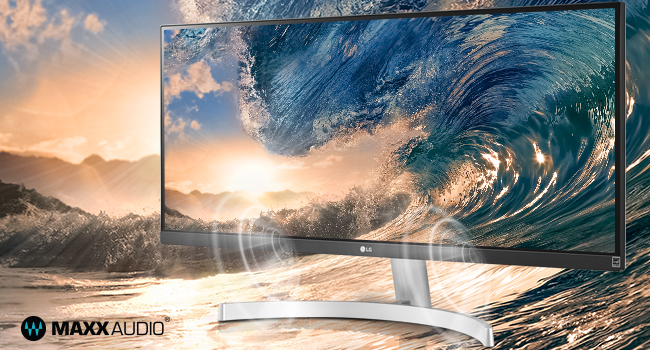
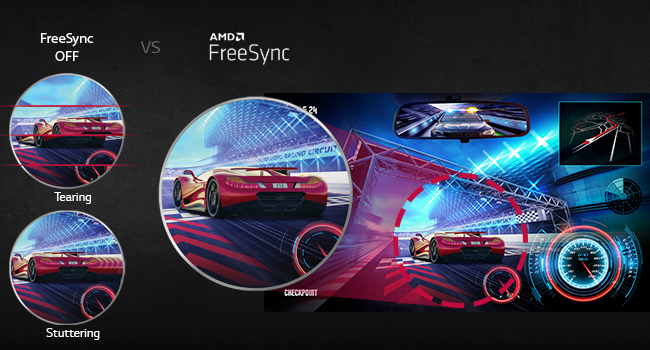
I am very happy with the LG Ultrawide 29-Inch FHD 1080p. It has a stunning IPS display, which makes everything look vibrant and crisp. The monitor is easy to set up and has built-in speakers with MaxxAudio, which sound great for movies and games. The monitor also supports FreeSync, which eliminates screen tearing and stuttering. The ultra wide aspect ratio is perfect for multitasking, as I can have multiple windows open at the same time without losing any detail. The monitor also has a sleek design and a white color that matches my desk. I highly recommend this monitor to anyone looking for a high-quality, affordable and versatile ultra wide monitor.
B**B
Perfect For Anyone Working From Home That Uses Multiple Windows
I work from home, and use a 14" MacBook Pro. As mush as I love my MacBook, w/my job as an Insurance Broker, I use a lot of different windows, and my 14" screen wasn't cutting it. I could swipe across different desktops on my MacBook, but having this screen gave me pretty much 2 more screens. So instead of me swiping, I have 3 viewable screens (as seen in the attached picture) that helps me when I work. The only thing, which still isn't a deal breaker, is the stand. The stand is not adjustable. So I ended up spending about $25 for a stand that I can adjust the height, tilt, etc, and with that, this monitor is perfect! Quality of the picture is perfect as well. If you're needing something that has the best quality for Video or Photo editing, then maybe you should spend a little more on a higher end monitor with 4K or higher. But again, for use of work, this is perfect. I will say, I've watched movies via Netflix, and Youtube videos, and it looks great! I've also connected a PS5 to this monitor, and I have no complaints as well. If you use a Monitor Light bar, depending on the style of the mount, it can hang over the screen. But for myself, as a Mac user, there is a menu bar at top at all times, so it really doesn't hinder any of the screen. So if this is something of concern, I'd check the light bar you're looking into to see how it sits on a screen. Final verdict is if you're in the market for more screen real estate, but don't want to break the bank, I would definitely back this product, and say this is a perfect purchase. Hope this helps someone with their decision!
P**S
Great! Perfect add on for a laptop.
Good: - Maximum real estate for productivity on a desk. Easy to snap 2-3 windows to see at once. - Great color, brightness, contrast. - Speakers! Pretty good ones too. - Picture in picture mode. Adds a spot to put a music player or chat over your workspace. - Dual Control functions as a virtual KVM switch. - Easy setup, sturdy stand. Sleek and modern looking. - Good connectivity w/ 2 HDMI, 1 Display, 1 Mic/Phones out. - Nice 3 trim bezels on three sides. - Plays well with a laptop dock. - Able to be vesa mounted. - Options Menus are easy to access and navigate. Bad: - Stand only has tilt. No height or rotate. - No built-in cable management. - Headphone jack is on back, kind of hard to access. - Decent specs for casual gaming. Serious gamers might not be impressed. - Doesn't have the PBP (Picture by Picture) mode for splitting the screen between two computers. - I can't figure out how to get Night Light (blue light reduction) to work on this as a 2nd monitor. Summary: Don't judge the monitor by my crappy phone photos. They don't come close to doing this justice. This is a great monitor. I've only had this monitor for a day but so far I'm in love with it. I was torn between a couple of 24" or 27" and this was the perfect solution. The color / brightness / saturation is all great, overkill in some ways. I had to tone the brightness and saturation down a bit to be able to comfortably view windows with a bright background. The FPS color profile setting works best for me. Viewing angles are terrific. The SPEAKERS!! It's been ages since I've had a monitor with built in speakers and although these aren't top of the line three-way they are stereo and quite loud and clear. It won't replace your home stereo with a subwoofer but these are more than good enough quality for casual listening and I consider myself picky in regards to sound quality. It's just so nice not to have to putz with speaker cables, bluetooth connections, yadda yadda. Just turn it on and it works. They are down-firing so if you wanted to get nerdy and put a deflector underneath them you'd get a cleaner, more direct sound. I don't think I'll bother. They're easily 3x better than my laptop speakers. For office - fantastic! So much real estate you can multitask with ease. Keep email, spreadsheets, Spotify, Slack, Zoom, whatever up and running at the same time so you don't have to keep minimizing and missing things. Easily break the screen up into 3-4 parts. Plays nice with my laptop dock. Picture in Picture mode is a game changer, adds even more ways to split up the real estate. The Dual Control function is pretty amazing too. I have my main PC as a laptop, second PC as a Mac and I can easily use Dual Control and switch between them, same keyboard, same mouse. All I have to do is change the input to HDMI 2 and hit CTRL, Rt Arrow to use the mouse and keyboard on the Mac. Can even copy files up to 2gb from PC to Mac without messing with shares or network permissions. Too Easy. For gaming - eh you'll get what you pay for with this one. It's an IPS panel so great color but not the fastest response times and it only goes up to 75mhz so won't win any refresh races. It would be fun for casual gaming. Beware that some games won't operate full screen widescreen and you may get black bars on the sides. For those that do widescreen though - fun! For photo editing - this is a dream. It's high enough res to see plenty of detail and you get tons of real estate for menus, toolbars, etc. Color reproduction is fantastic. Super easy to see side-by-sides for color matching. No messing around trying to get two monitors calibrated to look the same. It is only an 8bit display so not super-duper pro quality but definitely 16 million colors will be enough for most uses. So far the good heavily outweigh the bad - the bad are not really bad just meh. If you're looking for a way to maximize your screen real estate and don't want to break the bank this is a great option.
H**M
Very nice. LG knocked it out of the park on these.
I've been running multiple monitors for years and thought that was the ultimate in productivity, until I got these. I got two, so when putting windows side by side it's like having 4 monitors, but looks much better and fewer cords. I like to run different operating systems, sometimes on different machines, and I've always thought input switching on monitors should be easier. A lot of monitors accept multiple inputs, but it's not easy to use them with multiple things because you have to fumble around with too many, unmarked buttons, usually on the bottom or front of the monitors, and do a lot of trial and error to remember which combination of buttons will get you to inputs, which is up/down, which is select....and you have to do it quickly or the settings screen will time out if you take too long to think...then you have to start over. It's been a crap design /UX flaw of monitors for YEARS. On these LG's switching inputs is painless. One, centered, joystick control for settings is the way it should be done. I switch between display and HDMI ports easily so that I can have whatever OS I want up and running front and center. Or if running audio through them, the joystick is volume control. This design/feature alone makes these monitors worth trying. Everyone should adopt how LG does it. All in all I'm very happy with them, and for this price you can't beat it. Highly recommend.
V**G
Value product
Extra screen real space with Split screen spruces up the productivity. Screen height is fixed because there is no room for vertical adjustment. Only slight tilt adjustment is possible so please keep that in mind while purchase. Speaker sound quality is Okay. Cable provided for connection was short and HDMI port both ends and if you need length more than 2 feet or have an older computer you would need to buy a good quality DP port cable.
E**N
Excellent screen size for split screen function.
Took me some time to consider wide-screen monitor especially this LG model. I was hesitated during a promotion campaign at other E-commerce platforms until promo ended. Luckily I’ve made a final hope to try on Amazon. Surprisingly this item is cheaper than the others. Product wise : a perfect 29” screen size and spilt screen function; just right for my document and simple web design works. Delivery : super fast ever 😆 (purchased at 12mn Friday - delivered 5pm Friday) Overall: My 1st purchase experience with Amazon. My 1st purchase on LG wide screen monitor. My 1st encounter such speedy delivery from supplier. = No regrets ✌🏼💯 Thank you Amazon, supplier and manufacturer.
S**A
Picture and screen quality is excellent
Would highly recommend
A**O
Muy buen producto
Se pueden tener varias ventanas visibles a la vez. Para escribir código es excelente porque permite tener varios archivos abiertos en vertical(yo divido la pantalla en 3). La base es sólida, aunque el escritorio se mueva, el monitor no se cae. La base no es ajustable, pero en un escritorio de altura promedio no debe ser ningún problema. IMPORTANTE: Es excelente opción para usarlo como único monitor. No es curvo y, en mi experiencia, las dimensiones que tiene son el límite para un monitor plano. Combinarlo con cualquier monitor adicional no será cómodo, a menos que el escritorio que usen tenga forma de U y la silla que utilicen pueda girar. Será casi imposible usarlo con un monitor adicional sin tener que girar/arrastrar la silla o girar mucho el cuello. Para ese caso es mejor 2 monitores de 27" o 3 de 24"
A**D
Best monitor even economical and has required features
I bought LG Ultrawide monitor. Day before yesterday it came along with a stand. I opened this and connected to Satechi HDMI port. Turned my Macbook Pro on and monitor is showing no signal. Yesterday I went and bought another HDMI cable to check if it is wrong with cable but didnt help. Macbook Pro has detected the monitor and it shows LG Ultrawide in Displays, but monitor does not detect laptop. I bought this with so much expectation. Then I ordered for HDMI to USB connector and directly connected to Macbook Pro and yes it is working. Iam so happy to see it. Really effective. It is good if you have more tabs and windows. For me I used to have a lot of tabs and windows and I used to manage it with a bit difficulty. Now I have the best monitor and it is economical compared to other monitors.
Trustpilot
2 months ago
2 weeks ago