Desertcart purchases this item on your behalf and handles shipping, customs, and support to Croatia.
๐ Elevate your workstation โ power, speed, and style in one sleek dock!
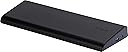
The Targus Universal Dual Video Laptop Docking Station (ACP71USZ) is a versatile, high-performance hub designed for professionals who demand seamless multi-device connectivity. Featuring universal 90W laptop charging with multiple power tips, dual video outputs supporting up to 2560x1600 resolution, six USB ports including two USB 3.0 SuperSpeed ports, Gigabit Ethernet, and audio ports, it transforms any compatible laptop into a powerhouse workstation. Its compact wedge design saves desk space while providing security with a lock slot, making it the ultimate all-in-one docking solution for PC, Mac, and Android users.


| ASIN | B006FXVT6K |
| Brand | Targus |
| Built-In Media | Dock |
| Color | Black/Grey |
| Compatible Devices | Laptops |
| Customer Reviews | 4.1 out of 5 stars 313 Reviews |
| Global Trade Identification Number | 00092636262488 |
| Hardware Interface | VGA |
| Item Weight | 1.5 Pounds |
| Manufacturer | Targus |
| Mfr Part Number | ACP71USZ |
| Model Number | ACP71USZ |
| Number of Ports | 4 |
| Smart Home Compatibility | Not Smart Home Compatible |
| Total Number of HDMI Ports | 1 |
| Total USB Ports | 6 |
| Total Usb Ports | 6 |
| UPC | 804993671045 168141534362 071040159898 191120030333 763615794596 009263626248 092636262488 926362624886 132017814520 778889495315 |
| Unit Count | 1.0 Count |
| Warranty Description | 1 Year |
L**R
Works Just Fine for Me!
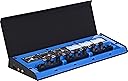
With some trepidation, I ordered this docking station to use with my new HP Envy m6-1125dx 64-bit Windows 8 laptop. After using business laptops with custom-made docking stations for years, I hadn't thought too much about the process of finding a docking station for this consumer laptop. As it turned out, it took a bit of a search. I learned about the latest generation of "universal" docking stations which are made possible by USB 3.0, as I understand it. Two reps at HP's Boise Sales Office (who were great, by the way) told me that the Targus ACP71USZ would work with my laptop (which has a USB 3.0 port), in spite of a review to the contrary on the HP website page describing the unit. In fact, they said, the Targus unit was connected to the same laptop in the "playpen" in their office, and they could vouch for the fact that it worked. So, I ordered it from Amazon. When it arrived, I followed advice others had offered in other reviews: (1) update your USB 3.0 host controller driver (mine was current); (2) download the latest drivers from Targus or Displaylink (ignore the CD that comes with the unit). Turns out DisplayLink had a newer version than Targus itself did, so I downloaded and installed it before connecting the unit to my laptop. Contrary to other reviews, the docking station DID have a power tip to fit my laptop, which was a relief, so the laptop charges when it's connected to the dock. Everything else (wireless keyboard and mouse, audio, printer) is powered through the USB 3.0 cable which connects to the dock. Once connected, the laptop recognized the dock, and everything worked just as I hoped, with no noticeable loss in performance! I like the fact that the docking station will accommodate any laptop for which there is a power tip, so this should be the last docking station I need to buy. The unit itself is very well made, and reflects a nice design. It even fits nicely within my monitor stand! Finding the power tips is a bit tricky (the HP reps were helpful here too); you flip up a door on top of the unit to reveal a compartment with 8 different tips. All in all, armed with the advice from previous reviewers and the HP reps, it was a piece of cake, proving it pays to do your research, I guess. Judging from the reviews, I guess the ACP71USZ will work with some laptops and not others, and in the final analysis there is really only one way to find out: order it from a store with a reasonable return policy and try it out! UPDATE: A little more than a year later, and the Targus unit is still going strong, with no problems over the past year. My Windows 8 computer recognizes it as part of the system, and even tells me when firmware updates are available, which was unexpected! This little unit still gets five stars from me! UPDATE 10/06/14: After working perfectly for 1.5 years, my external monitor (attached to the dock) stopped working. Attaching the monitor directly to the computer revealed that the monitor was working just fine. A visit to the Targus web site showed the same driver already installed. On a hunch, I visited the DisplayLink (whose logo appears on the product) web site and found a new driver. Installed it; problem solved. Lesson here: check BOTH the Targus and DisplayLink web sites for driver updates. By the way, tried running "Update Driver" from inside Device Manager, and it pointed me toward the Targus site, but NOT the DisplayLink site. UPDATE 01/18/16 Two years now, and aside from the driver lesson learned that I described in the previous update, it's been nothing but smooth sailing with this well-designed little dock! I'd still give it five stars! The dock is on my mind currently because up until now I've used a 24" external LED monitor, and my laptop monitor as needed. Now I'm thinking of adding a second 24" monitor, using the Targus dock. I'm not entirely sure of the best way to do that, since my current monitor uses an HDMI cable, and there is only one HDMI port on the dock. I'm sure a little study will turn up the answer to the cabling question.
H**Y
Works perfectly
Everything worked right out of the box. I have a Windows 7 Toshiba Ultrabook and it automatically installed all of the displaylink drivers and everything ran the first time. I used the hdmi and dvi cables to my two external devices and all worked well. I then removed the hdmi cable and put it back on my tv so I needed to convert the hdmi to dvi which worked great. I then needed to convert the dvi to vga which also worked great. I even connected the power adapter to the laptop and it now replaced my Toshiba AC adapter and made it a spare which is nice. Advantages 1. Flat unit so it fits under my riser nicely. 2. I now have a spare AC adapter since I use the power adapter that came with it 3. I now have three monitors ( 1 laptop, 2 external ) 4. The ability to use straight hdmi, dvi and or convert hdmi, dvi, vga came in handy 5. I now use a gb ethernet cable always plugged into the Targus which is still faster then my draft N wifi nic 6. The screen resolutions were auto detected ( by Windows 7 ) but played nicely with the Targus 7. I plugged in my Logitech unifying adapter into the Targus to use my wireless keyboard and mouse which saves me a usb port on my laptop. 8. I plugged in my external dvd drive into one of the usb 2.0 ports and it worked great to install Windows 8 into a vm. Cons 1. Unit is a little bigger then I had hoped but minor 2. With Ultrabooks becoming more popular, additonal manufacturer tips would make sense All in All, I have had a perfect experience, recommend it.
L**8
Not like factory, but works just as well.
I've been using this dock with a few laptops- my personal ASUS X750JB-DB71, and my company-provided business-class HP Elitebook 8470p. Both laptops have USB 3.0 ports, but the HP has proprietary docking capabilities as well. Pros: Simple, clean look. Everything plugs into the back of the dock so you can keep your wires out of the way. Powered. No fumbling around for your laptop's O.E. power supply as the dock provides one for you. Plenty of tips, too. It just works. No, seriously. Plug your laptop in and enjoy a full-desktop experience. Ports. Plenty of them. You trade one USB 3.0 port for 6 additional ports, 2 of those being USB 3.0. DVI, HDMI, Gigabit Ethernet, and speaker/mic Cons: Tricky to set up. Requires a driver install before anything actually works. Not a true "port expander". Proprietary docks like the one for my HP are tied directly to the motherboard. This dock uses a USB 3.0 interface instead. Short USB cable. My ASUS is a large laptop, the cable barely reaches to the USB 3.0 ports. Works very well for home use. Definitely keeping this one.
T**E
Great docking station for 1080 resolution
I installed this docking station to support dual 1920x1080 resolution monitors, network cable and USB connected printer. Also use USB drives through this docking station. All work perfectly. I also wanted a docking station to charge the laptop without having to pull out the power supply every morning, and this one does that. Still 2 cables needed to be plugged in, but only the laptop has to come out of the case. Very easy to install, and use. Great if you don't have the option for USB-C, even if you do as I am finding issues related to the USB-C DisplayPort capabilities that make me want to use this dock instead.
R**Y
does the job, but not great
This product does everything it says it will do, but a couple notable issues can be frustrating. Three problems that stand out: 1. video anomalies - I'm driving two external monitors, and video quality on both displays is mostly OK but occasionally poor. Occasionally the video on one or both screens will display as if it was being affected by interference. Out of focus, jittery pixels, etc. Then a few seconds later it snaps back to normal. I'm using two digital outputs, and this is the first time in 20 years of computing that I've seen something like this. Mostly it does the job, so I can work around this problem, but it is annoying and doesn't give confidence as to the product quality. 2. network speed - the lan connection reads as 1gb, but throughput on the device is extremely inconsistent. If I do a file copy, throughput jumps up, then drops to almost nothing, then may pause for a second or two, then jumps up again. This inconsistent behavior is confident throughout the file copy. If I do the same copy through my wireless, I get consistent throughput. Also, my wireless throughput is just about the same as what I get through the wired 1gb on this dock - probably due to the strange behavior I already noted. For my uses, this particular issue is the most concerning. 3. dock pauses - occasionally the dock functionality pauses for a second, then resumes. Mouse & video lock up, then immediately proceed again. This happens a couple of times a day, so like #1, not frequent enough to be a show stopper. I can work around it, but it is annoying. So the dock does what it says it will do, but doesn't do it in a way that gives me confidence in the product. I'm using an XPS 12 Windows 8 PC with USB 3.0 connection. No issues when using just the PC, only when using the dock. I need the dock for the dual video output and the wired LAN connection. If I knew of any alternatives I would try them, so this will have to do for now.
N**O
Video and network port stopped working after a few months.
Worked without a hitch the first few monts. When it did work it wasn't too bad. Was able to use dual monitors. Video refresh was a bit slow and the monitors would sometimes freeze and pixellate badly. I was using the old driver then, maybe that was the reason. I would give it 3 stars then. Where they lose 2 additional stars is the horrible support. So, fast forward to now where the only thing that works is the USB ports. Video ports and network port no longer works. Been troubleshooting for a week with Targus support. First, they had me update all the drivers for NVidia and the Intel video drivers. They could not explain why the old drivers was working before and why I have to update now. They then advised to turn on the Aero theme, Huh????? I don't see what that has to do with anything. This thing does not work, just replace it already and stop giving me the runaround.
A**C
Works great
I use this with an asus zenbook ux21e through the USB 3.0 port. I updated the USB host, graphic card, and the display link drivers before connecting the dock as requested by a card that came in the package through Targus website. Although the asus update software showed that everything was updated and I had the latest drivers, checking the driver dates manually through device manager showed that that was not the case. After updating, I connected the docking station and it worked perfectly. I have two dell 22in monitors attached through dvi and hdmi and also use the wired network connection. 2 USB 3.0 ports and the extra 4 USB 2 ports are great since my ultraportable has only 1 of each. This docking station has also a connection to charge your laptop but I decided to use my own charger. The wedge shape also helps with cooling by lifting the back of my laptop. Overall, nice product, no problems and worked as advertised!
J**W
~ 6 Years & Still Strong
I bought this power model (ACP71USZ) and it's smaller brother (ACP70USZ) in 2013, and am now revisiting this model as the younger brother's video ports have stopped working. I even upgraded the driver from DisplayLink, which actually solved it!.. until this week when once again, "no signal detected." Boo to the little brother (ACP70USZ), but this power model (ACP71USZ) has remained just as stable as it was when I bought it. (ACP71USZ) While the power head works for the computer I had at the time, it's Lenovo head doesn't fit my work computer so it's definitely unfortunate for those without compatible equipment but it has been a tremendous benefit for my laptop over the many years. The design is also superior, as it's does a good job at holding my PC in place while working, as well as allowing me to shift it with ease when I need to. I look at the newer models and cant help but wonder if they are as smooth and easy to access as this model has been. The possibility of using a different computer and it not being compatible is a definite reason to pause if this is the main allure, as is was for me, but I haven't had a single problem with this in close to six years and I'm very likely to get this again if my incoming computer is compatible with the power model (ACP71USZ) I already have.
D**.
Just what you need!
Targus is one of the few companies who provide such accessories for laptops, etc. They've been around a long time and have put out a very good product with this docking station. I have a laptop with no docking port so i needed a USB 3.0 dock. I can run 2 screen no problems now. It had everything I could possibly need to connect a monitor, keyboard, mouse, speakers, etc. The power tips provided make sure you should be able to use it on just about all of the name brand laptops. And it finding a docking station that would also power/charge a laptop without using the laptop's separate power cord was very difficult. In fact, this is likely one of your only viable options. Good thing is that this docking station has you covered with all of the connection options for monitors, USB 3.0, and more. Check out the Targus web site for complete specs, etc. as needed. I would not hesitate to buy this item again. I received this product at a discount in exchange for my honest and unbiased review, all opinions expressed are my own. My rating and review are results of testing and personal use of this product.
F**D
Very happy.
Everything I need in one package. Place my ultrabook on top, plug in the (included) power adapter and (included) USB 3.0 cable and instantly have high-speed wired ethernet, 2 additional monitors, mutliple USB ports, external speaker, and external microphone. I keep my ultrabook charger in my travel case and not worry about forgetting it. The external monitors are driven by DisplayLink. My setup was quick and easy. If you connect to a USB 2.0 port, you may notice some minor video lag on HD videos. This does not happen on my setup when connected to a USB 3.0 port. If your experience is similar to mine, you will be very happy. Just wish I had purchased this docking station a long time ago...
K**N
Excellent !!
Everything was packed well and functions. Seller was very quick at responding. I had no issues and very satisfied with my purchase thank you !
A**T
Good adaptable docking station for any laptop.
It was almost what I expected. Connections was easy. Lots of ports for extensibility. I like the side USB ports which makes for convenient attachment of temporary peripherals (eg audio headsets, CD drive, etc). What I didn't expect was that I still needed to connect a power cable to my laptop - which inhibits the portability of the setup. It means that I still have to plug and unplug the Laptop power cable in addition to the USB3 connection. It would be great if it didn't need that extra power supply or if the unit came with a power supply connection for the laptop from the docking station itself. The blue light at the back of the unit could not be dimmed which can be annoying if you want darkness in the room while sleeping.
F**L
Constant Problems
------------------------------------ Original Review First ------------------------------------ I love it. It works great. My laptop didn't have a USB3.0 port, so I had to purchase the "StarTech.com ECUSB3S1 1-Port Flush Mount ExpressCard SuperSpeed USB 3.0 Card Adapter". Installing the drivers for the USB3.0 adapter was a pain (make sure you find the most recent versions or it will give you problems). Once I installed the most recent drivers, I was able to plug everything into the Targus Docking Station, and it worked beautifully. Pros - Gives me multiple monitors (a lot more) - Gives me one location to plug everything into - Gives me a more USB ports Cons - Sometimes the NIC diconnects and I have to get Windows to quickly Troubleshoot/Resolve the issue. ------------------------------------ Updated Review ------------------------------------ Well I've had this for a little more than a month now. I regret buying it. The docking station fails to connect to my monitors regularly. My monitors connected to the docking station will suddenly go a solid color (often grey, but sometimes pink or green). The only way to fix it is to unplug the power to the docking station and plug it back in. But it fails within minutes of doing this again. Some days it works all day, some days it doesn't work at all. Don't buy this product!
Trustpilot
1 day ago
1 month ago