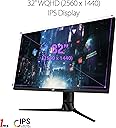
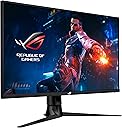
🎮 Level up your game with ASUS ROG Swift PG329Q — where speed meets stunning clarity!
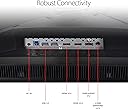
The ASUS ROG Swift PG329Q is a 32-inch WQHD (2560x1440) Fast IPS gaming monitor featuring a 175Hz refresh rate and 1ms response time. It supports G-SYNC and ELMB Sync for tear-free, blur-free visuals, boasts DisplayHDR 600 certification with 98% DCI-P3 color gamut, and includes eye-care technologies and ergonomic adjustments. Connectivity options include HDMI, DisplayPort, and USB 3.0, making it a versatile choice for professional gamers and creatives alike.


| ASIN | B08GL66PK4 |
| Adaptive Sync | G-Sync |
| Additional Features | Blue Light Filter, Built-In Speakers, Flicker-Free, Height Adjustment, Swivel Adjustment, Tilt Adjustment |
| Aspect Ratio | 16:9 |
| Best Sellers Rank | #3,538 in Electronics ( See Top 100 in Electronics ) #127 in Computer Monitors |
| Brand | ASUS |
| Brightness | 600 cd |
| Color | BLACK |
| Color Gamut | 150 |
| Connectivity Technology | DisplayPort, HDMI, usb |
| Contrast Ratio | 1000:1 |
| Customer Reviews | 4.4 out of 5 stars 202 Reviews |
| Display Resolution Maximum | 2560 x 1440 pixels |
| Display Technology | IPS |
| Display Type | LCD |
| Hardware Connectivity | 3.5mm Audio, DisplayPort, HDMI, USB 3.0, USB 3.2 Gen 2×2 |
| Image Contrast Ratio | 1000:1 |
| Included Components | DisplayPort cable, HDMI cable, PG329Q Monitor, Power Adapter (150W), Power cord, Quick Start Guide, ROG sticker, ROG welcome card, USB 3.0 cable, Warranty card, color calibration report |
| Item Dimensions D x W x H | 17.79"D x 28.67"W x 11.52"H |
| Item Type Name | ASUS ROG Swift PG329Q 32” Gaming Monitor, 1440P WQHD (2560x1440), Fast IPS, 175Hz (Supports 144Hz), 1ms, G-SYNC Compatible, Extreme Low Motion Blur Sync, Eye Care, HDMI DisplayPort USB, DisplayHDR 600 |
| Item Weight | 20.9 pounds |
| Manufacturer | ASUS |
| Model Name | PG329Q |
| Model Number | PG329Q |
| Mounting Type | Wall Mount |
| Native Resolution | 2560x1440 |
| Number of Component Outputs | 3 |
| Picture Quality Enhancement Technology | Fast IPS, G-SYNC Compatible, Extreme Low Motion Blur, High Dynamic Range |
| Power Consumption | 43 watts |
| Refresh Rate | 175 hertz |
| Resolution | QHD Wide 1440p |
| Response Time | 1 milliseconds |
| Screen Finish | Flat |
| Screen Size | 32 inches |
| Screen Surface Description | Flat |
| Shape | Flat |
| Specific Uses For Product | Business, Gaming, Personal |
| Total Number of HDMI Ports | 2 |
| Total USB 3.0 Ports | 2 |
| Total Usb Ports | 2 |
| UPC | 192876829134 |
| Unit Count | 1 Count |
| Viewing Angle | 178 degrees |
| Voltage | 240 volts |
| Warranty Description | 3 Year Warranty with ARR |
| Warranty Type | Full warranty |
B**N
Great IPS Monitor not just for gaming, but for overall content consumption.
I'll start by comparing this to the close second I almost ended up with: I was stuck between this and the Samsung Odyssey G7. Basically a high quality VA vs a high quality IPS. What the G7 has that the PG329Q doesn't is 240hz, and better contrast, plus the curve if your into that. I ended up not going with a high end VA because of the QC issues Samsung has been having, plus the fact they only warranty their product for 1 year, vs Asus who has a 3 year (which includes a warranty of less than 3+ bright dots and 5+ for black dots, which I think is decent), along with the black smearing concerns and poor viewing angles. Samsung has mitigated the black smearing to some extent (its better than almost any other monitor with a VA panel on the market), but it is still present at 240hz. To eliminate the black smearing entirely on their G7, you must reduce the refresh rate to 165hz, which kind of defeats the selling point of that monitor. (There or more reviews online if you want to learn more about the specific pixel response times of the G7). I've tried VA and IPS panels before, and I consider black smearing to be really unpleasant, that specific thing ended up being more important to me than better contrast. About the PG329Q, my unit came great out of the box and I couldn't find any dead pixels. Setup was easy and straightforward: REFRESH RATE: 9/10. The refresh rate of 165hz (oc'd to 175 in the OSD), at this price point is great. It won't get up there in the 240 hz range with its TN and VA counterparts, but it provides a great experience overall. (There is a 240hz version of this monitor that will be released next year, though I am unsure of the penalties this will result in picture quality, price, etc...) PIXEL RESPONSE: 9/10. I settled on the 4/5 overdrive setting in the OSD. 5/5 resulted in overshoot and artifacts, and feels like that is only there so they can claim the 1ms response time. I do not have special tools to measure the response time, and am basing my opinion based off of my own experience in games and the UFO test. At 4/5 the transitions look very good, and I couldn't notice any significant overshoot. ELMB w/ sync: 10/10. What Asus has done here is incredible with their ELMB (with gsync!). Double imaging was only present on very quick movements on the desktop, and it is so subtle I leave it on, even while I'm not gaming. The brightness was still very good for me with it on, as it does decrease brightness by maybe 25-35%. The benefits in game took me by surprise, it really does look quite good. It makes a 80 FPS experience feel like a 160 FPS experience. COLORS: 9/10. Absolutely fantastic colors, and the monitor comes pre calibrated from the factory. They even provide the calibration profile and the color space it covers. I am no professional, but I was very pleased with it. I was disappointed it doesn't do true 10 bit. It does 8 bit color with +2 provided with GPU dithering. But the colors provided to the end user are great for a layman such as myself. CONTRAST: 7/10. It feels good for an IPS, not at VA levels of contrast however, and the blacks do feel a bit grey at times in dark scenes. So as I said before, good for an IPS panel, but its nothing to write home about. IPS GLOW/BACKLIGHT BLEED: 10/10. For my unit it was great. I had no issues with bleed, and the IPS glow is low. VIEWING ANGLES: 8/10. Good viewing angles, but at about 35-45 degrees they begin looking a little washed out. ERGONOMICS: 8/10. Height, tilt and swivel work great. I was disappointed it didn't come with rotation as well. HDR: 6.5/10. This isn't going to impress any HDR junkies out there but its nice to have. The peak brightness (for flashes and explosions was bright enough to make me flinch) was really great, but being edge lit it isn't going to give an OLED HDR experience, so go into it understanding that. It's a nice perk, and did surprise me with it's capabilities, though limited. INPUT LAG: 10/10. From my love of playing twitch games, I can say that from the seat it felt incredibly responsive. No complaints here. CONNECTIVITY: 8/10. Only complaint is that the DisplayPort is 1.2a+ and not 1.4. Not a huge deal as it doesn't really need more than that, but it's worth mentioning. Given its price point, advertised performance and specs, I am really happy with it overall and plan on keeping it as my main monitor. 5/5 stars. The unboxing experience and materials provided were great, and the monitor and stand itself feels extremely solid. The "gamer" aesthetic on the back may be polarizing for some but it's on the back so I don't really mind.
J**V
Unparalleled Gaming Performance and Fluidity - The Ultimate Monitor!
I recently acquired the ASUS ROG Swift PG329Q gaming monitor, and I must say it has completely revolutionized my gaming experience. With its exceptional features and cutting-edge technology, this monitor truly stands out as the best in its class. First and foremost, the 32-inch display with a 2560x1440 resolution provides stunning visuals that are incredibly immersive. The picture quality is exceptional, with vibrant colors, sharp details, and excellent contrast. Whether I'm exploring vast open worlds or engaging in fast-paced FPS battles, the display brings every scene to life with remarkable clarity and precision. The standout feature of the ROG Swift PG329Q is its 166 Hz refresh rate. This refresh rate offers an incredibly smooth and fluid gaming experience, providing a significant advantage in fast-paced games. The increased refresh rate ensures minimal motion blur, making it easier to track moving targets and react swiftly, giving me an edge over my opponents. The difference in responsiveness and fluidity compared to lower refresh rate monitors is truly remarkable. In addition to its high refresh rate, this monitor also boasts an impressively low response time of just 1ms. This fast response time virtually eliminates ghosting and smearing, ensuring that even the most action-packed scenes are rendered with exceptional clarity. The result is a seamless and immersive gaming experience without any distracting visual artifacts. The ROG Swift PG329Q also features NVIDIA G-SYNC technology, which synchronizes the monitor's refresh rate with the GPU's frame rate, eliminating screen tearing and minimizing input lag. This technology further enhances the smoothness of gameplay, providing an incredibly immersive and tear-free gaming experience. The design of the monitor is sleek and visually appealing, with thin bezels that maximize the screen real estate. The ergonomic stand allows for easy adjustments, including tilt, swivel, pivot, and height adjustment, ensuring optimal viewing angles and comfort during long gaming sessions. Connectivity options on this monitor are plentiful, including DisplayPort 1.4 and HDMI 2.0, allowing for easy connectivity with various gaming devices. The OSD (On-Screen Display) menu is intuitive and user-friendly, making it effortless to customize and fine-tune the monitor's settings to suit personal preferences. In conclusion, the ASUS ROG Swift PG329Q gaming monitor is the epitome of gaming excellence. With its jaw-dropping visuals, incredibly high refresh rate, lightning-fast response time, and NVIDIA G-SYNC technology, it provides an unparalleled gaming experience. If you're a serious gamer looking for a monitor that offers a competitive edge and an immersive gaming environment, look no further than the ROG Swift PG329Q. It is truly the best monitor for gaming in its class.
W**S
Quality during gaming is amazing. Frames...yes, as long as you have the hardware to back it.
The monitor I received would randomly dim even though I had turned off the auto dimming in the in-screen monitor setup. In game or not, it would just randomly dim itself. I was running it at native resolution at recommended refresh, not the overclocked refresh, on Display Port. Only other issue was the Asus Aura Sync couldn't control the RGB I've had installed on my Asus motherboard. Other than those 2 issues, this monitor worked & looked great. FPS, colors, display quality, & viewing angles were superb. She's a big boy for a 32", so if you're trying to fit it into a spot & not onto a desk, check the dimensions twice.
J**O
Excellent display with great features!
This monitor is excellent and is a worthy successor to the PG278Q I had and it is worthy of the Swift name. Adaptive Sync, ELMB-SYNC, and overclock work wonderfully well. I have not seeing any blurring or tearing. The IPS panel displays very little bleed and glow. Colors look deep and vibrant. It comes factory-calibrated. The Aura lighting is cool but I didn't really notice it in common use. The matte coating looks good and mitigates reflections quite a bit, even with bright lights behind me. I bought it because I could not get used to a 34" ultrawide (LG 34GP83A-B). That is also a fantastic monitor but it was just too wide and it felt awkward. For you nVidia users out there: Ensure that G-Sync is enabled. Set your frame rate cap to at least 3 frames below the max refresh rate of the display; so 162fps on 165hz or 172fps on 175hz. Enable Low-Latency mode. Enable V-SYNC within NVCP but *not* within games. Ensure your mouse polling is 1000hz. This will give you the smoothest gameplay, minimize input lag, and make your gaming experience better. The one negative thing I have to say is that the stand is a bit deep and did not sit well on my desk. Using an Amazon Basics floating arm instead. It works just fine and I can move the display where I want it. - The Windows HDR implementation is absolute garbage and should not be compared to what one might see on a high-end television. There are many competing standards and they all look different. IF HDR on your monitor looks like trash, it's because of the OS and the game, not your display. - DisplayPort 1.2 is more than adequate for this monitor at it's native resolution and maximum refresh rate of 2560x1440x175hz. DP1.4 is not needed on this device. DP1.2 has a maximum bandwidth of 21.6Gbps. This monitor requires a maximum of 19.35Gbps at 175hz and 8 bits per pixel. In my photos, my window curtains at my back-left are slightly open so there is some light reflections on the screen. It is NOT powdered on in the third pic.
I**S
Sharp, clear, bright, good color
It's beautiful. Very sharp and clear with no flicker. I had to adjust the colors and brightness because the default is really bright. The red default especially was so crazy bright. Once adjusted it's excellent. Using for gaming, photoshop, and video editing.
D**N
Good luck finding an IPS monitor without backlight bleed
ASUS ROG Swift PG329Q 32” - as above, good luck finding an IPS monitor without backlight bleed. I went thru 5 before I gave up and settled on this one, which has a noticeable backlight bleed from the lower left corner. Not an issue specific to this monitor, the others I tried were three LG Ultragear 32GP83B-B's and one ASUS PG279QM, and the only one that might not have had backlight bleed issues had a stuck pixel, 4 out of 5 for sure had backlight bleed issues, some worse than the one I settled with. Not sure why anyone praises IPS monitor's higher viewing angles compared to TN when you can't even get a uniform picture when you're staring straight at it. So anytime I'm stumbling around at night in DayZ or viewing the startup screen for Jedi Stuttervivor I'm actively and unsuccessfully trying to tune out this blue/grey cloud in the lower left corner of an otherwise great looking screen. If you luck out in the panel lottery and/or are not as sensitive to backlight bleed issues as I appear to be, this is one nice screen. Colors pop, from the factory waaaay too much, but there's plenty of options to tone them down. Now my old TN (ASUS PG278QR) looks quite dull in comparison (but the darks are far more uniform). Unless you're in HDR, in which case you get no options to adjust colors, brightness, or anything, outside of the software options. And the HDR is edge-lit, which is whack but picture quality seems serviceable in practice. I heard there's an ACER model with the same panel as this (Acer XB323U), but it's less oppressive about what you can adjust in which mode on the OSD. Just what I heard on reddit, no idea about that personally. Overall, I kinda love and I kinda hate this monitor, averaging out to a resounding "MEH"
R**P
Great monitor all around
Hate to say it but you get what you pay for. This monitor is fantastic and is one of the best picture quality screens. The price is warranted with the 175 fps and buttery smooth. No ghosting or other issues that commonly come with lower priced ones in the same range.
W**S
The Best Hands Down
Purchased Acer, Benq, and LG, all with similar specs, over $600 dollars and returned them all. I just don't think you can go wrong with this monitor. You need a good video card to drive it at 175Hz and you need to understand how to set up your games to get the FPS without nerfing all the textures and what not. I won't get into all that here, there are plenty of good videos on YT about it - I suggest Fr33thy for one. Fact is I have purchase 6 monitors to test in the last 2 years and this one is staying. I replace the LG 34 monitor with this one and can't go back. The refresh rate, color, brightness, features, etc are just the best. One reviewer complained about only 1 display port - really? I think he was just looking for something to whine about. IF you can find one, get it. I suggest only ordering from Amazon AND Amazon Prime at that. You don't want to be stuck with a $750 monitor that you can't return quickly. BTW me and my friend both got one the day the appeared on Amazon for $699, worth every penny. I also suggest Gamma Ray Blue Light Blocking Glasses Amber Tint Anti Glare UV Digital Eyestrain. These make your eyes feel SO much better it is unreal. Give them a try. I suggest 1X power.
C**A
Excelente servicio
El artículo llegó en excelentes condiciones y antes de lo programado. Excelente servicio.
K**N
Excellent ROG monitor
Highly recommended monitor Very sharp text is clean motion blur is very minimal. very impressive
D**V
Monitor agridulce
Yo utilizo este monitor principalmente con Mac. A veces me lo usa con una que requiere de un adaptador para conectarse. Tengo una M1 y esa tiene entrada HDMI. Con ambas máquinas tengo el problema de que en ocasiones la imagen parpadea horriblemente. Tengo la hipótesis de que es son los 144 Hz. He arreglado este problema reduciendo a 120 Hz. A veces me toca conectar y desconectar o reiniciar el equipo para que se resuelva del todo. Con Windows no he tenido absolutamente ningún inconveniente. Los colores son configurables y los modos Game Visual son muy útiles para los diferentes modos. El Punto de Mira en el GamePlus es uno de los features que más utilizo. Los colores son ricos y profundos. Un excelente monitor dejando de lado el "problema" ocasional del parpadeo.
A**K
Decent monitor but has quality control issues
Got this monitor because of the great reviews about picture quality. The unit I got has some issues though. The screen kept dimming when HDR was on and turns out others had the same issue. Also, the picture was too saturated for me in Racing mode without HDR on. Mine shipped with firmware v34 and latest when I bought it was v36. After I updated the firmware the HDR issue seems to be fixed and picture isn't as saturated as before so I thought everything worked out. Then I was gaming for about 2 hours at 144hz & HDR on and the screen temperature was around 50C. Contacted asus support and they said its defective and I should RMA. Going to return it instead since its still within the return window.
T**2
Decent
Other than the 1 dead pixel this monitor is excellent. For half of the cost of it brand new I guess I'll tolerate it.
Trustpilot
3 weeks ago
3 weeks ago