๐จ๏ธ Print Smart, Save Big, Stay Connected!
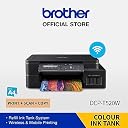
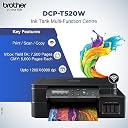
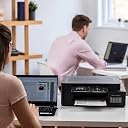
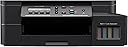
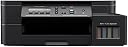
The Brother DCP-T520W is a sleek all-in-one ink tank printer designed for home and small office pros. It combines high-resolution printing (up to 1200ร6000 dpi) with fast speeds (30 ppm B&W, 12 ppm color) and wireless convenience. Its refillable ink tanks offer exceptional page yields, drastically cutting running costs. Compatible with Windows, Mac, Linux, Android, and iOS, it supports versatile media sizes and includes scanning and copying functions, making it a powerhouse for productivity and budget-conscious users alike.


| ASIN | B08M4VPW2R |
| Additional Printer Functions | Copy |
| B&W Pages per Minute | 30 ppm |
| Best Sellers Rank | #31,497 in Computers & Accessories ( See Top 100 in Computers & Accessories ) #50 in Ink Tank Printers #777 in Inkjet Printer Ink Cartridges |
| Box Contents | Printer, Power Cable, Installation CD |
| Brand | Brother |
| Brand Name | Brother |
| Color Pages per Minute | 12 ppm |
| Colour | Black |
| Compatible Cartridge | BTD60BK & BT5000CMY |
| Compatible Devices | Laptops, Smartphones |
| Connectivity Technology | USB |
| Control Method | Touch |
| Controller Type | Android |
| Customer Reviews | 4.3 out of 5 stars 1,423 Reviews |
| Display Type | LCD |
| Dual-sided printing | No |
| Duplex | auto |
| Global Trade Identification Number | 04977766807227 |
| Hardware Interface | Ethernet, USB 2.0 |
| Importer Contact Information | BROTHER INTERNATIONAL (INDIA) PVT. LTD. UNIT NO. 801 AND 802, 8TH FLOOR, ALPHA BUILDING, HIRANANDANI GARDENS, POWAI, MUMBAI - 400 076, INDIA |
| Ink Color | Black |
| Item Type Name | Ink Tank Printer |
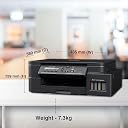
| Item Weight | 7.3 Kilograms |
| Manufacturer | BROTHER INDUSTRIES (PHILIPPINES), INC, Lot 1-B-2, Phase 1B, First Philippine Industrial Park, Brgy. Ulango, Tanauan City, Batangas 4232 Philippines" |
| Manufacturer Contact Information | Lot 1-B-2, Phase 1B, First Philippine Industrial Park, Brgy. Ulango, Tanauan City, Batangas 4232 Philippines" |
| Max PrintResolution Color | Up to 1200 ร 6000 dpi |
| Max PrintSpeed BlackWhite | Up to 1200 ร 6000 dpi |
| Maximum Copy Speed Black and White | 30 ppm |
| Maximum Media Size | A4, Letter, Legal, Mexico legal, India legal, Folio, Executive, A6, Envelopes, Photo (4" X 6")/(10 x 15 cm), Photo 2L (5" X 7")/(13 x 18 cm) |
| Maximum Sheet Capacity | 150 |
| Model Name | DCP-T520W |
| Model Number | 8CH74300171 |
| Network Connectivity Technology | USB |
| Other Special Features of the Product | Refillable Ink Tank, Display Screen, Borderless Printing, Network-Ready, Auto Reduction |
| Output sheet capacity | 150 |
| Packer Contact Information | BROTHER INTERNATIONAL (I) PVT. LTD C/O YUSEN LOGISTICS INDIA PVT LTD. SURVEY NO. 18 & 19/2 , ADIVALI VILLAGE KIRAVALI, PANVEL |
| Paper Size | A4, Letter, Legal, Mexico legal, India legal, Folio, Executive, A6, Envelopes, Photo (4" X 6")/(10 x 15 cm), Photo 2L (5" X 7")/(13 x 18 cm) |
| Power Consumption | 16 Watts |
| Printer Output Type | Color, Monochrome |
| Printer Type | InkTank |
| Printing Media Type | Envelopes, Glossy photo paper, Paper (plain) |
| Printing Technology | InkTank |
| Resolution | 1200 x 6000 |
| Scanner Type | Photo |
| Special Feature | Refillable Ink Tank, Display Screen, Borderless Printing , Network-Ready, Auto Reduction |
| Total USB Ports | 1 |
| Unit Count | 7.3 Kilograms |
| Warranty Description | 1 Year On-Site Warranty |
| Wattage | 16 Watts |
S**A
Excellent!
Namaste! Glad to help others by way of sharing experience with this printer. Got it at a discounted price of โน12059 (sbi credit card discount). Its installation was very easy and required no much ado. Its operation too, is very easy and convenient. I'm currently using it for printing study materials from mobile only. The performance is really admirable. Initially gave command to print some PDFs of 2 or 3,4 pages and it printed very fast. Afterwards I willingly downloaded brother plugins and mopria print service which also helped me print smoothly but one day when commanded to print PDFs of pages more than 25, it took very considerable time to respond. I was troubled a little bit but soon, I uninstalled all plugins and operated with the help of android printing service itself. It gave wonderful response. Since then, I'm very happily printing my docs. Now come to its printing quality. It yields high quality printing both in color and mono. Time: In my case, black and white print rate is more than 20 ppm (average) while a color photo took me 12 minutes to print. The best thing for me is that this printer does not annoy you by taking too much time in warming up each time you start this. It instantly becomes ready to print ASAP you turn it on. It automatically cleans the heads. Print, scan and copy quality is the best. Moreover, it is manufactured in the Philippines with no equipments from PRC. I don't have experience of printing through laptop or PC, but I say that this is the best printer for printing purpose. If it is functioning very fast even wirelessly, then what about USB connection? Surely, it will not disappoint you. So kindly go for it. Dhanyawad!
R**A
Good but not good!!!!
Product finish and built is compact ,sturdy and pleasing. Had trouble with trying to figure out wifi connection even after watching umpteen you tube videos. Connection to wifi was easy but connection to mobile thru wifi was confusing. Even after downloading iprint app from playstore ,printing is so slow thru mobile. Pdf printing gets stuck at times. Infact printing without downloading app was easier. Mobile printing is a pain. But connecting thru laptop is comparitively easier, once you install drivers from cds given, its easier to print thru usb cable and wifi. U will see 2 printers icons in printers & scanners display. One is used for usb ,click on another wen trying to print thru wifi. Printing thru laptop is quicker than mobile. Printing after scanning is also quick. Havent yet tried to print pics. But was really disappointed with slow mobile printing. Maybe will figure out more after few more days, this is after couple of days of usage. Tray can handle 50 plus sheets at one time, with concealed cover. So papers dont get dirty or lose shape.
S**R
Best Inktank Printer till date with value for money
I was using hp ink advantage printer till date but as time passed it started to become a disadvantage๐ for use due to increase in price of catridges every few months and less nos of prints. I was looking for economic printer and then came accross this one. I had used brother printers at work, so knew its a trust worthy japanese brand. It prints almost every single type & sizes of paper and printing speed is just wow. I like bottom load tray and that is why did not go with canon brand (Canon has topload). I am sure this is going to be a popular model of brother because of its so many features. Only con is it does not have duplex printing but you canโt complain in this price range. Wifi print and air print is pretty fast and flawless. Photocopy is very fast. Scanner is also very easy to use. Very Happy with purchase and thanks to amazon for speedy 1 day delivery. Highly Recommend. Value for money. Happy Printing.
V**Y
No Nonsense printer with good print quality
Bought this printer in jun of 2021 have been using occasionally it works without hiccup, I use a printer cover, I usually print on Bond paper and Legal Paper, Quick tip go to brother website register your product download the manual, Watch a few videos online on how to fill the ink than go ahead and setup your product with care once you are done keep it covered with a printer cover to avoid dust ingress. If you want to print both sides you only need to select double side/duplex printing option and pull the paper tray once to add the printed papers back in the tray to print the other side as well the onscreen instructions are self explanatory, You don't need to remove the tray multiple times as claimed by others. Its cheaper than most other printers and offers a higher resolution.
G**D
Excellent Printer
This is really a very good printer with all the features like WiFi, wifi direct, control panel with display, dual paper tray can be easily manage for manual dual printing purpose, good print quality mono and colour, Photo printing quality on glossy paper is good. For home use and small business useful features copy,scan and print. Good build quality from bbother at this price range really worth buying. I got it at 12300 including 10% cc discount. You can go for it without any hesitation. Thanks to brother and Amazon..
D**R
Easy to use
I've been using this for a few months and find the printer really good. Specially using the brother mobile connect makes printing and scanning a breeze. Only issue is with manual duplex printing. Tried lot of ways as suggested in YouTube etc. The only way I can get it to work is by 1. Print odd pages first. 2. Take the bundle and put again in main tray. 3. Print even pages now with "reverse order" option checked in print setting.
V**.
Good for A4 but bad for Legal size
Nice and sturdy printer Pros 1. Low cost 2. Good speed 3. 150 pg paper tray Cons 1. Manual feed is really bad - one page at a time 2. The paper tray can accommodate sizes upto A4 only. If you have to print legal, you will have to feed pages one by one in manual tray located at the back side. (not easily approachable)
S**R
Overall a good printer
Itโs been a few months and so far have not had to replace the ink cartridges. The colour prints are not very crisp. Some of the prints seem a bit washed out. The b/w prints are quite good. Seems quite durable and the WiFi printing feature also works quite well.
Trustpilot
2 weeks ago
2 weeks ago