Desertcart purchases this item on your behalf and handles shipping, customs, and support to Croatia.
๐ Elevate your productivity with immersive ultrawide clarity!
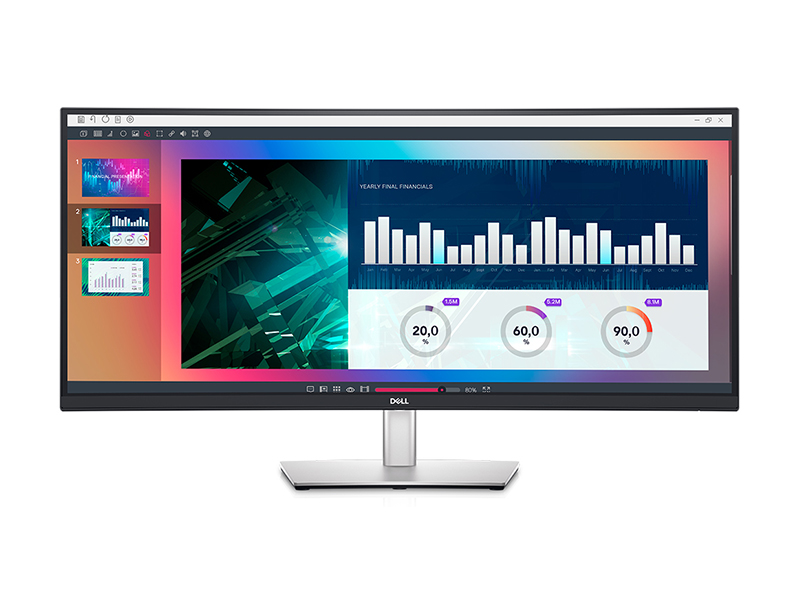
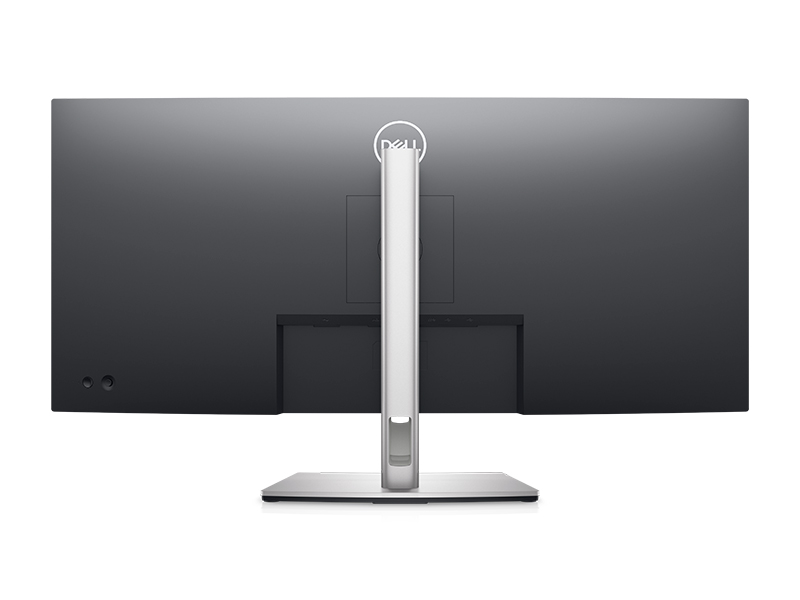
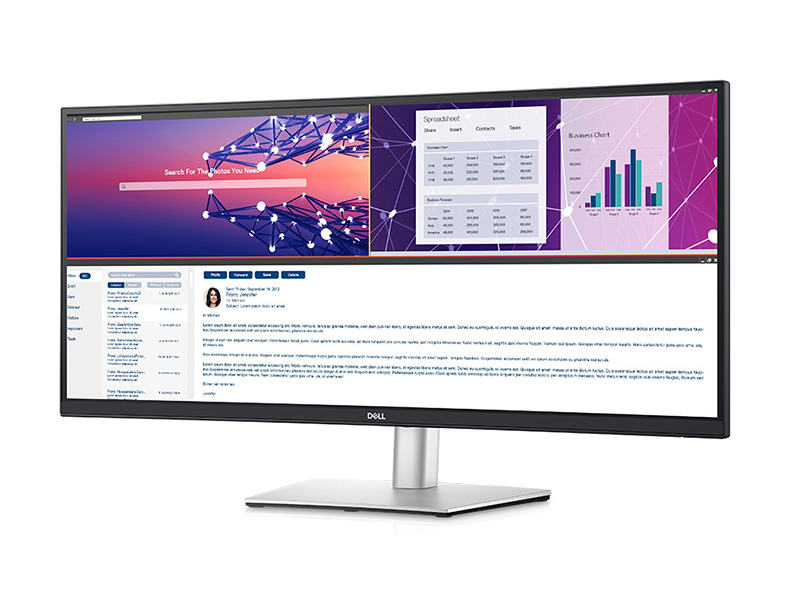
The Dell 34 Inch Ultrawide Curved USB-C Monitor (P3421W) features a 3440x1440 WQHD resolution on a 3800R curved 34-inch LED display, designed for professional multitasking and ergonomic comfort. It supports dual-PC inputs with Picture-by-Picture and KVM, includes flicker-free and blue light reduction technologies for eye comfort, and offers versatile connectivity including USB-C, HDMI, and DisplayPort. Ideal for managers and professionals seeking sleek, efficient workspace enhancement.


| ASIN | B08MWY9THF |
| Adaptive Sync | FreeSync, G-Sync Compatible |
| Additional Features | Anti Glare Screen, Curved, Flicker-Free, Height Adjustment, Swivel Adjustment, Tilt Adjustment, Ultrawide Screen |
| Aspect Ratio | 21:9 |
| Best Sellers Rank | #203,516 in Electronics ( See Top 100 in Electronics ) #4,350 in Computer Monitors |
| Brand | Dell |
| Brightness | 300 |
| Color | Black |
| Color Gamut | 99 |
| Compatible Devices | Laptop, Desktop |
| Connectivity Technology | DisplayPort, HDMI, USB |
| Contrast Ratio | 1000:1 |
| Customer Reviews | 4.3 out of 5 stars 263 Reviews |
| Display Resolution Maximum | 3440 x 1440 pixels |
| Display Technology | LED |
| Display Type | LED |
| Hardware Connectivity | DisplayPort, HDMI, USB, USB 2.0, USB Type C |
| Image Contrast Ratio | 1000:1 |
| Included Components | 1 x DP cable (DP to DP), 1 x HDMI cable, 1 x SuperSpeed USB 5Gbps (USB 3.2 Gen1) upstream cable, 1 x USB Type-C cable (C to C), Monitor with stand, Power cable |
| Item Dimensions D x W x H | 9.35"D x 32.11"W x 21.3"H |
| Item Type Name | Monitor, Panel |
| Item Weight | 23.9 pounds |
| Manufacturer | Dell Computers |
| Model Name | Dell 34 Curved USB-C Monitor โ P3421W |
| Model Number | P3421W |
| Mounting Type | Panel Mount |
| Native Resolution | 3440x1440 |
| Number of Component Outputs | 2 |
| Picture Quality Enhancement Technology | ComfortView Plus |
| Pixel Pitch | 0.23 |
| Power Consumption | 65 watts |
| Processor Count | 4 |
| Refresh Rate | 60 hertz |
| Resolution | QHD Ultra Wide 1440p |
| Response Time | 8 milliseconds |
| Screen Finish | Matte |
| Screen Size | 34 inches |
| Screen Surface Description | Matte |
| Shape | Rectangular |
| Specific Uses For Product | Business, Multimedia, Personal |
| Total Number of HDMI Ports | 1 |
| Total USB 2.0 Ports | 2 |
| Total USB 3.0 Ports | 3 |
| Total Usb Ports | 7 |
| UPC | 884116381143 |
| Unit Count | 1 Count |
| Viewing Angle | 178 degrees |
| Voltage | 240 volts_of_alternating_current |
| Warranty Description | 3 Years Advanced Exchange Service, Limited Hardware Warranty, Premium Panel Exchange |
| Warranty Type | 3 Years Manufacturer Warranty |
J**N
Me = Very satisfied with this display
My general thoughts: I am very satisfied with this display. I did a lot of research on the best fit for my situation. I wanted something that appeared somewhat professional and sleek, and most of the options in the price range are tailored for gamers and look like gaming monitors. I first looked at 4k monitors so that the resolution would be that far off but there just arenโt many ultra-high res options for less than $1,300. I forget exactly how I found this display, but I am glad I did. At the time of purchase, it was $679. I noticed as of a few days later the price went up above $700. I am sorry to see that for anyone interested in it. I was a little nervous about the resolution but had to remember I was still stepping up from a $150 1080p 24โ monitor. I plan to use this connection to a new MBP, I am still on the fence about waiting for the possible updates next year. For now, I am using a windows 7 machine that I built like 8 years ago. Anyway, back to the resolution, 1140p looks good compared to 1080p and the fact that the screen is enormous is a real game-changer for productivity. I use mine for school and work and man itโs amazing having the windows side by side. Where I work, I have 2 monitors set up, I just prefer this so much more though. Itโs clean, using less power, fewer cables, and does the same thing. You can even get โsuper ultra-wideโ but I think itโs a bit overkill, at least for me. I recommend reading all the specs and features because there are many. You might find more info on dell.com. Connectivity & settings: I plugged it in using a DP (display port) and it calibrated itself. I dint not change any settings, the aspect ratio was perfect! Color calibration and all settings are perfect. I will not be adjusting any of it. Thatโs cool to me, I mean I spent hours adjusting my 70โ 4K TV. I still mess with it after years of ownership. Donโt forget this display comes with HDMI and Thunderbolt inputs with a few USB ports. So you could have this running your laptop and keeping it charged to boot. Image quality: It might be that my old monitor just sucked, but I am so happy with this purchase. The image quality and clarity are fantastic for what it claims to be. This monitor is not advertised as UHD so if you expect UHD, itโs not. But seriously, most people out the can relax about that. This is not comparable to say, an iMac retina display. So it would look out of place next to one, but as your primary display and laptop in clamshell mode, this is not going to disappoint. I downloaded a ton of high res ultra-wide images for my backgrounds. They look awesome. I ran a couple of color and gamma tests and this display was calibrated perfectly right out of the box. Plug and play, in my experience. Oh, it is worth noting that it is pretty bright, no complaints about brightness. Build quality: I like the design of the display because it looks great at the home of the office. I am not a fan of gaming-style displays, they just look a little cheesy to me with added logos and lines. I think of this monitor as a conservative luxury design like a BMW 5 series vs. a Honda Civic Type R. Nothing against the Type R, itโs an outstanding automobile and an engineering marvel. It just looks like a cartoon. The bezel is about 1 CM and it has a ยพโ chin at the bottom. It comes out of the box with a film on the screen. Most people wonโt even notice it, and it is hardly noticeable except for the very edge and appears to be protecting the screen so I will be leaving it on unless it starts to peel naturally or something. Included in the box: It came with several cables! I was thankful for that. I think it had a power cable, HDMI, DP and a USB-C, and some cable management accessories. The box was the least impressive part for me. It is very generic, just regular old cardboard, and the lady sat it down on its side in front of my door. Wind could have blown it over or something. Hey, she got it to me in working condition, so all good. Bonus: I also ordered a new desk pad and Logi mouse. Both are awesome! Desk pad: https://www.amazon.com/gp/product/B08DG8Q2FH/ref=ppx_yo_dt_b_asin_title_o03_s00?ie=UTF8&psc=1 Logitech MX Master: https://www.amazon.com/Logitech-Master-Advanced-Wireless-Mouse/dp/B07S395RWD/ref=sr_1_2?dchild=1&keywords=logitech+mx+master&qid=1625000349&sr=8-2
J**E
Fine Productivity Monitor for WFH
As more content becomes 21:9, the viewing experience is greatly appreciated with a wider screen. The pixels are noticeable if you look close enough. I ran the monitor through various monitor tests and did not see any dead pixels on 10bit mode without sub-sampling. The power button indent is much appreciated. It makes it easy to turn on/off as opposed to the feeling for the small numb on the U3417 and like. I generally can fit 2 windows comfortably side by side (perhaps 38" would provide the much needed space for 3 windows). The curvature is quite high (large number / less curve) that I find myself turning from side to side instead of moving my body. The placement of the ports is somewhat low and thus prevents you from shifting the monitor to its lowest position without going too far and pinching the cables. Small incremental movements are hard to pull off and often end up as some jerking motion.
H**C
The best monitor Iโve had yetโฆ
I have a 32โ curved at work, and โhad two 20โ monitors at home. My eyesore is degrading in my older age, and after sending multiple emails to the wrong person, I decided I needed something bigger. This monitor works Petraโs a KVM device, the viewing area is excellent, screen contrast/brightness choices are great (mine is set in โblue blovkwrโ which works well. If you are isi g two monitors, I recommend you go single curved. It saves space on the desk, but increases your working area. Iโve gotten back into 3D CAD (hobby), something impossible with two monitors. This monitor doesnโt have speakers, but uses the speaker for Your PC/laptop. This is acutely a benefit, you do t have to pick/change your source. I have two laptops connected and my keyboard and and keyboard and mouse. Switching between laptops is very simple. Actually easier to connect than my previous separate/dedicated (high dollar) KVM switch. This came with all cables needed for two laptops.
J**G
This monitor works great with the new M1 imac mini
If you are wanted a great monitor for the imac mini this one is great. I really love the monitor. Running at 60hz it meets Apple's requirements. If you are thinking a 120hz monitor is better, those are not compatible. This is the one to get. Some things to know, the PBP works good but the monitor switching is done using a hardware switch like joystick. The software to manage the screens is not designed to work on mac or linux. But there are some third party open source options. I found it just easier to have more then one keyboard for multiple computers in a mixed OS environment. You may be able to get the drivers working easier on linux. Running 3440 x 1440 on the M1 imac.
B**S
USB-C port stopped working after 2 months and there is no support or option to return it.
USB-C port stopped wiring after 2 months. Spend an hour and 6 phone calls with Dell to try to get it resolved, but they cannot find the Service Tag number as it is not bought directly from Dell and therefor they are not supporting it. The reseller says it should be supported by Dell and is not providing any help at all. Amazon is letting me hang in the middle with a defective monitor that should still be within warrantee, but no one to handle the warrantee. Update 11/06/2023. I spend another few hours with Amazon trying to get my refund. They keep on telling me I should get my refund with 3-5 business days but then when I call up to ask where my refund is they say they need to re-investigate the issue again.
A**R
Great Monitor but Such A Pain to Get Working Well
It took me three tries to figure out what was wrong with my monitor. This was the highest rated and is a surprisingly good pricepoint. The issue is, the cable is awful! I'd get horizontal or vertical (can't remember which) flashing. Thought it was a chip but turns out the cable Dell gives you must be junk. I also had the stand arrived damaged but considering this was the third try, I just dealt with it. Love the monitor but pretty furious at the number of times I had to deal with issues. FYI did a ton of research and used this Anker cable to solve my issues: https://www.amazon.com/gp/product/B072JYDQ7N/ref=ppx_yo_dt_b_search_asin_title?ie=UTF8&psc=1
J**N
Recommended
Great image quality. Works well with Apple and PC. I like that I can plug USB accessories (mouse and keypad) in and use for both devices. The only downside is that Dell Display manager doesnโt have an iOS version. Itโs much easier to use than the Apple screen positioned built into their iOS. Also bought the sound bar which Iโm not as impressed with.
E**S
Wonderful monitor with MacBook Pro
This monitor pairs beautifully with my MacBook Pros - both the new 14" M1 and my older 15" Intel Core i7s models. Color reproduction is about perfect, the USB-C connection means one cable to dock and charge my laptops. I loved this monitor so much at my office that I bought one for home for those Work-from-home days. Perhaps a little overkill, but it sure gives me plenty of space to work. Highly recommended!
C**A
Muy buen Producto
Muy buen monitor me gusta mucho, pero ahora estoy viendo de cambiar a uno mรกs grande ya quรฉ me gusta tener varias ventanas abiertas, lo que si es que modelos de mรกs tamaรฑo si su precio se va por los cielos
A**O
Great product ๐
Just what I needed for my home office Arrived within a week of purchase ๐
R**I
Value for money
Got it for around 35k in Great Indian sale
J**N
Productivity 100%
Revamped and improved my productivity 100%
A**X
Nice monitor
Wobbles a bit but overall satisfied with it
Trustpilot
2 weeks ago
3 weeks ago