☁️ Own your cloud, own your digital life!
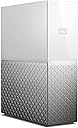
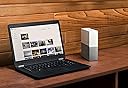
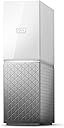
The Western Digital WD My Cloud Home 1Bay NAS 4TB is a user-friendly personal cloud storage device that connects via Ethernet to your home router, offering 4TB of centralized storage. It supports 625 Mbps data transfer speeds, USB 3.0 for importing external files, and provides seamless mobile, desktop, and web access with automatic photo and video backup. Designed for easy setup without a computer, it empowers professionals to securely store, sync, and stream their digital content anywhere without monthly fees.


| ASIN | B074DXNT7T |
| Additional Features | Portable |
| Best Sellers Rank | #43,191 in Computers ( See Top 100 in Computers ) #29 in Network Attached Storage (NAS) Devices |
| Brand | WD |
| Built-In Media | Ethernet cable, Personal cloud storage, Power Adapter, Quick Start Guide |
| Cache Memory Installed Size | 4 |
| Color | White |
| Compatible Devices | Smartphone |
| Connectivity Technology | USB |
| Connectivity technology | USB |
| Customer Package Type | Standard Packaging |
| Customer Reviews | 3.8 out of 5 stars 3,841 Reviews |
| Data Transfer Rate | 625 Megabits Per Second |
| Digital Storage Capacity | 4 TB |
| Digital storage capacity | 4 TB |
| Enclosure Material | plastic and metal |
| Form Factor | 3.5-inch |
| Global Trade Identification Number | 00718037848242 |
| Hard Disk Description | Mechanical Hard Disk |
| Hard Disk Form Factor | 1 Inches |
| Hard Disk Interface | Ethernet |
| Hard disk form factor | 1 Inches |
| Hard disk interface | Ethernet |
| Hard-Drive Size | 4000 GB |
| Hardware Connectivity | USB 3.0 |
| Installation Type | External Hard Drive |
| Item Dimensions L x W x Thickness | 13L x 5.3W x 17.6Th centimeters |
| Item Type Name | WD My Cloud Home 4TB |
| Item Weight | 1.05 Kilograms |
| Manufacturer | Philips |
| Media Speed | 50-200 MB/s |
| Mfr Part Number | WDBVXC0040HWT-EESN |
| Model Name | My Cloud Home |
| Model Number | WDBVXC0040HWT-EESN |
| Number of Items | 1 |
| Read Speed | 625 Megabytes Per Second |
| Special features | Portable |
| Specific Uses For Product | Personal |
| UPC | 718037848242 |
| Unit Count | 1 Count |
| Warranty Description | 2 year |
S**M
Have your own cloud
Nice and user friendly
K**M
Does not connect via USB to any device, only through Ethernet
The device does not connect to any device via the USB port at the bag, that is purely for connecting it with something for backup only - didn't bother reading more into it. My intention was to connect this to my router via ethernet and then via USB to my tv so that i can access content on tv directly without having to copy paste files onto a usb or a hard drive every time I wanted to watch something from my computer on my tv. And so if that's what you're looking for, this is not the device for you. Contents on the device are only accessible through the internet. WHY?! Accessible through the internet, great, but ONLY!? WHY?The software WD Discovery that you need to have on your computer when setting this up, is very useless and choppy. There are those who mentioned that for this, Plex add on works, but quite honestly I tried that lthough it I already ahve Plex as an app on my smart tv and did not need an external HDD for this, (and the reason that didn't work for me via the tv app is becuase it's very very slow and useless)... and that also proved to be just as bad as the in-tv app. Lastly, the drive that eventually appears in your windows representing your HD drive --- mapped "network" drive is slow, the device connects and disconnects from network occassionally and for no reason, windows with the mapped drive open sometimes crash, and quite honestly, it took me back to windows vista horror days. I'd say this was a cheaply put-together software and hardware setup that is just amateurish, and a big fail on WD part. In short, I've requested my refund and will never be looking back at this direction again or for any other WD devices in the future.
Z**D
concern on the WD my home cloud
one concern on the product you have limited action on the USB port you can not use the USB port for backup your hard desk
H**Á
Good for the price
Very nice, easy to setup and with plenty of storage for an average user. Their app is not the best but I noticed you can do some more if accessing the cloud via the website. Found it slow to transfer the files but it does the job and is a good cost benefit.
H**D
Recommend
Great product I am using it and there is no problem ✌🏼😎
A**A
Great value
The user interface needs a lot of enhancements
R**I
Perfect
Perfect!
M**.
Unfortunately Unlucky
Even though the product worked fine, the moment i would plug it on to my home network, it would eat up my entire Internet speed by 90%. I tried different Ethernet Cables, different locations even and faced the same issue. When I searched the Web for answers, turns out this was a common problem with the WD My Cloud Home device. I had done a lot of research and had seen many Review & Unboxing videos before purchasing this item and was shocked on the network lag problem. After failing to fix or rectify the issue after a week, I decided to send it back to Amazon. However, if I isolate the network lag problem, the device was very simple to setup and use. I did it through my Mobile only and didn't even need any PC. Transferring files and setting backup was fairly simple too. If I hadn't had this Network Lag, this would be a great buy on a great bargain price. There are plenty guide videos on YouTube for this device. If you buy one and it does not cause the Network Lag issue, it's an awesome entry level model for anyone looking for a NAS Device.
C**S
Reasonably fast data transfer, very severely limited capabilities
I needed to replace my 10year old Aldi NAS whose disk was dying. I was expecting to have more space and faster transfers, I wasn’t expecting to have a UI more severely limited than that of the basic Aldi NAS. For example it is not even possible to rename the device! Only one top level password protected share can be created. When a password protected share is created it’s not possible to access the public share from the app. I kept it since my primary use for sharing files between my Windows boxes and the unix/android based tv boxes and it works ok for this.
M**D
ممتاز
ممتاز ومفيد
B**.
Super Product, Excellent Photo storage device
The WD 4TB My Cloud Home Personal Cloud is a nifty little device that brings convenience and security to your photo storage needs. It offers some great features that make it an excellent choice for those who want an accessible storage solution without any fuss. Let's start with the setup process, which is an absolute breeze. Even if you're not the most tech-savvy person around, you'll find it a piece of cake to get the My Cloud Home up and running. Just connect it to your local network, and voila! You're ready to start using it in no time. No complicated steps or headaches involved. When it comes to storing your precious photos, this device truly shines. With a whopping 4TB capacity, it offers more than enough room to store a vast collection of pictures. And the best part? It automatically backs up all your photos from your phone as you take them, ensuring that none of those cherished memories are ever lost. Just imagine the peace of mind you'll have, knowing that your photos are safely stored and easily accessible whenever you need them. One standout feature of the My Cloud Home is its ability to invite different accounts to the drive. This means that each person can have their own private space to access their files, and even the owner of the drive won't be able to peek into someone else's stuff unless they're specifically invited. It's like having your own little digital haven where you can keep your files secure and separate from others. Privacy and control at their finest! Now, let's talk about one minor drawback. Some users have reported that transferring files from their computers to the My Cloud Home over the local network can be a bit slow. It's not a dealbreaker by any means, but it's something to keep in mind if you frequently transfer large amounts of data. However, when it comes to photo storage, this device truly excels. In a nutshell, the WD 4TB My Cloud Home Personal Cloud is a fantastic choice for anyone looking for an easy-to-use and reliable device to store their photos. The setup process is a breeze, and it automatically backs up your precious memories from your phone. Plus, with the ability to create private spaces for different users, you can rest assured that your files are safe and sound. Just keep in mind that if you're looking for lightning-fast transfers over the local network, there might be speed bumps along the way. But overall, it's a wonderful option for hassle-free and subscription-free file storage.
M**2
WD My Cloud Home osobista pamięć chmury 4 TB
Wysoka jakość wykonania, intuicyjne zarządzanie danymi. Dla domu, zdjęcia/filmy/pliki OK, do pracy z danymi transfer jest za słaby. Zadowolony z zakupu.
P**P
User friendly home cloud
Straigh forward -get what your ordered.easy setup ,user friendly,anything you need to know about this product is on video on youtube .perfect for home use,and to integrate with you phone use.
Trustpilot
2 weeks ago
2 days ago