🎨 Unlock your digital masterpiece with every stroke!
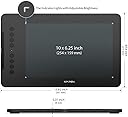
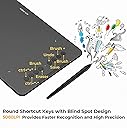
The XP-PEN Deco 01 V2 is a sleek, ultra-thin digital drawing tablet featuring a large 10x6.25 inch workspace, 8192 levels of pressure sensitivity, and an ergonomic battery-free stylus with 60-degree tilt support. Equipped with 8 customizable shortcut keys and broad compatibility across Windows, Mac, Android, and Chrome OS, it’s designed to elevate digital art, animation, and remote teaching with precision and ease.


| ASIN | B077P6BQP7 |
| Are Batteries Included | No |
| Average Battery Life (in hours) | 2 years |
| Brand | XP-Pen |
| Color | Black |
| Computer Memory Type | SDRAM |
| Customer Reviews | 4.4 4.4 out of 5 stars (13,750) |
| Date First Available | 22 November 2017 |
| Item Weight | 1 Kilograms |
| Item model number | Deco 01 V2 |
| Manufacturer | XP-PEN |
| Operating System | Android 6.0 Marshmallow, OS X 10.10 Yosemite |
| Processor Count | 1 |
| Product Dimensions | 35.1 x 21.7 x 0.8 cm; 1 kg |
| Screen Resolution | 1920x1080 |
| Series | Deco 01 V2 |
| Standing screen display size | 10 Inches |
| Voltage | 5 Volts |
A**I
It's amazing, it works very smooth, and pressure sensitivity too is great. I got latest XP-PEN Deco 01 V3. The amazon app is showing Deco 01 V2 but, i am happy that I got latest V3. It is amazing, you can see the photos and videos. My handwritting may not be looking very good, because I am new to it, it will improve in later time. I got each and every accessories. The packaging was great, and the XP-pen box was absolute perfect. And it works very smooth, if you want a tablet to teach other students you can definately go for it, also it's great for artists, because it have pressures sensitivity of 1600+ , and its size too is great, not very small not very large, it's enough to be called perfect. Thank you @Amazon
A**A
O pacote veio muito bem embalado, com tudo descrito e organizado dentro da caixa. Por ser a minha primeira vez utilizando um dos produtos da XP-Pen, a instalação e configuração do dispositivo demorou um pouco, mas já me acostumei. Decidi usar a capa que o produto vem para o tablet pq achei a superfície mt fácil de riscar e só fazendo alguns testes eu ouvia ruídos que poderiam riscá-lo com facilidade. Porém, eu percebi que não só as configurações são um pouco limitadas comparadas à minha experiência com os drivers da wacom, mas também as pontas da caneta desgastam com facilidade, o que me chocou um pouco por testá-lo raramente em questões de dias e já ver a ponta da caneta beeem desgastada pro meu gosto. Sobre as pressões, tenho preferência a níveis de pressões mais altos, então achei q fosse uma boa escolha, porém eu percebi que o tablet falha um pouco (não sei se é por conta da capa que dificulta um tico), no sentido de tentar fazer uma pressão mínima, muito baixa e o tablet não conseguir detectar. Então quando há o costume de usar brushes de tamanho excessivo pra não só pintar áreas grandes, mas também conseguir pintar áreas mínimas por conta da pressão, aqui você vai encontrar dificuldade fazendo isso para pintar detalhes. Parece reclamação vazia, pois obviamente com um brush de tamanho muito grande não vai conseguir pintar áreas muito pequenas, mas com outros tablets eu conseguia esse feitio através das pressões. Também é difícil fazer pontos, por incrível que pareça kk. Isso tudo aconteceu mesmo eu tendo o costume de usar pressões mais baixas para evitar pressionar minha mão fortemente na superfície. Tenho ele faz mais de três semanas e sim, ele é muito bom, confortável, preferi não usar a luva, mas ainda assim foi uma boa escolha de compra. Até agora eu gastei duas pontas, pretendo ver até onde eu consigo gastar com uma (tá explicado porque vem tanta ponta, eles sabem que gastam bastante). Minhas únicas reclamações são quanto à pressão e as pontas, acho que deveria ser um pouco mais completo os drivers, tendo distância entre caneta e tablet e uma configuração mais completa sobre monitor, pois me irrita eu configurar um botão pra mudar entre dois monitores e eu precisar apertar mais de uma vez pois ele detecta a junção dos dois. Mas nada que eu não acostume, claro, são os drivers, não o produto em si. Por fim, os botões de atalho são algo que eu uso esporadicamente, não tenho mta frequência de uso, mas as vezes aperto aqui e ali pra tentar manter o uso um pouco mais frequente.
م**د
أنا اشتريته لغرض التدريس اونلاين وبصراحه كجودة وخامة ممتازة وفيها اسكرينة وحامل للقلم لكن المشكلة في حساسية القلم عند الكتابة دورت على تعديلات عليه مش لاقي لحد دلوقتي وال software الخاص بالتابلت مش موفر ده مع أنه من النقاط المهمة جمب الزراير لكن غير كده هو رائع وانصح بيه لو حساسية الكتابة غير مهمة
S**N
Very impressed with this tablet. It's a good price, the pen is responsive and the pressure settings are great. The only things I dont like are there's no calibration options, though that hasn't become an issue at all. In all honesty this is one of the better tablets (if not the best) I've ever owned. It is the first tablet that I've been able to use right away without any troubleshooting after downloading the driver. I've been using tablets for over a decade and have had bamboo/wacom, huion, monoprice, and I am super impressed with this one. Definitely worth the money, especially for a beginner.
F**E
This is definitely a life saver for my posture as an artist (by using a secondary monitor) and works amazingly well in terms of reactivity and tracking and was absolutely worth the money. This is my first graphics tablet and I do not regret buying this product at all— it only took me a little while for my hand-eye coordination to use this tablet to its fullest. Not to mention, I love buttons and custom keybinds, omg??? The pen holder is okay, but the stylus doesn’t seamlessly slide inside and wobbles a bit, which isn’t too much of an issue since I don’t plan on taking my big laptop or this graphics tablet outside regularly on the long run. Either way, 10/10, would buy from XPPen again!!
Trustpilot
1 week ago
3 weeks ago