Desertcart purchases this item on your behalf and handles shipping, customs, and support to Croatia.
๐ Upgrade your Wi-Fi game with lightning-fast, secure, and ultra-portable connectivity!
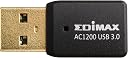
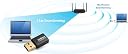
The Edimax EW-7811UTC is a mini USB Wi-Fi 5 (802.11ac) adapter delivering dual-band speeds up to 433Mbps on 5GHz and 150Mbps on 2.4GHz. Its compact design includes a protective cap and lanyard hole for portability. Compatible with Windows 11, Mac OS, and Linux, it offers plug-and-play convenience and supports advanced security protocols including WPA3. Backwards compatible with older Wi-Fi standards, itโs ideal for upgrading PCs and laptops to faster, more reliable wireless connections.


| ASIN | B0799LXYQR |
| Best Sellers Rank | #20,920 in Computers ( See Top 100 in Computers ) #158 in USB Computer Network Adapters |
| Brand | Edimax |
| Built-In Media | CD, Guide, Produc |
| Color | Black |
| Colour | Black |
| Compatible Devices | Desktop, Laptop |
| Compatible Operating System Family | Windows |
| Compatible devices | Desktop, Laptop |
| Customer Reviews | 4.3 out of 5 stars 112 Reviews |
| Data Link Protocol | USB |
| Data Transfer Rate | 300 Megabits Per Second |
| Data link protocol | USB |
| Global Trade Identification Number | 00649659025295 |
| Hardware Interface | USB |
| Hardware interface | USB |
| Item Dimensions L x W x H | 34L x 16W x 34H millimeters |
| Item Type Name | wireless adapter |
| Item Weight | 0.01 Pounds |
| Manufacturer | Edimax Computer Company |
| Mfr Part Number | EW-7822UTC |
| Minimum Required Operating System Version | Windows 7 |
| Model Number | EW-7822UTC |
| Number of Items | 1 |
| Number of Packs | 1 |
| Product dimensions | 34L x 16W x 34H millimeters |
| UPC | 649659025295 |
T**R
Very stable!..with the right device
Update 8/6/24: I'm fan of this product! Found the drivers on Edimax's website and installed them. Went from a max of 250-260 Mbps download speeds previously to 370+ Mbps (over a 300 Mbps Spectrum internet connection)! And it connects to my Wifi 6 router without issues. Update 7/29/24: Here's what I've found with this USB adapter. On my old Lenovo (with a USB 2.0 port), it's super reliable/no issues. On my Dell laptop purchased in 2018 with USB 3.0 ports, it's finicky (especially when in a scenario of high usage/lots of data passing through over many hours such as with streaming 1080p/4K video). The trick I found when using it in that scenario is I'm better off leaving the laptop powered on at all times and powering it off completely once a month then powering on again. After powering on again you may have some instances of disconnection (wifi status showing Connected/No internet). Simply disconnecting from wifi, unplugging the wifi adaptor, waiting 10 seconds then plugging it in again then reconnecting to wifi seems to work. I admit it was a royal pain to figure this out, but I suspect it has to do with the USB controller within the laptop so won't be removing an stars from this review. Update 9/04/22: So good I ordered 2 more! This USB Wifi adapter has bailed me out twice when dealing with integrated wifi adapters in laptops that weren't performing as they should. Running 5 Ghz on my router with 40 Mhz channel width and this adapter has speed tests of around 240 Mbps Down / 12 Mbps Up (currently on the Spectrum 300 Mbps / 10 Mbps plan. In doing a continuous ping test to my router I've not seen any drops yet for the new ones I just received and the one I've had since July 2020. Good job Edimax. 3/12/22: I use this with an old Laptop which has an integrated wifi adapter that only supports Wireless N. It's been in use since near the beginning of the covid pandemic (July 2020) and it's been very reliable! Did not need to load any drivers. Windows 10 recognized it and installed drivers for it. The machine it's plugged into only gets reboots once every 1-2 months and I've seen stats where it shows connected over a month. In fact, as I was testing some older routers where other wifi adapters had difficulty staying connected past 12 hours, this one stayed connected for several days. Very much a good investment for an older laptop!
N**R
Excellent Wi-Fi Replacement for a Laptop
Easy to install and setup and worked right out of the box! Simple device, great signal, and no complaints with how well it works. The only downside is how long it is compared to other devices, but I think that is a worthy tradeoff for something that just works. Will consider getting another one if and when the time comes.
C**I
Works as advertised
Works very well, unlike the "Killer" WiFi built into my laptop. It is also smaller than most USB WiFi adapters.
E**H
Install the drivers and make a quick fix
Driver Version: 1.0.0.6 / 1030.25.701.2017 PC: Windows 7 Service Pack 1 The adapter was only slow until I dug up kirkd's "defeat the 'n'" fix from a Dell forum. There isn't much else to say about it other than the fact that I've only had to mess with it when connecting to a new network. Below is a quick fix that should increase your connection speed significantly: Device Manager > Network adapters > Edimax AC1200 MU-MIMO WiFi USB 3.0 Adapter > R-Click > Properties > Advanced > Wireless Mode > IEE 802.11a Try other values to see which ones work best for you. According to a Forbes article, the order of WiFi speed is ac > n > g. For other WiFi adapters, the solution may be to switch the Wireless Mode from "Auto" to "Mixed" or disable to "n" entirely. EDIT: I've been using this for ~5.5 months now and the only problem I've had is that (lately?) I have to manually reconnect to a network after waking my PC from hibernation. After some googling, I've managed to find a solution that should work for most: Device Manager > Network adapters > Edimax AC1200 MU-MIMO WiFi USB 3.0 Adapter > R-Click > Properties > Power Mangement > uncheck "Allow the computer to turn off this device to save power" Device Manager > Universal Serial Bus Controllers > USB 3.0 Root Hub > R-Click > Properties > Power Mangement > uncheck "Allow the computer to turn off this device to save power" EDIT 01/10/20: For some reason, reinstalling the driver, restarting the computer, and not changing the Wireless Mode from "Auto" caused the download speed to increase (double?). EDIT 01/11/20: After noticing an oddly slow speed and the status speed being at 500-something Mbps after waking the PC from hibernation, I decided to test it out in the below order. Keep in mind that the WiFi adapter was set to auto before I switched it to "a". Not an expert and haven't properly tested all of options, but I'm gonna recommend setting it to "a" unless you feel like experimenting. a . . . . . 54Mbps . . . . . fast ac . . . . 585Mbps . . . . very slow auto . . 144.4Mbps . . fast
T**1
Excellent USB adapter
I was looking for a USB 3.0 802.11AC Wifi adapter with Mu-Mimo. For comparison, I also purchased the TP-Link AC1300 USB 3.0 Mini WiFi Adapter. The Edimax had a slightly higher throughput and it's also smaller. Also, it doesn't block the neighboring USB 3.0 port. Compared to the built-in wifi card in my Asus laptop (802.11N), the Edimax was more than three times faster. Built-in wifi downloaded a large file at 71mbps vs 260mbps (Edimax). I highly recommend this Edimax USB 3.0 wifi adapter.
Trustpilot
3 weeks ago
5 days ago