Desertcart purchases this item on your behalf and handles shipping, customs, and support to Croatia.
๐ Capture the future of gaming in 4K HDRโdonโt just play, broadcast like a pro!
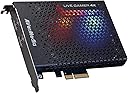
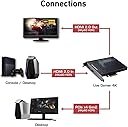
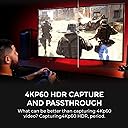
The AVerMedia Live Gamer 4K (GC573) is a PCIe internal capture card designed for professional-grade 4K60 HDR10 streaming and recording with ultra-low latency. Compatible with next-gen consoles and major streaming platforms, it supports up to 240 FPS capture and features customizable RGB lighting, making it the ultimate tool for gamers and content creators seeking flawless, high-resolution gameplay capture and live broadcasting.


| ASIN | B07DHSZC4K |
| AV Output | HDMI, DisplayPort |
| Antenna Location | Video Recording |
| Best Sellers Rank | #37,774 in Computers ( See Top 100 in Computers ) #51 in Internal TV Tuner & Video Capture Cards |
| Brand | AVerMedia |
| Built-In Media | Live Gamer 4K (GC573) |
| Compatible Devices | Next-gen game consoles such as PS5, Xbox Series X/S, One X, and PCs with PCIe slot |
| Customer Reviews | 4.4 out of 5 stars 1,028 Reviews |
| Global Trade Identification Number | 00795522965868, 04710710678982 |
| Hardware Interface | PCI Express x4 |
| Hardware interface | PCI Express x4 |
| Item Dimensions | 15 x 12.4 x 2 centimeters |
| Item Type Name | Game Capturing Device |
| Item Weight | 209 g |
| Manufacturer | AVerMedia Technologies, Inc |
| Mfr Part Number | GC573 |
| Minimum System Requirements | Operating System: Windows 11 or Windows 10, Hardware Interface: PCIe x4 |
| Model Name | Live Gamer 4K |
| Model Number | GC573 |
| Operating System | Windows 10 |
| Operating system | Windows 10 |
| Other Special Features of the Product | Stream and record 4K60 HDR10 content with ultra-low latency |
| Platform | Windows 11 |
| Recommended uses for product | Video Recording |
| Special features | Stream and record 4K60 HDR10 content with ultra-low latency |
| Tuner Type | DVB-T |
| Unit Count | 1 Count |
| Video Capture Resolution | 4K |
| Video capture resolution | 4K |
O**E
Excelente capturadora interna para PC.
Graba tus partidas, emite directos, todo con gran calidad y sencillez de uso. La instalaciรณn tambiรฉn es intuitiva y muy sencilla, prรกcticamente plug and play. No requiere de grandes conocimientos previos y captura todo tipo de aparatos (PlayStation, Nintendo Switch, consolas retro...). Es una excelente herramienta que da una calidad de imagen y sonido realmente buena sin necesidad de grandes ajustes. Ahorra espacio al ser interna. Se acompaรฑa con un programa de ediciรณn y captura de video como es el Power Director, en una versiรณn algo antigua eso sรญ, pero permite trabajar y editar en la mayorรญa de las situaciones mรกs habituales, con lo que no es una gran pega esta versiรณn, se le puede dar un uso mucho mรกs que aceptable con muy buenos resultados. El programa sรญ requiere de algo mรกs de prรกctica, pero como cualquier otro editor de video, una vez conocidos los pasos bรกsicos es muy fรกcil de usar y conseguir los resultados que buscas.
L**.
Parfait pour le streaming
Je lโai achetรฉ pour lโoffrir. Dโaprรจs coque jโai pu voir en terme de rendu, la qualitรฉ est vraiment lร . Cette carte dโacquisition est lโรฉquivalente de son concurrent mais moins chรจre. Je recommande
ใ**ใฉ
ไฝฟใใใใ
ใใใใใใ
D**S
Same Features as Elgato $100 Less
Generally I do not write reviews for most things I buy on Amazon...but when I have a really positive experience I will take the time to do so because I want others to know that this is a safe product to purchase and I personally have had a great experience with it. First, I have used an Elgato HD60 Pro for a few years and they make a great product. Its always worked perfectly so long as I game on a 1080P monitor. My one issue though has been that this card could not deal with my 1440P/144Hz monitor making it difficult to stream without making compromises. When the 4K cards started showing up on the market I was sure that Elgato would come to the rescue and of course they did. At $400 its probably worth it. BUT then I ran into this gem. The Avermedia LiveGamer 4K at $299! I have had an Avermedia card in the past that I returned for poor performance so I was a little nervous about picking up this card. But for $100 off I figured I could always return it if it didn't perform well. I'm so glad I made this decision. The LiveGamer 4K works perfectly and I can finally have lag free 1440P 144Hz gaming while dumping all of the output to my streaming PC and right through the game capture. The LiveGamer 4K handles everything perfectly, doesn't get overly warm, and just works. I didn't even install anything but the drivers for the card (apparently you used to have to install their software to get the drivers but it is now available as a separate driver only download). I just dont see a reason to spend an extra $100 for the Elgato...at least in my setup. The LiveGamer 4K came well packaged, and included the HDMI 2.0 cable that I needed....though if your gaming PC and your streaming PC are far apart you'll need to make sure to pick up a longer one that meets that specification. The card was extremely simple to install and the drivers were easily available on Avermedia's site. I was up and running in no more than 5 minutes. There are no "settings" to make. Just pop open OBS or whatever you're using and it just shows up as a video capture device. On the Gaming PC I simply went into NVidia Control Panel and made sure the capture card showed 2560x1440 @ 144Hz and duplicated from the main display....that was literally it. So if you're in my situation looking for a way to send your gaming PC video to your streaming/recording PC at full resolution and frame-rate then this card will do the trick.
T**E
Excellent purchase for retro gamers
I can only speak for my personal use case, and for what I bought this for, it's perfect. I bought the 4K Live Gamer for capturing 4K footage of retro games for my youtube channel and it's handled everything I have thrown at it with almost zero lag. If your intention is to use this capture card in a similar way to me, then it will do everything you want. I originally used this with the OSSC, with the 4K Live Gamer accepting every signal I input. I have since bought a Retrotink 5x, and while researching before buying the Retrotink, I saw many not getting the 1440 signal detected by the 4KLG. I bought it anyway, as 1080p was acceptable, and I wanted the composite signal the Retrotink accepts. I was pleasantly surprised when the 4KLG accepted every signal the Retrotink x5 output. This is the same for the OSSC, I saw scaremongering of the same type about OSSC not accepting signals, but unless I received some magical version of the 4KLG, everything works great. Consoles I have tried are as follows; NES, N64, SNES, Megadrive, Mastersystem, PS1, PS2 and OG Xbox. Note though, consoles that require it, have been modded to output an RGB signal (which most stock retro consoles will not do), and I have spent ยฃ100s buying the best quality retro cables and modding my consoles which helps the signal quality. Regardless though, at the end of the day, all these consoles signals are being processed through the OSSC or Retrotink 5x, so if you are planning to use these upscalers, this is the ultimate capture card. I cannot speak for older Retrotinks or the Framemeister, but I have seen people struggling with the signal swapping delay and video output of the Framemeister as it is old tech now. Not all is positive though, I found the customer support incredibly unhelpful. I don't believe English was the first language of person I was emailing, so I will go easy. I was getting a popping sound in the audio, and support E-mail reply I got was along the lines of "these are the common fixes, if it doesn't help, we won't offer any further support". I'm paraphrasing of course, but considering the fix had nothing to do with what they offered, I have very little trust in them to offer genuine support. I'll quickly run through some technical setup tips and problem fixes that I had in case it helps someone else. First off, PCIe has become far more complicated, so you might have speed problems based on the age and spec of your PC. PCIe has individual lanes that shares bandwidth when multiple devices are used. I would suggest not buying this if you don't have at least a gen 2 PCIe board, and even then, due to the bandwidth 4K uses, you might have issues if using less than Gen 3. Assuming your 16x lane is housing your GPU, you will probably be using the x8 lane for this card. This is important, because some motherboards will only allow either a M.2 NVME drive, or use of the PCIe slot not both. My point is, it's worth seriously looking into your motherboards specs and how you have configured it before you buy this as the 4x lane will probably be too slow for capturing 4K. Since buying this I have upgraded to an ASUS ROG x670 EXTREME motherboard, which is a top end ยฃ1k board paired with a Ryzen 9 7850x3d, if you have anything like this, this card will be no problem at all no matter how you configure it. My second point is related to the problem I was having with the audio cracking. Little embarrassing but make sure you are using good quality HDMI cables and I suggest not using a cable longer than 2m max. After I bought a high quality 4K cable, I realised there was a cable in the 4K Live Gamer box, so fool on me I suppose but it did fix the issue. I can confirm that long HDMI cables will lead to an unstable signal. For me, anything over 2M would cause the picture to keep dropping out. Regardless of the poor customer service, I still give this 5 stars as it really is a fantastic card. I had an Elgato 4K card and it was a nightmare, very picky about signals and cables, making it pretty much trash for what I wanted to use it for. So, in summary, if you are looking for a card that works great with OSSC and Retrotink 5x, this is a must buy over anything Elgato offers. I haven't tested it with modern consoles like PS5 and Xbox series X, but I really can't see it having any issues as they are the modern standard of video signal. Just to be clear, I am using this with a RTX4090, but I was using it in my backup rig with a 2080 Super, and it works just as good rendering a 4K capture. I cannot speak to the compatibility with AMD or Intel GPU's. Hope this helps. *UPADTE* Just a small update, I have since upgraded to the Ryzen 9950X3D, RTX 5090 and most importantly, the RetroTink 4k. Everything still works fine with the new hardware in 2025. As for the RetroTink 4K, the 4KLG handles everything just as good as the RT5X. I will probably upgrade to one of Avermedia's newer capture devices soon, not because the 4KLG is no longer usable, just because I need a second device. This card is still brilliant as of May 2025.
Trustpilot
3 weeks ago
1 month ago