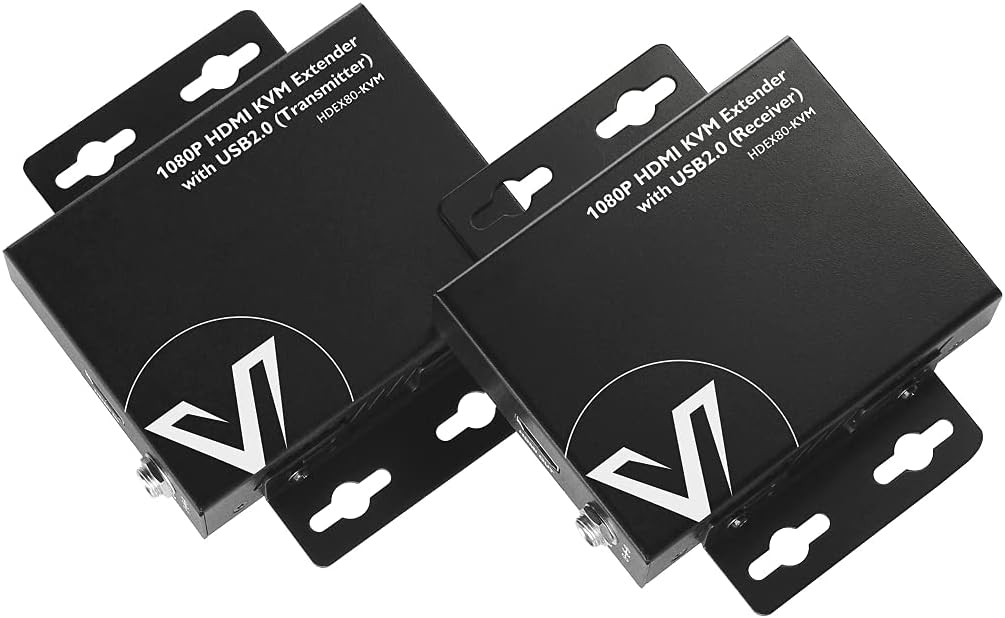
🚀 Extend Your Workspace, Not Your Wires!
The v AV Access HDMI USB KVM Extender delivers flawless Full HD 1080p@60Hz video and USB 2.0 peripheral extension up to 260ft over a single Cat5e/6 cable. Featuring dual USB ports, PoE support, adaptive EQ, and a robust metal casing, it ensures zero signal loss and latency for seamless remote control. Ideal for professional setups demanding reliable, long-distance HDMI and USB extension with easy installation and 12-month warranty support.


| ASIN | B073B84CY1 |
| Item model number | HDEX80-KVM |
| Manufacturer | AV ACCESS |
| Product Dimensions | 9.82 x 2.3 x 7.5 cm; 240.4 g |
E**B
HDEX80-KVM: Games and videos look great with this extender, however, if the screen is busy with small font text, the text becomes noticeably fuzzy with compression artifacts. I'm picky so that's a deal breaker for me. I'm going to instead buy the unit that does uncompressed video. The 4KEX100-KVM video quality is uncompressed and appears perfect. I run a 2560x1440 display at 60Hz. I ran a 50M Cat7 cable. Works great.
R**N
Not often to I grant 4 stars. But the only problems I had with this thing is what is the lack of knowledge base thats publicly available to it. I am in IT, this is what I do. To me, a tech savvy guy... This thing was a pain in the ass. So heres the good and the bad: The good: Easy to setup Works when finished 0 Latency The bad: Lack of publicly available knowledge base regarding this product for troubleshooting USB functionality does not cover usb 3.0, I think it's at 1.0 but I could be mistaken since the last time I checked the specs. I spent hours on the phone with their support trying to get this to work. We eventually discovered that there is only 1 known type of display to HDMI cable that works with this system. which is the UGREEN Display to HDMI cable. The product works! But make sure that you have every bit of detail about what you are plugging into your machine before making this purchase. It does not support usb 3.0, so some of your accessories might not work. Very specific cables are needed under different circumstances.
T**Y
Use to run a 75ft Cat6 between front stage and control booth. My USB cam and USB Audio interface works together just fine, since this thing has two usb ports. All metal housing. Power supply has locking screw for added secure power connection.
M**Y
Purchased the HDEX80-KVM. Was dead on arrival. USB worked correctly, however video through the HDMI did not. Tried both Cat5e and Cat6 cable, with no difference. Both test cables were less than 6' long. I noticed that the build quality seems cheap, and the components are very light and unsubstantial feeling. Incidentally, the module also seemed to run hot. this makes me concerned that even if it did work correctly, it may not last. Looks like i'll be looking elsewhere. ** Update 5/14/18** I spoke with a technician named Ryan, who contacted me hours after I sent an e-mail to tech support following the issues I had with the first module. He was extremely professional and quick to dispatch a second module which arrived a few days later. This one works! The USB seems to have little to no delay and the video at 1080P looks as good as though it were connected locally. I'm using cat6 cable at 50-ish feet with no problem. Also, the issue with the heat on the first module must have been due to the internal issue it had, as the working module does not have that issue. A couple of observations: 1) This will not pass a HDMI CEC signal. This is a niche requirement, and it was not stated to have it... My fault for net checking. 2) i would recommend applying the power to the Receiver module, as it seems to help with higher current draw USB devices. If you are using just a mouse and keyboard, then you should be fine connecting power on either end. Would recommend AV Access to anyone.
E**D
PAY ATTENTION: If you buy the doul monitor cover for your two monitors, DO ONT BUY, I WILL NOT WORK OR WILL BREAK SOON, this is very cheap product which for single monitor could do the job for you but once you plug two monitors it will keep going on and off to black screen as it shows how cheap the product is and no way it can handle two monitors,,. but once you plug our one of the monitors then it works,. it just simply is not what they advertized and they charge you for dual monitor where as it just works with one,. so save ur money either buy the single monitor or go with more expensive brand with decent quality
Trustpilot
3 weeks ago
3 weeks ago