

💿 Archive like a pro, burn like a boss!
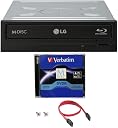
The LG WH16NS40 is a high-performance internal Blu-ray burner delivering 16X write speeds for BD-R and DVD-R/+R discs, equipped with advanced M-DISC technology for archival data storage lasting up to 1000 years. It features a 4MB buffer with underrun prevention for reliable burns and comes bundled with essential installation accessories and a free M-DISC DVD, compatible with Windows XP through Windows 8.
| ASIN | B00KFMCX2Q |
| Additional Features | Blu-Ray Disc |
| Brand | LG |
| Built-In Media | 1pk M-disc DVD, Cable Accessories, Cyberlink Software, Internal Blu-ray Burner |
| Cache Memory Installed Size | 4 |
| Cache Size | 4 |
| Color | Black,Blue |
| Customer Package Type | Box |
| Customer Reviews | 3.9 out of 5 stars 112 Reviews |
| Global Trade Identification Number | 00679113423510 |
| Hard Disk Form Factor | 3.5 Inches |
| Hardware Interface | CD-R |
| Hardware Platform | PC |
| Item Type Name | LG 16x WH16NS40 Internal Blu-ray Writer Bundle with 1 Pack M-DISC DVD and Cable Accessories (Supports CD DVD BD BDXL MDISC) |
| Item Weight | 2 Pounds |
| Manufacturer | Systor Systems, Inc. |
| Mfr Part Number | FBA-WH16NS40-Mdisc |
| Model Number | FBA-WH16NS40-Mdisc |
| Operating System | Windows |
| Optical Storage Read Speed | 16x |
| Special Feature | Blu-Ray Disc |
| Specific Uses For Product | business, personal |
| UPC | 679113423510 |
| Warranty Description | 3 years labor, 1 year parts warranty and lifetime technical support. |
D**N
Everything you need to go BluRay
My first test was to burn a dual layer DVD from an ISO image file I'd created several years ago but was never able to burn on the dual-layer DVD burner I'd initially installed in this system. It worked flawlessly. It will probably be a while before I use the Mdisk capability, but the reported archival capability for long life storage is one of the key reasons I went with this drive. The software that comes with it has the usual "Sure this stuff is okay but you REALLY need to buy this magical upgrade!" beg screens, but read the comparison chart - it looks like most of the "optional" features tagged with footnotes are included in this version. This has an older style Molex power connector, but it comes with an adapter if all your power supply has available is a more modern drive power connection. It also comes with the data cable, mounting screws, and driver disc. It's FAST - the install routine loaded faster than anything I've ever installed from an optical drive. Windows recognized the drive automatically and installed enough default drivers to let the drive read the install disc with specialized drivers and software to make full use of the drive's write capabilities.
C**A
Quick Blu-ray drive!
Great value. The drive is definitely quick. One thing to keep in mind is that the drive will rip at a maximum 8x with dual layer Blu-ray disks (as specified). Another thing to remember is that the drive will almost, if not ever, reach its full 8x rip speed due to the fact that the reader is at its fastest speeds on at the edge of the disc. So far so good, no coasters. As for the included software, I'm on the fence. I tried using the included software... Not a fan. I decided to use VLC (freeware) for the player. As for the burning software, I found Nero to be less clunkier.
R**M
Great Bluray, Fast on read and rip
Great player. Rips and read disks at full speed. Came with software (I did not install as I have no use at this point in time but will at some point in time and will eventually need it) I have not used the MDISK but it did come with one and I must assume it works. I needed no drivers, worked fine in windows 7. It is used in conjunction with a Asus Blu Ray drive that runs at 12x in my desktop and double the speed of the 8x blu ray in my laptop.. The LG is notably faster on read and rip. It plays DVD and CD fine, I have not tried to burn using either of these formats though. Cons: The button is a little funky, does not have a button per say but part of the face plate. It works, no issue, but I prefer a square little button, nothing to be concerned, just a preference. I am very happy with the drive but realize, my usage is limited, I am not burning a bunch of disks with it.
L**N
Beware of Bait and Surreptitious Switch
The LG BD drive seems fine. The included software is CyberLink PowerDVD 10 with LG branding. It does not work well for my use, watching Blu-Ray film disks, fast forward and reverse being nearly non-functional. The package includes and offer to upgrade to CyberLink PowerDVD14 Ultra for $40, a seemingly fair offer. When taking advantage of the offer, I discovered the $40 was bogus, and the cart price was $44. Then after placing the order, I discovered the price charged to my account was $54, nowhere near the advertised price. Since the drive can be purchased without software for about $70, this means I have spent $68 for software that CyberLink sells for $70. I have asked CyberLink to refund the discrepancy. The updated software does a good job of playing Blu-Ray disks, but for DVDs, the touted TrueTheater HD was essentially useless at best and the ability to adjust closed caption's font, size, &c, was not functional. UPDATE: CyberLink denied a refund. I filed a complaint with the Better Business Bureau, and now CyberLink has said it will refund the overcharge plus tax. UPDATE-TECHNICAL: Installed and have been using the Blu-ray player. My Home Theater Personal computer has an Athlon II Dual-Core 3.2GHz and a GeForce GT 610 1GB graphics card (which has full PureVideo® capability) MSI NVIDIA GeForce GT 610 1GB GDDR3 VGA/DVI/HDMI Low Profile PCI-Express Video Card N610GT-MD1GD3/LP , both not exactly extreme performance nor big price tags. After some effort, 1080p 60Hz performance is very good. Some notes: the PowerDVD 14 upgrade does not remove the LG PowerDVD, and must be done manually. The PowerDVD software is "spindly" and will hesitate when Windows® suspects anything else needs be done, resolved by stripping Windows® of all needed programs, processes and services. (For me the worst offender was Canon®'s software for a wireless printer.) PowerDVD's "unique" TrueTheater(tm) is not needed when there is hardware acceleration in the graphics adapter (i.e. nVidia's PureVideo®). The CyberLink package is bloated with unnecessary stuff and over complicated for just watching Blu-ray disks, and spending time watching how-to videos was very useful. Good news, the Windows® Media Player Remote Control successfully controls playback. Except for the overcharge snafu, I would give this purchase 3 stars.
J**Y
LG 16x WH16NS40 Internal Blu-ray = Great Drive, "Bundle" = Terrible
LG 16x WH16NS40 Internal Blu-ray Writer Bundle with 1 Pack M-DISC DVD and Cable Accessories Not much of a "Bundle". What you see in the picture is what you get and nothing more, drive, screws, cable, and 1 M-Disk. There is no software of any kind, no drivers, no nothing. Not even trial software. LG drive is great and works well, but that is the end of it. You must provide all of your own burning software and if needed download the drivers from LG's site. Not a big deal if you are computer literate, but save yourself some money and get the same drive that is retail package with the burning software and no M-Disk. This is not a retail package/bundle at all it is OEM which means that it is a multi-pack that the vendor purchased in bulk and then separates out and sells units individually. Nothing wrong with that, but the description is so poor and needs to state that it is not a retail package or bundle. Would not purchase from seller, Produplicator again. Vendor is charging $20 more for the drive and you are getting less in return.
M**4
It's O.K.
The G in LG is for Goldstar. They made the worst TV's in the early 90's, I used to repair them. More recently I bought a home theater system made by them. It was a refurb that they would not support, it lasted a year. I'm not sure why I bought this one. I don't have a need to store 100 GB of anything on a disc. It does present some interesting possibilities though. I downloaded some Blu-ray player software and was able to watch a Blu-ray movie. So the drive works. I loaded the software that came with it from the drive and it loaded ok. But to play a movie with the software is a different story. When I save up the money I will look for something that works to display my movies. I basically bought this to test Netflix blu-rays. I seem to get about 90% from them that I have problems viewing. The disc that comes with the drive stores 100GB and LG claims is archival quality. I don't do anything to keep or is worth having around for a 1000yrs. My hope is that this drive lasts me more than a year.
B**Y
Had it since 2016 no issues works great.
Well got mine in 2016 no issues since. I have a gaming pc that is also my main home theater connected two to 4K TVs one 75” lg nanocell and a 65” curved 4K Samsung and a 106” 1080gt derby projector so I have a lot of variety on what to stream. So I went and used the cyber dvd upgrade when I started to watch 3D and needed the atmosphere audio since I am running 1080ti sli on my rig so enjoying my 4K hdr content also compared to other units this is great. It’s fast and durable. So software is an issue but I paid under 85 for it. It’s well worth it. Plus it’s quite. Also just today I ordered the dvd drive cleaner never done that lol. But some newer drives with same or higher specs are not near this price.
M**Y
VERY easy swap out of old top new
So far, so good. Very easy to swap out in my pc. Very, very much easier than someone would think. Easy out of the old one, then, zip zap in worth the new. Not as easy as plugging in a thumb drive, but, not a whole lot more. After looking on YouTube for how to video, all fear of the diy job was dwindled and it took about 15mins to complete the change, then answer a few questions as it installed itself, ram the dvd for the extra Gosford and i was up and running. .
Trustpilot
1 month ago
2 weeks ago