


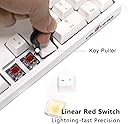
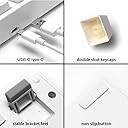
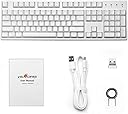
Product description Itโs time to switch to a mechanical keyboard for office work and typing. The Velocifire VM02WS features Red Switches, which can give you great hand feels while typing. Ultra-durable keys tested to 50 million keystrokes. The force at the beginning and the end of each stroke is nearly identical which makes the red switch โsmoother" and "faster". Red Switch is the best-fit switch using in Office. Universal Compatibility Compatible with Win10, Win8/8.1, Win7, WinXP, Windows Vista, and Linux, also could be used with Mac OS but should know there are some different function keys. Endurance Battery Life Quick charging with a universal USB-C cableโ realize typing during charging. Charging 4hrs and getting up to 100 working hours of battery life on a single charge in a non-backlit usage. USB-C & Double modes Charging and typing process at the same time, with a 5V and 1A charger (Not included). Tips: If charging fails to work, please try another Type-C charging cable first. Review: Add me to the list of fans! - I have been banging on this a few days. Here are my thoughts: Coming from a Logitech K840 mechanical, which I like very much. But, with a two level desktop and keyboard drawer, I wanted a wireless mechanical KB so I could move it to the desktop for extended typing (such as this review). I am not a reward reviewer. I pay my hard earned cash for desertcart products. Found this Velocifire VM02WS searching desertcart, saw some good and bad reviews, mostly positive. Then I saw desertcart had it tagged with a 10% discount coupon. I poised my finger over the "Buy" button. Then, I thought a visit to the Velocifire US seller website wouldn't hurt. Once there, the seller offered me an additional 15% discount. SOLD VERY quick two day delivery. Long skinny desertcart box, inside is a very plain, no-nonsense brown cardboard package with only the word Velocifire on it. Minimal waste on packaging, a keyboard, USB-A to USB-C cable, very rudimentary User Guide, and strong simple key puller. Plug USB between computer (A) and the very center back (C) of keyboard. Not mentioned in manual, but an orange LED lights up just above the spacebar to indicate state of charging. The manual illustrates some key combinations very clearly with a picture of the keyboard and circles indicating the keypresses needed: For three different saved macros. How to poll the USB-A receiver key. How to turn on and off the clear white LED backlights. How to lock the Win key. These are all possible with the addition of a new (to me) "Fn" on the bottom row between the right Alt and Menu keys. So I guess this is actually a 105-key board. The backlight LED shines through the double capped keys so there are no decals to wear off. They are brightly illuminated, and I guess the font may be funny, but I am a touch typist and all I want to look down for is reassurance on some of my more seldom used keys. The nubs for the "home" keys are very slight, but noticeable to your sensitive pointer fingertips when you look for them. I have to say: I LOVE the stroke and clicky noise of these keys! I am in my sixties and grew up with IBM Model M - let me HEAR them keys so I know I hit them! :D I like the action as much ... no, better ... than the wired Logitech I just gave up. If you want QUIET, you can order additional rubber "o" rings pull the keys and mush them right out of hearing! The weight and heft of the keyboard speaks of strength and probably longevity. Time will tell. But part of what makes my computer do what I tell it to is the confidence that I am in command. This Velocifire gives me that feeling. I also have not exhausted the battery yet so I cannot testify how long it lasts. But the charge cycle was only about an hour. I am *delighted* to find a new supplier of quality accessories. I give this Velocifire VM02WS Five Stars mostly on the strength of a GREAT VALUE: A fine quality product at a very fair price. Just try to find another fullsize wireless mechanical keyboard to compete at this price level! Review: Great option for less money - I was hesitant to buy a cheaper mechanical keyboard (and this is truly one of the cheapest options available) but I'm so happy I did. Everything about this model feels more expensive than it was. It's nice and heavy, with rubber feet that plant it solidly on the wood of my desk with no wobbling. The double shot PBTs feel great (although I did switch them out for blanks because I prefer no imprint.) The brown switches have been a dream - I am a data analyst who types 105 wpm, and having a quiet but tactile typing feel has been perfect for the hours I spent hammering away. The wireless connectivity has also been A+ - I popped the nano into my KVM switch and have had 0 issues since (another plus: the reviews for my KVM said that a few people with mechanical keyboards were unable to get them to register, but no problems from this model!) The C charging port is awesome. Like most people, my phone has a C port too, so whenever my keyboard dies I just pop the cable out of my fast charger and plug it in. As the description notes you can continue using it while it's charging, and I typically go several days (sometimes the full week) on a single charge. It doesn't warn you before it dies, but since the charging is so unobtrusive I have not had issues with that. Overall, I am extremely satisfied with this keyboard, a wonder for the price. My boyfriend has been gaming with a Razer for awhile now, and once I got this he started playing around with it when I wasn't at my desk and has become a little obsessed. I highly recommend this for anyone looking for a clean typing experience and dependable useability.





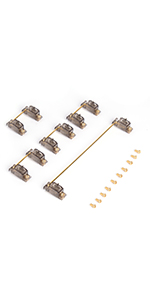

| ASIN | B08L8QSTLY |
| Additional Features | Backlit, Ergonomic |
| Antenna Location | Gaming |
| Best Sellers Rank | #117,086 in Video Games ( See Top 100 in Video Games ) #4,700 in PC Gaming Keyboards |
| Brand | VELOCIFIRE |
| Built-In Media | USB Cable |
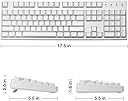
| Button Quantity | 104 |
| Color | White VM02WS Red Switch |
| Compatible Devices | PC |
| Compatible Operating System Family | Linux, MacOS, Windows |
| Connectivity Technology | Mini USB |
| Customer Reviews | 4.0 out of 5 stars 928 Reviews |
| Enclosure Material | Plastic |
| Hand Orientation | Ambidextrous |
| Item Weight | 2 Pounds |
| Keyboard Backlighting Color Support | Single Color |
| Keyboard Description | Mechanical |
| Keyboard Layout | QWERTY |
| Manufacturer | VELOCIFIRE |
| Model Name | VM02WS |
| Number of Keys | 104 |
| Power Source | USB Powered |
| Recommended Uses For Product | Gaming |
| Special Feature | Backlit, Ergonomic |
| Style Name | Contemporary |
| Switch Type | Linear |
| Unit Count | 1.0 Count |
P**F
Add me to the list of fans!
I have been banging on this a few days. Here are my thoughts: Coming from a Logitech K840 mechanical, which I like very much. But, with a two level desktop and keyboard drawer, I wanted a wireless mechanical KB so I could move it to the desktop for extended typing (such as this review). I am not a reward reviewer. I pay my hard earned cash for Amazon products. Found this Velocifire VM02WS searching Amazon, saw some good and bad reviews, mostly positive. Then I saw Amazon had it tagged with a 10% discount coupon. I poised my finger over the "Buy" button. Then, I thought a visit to the Velocifire US seller website wouldn't hurt. Once there, the seller offered me an additional 15% discount. SOLD VERY quick two day delivery. Long skinny Amazon box, inside is a very plain, no-nonsense brown cardboard package with only the word Velocifire on it. Minimal waste on packaging, a keyboard, USB-A to USB-C cable, very rudimentary User Guide, and strong simple key puller. Plug USB between computer (A) and the very center back (C) of keyboard. Not mentioned in manual, but an orange LED lights up just above the spacebar to indicate state of charging. The manual illustrates some key combinations very clearly with a picture of the keyboard and circles indicating the keypresses needed: For three different saved macros. How to poll the USB-A receiver key. How to turn on and off the clear white LED backlights. How to lock the Win key. These are all possible with the addition of a new (to me) "Fn" on the bottom row between the right Alt and Menu keys. So I guess this is actually a 105-key board. The backlight LED shines through the double capped keys so there are no decals to wear off. They are brightly illuminated, and I guess the font may be funny, but I am a touch typist and all I want to look down for is reassurance on some of my more seldom used keys. The nubs for the "home" keys are very slight, but noticeable to your sensitive pointer fingertips when you look for them. I have to say: I LOVE the stroke and clicky noise of these keys! I am in my sixties and grew up with IBM Model M - let me HEAR them keys so I know I hit them! :D I like the action as much ... no, better ... than the wired Logitech I just gave up. If you want QUIET, you can order additional rubber "o" rings pull the keys and mush them right out of hearing! The weight and heft of the keyboard speaks of strength and probably longevity. Time will tell. But part of what makes my computer do what I tell it to is the confidence that I am in command. This Velocifire gives me that feeling. I also have not exhausted the battery yet so I cannot testify how long it lasts. But the charge cycle was only about an hour. I am *delighted* to find a new supplier of quality accessories. I give this Velocifire VM02WS Five Stars mostly on the strength of a GREAT VALUE: A fine quality product at a very fair price. Just try to find another fullsize wireless mechanical keyboard to compete at this price level!
A**R
Great option for less money
I was hesitant to buy a cheaper mechanical keyboard (and this is truly one of the cheapest options available) but I'm so happy I did. Everything about this model feels more expensive than it was. It's nice and heavy, with rubber feet that plant it solidly on the wood of my desk with no wobbling. The double shot PBTs feel great (although I did switch them out for blanks because I prefer no imprint.) The brown switches have been a dream - I am a data analyst who types 105 wpm, and having a quiet but tactile typing feel has been perfect for the hours I spent hammering away. The wireless connectivity has also been A+ - I popped the nano into my KVM switch and have had 0 issues since (another plus: the reviews for my KVM said that a few people with mechanical keyboards were unable to get them to register, but no problems from this model!) The C charging port is awesome. Like most people, my phone has a C port too, so whenever my keyboard dies I just pop the cable out of my fast charger and plug it in. As the description notes you can continue using it while it's charging, and I typically go several days (sometimes the full week) on a single charge. It doesn't warn you before it dies, but since the charging is so unobtrusive I have not had issues with that. Overall, I am extremely satisfied with this keyboard, a wonder for the price. My boyfriend has been gaming with a Razer for awhile now, and once I got this he started playing around with it when I wasn't at my desk and has become a little obsessed. I highly recommend this for anyone looking for a clean typing experience and dependable useability.
G**N
Solid keyboard, backlight severely lacking
If you like mechanical keyboards you'll like this. It's solid and at least twice the weight of any other keyboard I've used. USB C is a nice touch. My only real complaint is that the backlighting is basically non existent. There's only 1 brightness setting and it's pretty dim. It will quickly turn off automatically with no way to leave it permanently on, which is a must for me. The manual says it turns off by itself after 1 minute, but it's closer to 30 seconds.
T**3
Great keyboard...great switches and dual connectivity...great
This is a great wireless&wired mechanicle keyboard with solid build quality with enough weight to be solid and just heavy enough without being tinny with bottoming out metallic sound on the keypresses as its casing is think high quality plastic with simply metal weights added for heft without making it noisy...the brown(not mx switches but still good switches that dont cost a small fortune each) these switches are soft on the bottem with no aggressive click but just a subtle maybe tenth of a gram of release pressure for that very slight tactile response with the whole mech is just springy enough to have some resistance to pressing it's a great balance and a unbelievably well optimised switch for how cheap the whole product is...now I havnt had this keyboard long enough to determine its battery life but i do own this exact model without the number pad and iv had that one over 6months now and iv only had to charge it a few times becase the dual woreless/wired mode ends up being more of a convenience feature than anything else and actuly means I rarely need this to be wireless so the once in a while when I need to log into my server directly and not from a remote secure shell I can simply unplug my USB and I'm evidently connected to the terminal and just have to switch my monitor inputs I use this like this daily not just once in a while this is not an advertised feature or at least not directly but its is hard to express over a written review how invaluable this unintended future has been and for that no matter how long the battery may last off a single charge if I dont ever need to use it for more than an hour wirelessly I dont see me ever needing to crack this guy open to see if I can replaice the battery pack but as far as I can tell with the backlight timing out after only a few seconds on battery it can last for close to a week with maybe 3 to 4 hours daily use but I can imagine the backlight is going to have a bigger effect on total battery time and giving everything I know about the version of this with no nuberpad its probebly safe to extrapolate some of these conclusions to the one with a number pad o and a plus its has a number pad lol cant easly express how much i missed that using my smaller more portable numberpadless model lol but so far I love this model just as much as I do my other one and will likly just use the number pad less model for my htpc inwich I will likly get a much better idea as to it's real long term battery life and if anything changes from my previous conclusions I will simply update this
E**I
Works great, solid heavy keyboard of the old Northgate heft and feel (removed 1 star)
I am a long time typist. My first keyboard was a solid clicky Northgate Keyboard. That thing lasted for years. This keyboard is HEAVY due to the built-in battery. It is solid and the rubber feet keep it in place. I have other Brown Switch Keyboards and when I needed a new wireless keyboard I wanted another mechanical Brown Key keyboard. When the keyboard arrived, I allowed it to fully charge and then I used the on/off switch on the bottom to turn it on. I tried in wired mode first. Windows 10 found the keyboard and installed whatever generic drivers was required. The keyboard shortcuts to like the calculator all worked. Next I tried in wireless mode. I installed the dongle and it did what it needed to do. Everything worked. So, the typing feel is great, the setup is easy and it works. Now the cons. - I have no idea if I can record just one macro or many macros. The manual is useless on this topic and the keystroke combo to record a macro is overly complicated. So bad instructions and bad activation to record. - Not the fault of the company, but it sucks that there is no single universal standard for wireless devices. If you have a logitech mouse you are locked into a wireless logitech keyboard unless you use two dongles. I had a spare usb port on my docking station so thankfully I could use that USB port. Just be aware, for those that do not know, logitech has a proprietary protocol. - They DO NOT use Cherry switches, these feel good but no idea how long they will last. My other Cherry Switch Keyboard lasted a VERY long time. I may change my review if this keyboard has a short life The keyboard does everything I need and that is good enough for me. We will see how long it lasts as I have had bad luck with off brand products. Th only thing I would change is to have the caps lock LED on the actual caps lock so it it more obvious if it was accidently pressed. Also, the macro key combo is just too complicated Fn+Ctrl+Q+W+E and I have no idea if that is for one macro or if I can record more than one. So confusing. If you need macros, find a different keyboard. UPDATE: You can in fact create 3 macros. Each assigned to the Q, W, or E key which is annoying. Also, there is NO battery indicator. No sound, no flashing, no LED to tell you that you battery is about to go dead. The battery goes dead and you have no idea. You must then remove the dongle and plug in the cord to so you can use the keyboard again. Not a show stopper, BUT very annoying. There is a light on the space bar that is red when charging. If they just add another LED that is yellow that would go on or blink when the battery is about to run out it would be much better. This is annoying because with other wireless keyboards you just replace the battery and go, with this one you if you do not have a free port you need to unplug and then plug in the wire. [EDIT] 9 months after purchase, the keyboard will no longer take a charge. It only works by being plugged in. Changed my review to 1 star. No way should this happen. It was while it worked but now it is going into the trash where it belongs.
T**N
Cheap starter mechanical keyboard
I was unsure about the hype around mechanical switches and decided to get this one when looking for a new wireless keyboard. Pros - cheap price point, good mechanical switch "feel", wireless connection was consistent and easy to use. Cons - Durability - battery and keys failing after 15 months, ergonomics Details: It was a great, cheap starter keyboard but after 15 months, it's starting to show its pricepoint and lack of durability. The battery no longer works and requires it to be plugged in all the time and now key presses are starting to register inconsistently. I like the feel of the keys, but the board sits up higher than I'd like and isn't very ergonomic. I got what I wanted out of the keyboard but do think the durability issues are disappointing as that's one of the perks for mechanicals.
B**R
LOVE IT!! ...just know that there's an On/Off switch is on the bottom.
Before there were "quiet" keyboards, they were all mechanical - unless you had a membrane keyboard, but those don't count. I loved my old keyboards but they were not USB and I didn't want to pay the high price for a new, mechanical keyboard. I'm not a gamer, I just like that tactile feedback and positive sound as I type. But then I found this keyboard by Velocifire! It has a heavy, solid feel. Of course, tactile feedback and sound. Wireless and BACKLIT. It ticks all the boxes for me. The only problem was that I didn't notice the on/off switch on the bottom of the keyboard until just now. It's not even mentioned in the user guide. When the charging cable is plugged in, the power remains on. After being on the charger for a bit, the light on the space bar went from red to white. I unplugged the keyboard to use it wirelessly and it would not work. So, honestly, I was just about to return it. As I was writing up the return reason on Amazon, I started realizing that I like this keyboard so much that I think I'm going to keep it, and just leave it plugged in all the time. I mean, at this price, it's even a good deal as a wired mechanical keyboard. So I gave it one more inspection and found the On/Off switch under it! Flipped that baby to ON and I'm working!! So I just left the returns page and changed over to a raving review! I was so excited when I got it that I never even flipped it over - I just put it on my desk, plugged in the charger and started using it. As for my ratings.... Ergonomics: This is not really an 'ergonomic' keyboard, per se; however, it's really easy and comfortable to type on. Gaming: I'm not a gamer so I couldn't rate it as a gamer. But my son is a game and he's jealous, so that must be really good. Battery Life: It seems pretty good so far. It's been off the power for almost 24 hours (unused) and it's working now. We'll see how it goes when I use it all day. For my needs, I only need about 4-5 hours of backlight - so I'm sure I'll be fine. I'll update my post if this is an issue. My setup: I'm using the Velocifire keyboard and a Logitech mouse in a KVM switch with 4 computers - 2 Windows laptops, 1 Ubuntu server, 1 Ubuntu laptop. No issues. Thanks!
D**E
Feels nice but works poorly.
The home keys (F, J, Num 5) have insufficiently raised marks. This makes it slow to find the home keys, which is vital for touch-typing. "Brown" switches feel good, but they activate near the top of their stroke, rather than closer to the bottom as they should. The result is that the keyboard feels great but it is far too easy to mistype. That defeats the purpose of buying a mechanical keyboard. Battery life is nowhere near the claimed 90 hours (backlit). It is more like 10 hours (estimated). There does not appear to be any indication when the battery needs recharging. It just types until it stops. That's a bad plan with lithium batteries -- it suggests that the battery may just brick someday. The backlight is nice when it works, but you have to enter a keystroke to wake it up when it is sleeping. There is no way to wake up the (sleeping) backlight without transmitting a keystroke to whatever app is running. Combined with the short-ish sleep timeout, this is frustrating in low light. Overall, this is an excellent concept that looks and feels nice. But its real-life function is below average for any keyboard. Even $20 wireless keyboards work better. Unfortunately.
E**S
Does not work wirelessly
after one and half months the keyboard does not work on wireless and now I have to connect it all time while using.
O**V
Bastante bien.
No soy pedante con los teclados asi que posiblemente no se de que este hablando, pero he usado el teclado por unos meses y hasta ahora es el mas comodo que he usado, aparte el taka taka me hace sentir/verme productivo aunque solo este escribiendo reseรฑas en amazon.
E**E
Solid mechanical keyboard (UPDATED: Wireless now works)
This is my first mechanical keyboard. My friend kindly lent me her mechanical keyboard to try out and I fell in love with the tactile feel of the mechanical keyboard. I knew that I wanted a full sized keyboard, and I very much prefer one that is wireless. It wasn't that easy to find a wireless full sized mechanical keyboard that doesn't cost an arm and a leg, but this purports to be it. Even better, it is in white which fits the colour scheme of my home office set-up. The keyboard is awesome (and because it uses brown switches, quieter than the one I borrowed from my friend which makes this much more suitable for zoom calls), but I am disappointed that I cannot seem to get the wireless function to work. UPDATE: I have figured out how to get the wireless function to work - there is a tiny little switch on the bottom of the keyboard, and I just needed to flip the switch from "off" to "on". This wasn't in the manual so I completely overlooked it.
Trustpilot
2 weeks ago
5 days ago