We remain fully operational. Our teams are working around the clock to ensure your deliveries continue safely.

DOWNLOAD THE APP


Copyright © 2025 Desertcart Holdings Limited
DOWNLOAD THE APP



Buy anything from 5,000+ international stores. One checkout price. No surprise fees. Join 2M+ shoppers on Desertcart.
Desertcart purchases this item on your behalf and handles shipping, customs, and support to Croatia.
🚗 Upgrade your BMW’s brain — smarter, faster, sharper!
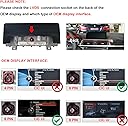
The PEMP F30 Android Screen is a direct replacement for BMW F30-series NBT CIC units (2012-2017), featuring a Qualcomm Snapdragon 625 8-core processor, 4GB RAM, and 64GB storage running Android 10. It boasts a 10.25-inch 1920x720 HD IPS touchscreen, supports wireless CarPlay and wired Android Auto with OEM Bluetooth sound integration, and includes built-in 4G LTE and dual-band WiFi for seamless connectivity. Designed for easy installation and enhanced multimedia functionality, it transforms your BMW into a modern smart car hub with access to apps like Google Maps, YouTube, and Spotify.


| ASIN | B08VHVSHY1 |
| Audio Output Mode | Stereo |
| Audio Output Type | Bluetooth |
| Best Sellers Rank | #13,090 in Electronics ( See Top 100 in Electronics ) #106 in Car Audio Receivers |
| Brand | PEMP |
| Built-In Media | GPS and 4G antenna |
| Color | Android 10 4+64 NBT |
| Compatible Devices | iphone and adroid phone |
| Connectivity Technology | Bluetooth |
| Connector Type | USB |
| Control Method | Touch |
| Controller Type | Android |
| Customer Reviews | 4.3 4.3 out of 5 stars (112) |
| Format | WMA |
| Item Type Name | car entertainment |
| Item Weight | 2.1 Kilograms |
| Manufacturer | N \ A |
| Model Number | AL-5213 |
| Number of Channels | 4 |
| Other Special Features of the Product | Built-In Bluetooth, Touchscreen, Use OEM Bluetooth get the Sound |
| Output Power | 50 Watts |
| Output Wattage | 50 Watts |
| Supported Internet Services | Spotify, YouTube |
| Surround Sound Channel Configuration | 4.0 |
| Video Encoding | MPEG-4 |
| Warranty Description | A. Free returns within 1 month (contact Amazon Customer Service) B. Warranty for non-artificial reasons within 1 year (but you need to bear the cost of sending back and forth in the United States), C. Repairs are provided after 1 year, in addition to paying for postage within the United States, additional parts replacement costs and labor costs are required. |
| Wattage | 50 watts |
| Wireless Technology | 4G |
T**W
Good replacement screen
I decided to write this review to help people out in case they had some unanswered questions. I have an F33 which is the convertible version of the F32. it's a 2015 428i. It's also fully loaded and I didn't see a lot of answers to questions I had 1st off the packaging is really nice. they include a pry tool that was helpful but I already had my own. everything on the wiring harness was nicely labeled and there was plenty of instructions that will take care of most of your needs and questions. install wasn't too bad. the worst part is removing the trunk interior to disconnect the battery but thats mostly just an issue with the convertibles. there are 10 screws total to remove, they hardest will be the 2 for the screen itself since it's above the AC vents and recessed in. having your own torx screwdriver set makes it a lot easier. also having fishing tape to run the Antenna and GPS is very helpful. the biggest issue I had was getting all the wiring harnesses to fit behind the main CPU. the extra wires made it tight for me. I know I have wires already from the videos since my car is fully loaded and I didn't need to add the 3rd party cameras or anything. Because of that, all I had to do was plug in the main harnesses and swap the fiber optic cable. I didn't need to hook up any aux, it works and switches automatically. I didn't need to wire any UBS either since the car already has them built in. using the device, I seen complaints about the boot up time. If you have it boot to android, it takes about 30 seconds. I set it to boot to OEM and it's up in like 5 seconds, no different from the OEM one. even the usage is 100% no different from the OEM one. all the buttons on the steering wheel work the same and the console. you can't use the touch screen in OEM, if you touch the screen it'll load up the android system. in regards to the android system, you can't use google maps without getting a 4g sim card and data plan. the GPS antennae works but google maps needs internet. same with the music. so you have 2 options if you want the full functionality, option 1 is to get a 4g sim card and data plan. option 2 is to use your phone (if you have an android phone) while using my phone it's all wireless and powered by the phone. ther eis a pre loaded app called zlink. you need your phone connected and paired to it and wifi on and android auto will work perfectly from the phone itself, however not all the buttons work in the car anymore. you have to use the touch screen. the cameras work but the pemp itself changes to aux for everything so android can operate for your music and such. as cool as the android stuff is, since my car was already fully loaded I just set it to boot up to OEM and use the car like I always did. I only purchased this because my OEM screen all of a sudden got a black circle burned into it which seems to be a somewhat common problem. the new screen looks great but it is more reflective and glossy then the OEM one. If your car doens't have all the options, the android PEMP system adds a lot more features and allows you to install additional cameras at a fraction of the OEM price
B**X
(EDITED) Connectivity issues mostly solved. Still not strong but works well.
EDIT: I had some issues with connectivity where I couldn't get my phone to pair. Solving that is detailed at the end. Pictures show the Android screen and Prime Video playing. Carplay works fine but the picture I have of it shows my address so not posting that one. Screen looks nice and it was snappy and touch sensivity is decent. It would be 5 stars except for two issues: 1) connectivity is not great, 2) brightness is too low, and 3) sound is low. Connectivity: Even after fixing my issues, sometimes the audio will crackle on Carplay. It's like the connection gets partly interrupted. Brightness: By using Bimmercode to override iDrive's "dim screen at night" function and turning the brightness all the way up, I was able to get the screen to a tolerable level during the day. There may be more to tweak in settings because sometimes when I turn off the engine, the screen brightens up a little more before shutting off. Weird. However, it's mostly usable if you're not using an app in "dark mode" during the day. (UPDATE: This is heavily dependent on your lights. If my lights are off or I just have parking lights on, the system knows it's daytime and keeps the screen brighter. If I turn on my headlights, the screen dims. Unfortunately, sometimes you want your headlights on during the day for safety, even if it's bright out, and then the screen will be kinda dim but still usable.) Sound volume: It's just too low. Have to crank it up on the volume knob. Still sounds good, but if you crank too loud, you can hear feedback noise. Microphone: BMW has a great built-in microphone for calls. Unfortunately, you lose this when you have this screen. There's just a tiny pinhole mic at the top of the screen which you literally have to yell into for people to hear you. I will update if I find a way to use a different mic. Solving connectivity issues: Tl/dr, I was able to get the bluetooth and the wifi both to work correctly, but it took some time to figure out. 1) Wifi to your home network *will not work* while your iPhone is trying to connect to Carplay. If you attempt to turn off Bluetooth or select a different WiFi network (i.e., select home wifi to override the Carplay connection), it will screw things up. 2) Contrary to the instructions from the manufacturer, I left Blutooth *enabled* in iDrive. But I removed all Bluetooth devices. 3) If you can't get Bluetooth to sync, get into the Android developer options, open the task menu, and reset the Android bluetooth process (if you don't know what this means, this might be too advanced for you). 4) Once your phone is paired and Carplay is working, if you need to access your home wifi network to get updates for your Android apps, turn off your car, power off your phone, and then turn on your car and use PEMP screen to connect to your home wifi network.
Trustpilot
3 weeks ago
1 day ago