🚀 Power, Ports & Performance — All-in-One Hub for the Modern Pro
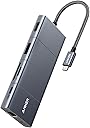
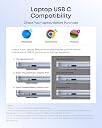
The Anker PowerExpand 11-in-1 USB-C Hub is a compact, aluminum-encased powerhouse designed for professionals who demand versatility and speed. Featuring 11 ports including HDMI, DisplayPort, USB-C, USB-A, Ethernet, and SD/microSD slots, it supports dual-monitor setups up to 4K@60Hz single or 2K@60Hz dual displays. With 100W pass-through charging and data transfer speeds up to 5 Gbps, it ensures uninterrupted productivity and seamless connectivity across MacBooks, iPads, and Windows laptops.



| ASIN | B08NDGD2V5 |
| Best Sellers Rank | 52,326 in Computers & Accessories ( See Top 100 in Computers & Accessories ) 792 in USB Hubs |
| Brand | Anker |
| Brand Name | Anker |
| Colour | Gray |
| Compatible Devices | Tablets |
| Compatible devices | Tablets |
| Customer Reviews | 4.2 out of 5 stars 2,211 Reviews |
| Data Transfer Rate | 5 Gigabits Per Second |
| Enclosure Material | Aluminum |
| Hardware Interface | 3.5mm Audio, Ethernet, HDMI, USB |
| Hardware interface | 3.5mm Audio, Ethernet , HDMI , USB |
| Item Dimensions L x W x H | 13.7L x 5.7W x 1.4H centimetres |
| Item Type Name | Anker PowerExpand+ 11-in-1 USB-C Adapter Hub, with 4K @ 60Hz HDMI and DP, 100W Power Delivery, USB-C and 3 USB-A Data Ports, 1 Gbps Ethernet, 3.5 mm Audio, microSD and SD Memory Card Reader |
| Item Weight | 0.29 Pounds |
| Manufacturer | Anker |
| Manufacturer Part Number | AK-194644064310 |
| Model Number | A83850A1 |
| Number of Ports | 11 |
| Operating System | Mac OS X 10.6 Snow Leopard, Windows 10 |
| Product Features | Continuous charging, HDMI️, Pass Through Charge |
| Special feature | Continuous charging, HDMI️, Pass Through Charge |
| Total USB Ports | 4 |
| Total USB ports | 4 |
| UPC | 194644064310 |
B**.
Excellent product
Anker products always deliver. Good quality and does what it needs to. Not the cheapest but good value for money.
R**T
It works, warmly
I think this is made of plastic, so it runs warm. I made the mistake of plugging the PD cable into the wrong socket, so my laptop failed to charge - but this hub worked perfectly running an hdmi monitor, a usb3 hub with cameras plugged in, usb2 Bluetooth and keyboard... all running from the laptop power - so these devices aren't dependent on the PD input. Naturally the laptop ran out of battery and I learned my lesson. Nothing broke, I just put the power into the correct socket and the pass-through charged the laptop as if it was plugged in directly. I've only had it 2 days, I hope if lasts, but so far so good. I only plug one cable into the laptop now, instead of four, much easier to come and go.
R**T
Works with the steam deck, but little else
Bought this for the steam deck and it works great, but refuses to work on 2 other laptops which work fine with another dock. Price is a bit steep for the number of ports, but Anker isn’t the new kid it once was and is starting to define prices rather than undercut competitors.
A**C
Very competent little dock, one caveat
Great little deck - replaced an off-brand knock-off that stopped working after 3 months. Didn't see the need to go full CalDigit at x3-5 the price of this Anker as a replacement. One caveat - you can use either the DP **or** the HDMI port on an (intel) mac, but not both at the same time. No idea if it's the same on apple silicon, but i would assume so given the general Thunderbolt multi-display limitations.
M**H
Stopped working
Stopped working or charging my tablet after a few months. Be wary of such issues and the warranty window of 18 months. Simpler and cheaper alternatives abound
G**N
This ANKER Hub [AH] actually ADDS 2 USB-C Ports to MacBook Pro M1 2020
The AH has 2 Female USB-C Ports + 1 Male USB-C Plug on a Short Lead. 1. Plug the Short Lead into the PD USB-C Port, nearest to Left Hinge Corner, of the MacBook Pro M1. 2. Plug the Power Supply USB-C Plug into the AH PD USB-C Port. 3. This leaves 1 vacant USB-C Port on the MacBook and 1 vacant USB-C Port on the AH. 4. A Large Screen can be attached by either HDMI or DisplayPort. 5. Cards can be read by the dual slot Card Reader. In my case the vacant 2 vacant USB-C Ports are used for connecting 2 Crucial X8 2TB SSDs, one for Time Machine and the other for DATA BackUp. The 3 USB ports are usually connected to:- DVD Drive; Unifying Receiver-Logitech MX Ergo wireless Trackball; PowerBreathe/Lung Exerciser. Apart from one minor glitch everything, mentioned above, functions as expected without conflicts. My first attempt at expanding the MacBook Pro M1 Ports resulted in: A. Conflict between Logitech Trackball and the Crucial SSDs, the Cursor used to become jerky and ultimately freeze when the SSDs were connected via USB. B. MacBook M1 Screen Brightness Controls disappeared from System Preferences > Display > Display Tab and Control Centre. In the latter the Control Slider Handle disappeared, with the AH only the Control Centre problem remains. I am very pleased to have found this Port Expansion GEM, and do not hesitate to recommend it.
J**S
Perfect - as usual from this brand
Having had massive problems with packet storms caused by other makes while the host sleeps, I turned to Anker - a brand I have always found to provide excellent products at the right price point. This hub, while not as neat-looking as some competitors, performs perfectly. It has the right balance of features and size, and is at a keen price point. I have no hesitation in recommending it.
M**L
Useful hub
The hub was ideal for my purpose. I've not used all the ports at once, regardless it's a sapcesaver and convenient for my use.
H**F
etui
W opisie produktu widnieje informacja że jest dołączone etui podróżne co jest nieprawdą
D**1
Works fine, as expected.
I have been using it for a few months, connected to surface pro, and it works fine.
S**A
Does the job..but expensive
Its a great USB-C hub. But very expensive!!
A**N
Keeps flickering
Hdmi port keeps flickering the monitor.
H**R
Goed product, fijne snelle poorten.
Werkt goed samen met macbook air m1.
Trustpilot
3 weeks ago
5 days ago