


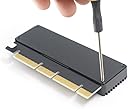
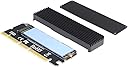


NVME Adapter PCIe x16 with Heat Sink, M.2 SSD Key M to PCI Express Expansion Card, Support PCIe x4 x8 x16 Slot, Support 2230 2242 2260 2280, Compatible for Windows XP / 7/8 / 10
Details
- BrandGODSHARK
- Compatible devicesPersonal
- Hardware interfaceUSB
- Item weight0.09 Kilograms
- StyleModern
Details
- BrandGODSHARK
- Compatible devicesPersonal
- Hardware interfaceUSB
Description
🚀 Unlock NVMe power anywhere — because your speed should never be limited!
- THERMAL MASTERY - Built-in heat sink and thermal pad ensure your SSD stays cool under pressure, maintaining peak performance during heavy workloads.
- BLAZING NV ME SPEEDS - Experience lightning-fast 3200+ MB/s read and 1500+ MB/s write speeds that leave USB interfaces in the dust.
- CROSS PLATFORM READY - Compatible with Windows XP through Windows 10 and Linux, making it a versatile choice for any professional environment.
- EFFORTLESS INSTALLATION - Includes screwdriver and screws for a hassle-free setup—perfect for pros and DIY enthusiasts alike.
- UNIVERSAL PC IE X 16 COMPATIBILITY - Seamlessly upgrade your setup with support for PCIe x16 slots, unlocking full NVMe potential even without an M.2 motherboard slot.
The GODSHARK NVMe Adapter PCIe x16 transforms your PCIe x16 slot into a high-speed NVMe SSD expansion, delivering up to 3200+ MB/s read and 1500+ MB/s write speeds. Equipped with a heat sink and thermal pad, it ensures optimal cooling for sustained performance. Compatible with multiple M.2 sizes (2230 to 2280) and supporting Windows and Linux OS, this adapter is the perfect upgrade for professionals seeking to maximize storage speed without motherboard limitations.
Specifications
| Asin | B07R4XPPCX |
| Brand | GODSHARK |
| Compatible Devices | Personal Computer |
| Customer Reviews | 4.4 4.4 out of 5 stars (109) 4.4 out of 5 stars |
| Hardware Interface | USB |
| Item Weight | 0.09 Kilograms |
| Manufacturer | GODSHARK |
| Model Number | a1d61011-d9b9-4aab-bc99-63b8c7fa6e4a |
| Operating System | Linux, Windows XP |
| Style Name | Modern |
| Unit Count | 1 Count |
| Upc | 723990092793 |
Reviews
User
Great quality, Amazing value, Very easy install, No negative affect on performance!
I was a little nervous at the idea of putting my NVMe in an adapter - but my motherboard only has space for one on board and that was already taken, but I wanted to add a larger second NVMe drive. It was very easy to put the drive inside this adapter and the performance was actually higher than I was expecting! So if you have a situation where you want NVMe performance, but don't have an available slot - this is a perfect solution.
User
Works fine, good price
Not much too these little adapters and over read reviews where people say the cheapest one work the same and the most expensive ones. This one liked exactly like some of the more expensive ones and I bet they are made at the same factory in China. It came with extra screws and a little screwdriver. It comes with the heat sync closed and the little screws were really tight but of you press really hard you should not strip them out, just be careful.
User
Easy to install
This is a great way to put an m.2 into a older pc. It's works great and is simple to install. The screwdriver that comes with it is a little small for the screws that are installed in the heatsink. And it will easily strip if not careful. That's the only downfall and the only reason it gets 4 stars instead of 5.
User
Works well in a MacPro4,1 upgraded to 5,1.
Installed this in my Mac Pro Tower 4,1 (flashed to 5,1) and using a 1TB ADATA XPG SC8200 Pro NVMe SSD as a Boot Drive running Mojave with a Radeon RX-580 Graphics Card. Some initial instability, but now apears to be rock solid once I reseated the adapter in the second (16x) slot. As with my previous OWC SATA 3 PCIe card, I had to put a small felt spacer between it and the graphics card to provide enough clearance for the RX 580 fan to spin freely. Not as fast as this NVMe card could actually go, but still 3 times the read speed of the SATA 3 SSD I had in it and over 10x the write speed at ~1500MBps on both due to limitations of PCIe 2.0 4x interface - whereas a bridged card would be required to max out this particular NVMe card speed of ~3000MBps on these Macs on the PCIe 2.0 16x lane slot.
User
Great price and easy to use
Used this upgrade my sons hard drive with a 1TB nvme M.2 and booted up without issues. Easy to install or remove and handles gaming no problem. Highly recommended
Common Questions
Trustpilot