๐ป Light Up Your Virtual World!
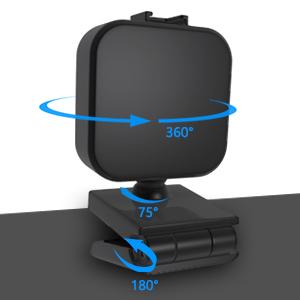
The Aulynp Magnetic Video Conference Lighting Kit is a versatile LED light designed for remote work and online communication. With adjustable brightness and a color temperature range of 3200K to 6500K, it ensures you always look your best. The innovative magnetic joint design allows for easy installation and 360ยฐ rotation, making it perfect for various lighting needs. This portable lighting solution is powered by a micro USB and comes with a one-year warranty, ensuring quality and reliability.


| ASIN | B08YDDNFNF |
| Brand | Aulynp |
| Connectivity Technology | USB |
| Customer Reviews | 4.4 out of 5 stars 535 Reviews |
| Flash Modes Description | Constant illumination, Adjustable brightness (6 modes), Adjustable color temperature (5 levels: 3200K, 4300K, 5600K, 6500K) |
| Hardware Interface | USB |
| Manufacturer | Aulynp |
| Manufacturer Part Number | NO-001 |
| Model Number | A-video01 |
| Number of Items | 1 |
| Number of Packs | 1 |
| Power Source | Corded Electric |
| Screen Size | 2 inches |
| UPC | 744675845152 |
| Unit Count | 1 Count |
| Water Resistance Level | Not Water Resistant |
J**E
Bright, versatile key light in travel-friendly format
I bought this little key light to improve my video conferences at my desktop computer, and it absolutely does the job. The USB-A plug will power it from any USB port. The cord is plenty long to reach to wherever you want to place it, and the in-line remote is far enough from either end of the cord that you'll be able to make sure it's in reach. The mount is actually the best one out of the five different light models I tried-- it's made of metal, has a firm hinge that's not going to budge once you get it set, and has a rounded-off rubber inside to grip the monitor back, instead of the fold-out 'foot' that most mounts use these days. It's also deep enough to fit any monitor; it has more than 2 inches of clearance. The light attaches to the mount via a magnetic ball-and-socket, which is a pretty neat choice. That means the light has full freedom of movement on 3 axes, because it's not actually attached to the mount. That mount design also means that this light travels very well, because there are no protruding parts to get stuck on anything, damage other items, or get snapped off in your bag. The light itself gets BRIGHT considering that it's 2.5 inches square. There are 6 brightness levels and 6 color levels (ranging between warm and cool), both adjusted by the remote. I do wish that the light could remember the last setting when turned off and on again, but alas, it always turns on to full brightness and a middle color setting. For just a few bucks, this little thing is absolutely worth it as a travel light or a quick fix to bad lighting at your desk at home.
K**I
Great Lighting for Video Calls
I work from home and there is a window on the left side of my desk. This casts a shadow on the right side of my face on video calls. However, it's really bad on cloudy/rainy days when there are no natural lights. The camera is good enough, but even with the lights in my room turned on, my face is very dark on video calls. I bought this camera light based on other reviews and have been pretty impressed with it. The setup is super easy. I used an old USB-A adapter that I had from an old phone and plugged it into a wall outlet for power. If you have spare USB-A ports on your computer, you can use that as well for power. I love that the light is attached to the base using a magnetic ball, so you can literally adjust the lighting in any angle. Another great thing about this light is you can adjust the brightness and the shade. I personally like the warm light over white light, it makes me look more natural on camera. Overall, I am happy with this little gadget. I always thought camera lights are only for YouTubers. But now that I am working from home, it is a worthwhile small investment since I do a lot of video calls. I highly recommend this to other people who works from home. Not only it's good for video calls, but you can also use it as a desk lamp if you need a bit more lighting in your room.
N**E
Solid enough for what I needed.
Not gonna win any awards, but itโs a decent little light. Itโs very bright, even on the lower settings. Itโs lightweight and easy to move around, but it stays in place on top of my monitor and doesnโt shift position at all. My only complaints are that I wish there were more color temps to choose from, and I wish it had a memory function to keep its last used settings if itโs ever removed from power. But beyond that, it does the job and Iโm happy with it.
N**R
Great little light at a great price
The light works exactly as expected, plugging in to a standard USB-A port on the side of my monitor. The stand for the light is well thought out so that the light can sit along the top of my flat screen securely and the magnetic ball joint makes is easy to adjust the direction of the light. I much prefer the diffuse light of this type of light to a ring light that would leave a clear ring-shaped reflection in the camera. The 5 different light temperature settings are very useful and give a good range of different shades of white light. The 6-different light intensity settings also give a wide range of control. The only thing I would change about this light is to put the controls on the light itself instead on a separate control fob along the power cable. Also would love some kind of bluetooth or USB-based control from my phone or computer. But I don't expect those features for this great price!
N**.
Great buy
I ordered this light to help with video calls for work. It worked great but mounting it on my laptop and having it straight in my face, it was a little too distracting and headache inducing - even at the lowest brightness level. The base has a 1/4-20 hole that will fit into any standard tripod stand. I have limited space behind the laptop that wouldn't allow for a tripod so I ordered a goose-neck stand with 1/4-20 attachment to allow for a different mounting angle and it worked like a charm. The base folds flat and the light mounts on the base magnetically so it's easy to adjust the angle. The only gripe I have about the light is that I wish it would remember the last brightness setting all the time, it will sometimes switch the brightness level on you. But for ~$15 I really can't complain. I have it on the lowest brightness and it's sufficient for me to work and have video calls. Here is the link to the stand I ordered, in case anyone would like to imitate the setup: Puroma Webcam Stand Goose-Neck... https://www.amazon.com/dp/B08FMMZGYR?ref=ppx_pop_mob_ap_share
~**G
Small size but makes a BIG difference !!
I have my work desk setup in one side of my bedroom and don't like to keep the room lights on as they cause a glare on the computer screen. My webcam (Logitech C920) did not find the lighting in the room sufficient, and many a times provided a grainy image :( Given all the Zoom/MS Teams calls, I was looking for an inexpensive solution to help with the webcam lighting issue without resulting in glare. The Aulynp solution does not need a separate power source and works fine with being plugged into a USB-A port in my monitor. It allows good control over the brightness & color temperature while the magnetic mount makes it easy to position the light at a convenient angle. I have noticed a marked improvement in the image quality even with the 2nd/3rd lowest brightness level and use it for all my Zoom/MS Teams meetings now. The light remembers the brightness/color settings as long as the USB remains powered but resets to max brightness if the USB is unplugged. The attached pic is at brightness level 2/5 and color temperature set as cool.
M**.
Don't plug directly into your laptop
You should know this is a dupe for a $60 Logitech light. With that in mind you get what you pay for. So far, I really like all the settings and ease of use. The light itself is great. However, the moment I plugged it into my MacBook Pro, I got an error I have never seen before, "USB Device disabled. Unplug the device using too much power to re enable USB Devices". Cable is long enough to plug into a nearby outlet, so I don't think it will be too much of an issue, but be careful. I tried to bypass the error and my J5 USB dock got really hot in a matter of minutes, so don't recommend doing that.
S**E
Nice little light
It is a nice little light. I have used it for a couple months now for video conference calls for work. For the price, I can't really complain. I saw some other reviews that indicate that some strain relief is needed at the controller and I agree. I am trying to be very gentle with it, but I can definitely see it failing because the cable breaks at the controller. I wish the light was a little more concentrated. I have my laptop farther away from me than most probably have it. I have a window right behind me and even with the blinds closed, there is a lot of backlight which makes it look like I am in a cave on camera. This light helps, but it still looks pretty dark on camera. With a better spotlight, at least my face would come through clear. It is pretty bright though and I like that I can control the brightness and color. The yellower shades are so much easier on my eyes than the bright whites. Literally had a 3 hour call today and by the end I was getting a migraine from having the bright lights in my eyes.
M**K
Nice!
Great product!
S**B
Value for money
All good , value for money. I use it for work (Zoom calls; Microsoft Team). Simple set up. Prompt delivery by the seller.
A**R
Nice and bright
Brighter than expected, a great little fill light for low light shooting. Versatile with a range of colour temperatures. Magnetic ball joint allows for smooth positioning.
M**O
Good small light, cable switches are a bit messy
I didn't want a big light, just something small and unobtrusive to add a little bit of brightness on calls. Which is what it does. It is bright in your eyes meaning you can't see your own screen very well and you do suffer a little bit having to look in the direction of a bright light. I've only just begun using it, I can't say whether it is something I will get used to or whether I will stop using it. I've also not tested physically larger lights, like the large ring style lights. I am wondering whether if on a similar brightness level they may throw a more even brightness over the whole face, thus being more effective at brightening the whole face and whether or not they are any less painful to look at while on a call. On the positive side, you can adjust the colour temperature and strength/brightness in 6 increments which is plenty. The stand is quite versatile and not bulky. You can sit it back so it is only just gripping a minimal amount of front edge around your screen so that it doesn't block part of your screen, or hang it down if you have a decent edge around your screen. There's a cutout so it doesn't block your laptop camera lens which works just fine. The only fiddly thing is the controls which are on the cable. There's nowhere good to put it. I think buttons on the actual light body would be tidier so that you can tuck the cable away and forget about it.
R**.
Awesome and easy
Great product, fits on my computer screen easily
Trustpilot
3 days ago
3 weeks ago