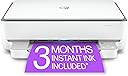
🖨️ Print smart, live vibrant — your home office’s new MVP!
The HP ENVY 6055e is a versatile wireless inkjet printer tailored for home use, offering fast print speeds up to 10 ppm (black), automatic duplex printing, and high-resolution borderless photo printing. It includes a 3-month Instant Ink trial for hassle-free ink replenishment and supports seamless mobile printing via the HP app. Compact and energy-efficient, it’s designed to keep your creative projects and daily documents flowing effortlessly.


| ASIN | B08XYRVSRT |
| Additional Printer functions | Copy, Scan |
| Best Sellers Rank | #39,088 in Office Products ( See Top 100 in Office Products ) #76 in Inkjet Computer Printers |
| Color Depth | 24 bits |
| Compatible Devices | Laptops, PC, Smartphones |
| Control Method | Touch |
| Controller Type | Android |
| Customer Reviews | 3.8 3.8 out of 5 stars (13,208) |
| Date First Available | March 19, 2021 |
| Dual-sided printing | Yes |
| Duplex | Automatic |
| Hardware Interface | USB 2.0 |
| Included Components | 223N1A HP ENVY 6055e All-in-One Printer; HP 67 Setup Black Cartridge; HP 67 Setup Tri-Color Cartridge; Regulatory flyer; Setup guide; Reference guide; Power cord [For ink volume and page yield information, visit http://hp.com/go/learnaboutsupplies] |
| Ink Color | color |
| Item Weight | 11.51 pounds |
| Item model number | ENVY 6055e |
| Manufacturer | HP Printers |
| Max Copy Speed (Black & White) | 10 ppm |
| Max Input Sheet Capacity | 100 |
| Max copy resolution black-white | 600 dpi |
| Max copy resolution color | 1200x1200 dpi |
| Maximum Black and White Print Resolution | 600 dpi |
| Maximum Color Print Resolution | 4800 x 1200 dpi |
| Maximum Media Size | 8.5 x 11 inch |
| Memory Storage Capacity | 256 MB |
| Model Series | 6050 |
| Number of Trays | 2 |
| Output sheet capacity | 100 |
| Power Consumption | 4 Watts |
| Print media | Envelopes, Glossy film, Glossy photo paper, Labels, Paper (plain) |
| Printer Ink Type | ink |
| Product Dimensions | 14.21"D x 17.03"W x 5.2"H |
| Scanner Type | Flatbed |
| Sheet Size | 3 x 5 to 8.5 x 11 |
| Specific Uses For Product | Home |
| Supported Media Sizes | 3 x 5 inches, Letter (8.5 x 11 inches) |
| Total USB Ports | 1 |
| UPC | 195161624865 |
| Warranty Type | limited warranty |
| Wattage | 4 watts |
T**N
Never again.
Just a few buyer beware tips before you buy this (and probably any HP printer) printer. If you are just in need of the occasional label, document, or picture printing, you might want to skip this brand. First off even though Amazon (and possibly the seller)encourages you to buy the off brand (and much more affordable ink) don’t. Only HP ink works. Also, the major selling point, for me anyway, that even if one cartridge runs out, you can still print. Nope. And lastly, unless you’re using enough ink to warrant the monthly subscription fee for their service, which automatically sends out ink you definitely want to skip this printer. I bought it, along with the recommended off brand ink that was 3x more printing at a savings. Unfortunately a month after sample in runs out I pop in my off brand, but the ink wouldn’t work the printer just kept saying not HP, buy more ink. Then wanted my cc information for the subscription ink. Long conversation with tech support. They turned off the subscription request and assured me that as long as I buy real HP ink no problem. Fast forward 13 months, I get low/no ink warning and it won’t print a label even though the black shows nearly full and color shows at least half. After waiting a few days for yet more ink to arrive still won’t print and keep getting call to renew subscription. After a good couple of weeks of me, my kid, a friend all running through set up rebooting whatever you can think of it won’t accept the new HP ink I’m guessing because the subscription hasn’t been renewed. I’m done. Over Christmas I’ve ordered a new Canon printer, it might have issues who knows, but I’ll take my chances. At least their ink is inexpensive, available everywhere not just Amazon (oh yeah I should add no where locally to buy the ink, Amazon or the subscription are the *only* options). I. Will. Never. Buy. Another. HP. Product. Again. We’ve had their desktops, laptops, and printers for decades, but never again.
A**E
It works great... no frills printing, scanning, and copying. Here's the trick...
I needed a printer for the odd occasional use for a MacBook. I had an old envy 4500 that was about 10 years old that finally tanked. I read the reviews here and at first I was concerned but I decided to go for it because the other printers were way too much for the few print jobs I need to do. The printer was easy to set up, remove the packaging materials and turn it on. (I tend to not print out the alignment sheet because it burns through the color ink). The printer has a cycling glowing purple light and it sleeps in a low blue light with a green light on the side. I just turn the printer off when not in use. It has a button for color copies and a button for black and white copies. A cancel button, and an info button--no display, it's very basic. I purchased a USB printer cable also on Amazon and plugged the printer into my Mac (should work with Windows too). Note, once you plug into the printer cable, it seems that connecting to WiFi is disabled. From there, you can get to the printer's web page which lets you play with all the settings. I turned on web print and disabled blue tooth (which I believe is used by the HP app that I didn't install). That's it. I can still print remotely to the printer from the sofa via web print, or print directly from my plugged in Mac. I didn't install any apps, I didn't get the printer on WiFI to get it talking to HP, and I didn't subscriber to any ink subscription service. Super easy. I hope this is useful for someone to make an informed decision for their printing needs. I would recommend to a friend and I would purchase this again.
B**T
Makes an expensive nightlight!😡
Don’t waste your time, money, or sanity on this piece of junk!!! First off HP wants way more info than they should have just for you to use a stupid printer! During setup they ask tons of permission and if you say no then your printer won’t work. After catching on to this and needing to print ASAP I finally gave in and (might have agreed to giving them my firstborn and) just answered the stupid questions the way they wanted. Finally get it set up and it worked ok for first few weeks. Didn’t need to use it for a few weeks, and now all hell has broke loose! I know I have crummy WiFi (if you live in country or otherwise have internet/WiFi issues you’ll probably have the same issues so don’t even bother). The next time we tried to use it we found that it likes to disconnect from the WiFi and does NOT automatically reconnect. This model does NOT have any kind of screen or an on/off button and constantly has bright glowing lights on with no other options. Even when it’s not connected or working properly it glows! It would work as a very expensive nightlight, but not a printer!!! We first started having issues with it saying it was out of paper even though there was plenty in it (it also doesn’t seem to hold as much as our last HP printer). One of the times it said this we refilled it and printed something. The paper came out all chewed up as if it had been jammed but there was no alert saying that it had jammed. Now I’m in a jam because I need to print again and it was a bugger to get reconnected to any devices that were previously connected. I FINALLY got the thing reconnected after six hours of checking devices for updates, reloading drivers, etc. now it STILL WON’T PRINT!!!!!😡 Its now saying that it’s low on paper AND ink! It has plenty of paper, but I went ahead and added more. It acknowledged the paper for a couple minutes but then reverted back (without ever printing anything)! It says the black ink is low and that I print an average of 14 pages a month. I’ve only had it set up for a few months and doubt that we’ve even printed 50 pages yet. I thought that maybe if I agreed to print in color it would still print then. No such luck! No, instead it tries to sell me on the $5 a month ink subscription. Oh, and the free ink you’re promised-dream on! In order to get the 6 months of free ink you have to sign up for automatic shipments (when you first set up your printer or you lose them) for a certain amount of time and guess how much ink you’re going to use (which you’ll likely be wrong since it seems their cartridges hold less ink) in order to get it. Oh, and if you think the handy app on your phone will be of any help, well, good luck. Sure, there are a couple places in the app that you’re supposed to be able to get help through tech support. None of them worked. I never even got an AI response. I’m done with HP. Spare yourself! You can’t say you weren’t warned! Bottom line-unless you’re looking for a nightlight that looks like a printer this isn’t the item for you. It does have a pretty glow, but I don’t know anyone that would choose to spend $150 on a nightlight!
R**A
Firstly, I love the look of it. All of the funky different coloured lights are so cool. It’s nice and slim and not bulky. I couldn’t believe how easy it was to set up to my WiFi and to my iPhone. It didn’t need my router password or anything. Super easy to install the paper and ink. It’s really quiet and prints fast with great quality printouts. The instant ink feature is great and so convenient. It has many other wonderful features! Great app and support. Amazing printer especially for the price. I had a Canon Pixma before this one and it was an absolute piece of junk! I got so frustrated with it that I just recycled it. I think HP printers are the best. I’m so glad I chose this printer.
P**Y
I am not a computer person. I am a retired senior who finds this sort of thing to be extremely frustrating. Although I try, I have to go somewhere else to have somebody else put it together for me. Life is just too short to live with that level of frustration. I was able to put together this printer together on my own, which is shocking! It was so easy. It came with a very easy to read booklet of instructions that tell you exactly what to do. This booklet also show you what the codes mean when it’s having an issue. That way you don’t have to guess, which in my mind is a really good thing. What I was most surprised about, was the way that it is put together. It’s built unlike any other printer I’ve ever seen, but it seems to work really well. Ie, the paper is fed from a drawer inside of the printer. You basically have to lift up the whole printer itself to get at the paper or envelope drawer. It’s curious, but it works amazingly well! I also didn’t realize that it hasn’t extra bit of warranty which is a treat as well! Extra bonus! I have only had it for a few days and have not had an opportunity to try out it’s other features but for me, given the cost, this HP printer is one of the best.
A**C
I've been using this printer for the last several months and it's been pretty good. Does your basic functions which is printing and photo copying. I haven't done any photos or anything on it so i'm not sure how good that is. But for office functions it's nice. The setup is what i had trouble with. The connection can be a bit buggy at times and the installation can stall. Sometimes when it's off and i turn it back on i have to uninstall and reinstall it on my PC which only takes a minute but it gets stuck in ''offline'' mode. I also find it doesn't read how much paper you have in it well at times.
C**S
I finally had to buy a new printer because my trusty old HP printer (over 11 years of use!) finally started having issues. After much research and wading through several bad reviews on every printer I looked at, I decided to go with this one and crossed my fingers that it would be a good experience. Everything started out fine, going through the process, but when it reached the step to connect to my wifi, it just would not, no matter what I tried, no matter what device I tried it on. I'm not new to technology and this type of thing should have been an easy process for me. Instead it was 6 hours of nothing working and complete frustration! Finally, I decided to just connect it with USB (USB cord doesn't come with the printer btw), grabbed the USB cord from my old printer and gave it a go. After another hour of downloading the driver from HP's website, and going through the lengthy installation, and it was connected via USB. Yay, time to print right? THINK AGAIN. When I put the ink cartridges in, I instantly got an error message stating that the color cartridge was not communicating with the printer and no matter what I did, it would not work. I read page after page of other similar issues (many of those to be found with this printer!!) and finally realized that my brand new cartridge or the cartridge compartment in the brand new printer was defective. Seriously!? So I ordered another ink cartridge from HP for $25 to see if it would work in the ink compartment. With time constraints on needing a working printer ASAP, I then decided to just send the defective printer back and have it replaced with the same model replacement. I was actually still hopeful I could make it work. Thankfully, I read the reviews on the actual ink cartridges for this printer and found out that they run out after 30 to 40 pages, though stating they will print 100 pages (still too low anyway). Since I can't connect to the subscription program through HP, and receive ink monthly, and would need to order my cartridges on an as needed basis, this was the straw that broke the camel's back. I ordered a completely different printer that hopefully will suit my printing needs better and will not arrive defective and unable to connect wirelessly! Would NEVER recommend this printer. Its too costly on ink and not user friendly at all. Don't bother, trust me. Horrible experience.
B**E
I found it extremely easy to set up. I had to re-set it up when my modem/router was replaced. I was irritated because I thought the printer had suddenly forgotten how to print... but it all worked out easily once I realized the prob. I don't print a lot, but I'm very happy with the quality for my home printing. I'm a retired graphic designer, so my standards are high. NOTE: I almost never print photos, so I can't address quality for those. I find the 2-sided printing works well. Printing speed is fine—not fast, but not too slow for me. Scanning is smooth. I like the small footprint and the ease of moving it when I need to.
Trustpilot
2 weeks ago
2 weeks ago