Buy anything from 5,000+ international stores. One checkout price. No surprise fees. Join 2M+ shoppers on Desertcart.
Desertcart purchases this item on your behalf and handles shipping, customs, and support to Croatia.
๐ Stay ahead of the road โ your discreet, smart eyewitness on every drive!
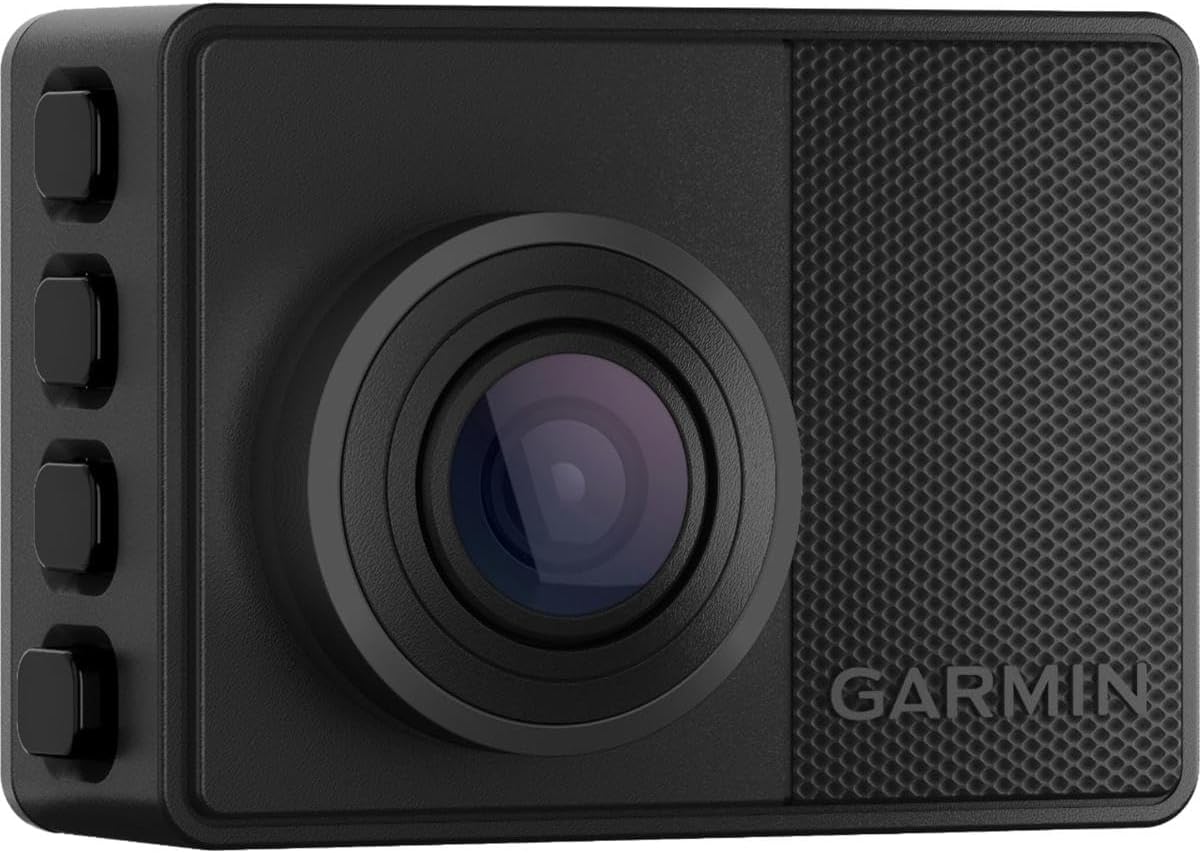
The Garmin Dash Cam 67W is a compact, pocket-sized dash camera featuring 1440p HD video with an extra-wide 180-degree lens for comprehensive road coverage. Equipped with voice control in multiple languages, it offers hands-free operation and smart safety alerts like forward collision and lane departure warnings. Its Parking Guard feature monitors your vehicle when parked, sending alerts via the Garmin Drive app. Videos automatically upload over Wi-Fi to a secure online Vault for easy access and sharing. Designed for durability and discreet installation, this dash cam is perfect for professionals seeking advanced vehicle monitoring and peace of mind on the go.


| ASIN | B093244D1J |
| Are Batteries Included | No |
| Auto Part Orientation | Front |
| Auto Part Position | Top |
| Battery Cell Type | Lithium Ion |
| Best Sellers Rank | #12,315 in Electronics ( See Top 100 in Electronics ) #178 in Car On-Dash Mounted Cameras |
| Brand | Garmin |
| Built-In Media | Garmin Dash Cam 67W, 16GB microSD card, low-profile magnetic mount, vehicle power cables, dual USB power adapter and documentation |
| Color | Black |
| Compatible Devices | Car |
| Compatible with Vehicle Type | Car |
| Connectivity Technology | Bluetooth |
| Control Method | Voice |
| Customer Reviews | 4.2 4.2 out of 5 stars (1,241) |
| Display Type | LCD |
| Field Of View | 180 Degrees |
| Flash Memory Supported Size Maximum | 512 GB |
| Frame Rate | 60 FPS |
| Included Memory Card Size | 16 GB |
| Item Dimensions D x W x H | 2.21"D x 0.86"W x 1.59"H |
| Item Type Name | Dash Cam |
| Item Weight | 57 Grams |
| Manufacturer | Garmin |
| Mfr Part Number | 010-02505-05 |
| Model Number | 010-02505-05 |
| Mounting Type | Dashboard Mount |
| Other Special Features of the Product | Compact Design |
| Real Angle of View | 180 Degrees |
| Screen Size | 2 Inches |
| UPC | 753759269395 |
| Unit Count | 1.0 Count |
| Video Capture Resolution | 1440p |
| Warranty Description | 1 year limited warranty |
C**6
Very small camera works with Garmin devices
I have the Garmin Dezl 800 GPS for my truck and wanted to get the camera which is 'supposed to' work with the GPS. I guess it does for the most part. I know there is a way to connect via bluetooth or WiFi just the camera and GPS - however I have been unsuccessful. The camera is small. It does have the old style micro USB power plug. The micro SDXC card is easily installed. My camera came with a 16 gb generic card which is effectively useless. It would only store 20 minutes of video before looping back and recording over everything. I purchased a Samsung EVO Select Micro SD 512GB microSDXC MB-ME512KA/AM and use it instead. Yes a 512 GB will work just fine. Once I put the new card in the camera it asked if I wanted to format it - I hit "yes" and the card was formatted for the camera. Pretty easy. Garmin does state the camera will work with up to 512 GB SD cards. If you want to format a new Micro SD card for the camera on your computer you need to format it in FAT 32. The camera comes with a glue on windshield mount or you can purchase separately a suction cup mount. I got the suction cup. There is no lens cover so keep your fingers away from it. The menu on the camera is pretty easy to navigate - which I found amazing. The default video quality is 1440p 30 fps and sound recording on. You can password protect entering into menu so only an authorized person can go into any of the settings. Requires use of a phone. The camera does want you to use the Garmin app Drive. This connects to the camera and allows the camera to upload video to a data vault. I do not use this option. The data vault is a paid service - and I know nothing of it. The camera wanted to update itself immediately when I first connected it to my laptop - it uses another Garmin app to register itself then download the 2.80 software. There are a bunch of other language and mapping software that can be downloaded. Was actually pretty easy to do the update. Overall - I'd say the Garmin v67 camera is pretty good. Its geared more toward fleet vehicle operation. You can use it on your own if you like. Don't ever expect to view any video from the built in 2" screen because it just not possible.
A**F
Guardian on the Road: Garmin 010-02505-05 Dash Cam 67W
The Garmin 010-02505-05 Dash Cam 67W is a true guardian on the road, offering unparalleled quality and functionality that makes it worth every penny. After a close call with a distracted driver, my wife and I recognized the importance of having a dash cam that doesn't compromise on performance. While the price tag may seem steep, the value it provides in potential legal disputes and peace of mind is immeasurable. With features like voice functionality, GPS mapping with speedometer tracking, and automatic upload of saved videos to a 24-hour cloud drive, the Garmin 67W goes above and beyond expectations. I opted for the Garmin Constant Power Cable, which seamlessly ties into the OBD-II port for a sleek and discreet setup. The 2K resolution and wide-angle lens capture every detail in front of your vehicle with crystal-clear clarity. Living in a digital age where personal accounts may not be enough, investing in the perfect witness for your car is a smart choice. The Garmin 67W works flawlessly, is reliable, and is crafted by a company that genuinely cares about its users. Shop smart, prioritize your protection, and choose Garmin for a reliable and trustworthy dash cam experience.
W**Z
Game Changer
This model works a little better than the previous version I own. It was very easy to install and set up through the App. The quality is great and the speed is quick. This things watches your driving and letโs you know if you are too close to the car in front of you or if you are drifting out of your lanes. The battery life seems to hold very well when the car is not driven. Great video and pictures for review.
B**N
Included SD card is incompatible
I bought 2 of these. One for each of my cars. After the hassle of trying to set these up I am returning them and will not be buying anymore dash cams. The first one I tried to set up got immediately stuck in a boot loop. It was stuck at the initial boot up screen and wouldnโt go anywhere. I removed the SD card but it requires it to boot so I put it back in and it went right back to where it was, stuck. Ok, maybe that was a fluke I will setup the other one. That one did boot up to the setup menu. I did the initial setup and tried connecting it to the Garmin Drive app. This is where it all fell apart. The app is terrible, the setup process is terrible. After multiple reboots of the device, the app and my phone it was finally connected to the app. I had brought the camera inside to work on because it was taking so long. After I finished the setup I unplugged it and took it to my car. I plugged in into the car to figure out where to mount it, and guess what, it was now stuck in a boot loop just like the other one. At this point I was done. I am sending them both back.
V**Z
Honest Opinion
All in all its a good camera for the price. However it did not come with a sd card. I did contact amazon and they pretty much got me one so props to them. i didn't realize the camera has to be on so you can connect to it to review the footage. and to get the vault cost an additional 9.99 a month or the one time payment plan. The installation and hooking up was super easy i would order a side of small plastic clips with it so the cables don't dangle everywhere. the camera works as intended and the camera quality is okay I'm still messing with it and ill update. it does record in about 30 min time loop. very small can notice it if you're actively looking for it. the magnet is very strong and so is the adhesive. the app is a bit glitchy and can take a while to load/review footage. Downloading a video to your phone depending how long the footage is may take a while like 20-30 min. The camera seems very well built does not seem cheap at all. in terms of if you want to get a good camera and don't mind the app and don't care about getting the vault plan this camera is for you. If not id look at a different camera. Only 4 stars because of the sd card not coming with.
B**T
iOS VPN apps can break WiFi connectivity to dashcam
I like the camera (67W) - It's pretty simple to use if you donโt run into the issues I had, the image/audio quality is great, the 140d wide angle lens captures a lot and after about a year of use, the camera has had no problems recording video/audio on a 256GB micro SD card (extreme environment version). The file retention @1440p with audio is about 2 weeks. I live in the southeast, so it's pretty hot during the summer. The camera started falling off the windshield with the included foam mounting tape at around 8-9 months. I ended up buying some good 3M high strength outdoor foam mounting tape, cut it to size, and replaced what came with the camera. The camera mount I chose was the hexagonal piece of steel that attaches to the windshield with the foam tape, and the camera has a hexagonal cup with a strong magnet it in it. The dashcam is pretty light, and they do include enough mounting/cable length to mount this where you'd need it. The Garmin drive setup software can use some help as the pairing process is very manual, and if you are not paying attention, and you miss hitting pair on both the phone and camera at the same time, you will need to reset the camera to factory defaults, and then remove the botched bluetooth connections in your phone. The bluetooth pairing process doesn't explain that you will have two different bluetooth connections for the one camera, so pay careful attention to the pairing process - Both bluetooth connections will be DC-67W and the other is DC67W-#####-BT Aside from this, I ran into a very difficult issue to solve after a few months of usage, but eventually figured it out - VPN apps in iOS will disrupt your ability to connect to the dashcam's WiFi connection depending on the VPN app settings. Basically VPN applications can become a middleman between your phone's wireless adaptor and the wireless connection or "SSID". These VPN settings can alter IP addressing/routing, and will prevent you from connecting to the camera with your phone/app to export or even watch the footage on your cameras SD-card. This is because the Garmin drive app is very simple in that when you try and view footage on your dashcam, the drive app actually tells the dashcam via bluetooth to "enable wireless", essentially making your dashcam a wireless access point, then the drive app connects your phone to the cameras SSID, enters in the wireless password for you (this is happening behind the scenes), and then allows you to manage the footage, update the firmware of the camera, etc. It is during this wireless connection process that VPN apps can enable itself to protect you and will basically change IP information of your phone, which then stops your camera and phone from communicating with eachother. I suspect this is because the dashcam only knows about the network 192.168.0.0/24, where as your VPN app may force your wireless adaptor to be on a different private network to basically hide your phone from untrusted WiFi SSIDs. I'm sure there could be more variables, but this is what was happening in my case. Disabling VPN was my resolution to this issue. If you have the option to set your VPN app to disable itself when connecting to trusted WiFi connections, that might be an easy fix. Garmin needs to streamline the software, and pairing process to help avoid having users that don't have I.T. or networking knowledge, getting stuck dealing with these types of connectivity issues. Garmin should include additional pop-ups in the app for when things aren't working or during setup like "please disable VPN connectivity when connecting to the camera's wireless connection", or "You must accept the bluetooth pairing prompts on both the mobile device, and on the dashcam at the time of pairing", etc. Other than the above, I do recommend this dashcam.
J**S
Works well, very discreet size, fish-bowl view.
I like the feature set available for this camera in terms of the level of customizability. I installed this in my wife's car (2018 Subaru Crosstrek), and initially she rejected it because it was regularly beeping at her and otherwise making noise. I was able to go in and shut all that off without compromising the ability of the camera to passively record what is going on around the car. The camera is also quite small (maybe 1" x 2"), so I could easily tuck it up behind the rearview mirror so she also cannot see it while she is driving. The default view of the camera includes a full 180 degrees of visibility, which is both good and bad. Good because it can see nearly everything the driver can, and bad because it distorts the image somewhat and also takes the notion of "objects in mirror are closer than they appear" to the extreme! For example, I captured the attached video on a short test drive after replacing the struts and springs on the car, and the oncoming Toyota Tundra doesn't look very close to my car at all. It was quite close, in fact. The ability for it to obey voice commands is nice, and it is very responsive, but I doubt I'll use them to "save video." Unfortunately, when you do that, it actually clips a chunk of time from the general timeline and saves it separately (rather than just having it both as standalone and in the general timeline). As such, if you want to build a video from the footage using a longer duration than the "saved" video, you cannot do so easily or without a timeline interruption. To that end, I recommend using a 256G microSD card. Overall, for the cost, I think this one is a keeper.
J**4
Seems to work well
Haven't had any incidents that require video review. Garmin generally makes good products. Cord was quite long making installation easy. I have one forward facing and one rear facing in my minivan.
Trustpilot
4 days ago
3 weeks ago