🚀 Upgrade your network, upgrade your game!
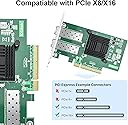
The 10Gtek 10Gb PCI-E NIC Network Card features dual SFP+ ports and an Intel 82599ES controller, delivering reliable 10Gbps Ethernet connectivity. Compatible with major OS platforms including Windows Server, Linux, and VMware, it supports virtualization and high-speed data center demands. Its flexible PCI-E x8 interface and included low-profile bracket make it ideal for both standard and compact systems, backed by a 3-year warranty and lifetime tech support.


| ASIN | B01DCZCA3O |
| Best Sellers Rank | #7 in Internal Computer Networking Cards |
| Customer Reviews | 4.3 4.3 out of 5 stars (218) |
| Date First Available | August 26, 2015 |
| Is Discontinued By Manufacturer | No |
| Item Weight | 5.6 ounces |
| Item model number | X520-DA2(Intel-1pc)(UK) |
| Manufacturer | 10Gtek |
| Product Dimensions | 10.35 x 6.42 x 2.17 inches |
W**S
Works great, pick the right driver
This card is easy and powerful. It comes with a PC case bracket and a server-style bracket which fit my HYTE case perfectly. One hurdle is the Win11 driver install, and since I have 2 ports, I had to install the driver for both of them. Use the Device Manager "update driver" process. I assume if you are buying this level of hardware, you have some idea of what you are doing... Download the Intel Win10 family drivers, I'd go for the complete set option. After extraction, find the PROXGB>Winx64>NDI565 folder, hit enter. Yes, the NDI565 folder (completely non-intuitive, I know...). Viola NIC recognized, do this for all ports in the DM. Happy networking.
R**.
Plug-and-play Intel-based 10Gb card
Plug-and-play with FreeBSD-based systems: toss it in and the Intel driver just works. As an Intel card, you are limited to Intel-compatible SFP+ modules unless you activate a kernel-parameter override. The card comes with a half-height PCIe slot backer preinstalled; you'll need to swap it with the included full-height backer to use in a standard PC. It runs a bit hot, and works best with a fan blowing on it, but I've had one running for some time with no issues.
E**S
Works good w/ Proxmox 9 and OVS
I got this to take the place of a Broadcom 2xSFP+ card that liked to have LACP timing fights with my TP-Link equipment and would refuse to establish links on TwinDac cables. I’ve had no issues on Proxmox 9 worked out of the box except for setting up OVS to use the new X520 card. I do not have fiber modules to test but twindac cables work fine for me on this x520.
Q**N
Linux Fail
On Linux, the driver intermittently fails to initialize the connection. No driver updates are expected.
C**O
Revising earlier review. Problem solved.
I apparently got a few cards from a bad batch and didn't realize the problem until after the return window. Seller reached out to me. We ran some tests and I sent them back. They then expedited replacement cards to me. Well today I got them setup in my HA cluster. I'm showing nearly identical speeds and latency compared to Intel branded cards. Very happy with the end result here! 10Gtek could have just ignored my previous complaint but instead they went above and beyond to make it right. I operate a production company that happens to make the base product for a final product also sold on Amazon. I've learned something today. I'll be pushing my marketing team to follow up on any bad reviews I get from now on. This is how business is done right. Mistakes and bad batches happen, it's how you handle it that makes a company good or bad. 10Gtek went from an unhappy customer to a future repeat order customer for my 10G needs.
M**N
Perfect! Simple process in a Windows machine. Works as advertised.
Perfect! Simple process in a Windows machine. Works as advertised. I was a little hesitant as I hadn't really heard of 10Gtek, then I realized basically all the cards are using Intel, Mellanox, etc. chips. I tried a different vendor first, and it was a total failure. This card got link light on my switch immediately, and was a 2 min driver install to get 100% working. I would absolutely by another 10Gtek card.
I**R
Works great
Works great, popped it in and it came right up on start-up and has been solid.
K**R
Flawless 10Gb performance
Worked great for a dual 10G connection from my server to a UniFi switch. True plug-and-play on my Linux build. Much more affordable than the local retail options and the build quality is top-notch. Highly recommend for any home lab or server upgrade.
J**A
Works good with opnsense now, its supported from kernel. No problems. Just ordered another one for my 2nd fiber link. It will have almost same kind of opnsense server than my 1st fiber link. This nic is factory unlocked.
A**4
J'étais sceptique au début en voyant quelques commentaires puis cela fait maintenant bientôt 2 ans qu'elle tourne dans un serveur Dell PowerEdge et fonctionne à merveille. Carte reconnue aussi bien sur Hyper-V, Esxi et Proxmox. Fait le job pour nous en tout cas.
G**E
Had trouble at first as this is a HBA type of card instead of a straight NIC. Found a slot that worked though. Very fast with lots of options. Auto detected in windows 10 and installed the drivers automagically. Not a typo :) I went to the Intel website and used those driver. Just a minor face change to the settings on device manager. This card is ace. Great price. Just get it. Though, if you've had issues with HBA cards before then be careful as it might not work for you. For example, I have a sata card that I just can't get working in this PC. It worked in my old machine. I think most pcie slots expect simple devices. This card is quite complex. If in doubt, but the more expensive simple NIC type cards.
C**T
The package arrived empty after ordering it here in Australia. Can also confirm this does not work in Synology DS1621+, only older Synology models.
A**E
Wird vom Standard-Kernel (ixgbe Modul) ohne Probleme erkannt: May 26 14:51:54 kernel: ixgbe: Intel(R) 10 Gigabit PCI Express Network Driver May 26 14:51:54 kernel: ixgbe: Copyright (c) 1999-2016 Intel Corporation. May 26 14:51:54 kernel: ixgbe 0000:01:00.0: Multiqueue Enabled: Rx Queue count = 12, Tx Queue count = 12 XDP Queue count = 0 May 26 14:51:54 kernel: ixgbe 0000:01:00.0: 32.000 Gb/s available PCIe bandwidth (5.0 GT/s PCIe x8 link) May 26 14:51:54 kernel: ixgbe 0000:01:00.0: MAC: 2, PHY: 15, SFP+: 7, PBA No: FFFFFF-0FF May 26 14:51:54 kernel: ixgbe 0000:01:00.0: Intel(R) 10 Gigabit Network Connection May 26 14:51:54 kernel: libphy: ixgbe-mdio: probed May 26 14:51:54 kernel: ixgbe 0000:01:00.1: Multiqueue Enabled: Rx Queue count = 12, Tx Queue count = 12 XDP Queue count = 0 May 26 14:51:54 kernel: ixgbe 0000:01:00.1: 32.000 Gb/s available PCIe bandwidth (5.0 GT/s PCIe x8 link) May 26 14:51:54 kernel: ixgbe 0000:01:00.1: MAC: 2, PHY: 1, PBA No: FFFFFF-0FF May 26 14:51:54 kernel: ixgbe 0000:01:00.1: Intel(R) 10 Gigabit Network Connection May 26 14:51:54 kernel: libphy: ixgbe-mdio: probed May 26 14:51:54 kernel: ixgbe 0000:01:00.1 enp1s0f1: renamed from eth2 May 26 14:51:54 kernel: ixgbe 0000:01:00.0 enp1s0f0: renamed from eth1 May 26 14:51:58 kernel: ixgbe 0000:01:00.0: registered PHC device on enp1s0f0 May 26 14:51:59 kernel: ixgbe 0000:01:00.1: registered PHC device on enp1s0f1 May 26 14:51:59 kernel: ixgbe 0000:01:00.0 enp1s0f0: detected SFP+: 7 May 26 14:51:59 kernel: ixgbe 0000:01:00.0 enp1s0f0: NIC Link is Up 10 Gbps, Flow Control: RX/TX Als SFP+ verwende ich ein SFP-10G-AOC-3M komaptibles Kabel: https://www.amazon.de/dp/B08HSNDGVX Funktiniert ebenfalls bestens mit einem Cisco 2960L Switch.
Trustpilot
1 month ago
3 weeks ago