🚀 Elevate your workspace with speed, color, and control — the M27Q means business.
The Gigabyte M27Q is a 27-inch QHD (2560x1440) IPS gaming monitor featuring a rapid 170Hz refresh rate and ultra-fast 0.5ms MPRT response time. It covers 92% of the DCI-P3 color gamut and supports HDR400 for vivid, professional-grade visuals. Designed for multitasking pros, it includes a KVM switch to control multiple PCs with one keyboard and mouse, plus versatile connectivity with DisplayPort 1.2, two HDMI 2.0 ports, and three USB 3.0 ports. Ideal for gamers and managers seeking a premium, future-ready display.


| ASIN | B08JWCHR5N |
| Adaptive Sync | FreeSync Premium |
| Aspect Ratio | 16:9 |
| Aspect ratio | 16:9 |
| Best Sellers Rank | 178,876 in Computers & Accessories ( See Top 100 in Computers & Accessories ) 2,952 in Monitors |
| Box Contents | Power cable/HDMI cable/DP cable/ USB cable/QSG/Warranty card |
| Brand | Gigabyte |
| Brand Name | Gigabyte |
| Colour | BLACK |
| Colour Gamut Value | 1.4 |
| Compatible Devices | Desktop, Gaming Console |
| Contrast Ratio | 1000:1 |
| Customer Reviews | 4.4 out of 5 stars 1,980 Reviews |
| Display Technology | LCD |
| Display Type | IPS |
| Global Trade Identification Number | 00889523023129 |
| Hardware Connectivity | 3.5mm Audio, DisplayPort, HDMI, USB 3.0 Type A, USB 3.0 Type B, USB Type C |
| Has Color Screen | Yes |
| Image Brightness | m2 |
| Image contrast ratio | 1000:1 |
| Is Electric | No |
| Item Dimensions D x W x H | 51D x 182.6W x 119.4H centimetres |
| Item Weight | 5.22 kg |
| Manufacturer | Gigabyte |
| Maximum Display Resolution | 2560 x 1440 Pixels |
| Model Name | M27Q-SA |
| Model Number | M27Q-SA |
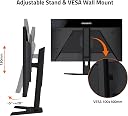
| Mounting Type | Wall Mount |
| Native Resolution | 2560x1440 |
| Network Connectivity Technology | DisplayPort, HDMI, USB |
| Picture Quality Enhancement Technology | AMD FreeSync Premium, HDR |
| Power Consumption Size | 0.5 Watts |
| Product Features | Blue Light Filter, Flicker-Free, Height Adjustment, Tilt Adjustment |
| Refresh Rate | 170 Hz |
| Resolution | QHD Wide 1440p |
| Response Time | 0.5 Milliseconds |
| Screen Finish Type | Matte |
| Screen Size | 27 Inches |
| Screen size | 27 Inches |
| Screen surface description | Matte |
| Series Number | 27 |
| Shape | Rectangular Prism |
| Specific Uses For Product | Business, Gaming, Video Editing |
| Total HDMI Port | 2 |
| Total USB 3.0 Ports | 3 |
| Total USB Ports | 4 |
| UPC | 889523023129 |
| Voltage | 19 Volts (DC) |
Z**N
Amazing Monitor
Probably one of the best 1440p gaming monitors on the market given the fact it performs at the same rate of other monitors that are prices £200 more. 170hz 1440p IPS panel for this price is a great deal and comes with the helpful KVM feature (Plug in a keyboard & mouse into the monitor and you can use it with different PCs that are plugged into that monitor). Brightness and contrast are amazing. Now have two of these monitors but be aware that one did come with a dead pixel which isn’t covered by warranty but it is not really noticeable (I only notice when I’m specifically looking for it) so I can’t complain too much.
M**I
It goes off and off over and over again
The monitor is very nice, well constructed and the image is amazing... when it's on... Every time I turn it on after a while It turns off for a couple of seconds by itself and then comes back on. Nothing I can do about this. It's not that it's fully off, I cannot just turn it back on, there's something wrong with it!... and it's worsening with time, now it's doing it at least 20 to 30 times during the first 10 minutes that is on!!! Impossible to work like this! Very very dissapointed
L**L
Defective product reviews were right about bad QC
My monitor arrived with a line of defective pixels near the windows button. I contacted amazon support to ask for a replacement but only could get a refund. I have ordered another one and will update this review when it arrives. Hopefully it won't have any issues. On another note amazon support is good as usual.
J**A
Justo lo que necesitaba
Excelente monitor, se adoptó para todo lo que necesitaba, conectar una Xbox Series X, una Nintendo Switch, una laptop con Linux y una Macbook Pro, todo sin necesidad de cambiar puertos y cambiar cables. Además de que puedo conectar un mouse y un teclado directo al monitor y usarlo para todos mis dispositivos con la opción de KVM que tiene el monitor. Dejo unos comentarios para cada dispositivo: * Monitor: - Se puede conectar un teclado y mouse a los puertos USB que tiene el monitor, para controlar tu computadora sin necesidad de conectarlos directo a tu dispositivo, lo que es una opción muy genial. - La frecuencia es de 165hz (adjunto imagen de la caja) no de 170hz. - Tiene varias opciones para juegos como contador de FPS, estatus de cpu, gpu, etc. Tiene para poner una mira estática para juegos shooter. - Se puede calibrar el brillo , intensidad de color, intensidad de la realidad, balance de temperatura, negros entre otras muy útiles. - Puedes crear 3 perfiles customs, para guardar tu configuración de colores , brillo, etc. Lo que es muy bueno, para cambiar entre juegos, películas y lectura sin necesidad de estar configurando aspecto por aspecto. - Tiene fuga de luz, diría que es razonable, en juegos de mucho color no se nota, incluso en el Zelda BOW, que tiene zonas oscuras, se ve bastante bien y no se nota la fuga. En juegos como COD, si se nota un poco más, pero no afecta demasiado la visibilidad. * Xbox Series X. - Reconoce el 4K y HDR. - Se puede poner a 1440p a 120hz. - El contador de FPS que trae el monitor, si detecta la frecuencia de los juegos en la consola. - Se puede ajustar el balance de negros y color. - Se puede activar la Frecuencia de cuadros variables. * Windows - Linux. - Reconoce la resolución 4K y 1440p a 165hz. - Se puede usar el teclado y mouse que se conectan directo al monitor. - El contador de FPS reconoce la frecuencia de los juegos. *Nintendo Switch. - La resolución es de 1080p. - No reconoce ni el teclado ni el mouse. - No reconoce los FPS de los juegos. - Se ve bastante bien apesar de estar en 1080p. - Los juegos van a 30 FPS apesar de que el contador marca 60. *Mackbook M1. - Solo lo conecté con el puerto tipo C y ya me detectó todo y hace todo , lo que es muy genial. - Con el puerto tipo c la resolución es de 1440p a 165hz, incluso detecta el 4K. - Con el cable tipo c, la batería de la Macbook ya se carga por lo que no es necesario conectar el cargador del equipo, solo conectar el cable tipo c al monitor y listo. - Se puede usar el teclado y mouse conectados al monitor. * Generales: En mi caso que quería conectar todo sin necesidad de quitar y poner cables, cumplió mis expectativas y más. Tiene buenos colores y puedes configurarlo a tu gusto.
D**G
Didn't get a lemon!
I'm happy! I didn't get a lemon! My own regret is that I have buyer's remorse because everything about 1080 was actually just so optimized, and the picture quality really isn't that much of a difference for me. That's my fault though, not the manufacturer or item's fault. Maybe this might help someone else XD, IN GENERAL, not to dissuade purchase of this product though. I'll list them as POTENTIAL CONs, not actual CONs because these cons are more of my own personal preference rather than product deficits. By all means, this monitor is awesome! The M27Q was purchased @ $330 at the time. I have ***-ed the biggest potential deal breakers in the cons. Pros: +KVM switch +IPS +High refresh +GSync (not confirmed but for some people it has been compatible, me included) +FreeSync compatible. +Reportedly great colors after calibration using Hardware Unboxed's recommendations, but I'll be honest, after utilizing the calibrations, I wasn't ecstatic. I found out that I personally prefer brighter, more vibrant colors than what is considered better color representation. +Personally, my monitor's IPS glow/backlight bleed was great. A bit on the lower left, but not nearly as bad as some of the images I saw on NewEgg. +Amazon service :) I personally accepted a $20.00(compared to NewEgg) difference in deals because of how magnificent Amazon's customer service has been to me in the past despite the failures of a few of their sellers. This particular monitor seems to have a high probability of QA issues, and last thing I want to deal with is NewEgg's service...go read the reviews and stories. +The increased resolution and screen estate is nice for me when viewing multiple stocks/crypto on one screen. Cons: -The biggest con IMO is the quality control issues with this monitor. I lucked out with a gem, but who knows how well this monitor will be performing in a few weeks, months, years? That can be stated of any product, but for this specific monitor, a LARGE percentage of its reviews across NewEgg, Amazon, and BestBuy have issues. This could be due to low sample size, but MUST be considered when purchasing. It is for this reason I prioritized customer service when factoring costs for buying this monitor.*** -IPS backlight bleed, but again, this is something to be expected of IPS monitors in this budget range. In my specific case, I'd consider my backlight bleed level to be a Pro rather than a Con.*** -Monitor is actually BGR, not RGB. Do some research on this if you don't know what this means. Might matter to you, didn't for me.*** -The stand is meh, it's good and stable but doesn't allow rotation to portrait. Doesn't bother me personally because I bought an after market arm, but worth considering. The base of the stand does have a large footprint though. -Lesser compatibility when it comes to gaming and productivity (this one varies). Please read lower for more details related to my specific case scenario. Even tho more games/tech are making 1440p possible, you just can't deny that it's still newer and will require more optimization/availability/accessibility. Esp. with the current scalping issues on the GPUs >=(. Other: My main game is League of Legends. For whatever reason, Riot Games has not implemented a 1440 resolution yet :(. Switching it to fullscreen utilizing the M27Q as a main display is UNPLAYABLE, and bugs out my desktop. Playing it on 1920x1080 on borderless gives me a smaller window than you'd see on a 1920x1080 monitor. For me, 1920x1080 was the PERFECT size/resolution/detail for me to enjoy and play the game while fully appreciating all the details. I can't really do that on the M27Q because I'd either have to switch the M27Q to it's non-native resolution (which can cause compatibility issues) or play with a smaller than desired screen of the game. Granted I COULD get used to it if I played on the M27Q enough, but it's a bit disappointing. Again, if LOL is not your main game, this shouldn't be that much of an issue. Also, while the screen is bigger, the icons are smaller. Nice for larger work space, but worst for smaller icons. You can work around this by changing the sizes of your icons on that display, but it can cause compatibility issues with other devices. It takes away from some of the uniformity if you are going to have some 1920x1080 monitors and the M27Q in a multi-monitor setup. While I haven't run into these issues yet, I have numerous devices that have reported issues with differing resolutions in multi-monitor setups, for example, Huion drawing tablets. While not actual problems, it leaves room for potential frustration/further troubleshooting considerations later on down the road.
R**K
Gigabyte M27Q 27" 170Hz 1440P KVM
2k ips display good using it for my gaming pc very good monitor as described
Trustpilot
3 weeks ago
2 weeks ago