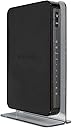
๐ Elevate your home network to pro-level speed and control โ donโt get left buffering!
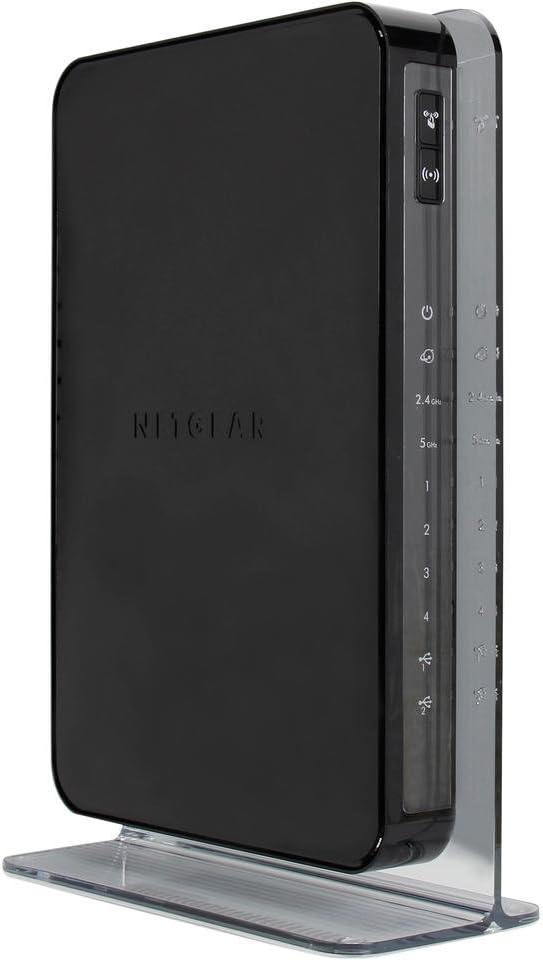
The NETGEAR WNDR4500-100PAS N900 Dual Band Gigabit WiFi Router delivers up to 900 Mbps combined wireless speed across dual bands, enhanced range for larger homes, and gigabit wired connections. It features ReadySHARE USB access for sharing storage and printers remotely, advanced QoS for smooth HD streaming and gaming, and an easy-to-use NETGEAR genie dashboard for network management. Compatible with multiple operating systems, itโs designed for professionals seeking reliable, high-performance home networking.
| Asin | B00HEX851C |
| Brand Name | NETGEAR |
| Compatible Devices | Gaming Console, Personal Computer, Printer, Smartphone, Tablet |
| Connectivity Technology | wireless |
| Control Method | App |
| Customer Reviews | 4.3 4.3 out of 5 stars (1,210) 4.3 out of 5 stars |
| Data Transfer Rate | 900 Megabits Per Second |
| Frequency | 2.4 GHz |
| Frequency Band Class | Dual-Band |
| Global Trade Identification Number | 00606449080131, 10606449080138 |
| Item Weight | 2.49 Pounds |
| Lan Port Bandwidth | 10/100/1000 megabits_per_second |
| Manufacturer | Netgear Inc |
| Manufacturer Part Number | WNDR4500-100PAS |
| Maximum Upstream Data Transfer Rate | 450 Megabits Per Second |
| Model Name | WNDR4500-100PAS |
| Model Number | WNDR4500-100PAS |
| Number Of Items | 1 |
| Number Of Ports | 4 |
| Operating System | Microsoft Windows 7, 8, 8.1, Vista, XP, 2000, Mac OS, UNIX, or Linux |
| Other Special Features Of The Product | LED Indicator |
| Security Protocol | WEP, WPS |
| Unit Count | 1.0 count |
| Upc | 606449080131 |
| Wireless Compability | 802.11abg |
User
Very happy with this.
First and foremost this is NOT capable of physically terminating a DSL connection. It can perform the authentication and terminate the PPP session. However you ABSOLUTELY do need another device to pysically terminate your DSL connection coming from the service provider, there is no RJ11 port on this router. The bright side is, that can be done with a nice cheap device that operates in what is called bridge mode.I bought this because the piece of crap "router" that AT&T charged me for didn't have anything like routing features on it. This is a fully featured home router and will perform many high end functions that most devices of this class do NOT do. For the price this is an excellent device. It has both a 2.4 and 5 ghz wireless radios, so you can seperate devices if you have any capable of 5 ghz, which will reduce latency in a home using lots of wireless such as mine. I have 2 ipads, 2 iphones, 2 macs, and an xbox. I've got all the apple gear running on 5ghz so my xbox is alone to use the 2.4 channel with no competition.If you've got any questions about the specifics of this device, feel free to ask. I'm completely happy with it, and it's worked flawlessly from day 1. I went from using AT&T's $100 "router" that constantly dropped the PPP session and wasn't even getting 65% of the advertised throughput with horrible wireless coverage, to using this for the same price and it does everything that the other piece of junk was supposed to do. Wireless coverage is great, I have a largish house. Router is on the first floor and my den is on the second story. It also has a GOOD NAT engine, which if you know anything about gaming or VoIP this is important. Many cheaper devices have garbage NAT engines and will try to "fix up" sessions that they think aren't working correctly. This doesn't do that. You can also disable any of the onboard fix ups that are in place to make sure traffic is getting through exactly as it reaches you.
User
Best Router I have Ever Owned
I have had many routers but this one is my all time favourite. Not only does it look amazing but it functions flawlessly. The set up was a breeze and yet also gave me tons of cool options. My connections are fast and it never fails. Amazing value.
User
Great dual band WiFi router in very WiFi congested apartment complex. Solved months of woes with Cisco WiFi on Comcast
Replaced Cisco/Linksys e3200 dual band with this new NetGear router. Cisco has serious problems on Comcast causing speed degradation from 75 Mbps to under 10 Mbps (download slower than upload). Used NetGear Genie to change my SSID and passwords to the ones I already had programmed on all my devices on previous router. Selected the best channels for my apartment complex. My Samsung Galaxy S4 and Samsung Galaxy 10.1 Tablet 2014 edition both run on 2.4 and 5 GHz band. I live in apartment complex where at least 40 different home networks are visible on 2.4 band using WiFi Analyzer. Too much interference to maintain a solid data stream. So I use the 5 GHz band for WiFi on my cell phone and tablet (only 5 networks on that band). I installed Powerline ethernet extender so my 2.4 band devices (Blu-Ray Disk, Roku, etc.) are now hardwired to ethernet and no more movie buffering. This new dual band has solved all my problems. No more slow internet speeds due to incompatibility between Comcast and Cisco/Linksys Wifi routers.Very easy setup without needing to talk to Comcast idiots. The only problem I encountered was the the 5 GHz band would not turn on no matter how many times I entered the SSID and password using Netgear Genie. I finally just unplugged WiFi router to reboot and problem solved.
User
It works!
Does what it's supposed to. It's nicer than my old router. I'm connected to wi-fi before I even get into the driveway when I'm coming home from work. It's a little more efficient overall. It was on sale and worth the price. Very easy set-up. No issues and no need for any trouble-shooting.
User
Super fast no degradation and works as a great access point - don't make the same mistakes I did
Important, make sure to read this so you don't make the same mistakes I did. Super fast and works as a great access point - pushing over 100mbps WiFi and Ethernet. I already own one of these for about 2 years or so and have been very happy with it but I did not think I needed another one just to use as a simple access point. (eventually you will see that I purchased another one to use as an access point.) I am not sure what the specification is with this device, but this brand and model allows full throughput which matches the Mbps as if you plugged in your machine directly to the cable modem. There is no degradation on speed. I was looking for a pure access point and purchased a couple of them prior only to have to return them, they were of the Cisco and Netgear variety. When I hooked those up I was only get 8 to 25 Mbps. Not sure why? If someone knows please chime in. I thought a Cisco WAP4410N Wireless-N Access Point would do the trick and that only gave me 8 to 10Mbps - I sent that back due to constantly needing to reboot it and purchased a NETGEAR Smart WiFi Router AC1750 Dual Band Gigabit (R6300v2) thinking this would be better based on the specs. I hooked that up and I only got 25 Mbps. I returned it. I thought it was my internal network, a bad wire, patch cable drop etc. I took the one I had out of my office, hooked it up in the area I wanted to use and BAM - over 100Mbps over wire and almost 100Mbps over WiFi. So I bought another one. So far so good. If anyone knows the reason why this router faster than the newer ones please feel free to comment. According to the specs
Trustpilot
2 months ago
2 months ago