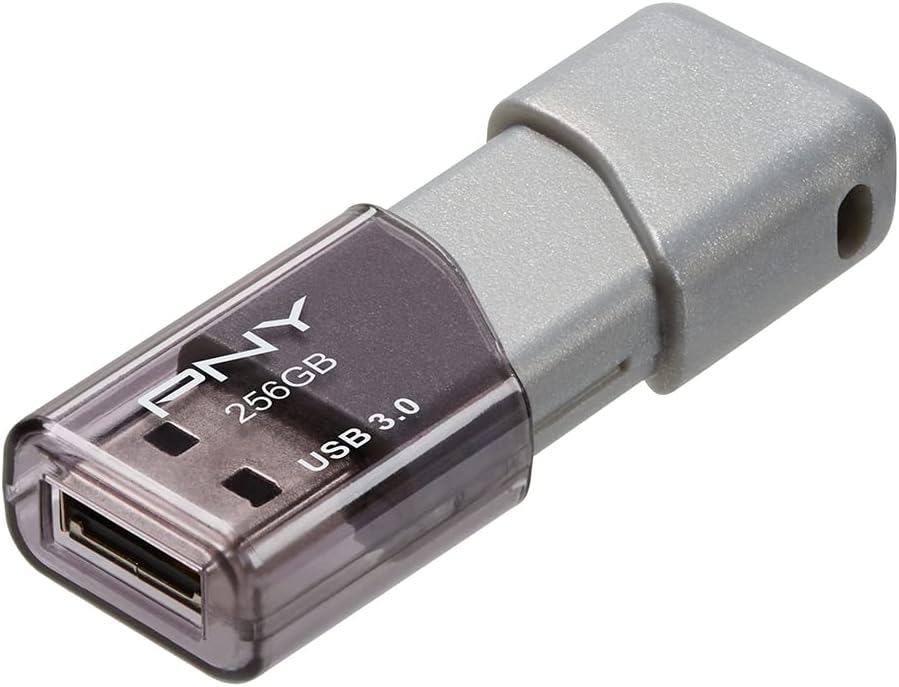




PNY 256GB Turbo Attaché 3 USB 3.0 Flash Drive
Product ID: 34088716
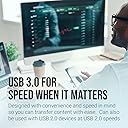
⚡10x faster USB 3.0 speeds
💾256GB massive storage
🔗Capless sliding collar with keychain loop
Desertcart purchases this item on your behalf and handles shipping, customs, and support to Croatia.
⚡ Turbocharge your workflow with storage that keeps up!
The PNY 256GB Turbo Attaché 3 USB 3.0 Flash Drive delivers lightning-fast transfer speeds up to 10 times faster than USB 2.0, massive 256GB storage capacity, and a smart capless sliding design with an integrated loop for easy portability. Compatible with USB 2.0 and 3.0 ports across PC, Mac, and tablets, it’s the perfect rugged, high-performance storage solution for busy professionals on the move.


| ASIN | B00JN1TOHM |
| Additional Features | Backwards compatible with USB 2.0 Ports |
| Best Sellers Rank | #18 in USB Flash Drives |
| Brand | PNY |
| Built-In Media | Pny Turbo 256Gb Usb 3.0 Flash Drive |
| Color | Grey |
| Compatible Devices | Tablet |
| Connectivity Technology | USB |
| Customer Reviews | 4.6 out of 5 stars 41,996 Reviews |
| Flash Memory Type | USB Flash Drive |
| Global Trade Identification Number | 00751492569765 |
| Hardware Connectivity Technology | USB Type A |
| Hardware Interface | USB 3.0 |
| Item Weight | 18.14 g |
| Manufacturer | PNY |
| Memory Storage Capacity | 256 GB |
| Mfr Part Number | P-FD256TBOP-GE |
| Model Name | P-FD256TBOP-GE |
| Model Number | P-FD256TBOP-GE |
| Number of Items | 1 |
| Number of Packs | 1 |
| Read Speed | 100 megabits_per_second |
| Special Feature | Backwards compatible with USB 2.0 Ports |
| UPC | 751492569765 |
| Unit Count | 1 Count |
| Warranty Description | 1 year |
| Write Speed | 400 |
J**S
An essential tool for my mobile workstation.
I work in graphics, and although most of my time is spent at my office at a powerful workstation connected to a Synology NAS, I also sometimes like to work from a little coffee shop near my house, on my Surface Pro. I needed a way to easily keep up to three years worth of project files with me at all times. For a while I used a USB external hard drive, but because the Surface Pro has only one USB port, I couldn't power both a hard drive and my wireless Wacom tablet at the same time. This PNY USB drive is small and fast, and it doesn't use much electricity. Now I can plug this and my Wacom wireless dongle into my tiny Anker USB3 hub, and I don't have to worry about a big rat's nest of cables when I'm working off my Surface Pro. I got this drive off Amazon Warehouse Deals, but I couldn't see any physical flaws in the drive when I opened the package. The drive itself looks and feels reasonably rugged; it's spent a good part of the past couple months bouncing around in my pocket next to my keys and other stuff, and aside from a little minor scuffing, it's still in great shape. A reasonably thick tab keeps the slider in the "closed" or "open" position, so it takes a little force to open and close it, but that also means it's never accidentally opened in my pocket, or closed itself while I'm trying to insert it into a USB port (as happens with some other "slider" type drives I've used). I haven't run any software to measure the USB3 performance, but I've never found myself wanting for speed from it. My Surface Pro has a USB3 port, and I'm using a USB3 hub, and I work with large files - when I need to copy over a few hundred megabytes of data, I don't find myself waiting for what feels like a long time. Also - and this is really just a small detail - the keychain hole at the end is reasonably wide, and is set back a bit from the corner of the drive. That means it might take a little more effort to get, say, a key ring through the hole, but once the ring is through, it's not going to slip out or break through easily. I personally have a small chain running through it, rather than a ring. In short, this is a reasonably fast, reasonably rugged, and high-capacity drive that meets all the needs of a mobile professional. I did a lot of research before buying this drive, and so far it's met or exceeded all my expectations.
D**Y
Flashinator
Great Price, Great Product Let's Go
M**E
Excellent quality - Good read/write speed - Would buy again.
Excellent quality - slide covers usb when they drive is riding around in my pocket. Work well when encrypted with Bitlocker to protect sensitive data. Great drives with enough capacity for the things I use them for. Fast read/writes.
R**O
Good product
It’s kind of slow, but it’s all right for the price size is good and if it’s good on your pocket or if you’re using this for files or for crypto it’s really good too, but it’s kind of slow and it doesn’t really overheat that much
L**Z
Both are great 128GB USB 3
I purchased a couple USB memories, so I won't only review them, but compare them. Memory 1 is: SanDisk Ultra Fit 128GB USB 3.0 Flash Drive (SDCZ43-128G-G46) Memoriy 2 is: PNY Turbo 128GB USB 3.0 Flash Drive - P-FD128TBOP-GE Both are great 128GB USB 3.0 memories, but each one could fulfill different needs. At the end I'll list some specs of the hardware used. Performance: On a USB 2.0, PNY has the advantage. SanDisk's only outperforms PNY in random writting. But besides that, PNY is a clear winner. Specially on sequential writting. On a USB 3.0. I'd say it's a tie. SanDisk has better sequential reads and random writes. PNY has better sequential write and random read. I could say PNY wins by a slight margin due the difference in sequential write is considerable. On a USB 3.0 + Turbo, while SanDisk increase its performance by a good margin, PNY actually performs worse... Don't ask me why, since it should increase its performance, but the results don't lie. SanDisk increased it's overall performance by about 40%; which is a very good margin. And an increase of about 200% in sequential writing. PNY on the other hand, decreased an overall of 4%. Sequential writing was reduced almost 35%. Sequential reading was increased by only 8%. And again, SanDisk is a clear winner in sequential reading and random writing, while PNY in random reading and sequential writing. SanDisk only outperforms PNY in sequential writing with turbo activated. PNY is a winner in performance. However, SanDisk performs really well with Turbo. Aesthetic: SanDisk is a clear winner. It just doesn't feel like a cheap USB. On the other hand, PNY seems to be made with cheap plastic, and also not very well painted. The hole for the lanyard, might be a tie. SanDisk's is toot thin and PNY's feels clumsy. None arrive with a lanyard, though. The USB cover is not the greatest in either one. SanDisk might get lost, but PNY has more friction. Warranty: SanDisk wins hands down. It's 1 year vs 5 year. Price: I paid 19.99 for PNY's and 27.99 fo SanDisk's. There's only a small margin in pricing. justified or not? might deppend on you. My verdict: It depends on your application. If you plan on keeping it in the USB port, SanDisk wins. Otherwise, PNY has a better performance/price ratio. Also, I didn't make a section for it, but SanDisk runs hotter, but this is understandable since it's smaller. SanDisk has a way better warranty, however. I'm using SanDisk for a Wii U. The console has a USB 2.0, which is the bottleneck in the system, but I I'd rather that it's the port, not the memory. So far is working great. Loading times are only slightly better, but that's preferable than worse. So now I can free some space from its 32GB internal memory. I wish the system had the capability of storing partially in the internal memory and the external, so I could have a increase in performance (Like a Raid 0), but, that's too much asking. It's lower profile will also help so it doesn't get in the way. PNY will be used by my father to transport large files. So sequential writing will have a better benefit. Also, since it's bigger than SanDisk's, there's less chance of losing it. And since he won't be able to lose the cap, it's a big advantage. Bench hardware The USB 2.0 tests were made in a dv2125la laptop. T7600 Core Duo with 3GB of RAM. The USB 3.0 tests were made in a desktop PC. Intel i7-4770k, 32GB of RAM, Z87 plus MB and C70 case. Thanks for reading. L8er!
J**P
I bought 4 of them.
It worked as advertised. Set the Label to be my phone number with area code. Put a "_ReadMe.txt" on the drive with so it would float to the top. Had identifying info with an offer of a small reward, and the notice "Sorry about that, but there is no pron on the drive, either hidden, encrypted, or otherwise." CHKDSK worked fine and shows 249...GB on the drive. It came set to FAT32, I believe, but I wanted NTFS. The windows FORMAT (Vista or Longhorn) didn't work on this drive, but thankfully I found "USB Disk Storage Format Tool" and it worked like a charm. It did take 6 hours to reformat, but mine is an older PC with only USB 2.0 connections available. Overnight is time enough. Bought one for my brother and sister. He has 128,000 PDF's backed up (for his work), and loves it. Also backs up to the cloud and a portable HDD. My sister, on the other hand, had never backed up in 8 years, but she didn't want to lose her pictures of the grand kids. She fit 130GB of pics from her Pictures folder with room to spare. Didn't want to use compression, nor encryption, and thus Windows Explorer, Xnview, and FastStone Image Viewer can easily show her what she has got on the PNY Flash Drive. Used Roxio to backup the same Pictures folder to CD/DVD, and it took 24 hours and 30 DVD's to accomplish. Roxio spans the DVD's. Gonna have her to it again, for an offsite backup to the Safe Deposit Box. Only then, I'll tell her she can safely delete stuff to make room. Now I've had a backup HDD's fail, and it made me sad (understatement). I wish the PNY came in a 512GB for the same price, and was a bright YELLOW (fire engine) color. My Hard Drive is 512GB, so backup would be easy. The YELLOW color - they're real easy to lose. I put mine is a Case Logic's carrier with the most garish color so it easy to find. I worry about EMP, Electromagnetic Pulse. I could wrap the PNY in AL foil, but that may be overkill where a metal box would do just fine. I also worry about the new wireless charging devices, and whether or not that could wipeout the memory or at least lead to significant degradation of the lifespan if you put the PNY on the charger. Haven't seen any literature on this topic. Don't forget, I've had backups fail where I put all my eggs in one basket. I have an LG portable BD drive which will write M@DISK's, but I haven't used it yet. I'm not sure, but Roxio shows only 4.4GB of a 4.7GB DVD filled up. That is a best practice. Of studies I've read, the degradation of the dye layer of a CD/DVD occurs from the outside rim inwards. By leaving a cushion on the outside rim, they extend the life of the CD/DVD. I don't know if they were smart enough to think that far ahead. I have other issues with Roxio, but only a few in passing. Had to install the software in SAFE MODE, but the Knowledge Base had a article explaining this. Roxio will backup categories of files, Pictures, Documents, Videos, etc, if you want, but they consider just a few extensions to be Pictures, certainly not .PNG, now raw files. Anyway, I digress. The forth PNY I bought for my girlfriend, a dear girl whom I love, but she owns a MAC. She tried the PNY, it works, but it is too small for the Time Machine. She wasn't impressed, but the Genius at the Apple Store was. "We don't see too many of these." Never met the guy, but I liked him already. Again, had to jump through a few hoops to fit my needs, but that's life. The PNY works.
J**E
Good product.
Good product.
K**A
Fast and Portable
The **PNY 256GB Turbo Attaché 3 USB 3.0 Flash Drive** is a reliable and lightweight storage solution, perfect for anyone who needs to store and transfer large files quickly and securely. With **256GB** of storage and **USB 3.0** technology offering speeds up to **100MB/s**, this flash drive is ideal for both personal and professional use. Here's a detailed review based on its **performance, design, and functionality**. ### **High-Speed USB 3.0 Performance** One of the most important features of this PNY flash drive is its **USB 3.0 interface**, which significantly enhances transfer speeds compared to USB 2.0. With a **transfer rate of up to 100MB/s**, this drive handles large files, such as HD videos, high-resolution photos, and software installations, with ease. In my experience, this flash drive is perfect for tasks like: - **Backing up large files** - **Transferring multimedia content** - **Storing important documents** The **100MB/s** transfer speed makes it faster to upload and download files, which is especially useful when handling large files or when you're working on time-sensitive projects. It’s also **backward compatible with USB 2.0**, so you can use it on older devices, though with slower transfer rates. ### **Ample 256GB Storage Capacity** With **256GB of storage**, this flash drive provides ample space for storing a wide range of files. You can easily store thousands of documents, photos, music files, and videos. It’s perfect for users who need to carry large amounts of data on the go, whether for school, work, or personal use. The large capacity is also beneficial for: - **Software developers** who need to store programs and data. - **Content creators** who handle high-resolution video and image files. - **Students** managing school projects, coursework, and multimedia files. ### **Lightweight and Portable Design** The **PNY Turbo Attaché 3** is designed with portability in mind. It's incredibly **lightweight**, making it easy to carry in your pocket, backpack, or laptop bag without adding bulk. The **slim and compact design** ensures that it’s not cumbersome, even when plugged into your computer or other devices. The **slide-to-cover** mechanism protects the USB connector from dust and damage when not in use, eliminating the need for a separate cap (which can be easy to lose). The design is practical and convenient for everyday use. ### **Durable and Sturdy Build** Despite its **lightweight** design, the PNY Turbo Attaché 3 flash drive feels solid and durable. The plastic housing is built to withstand regular use, ensuring that the drive can handle the daily rigors of being plugged in and out of various devices. This durability makes it a reliable option for users who need to use it frequently or travel with it. ### **Plug-and-Play Functionality** The **plug-and-play** functionality means you can start using the flash drive immediately—no installation of drivers is needed. It's compatible with most **operating systems**, including **Windows, macOS, and Linux**, making it a versatile tool for transferring files between different computers and environments. ### **Security and Data Protection** While this flash drive does not come with built-in encryption or security software, you can easily use third-party software to encrypt sensitive files, ensuring your data remains protected. The **256GB capacity** is more than enough for storing critical data, and you can easily integrate additional layers of security for peace of mind. ### **Pros** - **Fast USB 3.0 transfer speeds**: With speeds up to **100MB/s**, it allows for fast and efficient data transfers, perfect for large files. - **Large 256GB capacity**: Provides ample storage for a variety of files, including multimedia content, documents, and software. - **Lightweight and portable**: The slim, compact design makes it easy to carry anywhere, and the sliding cover protects the USB connector. - **Durable build**: Sturdy enough to withstand regular use and travel. - **Plug-and-play functionality**: Ready to use without the need for additional drivers or software installation. - **Backwards compatibility with USB 2.0**: Works with older devices, though at slower transfer speeds. ### **Cons** - **No built-in encryption**: The drive does not include native security features, so users will need third-party software for data encryption if needed. - **Plastic housing**: While durable, the plastic build may not be as premium or rugged as metal alternatives, though it’s lightweight for portability. ### **Final Thoughts** The **PNY 256GB Turbo Attaché 3 USB 3.0 Flash Drive** is an excellent choice for users who need **high-speed transfers** and a **large storage capacity** in a lightweight, portable design. With **100MB/s transfer speeds** and 256GB of space, it's perfect for managing and transporting large files efficiently. Whether you're a student, professional, or content creator, this drive provides a reliable and durable solution for your data storage needs. If you’re looking for a fast, spacious, and easy-to-use USB flash drive, the **PNY Turbo Attaché 3** is a great option. Its lightweight build and high-speed performance make it an essential tool for anyone dealing with large amounts of data.
T**L
MUITO BOM
Muito Bom ...Estou testando..
K**H
Best price
A one
K**N
買って良かった!
とても便利に使ってます。結構な量が録画できるので重宝してます!
A**R
USB Navideños a mis compañeros de trabajo
Regalé estos de Navidad a mis compañeros. Están muy contentos con su versatilidad y capacidad.
E**M
Muy buena memoria, muy bien fabricada.
Me gustó porque llevo usándola muy seguido durante más de 2 meses y no ha causado ni el más mínimo problema. Me vino en formato FAT32, le di formato exFAT y después de unos días la formateé en NTFS y siempre ha funcionado bien. Le escribo desde mi compu que tiene entradas USB 2.0, y va por lo menos a 24.7 mb/s y a veces supera los 25 mb/s. En lectura, supongo que va mucho más rápido porque las películas FHD que le grabo se miran perfectamente en cualquiera de mis teles, ya sea en puertos USB 2.0 o 3.0 No he tenido oportunidad de escribir a la memoria desde una entrada 3.0 Sí cumplió con mis expectativas ya que quería una forma rápida de pasar películas de alrededor de 30 gb cada una. Lo único malo que le vi fue la tapa o cubierta deslizante; la deslicé para 'destapar' y después no pude deslizarla para taparla de nuevo. Sólo se tapa a medias, ya que hay algo que la atora a medio camino. No quiero intentar muy fuerte porque temo quebrarla o rasparla. Después investigaré si estoy intentándolo de forma incorrecta o si realmente sí me vino con ese defecto. En comparaciones; sólo lo puedo hacer con la DataTraveler 100 G3 8gb de Kingston (la única otra 3.0 que tengo) que obviamente fue superada por mucho, ya que es de un límite más bajo de capacidad y velocidad. Entonces le doy 5 estrellas porque se ve que está muy bien hecha y no al aventón, porque, aunque su diseño no es muy bonito, su función sí es muy bonita.
Trustpilot
1 month ago
1 month ago