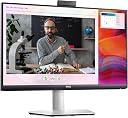
๐ฉโ๐ป Elevate Your Work-from-Home Game!
The Dell S2422HZ is a cutting-edge 24-inch FHD video conferencing monitor designed for professionals. With a 75Hz refresh rate, 4ms response time, and vibrant 16.7 million colors, it ensures a seamless and immersive experience. The built-in pop-up camera, noise-cancelling dual microphones, and dual 5W speakers make it perfect for virtual meetings, while USB-C connectivity offers versatile compatibility. Its ergonomic design allows for customizable adjustments, making it an ideal choice for any workspace.


| ASIN | B09DYXSPT4 |
| Adaptive Sync | FreeSync |
| Additional Features | Anti Glare Screen, Blue Light Filter, Built-In Speakers, Built-In Webcam, Flicker-Free, Height Adjustment, Pivot Adjustment, Swivel Adjustment, Tilt Adjustment |
| Aspect Ratio | 1.78:1 |
| Best Sellers Rank | #1,909 in Webcams |
| Brand | Dell |
| Brightness | 250 |
| Color | Silver |
| Connectivity Technology | DisplayPort, HDMI |
| Contrast Ratio | [1000:1 - 3000:1] |
| Customer Reviews | 4.3 out of 5 stars 295 Reviews |
| Display Resolution Maximum | 1920 x 1080 |
| Display Technology | LED |
| Display Type | LCD |
| Hardware Connectivity | DisplayPort, HDMI |
| Image Contrast Ratio | [1000:1 - 3000:1] |
| Item Dimensions D x W x H | 2.23"D x 21.17"W x 12.74"H |
| Manufacturer | Dell |
| Model Name | S2422HZ |
| Model Number | S2422HZ |
| Mounting Type | Desk Mount |
| Native Resolution | 1920x1080 |
| Number of Component Outputs | 2 |
| Picture Quality Enhancement Technology | IPS Panel, AMD FreeSync Technology |
| Power Consumption | 5 watts |
| Refresh Rate | 75 hertz |
| Resolution | FHD 1080p |
| Response Time | 4 milliseconds |
| Screen Finish | Dual |
| Screen Size | 24 inches |
| Screen Surface Description | Dual |
| Specific Uses For Product | Business, Education, Programming |
| Total Number of HDMI Ports | 1 |
| UPC | 884116404033 |
| Viewing Angle | 178 degrees |
| Warranty Description | 1 |
B**M
Amazing tech support
Camera stopped working (it turned "on" when pushed down and vice versa), called Dell, and after brief troubleshooting they agreed to send a replacement, which arrived just two business days later. Amazing! Works flawlessly with our HP and Lenovo Windows laptops, and MacBook Air. USB-C charging and display on a single included cable. Sharp; good speaker; decent autofocus camera for video calls; although microphone muffled compared with iPhone. Our Dell warranty period had activated 2 months before purchase from Amazon, something to look out for or correct if registering. Top marks, value for money, we bought a second one!
G**N
Great monitor, with audio and video
Our computer audio was having issues and we were thinking of replacing it. Instead, we found this monitor that not only has built in audio, but enables video (zoom) conferencing too. Great picture and the best price point for all these features. Note that if you have an older computer, be sure to search the cords (not included) that you will need to connect this monitor to your computer. It took me a couple of tries working with Dell support and they never got it right. Finally I did a search and found the right answer.
A**M
Good monitor, bad camera
It's a video conference camera so it's not the end of the world for me. If you need it for more than that, then this is not your monitor. I have a $20 no brand USB camera off Amazon that I gave to my wife for her monitor and that thing was miles better. I mainly bought this as a companion for my Dell P2419 monitor with a camera in it. The monitor is excellent just like the P2419. It was a bit finicky trying to get the S2422 to work with my dock and get the drivers installed. The camera wasn't initially recognized, and I have to use a USB A (dock side) to USB C (S2422) side to get the camera and USB ports to work. It's nice that this could be your only monitor without a dock too. I did try it out that way, but couldn't think of a way to get my other P2419 to work through the S2422. I believe the S2422 is designed to be your only external monitor. It is definitely possible to use the S2422 for a monitor, camera, speakers and USB ports AND another external 1080P monitor over a single USB-C dock. I love the nearly non-existent edge as well.
Y**I
WFH use to have fewer cables, mission accomplished, but...
I bought this specific monitor because the power cable goes to the monitor, then the monitor connects to my laptop via USB-C. Done. This replaced a power cable to the laptop, it gets power from the USB-C cable from the monitor. Then no extra cables to a camera or speakers/microphone. I was using a USB speaker with built in microphone from Jabra that is really good, but so many cables. If you can connect via USB-C then this is great. If you are going to use HDMI then you will need separate cables for the camera and microphone. Like everyone states the camera is lacking in a big way, but for my work our meetings are 95% audio with video cameras off, so its good enough when I need it. I also use a big 34" Dell widescreen and I love the software that comes with both of these that divides screen into sections to make it easy to fit applications into the boxes. So with these it works for me. Not a great monitor, but with all in one I can live with the compromises. The bad and it was really bad setting this up in Windows 10. Seemed to be plug and play, but the audio would just STOP after 10-20 minutes. Discovered in Web meetings, but then I tried playing music as a test and it still happened. Hours of frustration and even called Dell, but the problem is it works then 10 minutes later is STOPS working. I would have to turn the monitor on and off and then it worked. Dell couldn't solve it and after every attempt it was such a long wait to see if it was solved or not. Turns out there were two audio drivers active and once I disabled the one called ECHO something or another it has worked ever since. The problem with this is the one I am using doesn't allow me to adjust the volume past its maximum. So it was set at 14% on the monitor. Via the physical buttons this was the maximum volume. The fix was to disable the one that I was using and enable the Echo one, then adjust to 100%. Disable ECHO and enable the other one. Now I can control the volume normally. Just a royal pain to setup and now 14 days after buying this it is $50 cheaper. Rrrrr. Its all behind me now and maybe when my work goes to Windows 11 I can use the Echo one. BTW its a Dell laptop as well.
L**O
This works really well!
I purchased this to replace using my laptop screen for Teams meetings. I have another monitor but the microphone and camera are on my laptop so I've always used that. But as I am an older person, the laptop screen is just too small and when someone is sharing their screen, I can barely see it. This monitor is amazing! Took me a bit to figure out what I had available for ports (i.e. USB-C on my laptop is taken up by my docking station) but ended up with HDMI - HDMI and then USB-A to USB-C on the monitor. Works fantastic. I've closed the lid to my laptop and the monitor sits right on top. I did a test call with a co-worker and the sound is clear (and louder than the laptop) and she said the microphone works great.
A**.
Excellent Monitor. Makes working a breeze!
The monitor blew my expectations. It came fast and with no damages. be mindful when you are setting it up using a MAC laptop. Some people think the sound or camera don't work, but you have to change the settings on your laptop to the Dell display.
S**.
Very good monitor for the price
I needed a second monitor to attach to my laptop computer for work. The camera and speakers included in monitor were key requirements for Zoom calls. It was very easy to setup and the speakers are great, camera is very good. I think the display looks a bit pixelated but not too bad. Overall very happy with purchase.
O**E
Monitor stopped working after 5 months
I loved this monitor until one day, it decided to stop recognizing my computers. I tried connecting via USB-c and HDMI and even got new cords to try. I have tried using multiple computers. I have tried resetting everything on the monitor. Power still comes through to my laptop but otherwise the monitor is useless. I am super bummed to have this happen in a short amount of time, especially on a product with great reviews. I have wasted a lot of work time trying to get it up and running again. I canโt afford a new monitor right now, so I am stuck using my laptop.
Trustpilot
1 month ago
2 months ago