❄️ Stay cool, stay ahead — power your productivity with MSI Core Frozr L!
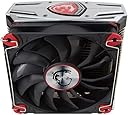
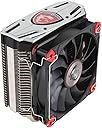
The MSI Core Frozr L is a high-performance CPU air cooler featuring a nickel-plated copper base and four 8mm heat pipes, capable of dissipating up to 200W of heat. Equipped with dual 120mm MSI TORX fans delivering 71.27 CFM airflow at a whisper-quiet 33.6 dB, it supports a wide range of Intel and AMD sockets, making it the ultimate cooling solution for professional-grade desktop builds.
| ASIN | B01MFB358A |
| Air Flow Capacity | 71.27 Cubic Feet Per Minute |
| Best Sellers Rank | #11,214 in Computer CPU Cooling Fans |
| Brand | msi |
| Brand Name | msi |
| Compatible Devices | Desktop |
| Cooling Method | Fan |
| Customer Reviews | 4.7 out of 5 stars 762 Reviews |
| Global Trade Identification Number | 00824142135341 |
| Included Components | CPU cooler, cables and connectors, quick setup guide |
| Item Type Name | Core Frozr L |
| Item Weight | 2.12 Pounds |
| Manufacturer | MSI Computer |
| Material Type | Copper,Silver |
| Maximum Rotational Speed | 1800 RPM |
| Model | MSI Core Frozr L |
| Noise Level | 33.6 Decibels |
| Number of Items | 1 |
| Part Number | MSI Core Frozr L |
| Power Connector Type | 4-Pin |
| UPC | 824142135341 |
| Unit Count | 1.0 Count |
| Voltage | 12 Volts |
| Warranty Description | 1 year |
| Wattage | 200 watts |
W**?
Big boy. Great looking and cooling.
This cooler is very big. It's the centerpiece in my rig now. My case is a mid tower and the cooler is touching the side glass panel so yes, it's big and tall. I'm still able to close my side panel so it's all good. Performance: With proper airflow, it drops my gaming temp from 52 (my old Thermaltake CPU cooler) to 45 which is a huge improvement. Prime95 for 15mins will max out at 68C and that's all I need since I rarely utilize all 100% CPU. I had Corsair H110i GT and the bump gave out so I switched to air cooler and I have to say that this MSI cooler performs just as good as the H110 AIO. No more pump failing. Noise: it runs silently. Under normal load and gaming, fans stay at 400-450 rpm so I don't hear anything from this cooler. Color: It looks great in the case with red fan shrouds, some may dislike the theme. To my surprise, the fan shrouds actually change color from red to black and black to red depending on what light is hitting the shrouds. Since I have RGB case fans and strips in my case, the shrouds can turn black when I switch RGB color to blue or cooler colors, and it will turn back to red when I set RGB color to warmer colors like yellow, red. This cooler has RGB lighting for the MSI dragon logo so I have tons of colors to change it to match my theme. Clearance: the two fans can move up and down to clear rams. I prefer to leave the fans flush with the logo and it's still able to clear all Ram slots which is great. I have G.Skill Ripsaw X rams just for your reference. As I mentioned above, this cooler is tall and it's touching my side glass panel (Mid tower case). So if you have anything smaller than a mid tower, it will not fit. Overall: I love this cooler for its performance, appearance and design. It's a perfect fit for my set up.
M**R
Amazing cooler! Easily as good as a Noctua and much better looking!
I recently bought a really nice custom-built computer off Craigslist when the previous owner decided to upgrade. The specs included an Intel i7-6700, Gigabyte GTX 1080, and MSI Z170a Gaming Pro Carbon. The computer came in a gym-locker-sized full tower case that needed to go, and the CPU was cooled using a Corsair AIO cooler (I'm not sure which one...I'm not a big fan of AIO coolers). I don't know if it wasn't seated properly of if the thermal paste had dried up, but the cooler was doing a terrible job. The CPU idled around 50C and under moderate 4k gaming topped out around 90C. The previous owner had been running the build as-is for about 4 years, so maybe it was just dried up thermal paste. While in the process of transferring everything to a new case that would actually fit ...well...anywhere useful, I decided to get rid of the AIO. I bought this MSI cooler, having never used an MSI cooler before, but it looked cool and the TDP dwarfed my needs. I was shocked, SHOCKED I TELLS YA, at the difference I saw once in the new case. Granted, some of that could have been airflow through the case, but the old case should've flowed just fine. My new idle temps were between 25 and 30C, and under the same loads the CPU peaks around 60C! I now use that PC with my new Steam Index VR set and even hitting 100% on multiple cores during the process of a session the CPU never tops about 68C. Really impressed with this thing! Installation was simple and well thought-out (despite so/so directions that were 95% pictures). It came with a tube of thermal paste that I opted to use (in order to test it how MSI intended). The description actually states how tall a ram stick it'll clear which is EXTREMELY convenient, because that's usually an unknown. It cleared my non-LED Corsair Vengeance sticks without adjusting the fans up at all. Overall, really nice looking, VERY functional unit! Extremely happy with my purchase, and by far the best price found here. If you can fit it, buy it.
A**R
Quiet and cooling
I have no idea what this "warmth" rating is. Does it get warm? Does the computer remain warm while it's running? I have no idea so I rated it 3 as the rating name makes no sense to me in regards to a fan. The fan comes with it's own set screws. The frame has inbuilt rubber gaskets to stop vibration. Dragon imprint side goes in. installation in my case was easy as there was nothing blocking the path of putting the fans in on my desktop computer. turn off the computer and unplug it. Move it to some place that you have room to work. Open the case and find where the old fan is located. Unbox your new fan along with the screws that come with it. Remove the fan by unscrewing the screws and set these screws aside. Follow the fan wiring to where it is plugged in. Pick up your new fan. Unplug the old fan and plug the new fan in the same place. Set the old fan aside. Put the new fan where the old fan was (dragon image facing in). use the screws that came with it to screw it in place. For higher performance you can go into your computer bios and set the fan up as PMW (Pulse-width modulation). Once you put it in this mode, you should be able to set-up fan curves to make it run at different rates based on the current temperature of your computer. My computer came with 2 low quality fans with artsy lights which started to die on me rather quickly. I could care less about lights. I want performance. These fans don't light up and sing songs. They do an excellent job of doing what case fans are supposed to do - they cool your computer. I think these fans are awesome. The keep my computer temperature down during graphic intensive gaming and that's what I want them to do. Two thumbs up.
G**N
One big cooler!
This is one big CPU cooler! The mounting was relatively easy but it took some fanageling to get it to set correctly above my RAM. I have the TridentZ RAM and they sit a bit on the high side of the RAM platforms. After mounting and a bit of tweaking in the Mystic Light settings, I really like the way this cooler looks. Previously I was running a 120mm AIO, but it just couldn't keep up with the load, so after considering bumping up to a 240mm AIO or air cooling I settled on this because the price to performance was just right. Running overclocked I5 9600k @ 4.6Ghz and my Max temp is around 69 C. When it does hit full load the fans spin up and you can definitely hear it, but for the must part my fans don't spin up past 65% which makes my system relatively quite. No real cons about this product, it's a quality air cooler that beats my old AIO by about 15C.
J**E
Beefy Cooler. Has its issues. (Core Frozr XL)
Pros: -BEEFY AF. Cooling is equal to an AIO liquid cooler (depending on the type you get) -RGB Dragon logo. -Two high-quality torq fans included. Quiet (for a heatsink), but still powerful. Able to cool my 105-watt Ryzen 9 3900X. -Easy to install (I've installed coolers that were so convoluted, even a rocket scientist wouldn't understand them). Cons: -They include an ENTIRE tube of thermal paste. DON'T USE ALL OF IT. You'll have quite a bit left over for use in the future. Or if you have a friend who needs some, you can use it there. Slight pro: The thermal paste is pretty good. -BEEFY AF. I had to get entirely new memory for my system. Something low-profile like the Kingston HyperX Fury memory just BARELY worked for my system. I had to replace my G.Skill Royal RGB memory. So unless you're not planning on running dual-channel memory and using two sticks for memory, this won't work. Get the Core Frozr L if you have memory you plan on keeping. -Again, BEEFY AF. I didn't measure clearance beforehand, but luckily enough it just fits in my Enermax Saberey case without touching the glass, somehow. Just barely. So if you're running a smaller system, like mATX or ITX, you may not be able to fit these kinds of coolers inside it. Usually you'll need to go with AIO if there are radiator mounts or a smaller heat sink (provided you're not willing to do a custom loop). -The 4-pin USB 2.0 header on it is mega-tiny. That thing will kill your hand if you install the cooler inside an already-assembled system. For the price, MSI should really make it a full-sized USB 2.0 header with RGB support in the software, so you can customize the dragon logo. I mean, you're already charging us nearly $100 for the cooler and the 4-pin for the RGB is already using a USB 2.0 header, mind as well go all-in and give us another feature. I would have gone with another cooler if I didn't get this cooler at $30 off thanks to minor cosmetic damage. All in all, a cooler that'll outperform expectations. If you thought "Oh well liquid cooling is always better, end of story", you may be right in some ways, but this cooler will put 120mm AIOs to SHAME! During Windows' security scan, my CPU was hovering at 3.99-4.00GHz on all cores with 100% load on each core (we're talking 24 threads being hit and overclocked by 200MHz). Temperatures were at max 78 degrees C, which is pretty good, considering the Kombuster tests from MSI couldn't bring it past 75 degrees C. Just be ready to get low-profile memory if you plan on using all four slots or dual-channel configuration.
E**)
Customer satisfied with the product, MSI provides quality
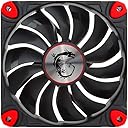
For a long time, I am a faithful user of the MSI brand, not because of its prices, since they are not the lowest in the market, but if it is equated with the quality offered. The simple fact of holding the box, we can feel the quality of its manufacture, these Torx fans, provides the sober style that is sought in a minimalist setup. Product quality MSI Torx Fan By removing it from its packaging, we will immediately feel the manufacturing quality, a finish to which I am already accustomed in the MSI components, simply first. What is the MSI Torx Fan package? Inside the box we will only find two things, the 120mm fan itself and a small bag with 4 black screws to fasten it to the chassis, just what is necessary. Why did I choose these fans? In some cases, the RGB is not important, everything depends on the approach you want in your setup, as we expressed above, if you are looking for a sober style but that maintains a highly pleasing aesthetic, the fans of this style are an excellent option, obviously not they bring RGB, that's why they are sober and minimalist, although perhaps the colors are somewhat aggressive for some since they maintain the style or palette of the brand, Black and Red. How about the air flow: As I could see in my tests, the airflow is somewhat superior to that offered by the Thermaltake Riig that I have installed in a NZXT H440 cabinet, but it does not mean that they are better at all, since it lacks RGB and for many this is very important. Type of connection to power: The MSI Torx Fan fans 120mm, have an electrical connection PWM, which would allow the motherboard to control them more efficiently, this through the 4-pin connector. This helps us to make the equipment even more silent thanks to the intelligent control and the total integration with the motherboards of the brand. In clonclucion I say: Actually I have never had major problems with the brand MSI and the time I had one with a MSI Z97 Gaming 3, this was replaced without problems. The components of MSI, simple have filled my expectations and these MSI Torx Fan fans have not been the exception. Although they will not be of my use, they were installed in a high-end equipment for a highly demanding person. Maintaining a good flow of air with good aesthetics is not easy but these fans achieve the perfect balance. So, if you are looking for a sober and aggressive style, without RGB but functional, bright colors and good air flow, these fans should be an option for you.
S**.
Does a great job keeping i7-7700K cool!!!
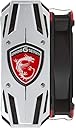
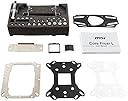
Knowing that i7-7700K has a tendency to run hot, Initially I was thinking to get water cooling for the i7-7700K, but after reading the reviews, checking temps benchmarks and also considering the price, I decided to give a shot to this cooler. So, I got the MSI CORE FROZR L cooler for a new build. Here are the main specs: Case - ZALMAN Z11 NEO, Motherboard - GIGABYTE GA Z270X Ultra Gaming, CPU - Intel i7-7700k, video card - MSI GTX 1080 Gaming X. Cooler installation was pretty straight forward. The parts are very well packed and organized to make the install very simple. It comes with an additional fan bracket if you want to have a push-pull configuration (additional fan not included, you can get it for about $10 if you’ll ever need one). Also an additional black faceplate is included if you don’t like the silver one. The cooler lights up with LED lights when turned on. For the install, I didn’t use the thermal paste that came with the cooler, instead used the MX-4. Make sure to apply the right amount of thermal paste to the CPU; the paste application it’s imperative to keep the temps down. I do it the following way: place a pea size amount on top of the CPU and then spread it with a small razor blade all over the IHS to form a very thin uniform layer. This method works great. After install, ran a CPU stress test. The i7-7700K CPU idle temperature is around 24 degrees Celsius, stress test pushed it to a peak of 67 Celsius with ambient temperature of 73 F. The cooler does its job pretty well and it’s very quiet too. Cooler fan speed ranges between 500 to 1834 rpm. Conclusion: Very well built cooler with cool LED lights and quiet fan. Does a great job keeping my i7-7700K cool. Highly recommend!!!
P**L
Pretty Cool for a Ryzen 1800X!
Pros: Great packaging, presentation and aesthetics Installation was super easy Allows for push/pull config Cheap and affordable while adding some flair with swappable face plates and an LED Logo Cons: Some motherboards might have an issue with 4-slot configuration as you don't have much room to work with if you have high profile heatsink ram. Review: Before I had Ryzen I was running water on my i5-2500k with a Kraken x60. I decided to upgrade to Ryzen but I would rather save up and go for a full custom water cooling loop. I didn't have the money so I figured I'll stick with air for the time being and this CPU cooler caught my eye. Installation was super easy, I went ahead and mounted this on my ASUS Crosshair VI Hero motherboard but I didn't like the mounting setup for the AM4 socket and luckily the motherboard also had AM3+ so I used that instead. I went ahead and bought another TorX fan for a push/pull config. My only gripe is that the first fan for the push config is literally touching my G.Skill Trident Z RGB. (I have 4x8gb of Trident Z RGB). Luckily it fits but barely. Temps is ridiculously cool to the point where I thought it was misreading. I am getting 26-28C idle and 48C at full load on stock settings which I do plan on overclocking later. (I also accounted for the 20C offset that AMD has with their 1700x and 1800x CPU and used Ryzen Master to monitor CPU temp as well as HWInfo64) I am blown away seeing how these temps just as good as having a water cooling setup on my last rig. I might just save my money and stick on air as this cooler is cool AF. My specs: CPU: Ryzen 7 1800X @ stock (for now) CPU Cooler: MSI Frozr L CPU Cooler (Push/Pull config) RAM: 32gb Trident Z RGB 4x8gb @ 3200Mhz GPU: GTX 1060 G1 Gaming 6GB Card PSU: Corsair AX860 with custom braided cables :D SSD: 1x 480GB OCZ Vector 180 and 1x 960 OCZ Vector 180 HDD: Toshiba X300 6TB x3 Case: Silverstone Kublai KL07B Fans: Noctua Industrial NF-AF14s, F12, Cryorig CR-XTA all PWM fans. (Jebus, the Fan Xpert 4 software makes this the coolest rig literally) RGB: Cablemod RGB strips all around woot!
H**.
Easy to install tower cooler
Generally quite easy to install but make sure it fits for your computer
M**S
very good
10/10 you can use it for lga1200 also
M**D
fell in love with it when I first saw it haha
this baby is just gorgeous to look at, does the job very nicely and I don't find it that loud. bit of an issue it seems with the program to play around with it's RBG and yes it is HUGE but not a moment I look at it and regret buying it. sexy powerhouse that ties in my setup of being a gamer.
F**O
Excellent
Me gusto mucho la operación del producto si te reduce la temperatura de un micro ryzen a 30 grados claro que mi procesador es 1700 su máximo consumo es de 65 watts esta sobrado para mi micro ya que permite en sus especificaciones dispar el calor efectivamente hasta 250 watts, el rgb del logo del dragon solo trabaja con usb 2 si tu tarjeta madre no tiene el puerto de 9 pines usb 2 no vas a poder hacer funcionar el logo , ahora los 2 ventiadores se conectan al puerto de 4 pin fan del procesador , yo elegi este en particular por lo alto de mis memorias corsair platinum ya que mi MOBO es asus rog strix x370 Mini itx y los noctua de doble ventilador no es ajustable, Este se me ajusta excelentemente por eso le doy 5 estrellas ahora si vino una etiqueta de WARNING WWW.P65warnings.ca.gov que este producto puede producir cáncer o dejarte estéril , pero por lo que se msi cuida que sus productos no incluyan plomo, pero como es un radiador de aluminio y antes utilizaban mucho la soldadura de plomo sobre le aluminio y en todo tipo de electrónicos que aun se usa y como eso no te lo va especificar msi en la caja de sus productos por eso etiquetan asi ahora yo recomiendo que cuando algún radiador sea viejo de mas de 5 años revisa si presente deterioro y oxido etc pues cámbialo porque lógico un producto en malas condiciones dañara a la larga tus pulmones las partículas que desprendan y que respires por que son metales pesados todo depende de la humedad y claro dependiendo de lo viejo de las soldaduras de metales pesados que contenga su fusión a altas temperaturas sera menos resistente es decir si es de 100 grados cuando es nuevo al pasar de 5 años la fusión de sus soldaduras puede decaer su grados su fusión por eso luego se desamblan solos con el tiempo, los radiadores de climas de autos al año se se pueden estropear estos manejan temperaturas a 100 dependiendo de la calidad algunos hasta 200 grados, todo depende de la calidad y eso lo vas a saber con el tiempo al hacer mantenimientos mientras el radiador se vea como nuevo y te disipe la temperatura igual sin cambios no pasa nada. Estoy agregando hoy 17 de abril del presente año despues de tres meses lo siguiente, el 17 de ene al abrir este producto y al moverlo para sacarlo se me olvido comentar que salio despedido de producto una nube de algun quimico parecido como cuando pones un poco de polvora de algun cohete y lo enciendes posiblemente el producto fue indirectamente fumigado no se si por parte de amazon en sus bodegas por lo del covid19 o fue desde china creo que se filtro en la caja y se fue almacenan en la doble torrre de aluminio , he presentado un cambio en mi salud o problemas en especifico molestias en la garganta pero sin infeccion ultimamente que estan persistiendo problemente todavia queden resisuos de ese quimico en la doble torre de este cooler y sea un reaccion alergica a las particulas que todabia tenga ,les recomiendo tener ventilado su cuarto ya que no dudo que esten sanitizando las areas donde estan los productos y estando estos en espacios cerrados absorban el quimico y se concentre o se filtre en el interiror del contenedor del mismo producto con el paso del tiempo.
A**R
not the quietest.but do the job
good looking.but not a quietest.
Trustpilot
1 month ago
2 months ago