🚗 Unlock the future of garage access—smart, secure, and always connected!
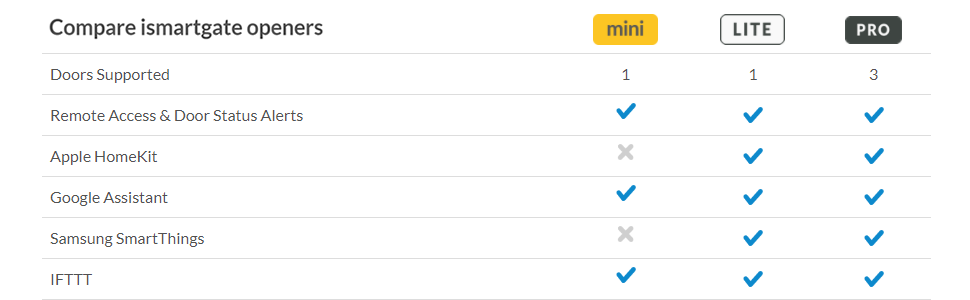
The ismartgate LITE Smart Garage Door Opener offers wireless app control and real-time alerts for a single sectional garage door. Compatible with Apple HomeKit, Alexa, Google Assistant, and IFTTT, it integrates seamlessly into your smart home ecosystem without subscription fees. Installation is straightforward with a wired connection to your existing opener and an included sensor, enabling voice commands and CarPlay control for ultimate convenience and security.




| ASIN | B07PX311B3 |
| ASIN | B07PX311B3 |
| Batteries | 2 Nonstandard Battery batteries required. (included) |
| Batteries | 2 Nonstandard Battery batteries required. (included) |
| Batteries Included? | Yes |
| Batteries Required? | Yes |
| Battery Cell Type | Alkaline |
| Best Sellers Rank | #105,440 in Tools & Home Improvement ( See Top 100 in Tools & Home Improvement ) #191 in Garage Door Remote Controls |
| Color | white |
| Customer Reviews | 3.9 3.9 out of 5 stars (169) |
| Customer reviews | 3.9 3.9 out of 5 stars (169) |
| Date First Available | 16 June 2019 |
| Date First Available | 16 June 2019 |
| Included components | Wi-Fi Standard LITE Garage Door Opener |
| Is Discontinued By Manufacturer | No |
| Item Package Quantity | 1 |
| Item Weight | 454 g |
| Item model number | 02WNA202 |
| Item model number | 02WNA202 |
| Manufacturer | ISMARTGATE |
| Manufacturer | ISMARTGATE |
| Material | Plastic |
| Part number | 4378813759561 |
| Pattern | White |
| Product Dimensions | 2.79 x 10.92 x 10.92 cm; 453.59 g |
| Product Dimensions | 2.79 x 10.92 x 10.92 cm; 453.59 g |
| Special Features | Smart Home Integration |
| Style | Classic |
| Voltage | 110 Volts |
| tech_spec_battery_description_toys | 2 non-standard alkaline batteries |
S**G
WiFi setup is simple and seamless. This can all be done inside your house or from the ground level as You take care of that first. Once that is complete and you put the batteries in the door sensor you can test the connectivity to the app and HomeKit simply by changing the orientation of the door sensor. Once configured, you can unplug and move the iSmartgate to the garage to get ready to connect and mount it. It will hold the configuration even powered off. Physical install requires a bit more effort. Install the door sensor on your door first (super simple with double sided tape provided) then the iSmartgate itself simply needs power and to be hard-wired into either the hard-wired opener that is by your garage to house entry door or the garage door opener itself. There are two wired leads that go from the iSmartgate to the the contacts on the remote or the opener itself (see images). You then mount the iSmartgate near where you connected it and provide power. That is it. There is no “programming” to your garage door because of the hard-wired connection. HomeKit Integration is from the app itself. Once setup, that too is seamless. One of the best features of the HomeKit integration is the its integration to CarPlay (if you have a newer vehicle that is CarPlay enabled) if not, Siri, the Home app, or the iSmartgate app will remotely let you control your garage door. If you do have CarPlay and iOS 13, a control for your garage door will appear on your CarPlay panel in your car when you arrive or are leaving your home to allow you to tap to open or close your door. This works flawlessly!
I**N
Super easy installation and configuration. Twenty minutes and Siri was opening and closing the garage door from CarPlay.
W**.
I've been using this for over 14 months now, and it has been great. But for the past month, it kept getting disconnected from Apple Home (homekit). I kept trying to re-add it, and it would work for a short while (minutes to hours) but then disconnect again. I tried hard resetting it and nothing worked. Finally, it occurred to me that the sensor has batteries. The batteries used aren't standard in the sense that you'll have them lying around, such as AA, AAA or A23 (common in car remotes, ceiling fan remotes). But they're definitely available here on Amazon (same day, even) or at your local Grocery Store, or Big Box Hardware store. Once I replaced the batteries, the iSmartgate immediately started working again. I didn't even have to re-add it to Apple Home. So, the moral of the story is that if the iSmartgate stops responding in Apple Home, replace those batteries!
B**G
Love this product, works on my two panel swing gate just great. Was real easy to set up and install, less than 30 min. Only issue I have is I order it for a gate but they sent me the companion garage door sensor instead of the companion gate sensor. I’m still waiting for the gate sensor so that it will show if the door is open or closed . Without it, Apple HomeKit does not work so I just use the smart gate app.
E**.
I will likely be replacing soon...installed 6 months ago. Worked beautifully at first, then started having problems with door sensor not functioning. Emailed customer service (the only option available) and they indicated it was a bad sensor and sent a replacement free of charge. 2 months went by, and I started having the same issues. Emailed customer service and started to go through the same troubleshooting emailing back and forth. I quit that because I discovered it was likely the sensor overheating in summer temps (NC area). Once temps cooled off, sensor began working again and correctly showed door position along with any door openings/closings. Today, I was notified of a firmware update and once I installed, it no longer recognizes my login information and just flashes between "connecting" and then "wrong login or password." It does not even give me the option to contact customer service. I wanted something that would seamlessly connect with the rest of my Apple Homekit compatible items and this has been too troublesome so I am ready to discard it and try something else. PROS: when it works it is great. CONS: Multiple malfunctions in short timespan, door position sensor does not work in summer heat, only customer service option is email, customer service email is inaccessible after firmware update.
Trustpilot
3 weeks ago
3 weeks ago