


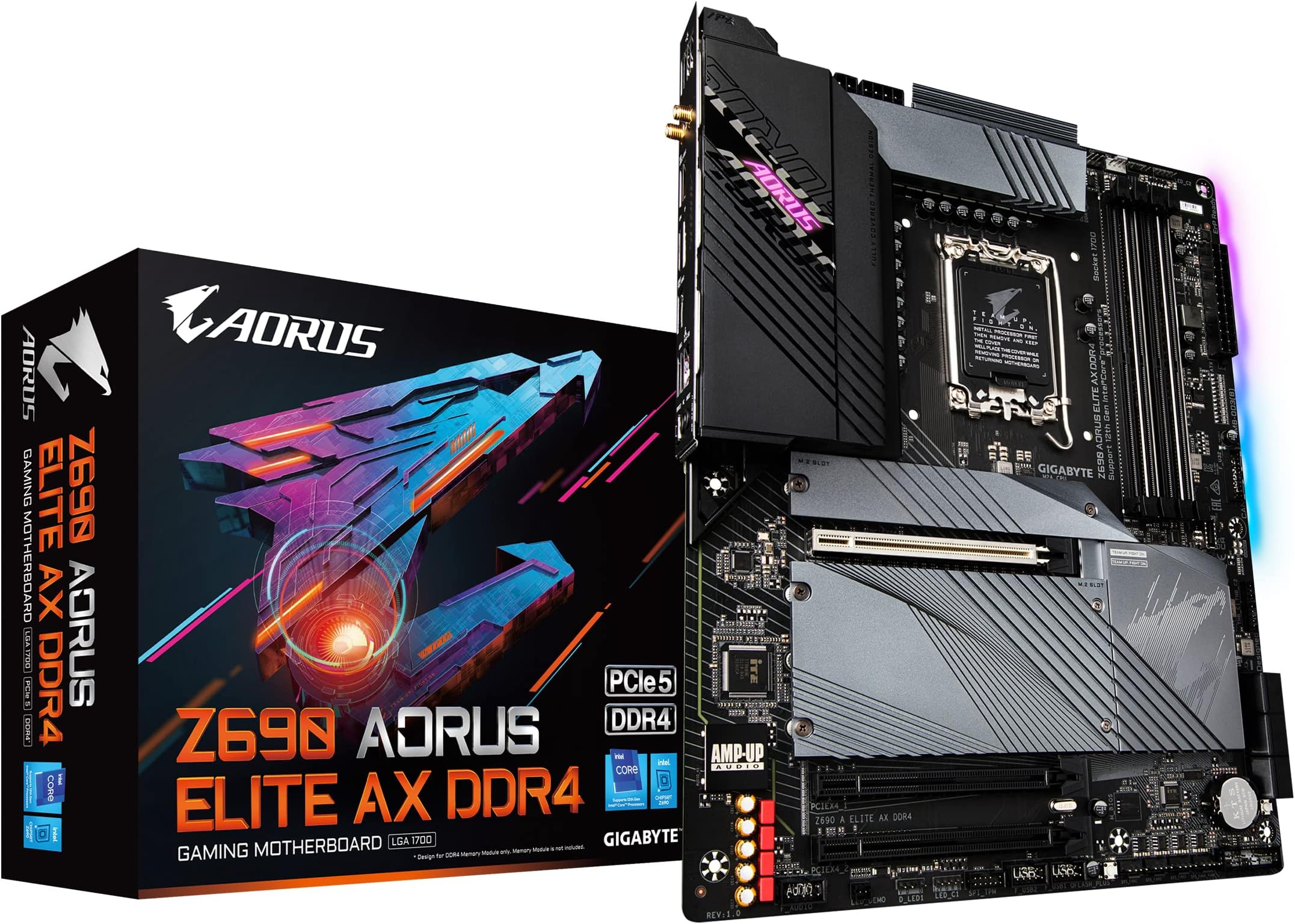
๐ Rule your rig with the Z690 AORUS Elite AX โ where power meets precision!
The GIGABYTE Z690 AORUS Elite AX DDR4 motherboard is a premium ATX platform designed for 12th Gen Intel Core processors, featuring a robust 16+1+2 VRM power design with 70A stages, quad PCIe 4.0 M.2 slots for ultra-fast storage, and next-gen connectivity including WiFi 6 and 2.5GbE LAN. Its advanced thermal armor and customizable RGB Fusion 2.0 lighting make it a top choice for gamers and professionals seeking high performance, reliability, and style without upgrading to DDR5 memory.


| ASIN | B09J6BWK2Z |
| Best Sellers Rank | #933 in Computer Motherboards |
| Brand | GIGABYTE |
| CPU Socket | LGA 1700 |
| Chipset Type | Intel |
| Compatible Devices | Personal Computer |
| Compatible Processors | 12th Gen Intel Core |
| Customer Reviews | 4.4 out of 5 stars 471 Reviews |
| Graphics Card Interface | PCI Express |
| Item Dimensions L x W x H | 10.62"L x 3.14"W x 13.18"H |
| Item Weight | 1950 Grams |
| Main Power Connector Type | 24-Pin |
| Manufacturer | GIGABYTE |
| Memory Clock Speed | 2133 MHz |
| Memory Slots Available | 4 |
| Memory Storage Capacity | 128 GB |
| Mfr Part Number | Z690 |
| Model Name | Z690 AORUS ELITE AX DDR4 |
| Model Number | Z690 |
| Number of Ethernet Ports | 1 |
| Number of Ports | 17 |
| Platform | Windows |
| Processor Socket | LGA 1700 |
| RAM Memory Technology | DDR4 |
| S/PDIF Connector Type | Optical |
| System Bus Standard Supported | SATA 3 |
| Total Number of HDMI Ports | 1 |
| Total PCIe Ports | 1 |
| Total SATA Ports | 6 |
| Total Usb Ports | 17 |
| UPC | 889523030059 |
| USB 2.0 | 2 |
| Warranty Description | 3 |
D**A
Beautiful, Wonderful, and Advanced
It took me 3 hours to tear down my most recent set up and replace it with this. Tight constraints but Iโm a big fan of the ATX factor. My immediate concern being a novice PC builder was that there is a 4x2 and a 2x2 ATX CPU power pin. If you are NOT over clocking, the 4x2 pin is enough and will boot and run things no issues. Tons of fan slots. The armor plates are removable and double as a heat sink for M.2 drives which go under them and can be screwed back on over the drives. Very sleek design. Heavy. Lots of metal parts and I love me some old fashioned gun metal colors. There is a built in RGB a lot so you can use those silly 3 pin connections and light up your world. BIOS from Gigabyte has always been nice in my opinion. This one is just as lovely as prior iterations and felt a lot better too. This board helped me trouble shoot why I could not boot my PC as well, made set up take a much shorter amount of time. This Z690 AX is labeled as the king of gaming by gigabyte. It, combined with a 13th gen processor, knows no bounds and transcends defeat. I did have some minor issues bios flashing, mostly operator error, but ddr4 updates I had to go back and use older files (F20) to use a 13th gen processor.
N**Y
Great board so far..
It's been two weeks since I completed my build (intel i7 12700k + Gigabyte AORUS Elite AX z690 ddr4 + 32gb corsair vengeance 3200mhz + 2TB Samsung 970 evo plus ) the system is stable as a Rock - 0 crashs, 0 issues with a Fresh windows 11 installation. First thing I did out of the box was to install the latest frimware (F6f). After windows installation was complete Run all the known test - cinabench r23, prime95 and few others with no issues. The memory xmp is working as intended. The nvme was detected during windows installation - to sum up non of the issues reported by others was present. My use for this system is mostly work and light gaming session. Didn't see the need to overclock it yet, since it a brand new system it fast enough for my need. I really like this board so far - hope it stay this way.
K**Y
Good board
Had to update the bios was able to use my 64 Gb Corsair ram overall good experience idk if people that are using ram thatโs not supported for the right capacity or what kinda funny if they are using 4400mz with more the. Two sticks probably wonโt work or if they try to 4 sticks In Two different packages that arenโt validated to work together
H**G
Plastic connector broke
The 9 pin USB slot broke off the motherboard too easily. Futher inspection showed very little adhesive on the mb for the plastic housing. There was no negative effect on the performance and the plug and the pins are working fine. Pros: It's great fit in the case. Processing is fast Cons: Not enough 3 pin LED connectors. I can't connect more than 2 LED components (system fans and cpu fans). All the plastic housings around the hub connectors (USB, etc) are cheap plastic. They look a little warped like they heated them to fit on the motherboard. I'd like to have a motherboard with better connectors and more LED connectors.
J**H
Does what I want it to now after doing more research.
Edit: After not giving up and doing more researching, I had to upgrade to a cpu the board supports and also put ram on slots a2 and b2 first in bios to change to xmp. After it worked I put my other 2 sticks in and its now working. So I wanted use my ddr4 rams 3200 option but when switching to xmp it would freeze(had to clear cmos). It runs fine on the other hand since I have 32g im not too worried. I just wanted to unlock my rams capabilities. Loses a star for that. Other than that good board for my elgato 4kpro with its pcie4x slot. Had a b660 before but it was only a pcie gen 1. I'd say its a good board for content creating, especially with all the m.2 slots! Hopefully gigabyte one day fixes the xmp. I really like their designs.
B**N
Great motherboard
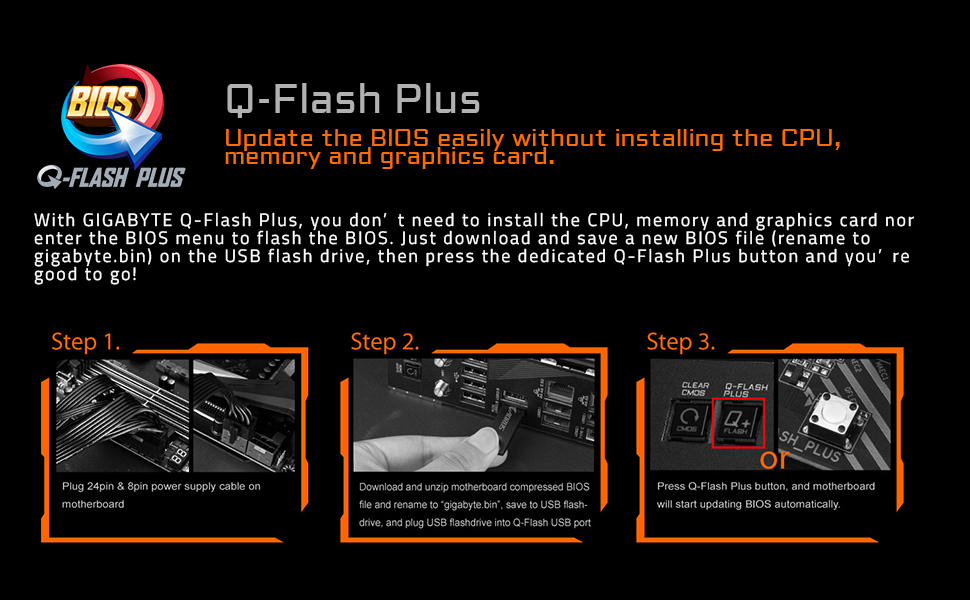
Purchased this motherboard after doing a lot of researching and Iโm glad I got this motherboard. The build feels very premium and it has some good weight to it. Plenty of plugins for different needs and good quality audio output. Lots of ports in the back as well. If you get the 13th gen intel cpu I recommend updating the bios which is super easy to do as it has a Q flash button to update it. XMP profile works without a problem so overall I recommend this motherboard for your gaming pc.
A**S
so far all good !
This motherboard comes with an actual printed manual - THANK YOU GIGABYTE. I used Qflash plus to update bios to F6A. It was easy enough. Motherboard works great so far. love the easy to use bios. Bios read my 32 gbs of ram and both of the m2.2280 pcie nvme ssds. I did not need to install any driver for Windows 10 to use the first m2 ssd as boot drive. Just a heads up, windows 10 will not recognize the second m2 ssd until you initialize (FORMAT) it. Type diskmgmt.msc in search box bottom left on screen to find and initialize drive.
C**Z
I obsolutely hate this motherboard...
I had to update my review on this motherboard because I genuinely have had nothing but problems since I built my computer. Back in April when I built the my PC, first thing that blew my mind was that the Motherboard wouldn't POST and boot into the BIOS for its first time if you only had a NVME drive connected to the motherboard. I HAD to have a SATA storage device plugged in for it boot into BIOS and then set my boot priority. After that, well I was having random issues where the PC would blue screen of death and the I would receive a POST error stating that I had CPU issue. It made me think my CPU was messed but this is where I figured out that it wasn't the processor and it was the motherboard. To see if I could fix this issue, I updated the BIOS to the latest version, then I updated to Windows 11. Only after that, the issues seemed to go away. Well yesterday, 25 June 2022, my PC crashed litteraly trying to boot Assassin Creed: Valhalla and boosted my CPU usage to 100% usage. I thought my CPU was toast, because the POST error for CPU Failure returned and this time it was basically permanent. I tried so many different troubleshooting steps from removing my RAM, GPU, and clearing+resetting the CMOS. Nothing. So I ran to Best Buy to buy another CPU because I thought my CPU was toast, just to find out that the CPU Failure issue was still there. IT WAS THE MOTHERBOARD.... What ended up fixing my issue was having to remove everything from my motherboard, except the CPU and RAM, and I had to initiate the Quick Flash that is built into the motherboard. My damn BIOS somehow got corrupted and IDK how. Now I know that I WILL NEVER buy a damn GIGABYTE motherboard again to save my life. Ill stick with ASUS or MSI. Other than the motherboard having a lot of input ports, optical audio support, built in wifi, and the RGB motherboard SYNC, the motherboard is pretty much trash, as the other competitors offer motherboards with similiar features, but they are actual stable out the box and have longevitiy. Do not recommend buying ANY INTEL GIGABYTE Motherboards.
A**L
ูุงู ุงููุงู ูุงู ูุง ูุนู ู
ูุงู ุงููุงู ูุงู ูุง ูุนู ู ุซู ุชูุงุตูุช ู ุน ุงูุฏุนู ูู ู ููุน ูููุงุจุงูุช ููุงูู ูุฒู ุฏุฑุงููุฑุงุช ุงููุงู ูุงู ูุงูุจููุชูุซ ููุฒูุชูุง ูุงุดุชุบู ุนูู ุทูู ูุจุนุฏูู ุญุฏุซุช ุงูุจููุณ ูุจุดูู ุนุงู ู ู ุชุงุฒุฉ ุฌุฏุง
A**N
good price for performance
looks powerful a lot of fan ports and sata for your HDDs and SSDs not enough RGB in my oppion but very good deal for the price
N**N
Just Amazing
Had been saving up for this for almost 6 months and it is by far the best I have used for the budget that has 4 nvme slotsworks flawlessly
J**O
Esta increรญble
Esta super bonita y muy bien construida se siente de calidad y trae mรกs de lo que puedes pedir
M**G
Sending not working mother board
Trustpilot
1 month ago
3 days ago