🚀 Elevate your home WiFi game—never settle for slow or spotty again!
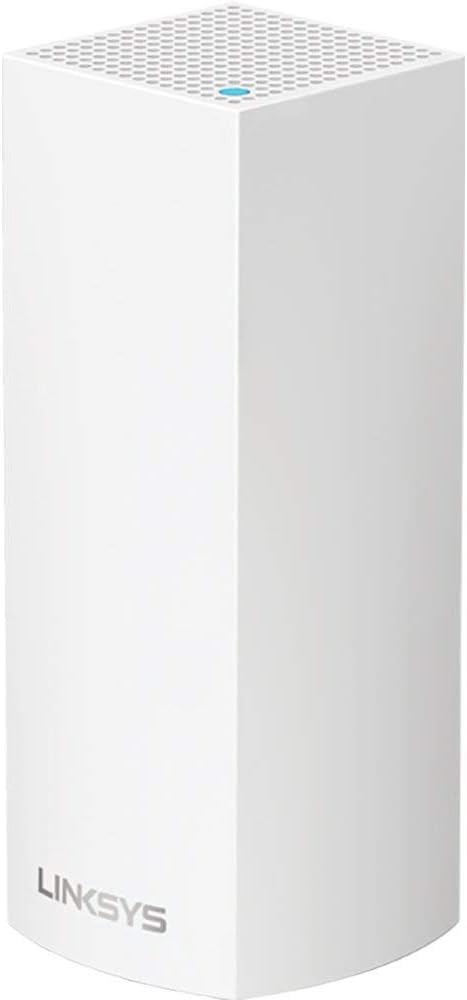
The Linksys WHW0301 Velop is a tri-band AC2200 mesh WiFi system designed for professional-grade whole-home coverage up to 6,000 sq.ft. Its intelligent mesh technology dynamically optimizes connections, while the intuitive Linksys app enables quick setup and advanced network management. With gigabit Ethernet ports, WPA2 security, and future Apple HomeKit compatibility, Velop delivers reliable, high-speed wireless networking tailored for modern smart homes and demanding users.
| ASIN | B01N2NLRSD |
| Antenna Location | Home |
| Antenna Type | Internal |
| Best Sellers Rank | #109,515 in Electronics ( See Top 100 in Electronics ) #368 in Whole Home & Mesh Wi-Fi Systems |
| Brand | Linksys |
| Built-In Media | Ethernet cable, Linksys Velop, Power adapter, Printed Documentation, Quick Start Guide |
| Color | White |
| Compatible Devices | Personal Computer |
| Connectivity Protocol | wi-fi |
| Connectivity Technology | Wireless |
| Control Method | App |
| Controller Type | homekit, vera |
| Coverage | Up to 6,000 square feet (expandable) |
| Customer Reviews | 4.3 4.3 out of 5 stars (1,139) |
| Data Transfer Rate | 2200 Megabits Per Second |
| Frequency | 2.4 GHz |
| Frequency Band Class | Tri-Band |
| Global Trade Identification Number | 00745883728114, 00745883728121 |
| Has Internet Connectivity | Yes |
| Is Modem Compatible | Yes |
| Item Dimensions L x W x H | 3.1"L x 3.1"W x 7.3"H |
| Item Type Name | Linksys WHW0301 Velop Wireless Whole Home Wi-Fi AC2200 Tri-band Mesh System |
| Item Weight | 1.1 Pounds |
| LAN Port Bandwidth | Gigabit Ethernet |
| Manufacturer | Linksys |
| Maximum Upstream Data Transfer Rate | 2200 Megabits Per Second |
| Mfr Part Number | WHW0301 |
| Model Name | WHW0301 |
| Model Number | WHW0301 |
| Number of Antennas | 6 |
| Number of Ports | 2 |
| Operating System | Linksys OS |
| Other Special Features of the Product | Foldable |
| Router Firewall Security Level | True |
| Router Network Type | Mesh |
| Security Protocol | WPA2 personal |
| Smart Home Compatibility | Smart Home Compatible |
| UPC | 745883728121 745883728114 745883836758 |
| Unit Count | 1.0 Count |
| Voltage | 100240 Volts |
| Warranty Description | 3.5 year manufacturer |
| Wireless Compability | 2.4 GHz Radio Frequency, 5 GHz Radio Frequency, 802.11b/n/ac, 802.11bgn |
B**R
Linksys Velop Saves the Day
We have a somewhat large house. As such, WiFi coverage can be spotty depending on where you are, how many walls the signal has to go thru, what furniture is in the way, and all kinds of things like that. We have a relatively new router, a Linksys AC5400 Linksys AC5400 Tri Band Wireless Router, Works with Amazon Alexa (Max Stream EA9500) . It works well and has good coverage as in my iPhone and MacBook Pro both get good signal thruout most of the house. Things had been okay until we got a new DirecTV DVR. Our previous model had worked fine on the LInksys 5 GHz WiFi band but this new model couldn't keep a connection up if its life depended on it. We tried both the 5 GHz as well as the 2.5 GHz bands, changed channels, but no joy. So a conundrum: what to do? The alternatives we came up with included: - Running CAT6 thru the walls for a direct connection - Running Ethernet over our power lines - Setting up a mesh WiFi network The first option would have been best. Direct connect to our router; no outside interference; number of walls didn't matter (well, other than running the cable). So good all around. But running wires thru a 2-story house is basically a real pain in the rear. So while we could make this work, we decided not to because of the problems running the signal cables. The second option seemed reasonable. The interface devices were relative cheap. You plug on into a power outlet near your router, run a CAT6 cable to it, plug a second unit into an outlet near where you need your network signal, plug that into your device, and all it good. So we tried a pair of Zyxel AV2000 power line devices Zyxel AV2000 Powerline Kit, Pass-Thru, 2-port Gigabit, Brown Box (PLA5456BBKIT) . Initially, this worked well: green connection lights on both units, good signal where we needed it. But it didn't last. We had a storm roll thru with a couple of mild power spikes. That killed one of our units. All our computers and electronics are behinds UPS units; there were unphased. The Zyxel unit, however, had to be plugged into the wall directly as the Ethernet signal wouldn't make it thru UPS filtering. Hmmm...bad luck I suppose. So I bought a pair of additional units, plugged one it, and all was good with the world again. That was, however, until we tried to pull some bigger download thru the unit. Our green lights turned to yellow indicating poor signal quality. Our download speed went to virtually zilch no matter what we do. Bottom line: this did not work for our needs. Our final option was to try a mesh WiFi network. I have done IT work for my entire career. Setting up access points so that you get good WiFi coverage without interference through a structure can be anything from easy peasy to downright impossible. So it was with some degree of apprehension that I decided to give this a go. As it turns out, any misgivings were ill founded as setup was a breeze. The steps were simple: - Load a free app onto your iPhone and Android phone - Wire one unit to your router and power it on - Use the app to setup your new WiFi SSID and password plus configure the device (2-3 min) - Plug a second device into power where you need WiFi coverage then use the app to configure it (again, 2-3 min) - Repeat if you have a 3rd or 4th device So this was cool: I now had another WiFi network running in my house. I joined my iPhone to it then tested it for ping, jitter, download, and upload speeds. These were the same readings I got when I tested via my MacBook Pro directly connected to that same router. Okay, we're good: strong signal, no performance penalty. So I joined my DirecTV DVR to this new network confident that I had solved the problem. Unfortunately, things did not go well. Even though I had a good connection. the DirecTV device couldn't use the signal. It told me this by freezing and becoming unresponsive any time I tried to download something over this new network. It was so hung up that I had to power cycle it to clear the condition. Well, phhhhtttttt (that's a highly technical term we us in IT when something should work but doesn't). Then I remembered: each Velop unit has a pair of RJ-45 connectors on the bottom. I wonder: could I run a short CAT6 cable from the Velop to the DirecTV DVR and use a wired rather than a wireless connection? So I gave it a shot and it worked. Not only did it work but it has stayed working ever since with nary a whimper and zero problems. Pros: - Works well - Reliable - Really easy to setup even for non-IT folks Cons: - Somewhat expensive Bottom line: - I would absolutely recommend the Velop to anyone looking for uniform, reliable WiFi coverage throughout their home.
P**I
Flawless...and better performance than I expected.
I have a 1,300 Sq. Ft. ranch style house. I placed one Velop in the corner of my basement and the entire house is getting a full signal on the upper level. My speed from ISP is rated at 75Mbs and the Velop is providing 90 Mbs throughout my upper living areas. My basement is Unfinished, so I'm sure it helps getting the great speed and range. I have 3/4" plywood subfloor and 3/4" hardwood flooring. The signal is easily passing through 1-1/2" of lumber between the basement and the living space above. I downloaded the App and installed the device as directed (step-by-step). I used my smartphone to operate the App. I turned on both Wi-Fi and Bluetooth radios of my smartphone prior to installation. Setup was very easy. Give the Velop several minutes to "communicate" and setup. After installation completed, Velop asked for permission to update itself. I approved the command, but no updates were required at the time. This is not a cheap system to install, but it was worth every penny. I saved time, frustration and effort because I purchased this unit. I have a great mesh network I can add onto anytime without network signal loss if necessary in the future (add a node in my detached garage). The Velop unit is solid construction and easy on the eyes. No "bright lights" to keep you awake at night if you place this in a bedroom. A soft purple LED glow illuminates from the top of the unit to let you know it's connected and working properly. You can add a guest network with ease....Velop software asks you during initial setup. I researched many WiFi units (probably too many) before I purchased the Velop. I think I made the right decision for my application. My house is 100% hardwired using CAT 7 and Gigabit, but I wanted a solid Wi-Fi network for my guests. Good luck with your search to find the perfect Wi-Fi system. I can recommend the Velop and suggest you give it a consideration. I'm happy :)
A**Y
Good system for non-IT folks with good performance but APP needs some work.
Good performance but APP needs some work. I have struggled as a non-IT tech, but as an engineer with some technical capacity, to get decent and reliable WI-FI in my house without having the place festooned with ugly IT hardware. I even installed ethernet cable to strategic points to get wireless access points hooked up -however setting these up for success seemed to require several year of IT training. I ditched a standard high-end router and WAPs for these. So far so good in terms of WIFI performance. The set-up and monitoring APP is simple if all goes well, but leaves something to be desired : - Gets stuck on location /finding an additional node and keeps asking you to reset . Only way to get out of this seems to be to switch i=phone off. - Dropped a node off the monitoring APP that was previously connected. Status light on node shows it supposedly working ok. Its recognised in the system via ethernet connection. - Told me it couldn't connect a node, but then when I quit it appeared. Minimal specific feedback . -There is very little in the APP instructions on connecting ethernet to it -I don't know wether this confuses APP vs status lights I think part of my seemingly lifelong WI FI struggles to dat has been heavy interference from neighbours. I get a strong signal from several nearby houses as we all play the Wi Fi arms race. The channel optimizer feature is good as it takes the guess work out and seems to help. It would be useful to have more information on wether its possible to integrate with existing WAPs -even if the answer is no it would be clear so then I can permanently decommission them. UPDATE : After a firmware upgrade the APP seems to be working as expected -all my nodes are showing up with correct status per lights on node. The WiFi performance continues to be excellent and a vast improvement.
C**N
They're good but not great. I already have 2 nodes and needed 1 more to complete the coverage in my home, as the one upstairs doesn't reach all the way to the back of my house. Pretty easy to set up if the signal is alright for pairing to the parent node. Connection speed I find is random in my house. I find any of my devices will have issues getting a constant fast connection and maintaining one. All in all these are nice routers with a few bugs that need to get ironed out. As for receiving my Linksys Velop, it was ahead of schedule by a day and no damage to box.
A**N
Quick integration with my existing linksys to boost coverage
L**.
Received in good condition!
F**A
Decidí comprar un solo nodo ya que mi casa no es muy amplia pero todos los muros son de concreto con lo que la perdida de señal era muy latente con los modems comunes. Mi primer experiencia con 1 solo nodo fue que mejoro el alcance pero aun así tenia puntos sin internet y la mayoría de los dispositivos se conectaban a la red de 2.4Ghz la cual el tiene mucha interferencia por los dispositivos comunes y el ancho de banda era muy bajo ya que yo tengo 150MB. Decidí comprar 2 nodos mas y con eso asegure una cobertura global de 5 Ghz con velocidades de descarga de de 148 MB, y así pude unificar la red local de mi domicilio. Actualmente ya no tengo problemas con que se desconecten los equipos o que Siri no controle todos mis dispositivos , etc. En general recomiendo el producto pero calen con 1 y con ese se pueden dar cuenta cuántos nodos les hace falta para una red de 5ghz. Saludos!!!
N**C
Evidente la calidad de la señal de cada nodo vendrá de la construccion de tu casa , tengo buena recepción en toda la propiedad con muy poca degradación en lo que sobresale es en el modulamiento de trafico , un modem tri-banda permite tener mas de una persona en conferencia y viendo videos en tiempo, si tienes un smarthome o mas de 10 dispositivos conectados a tu red es momento de invertir , para hacerlo funcionar con homekit tienes que bajar el firmware de la pagina de US e instalarlo manualmente , pero funciona sin problemas lo tengo ya en el 3 dia funcionando con homekit sin problema
Trustpilot
3 days ago
2 weeks ago