Buy anything from 5,000+ international stores. One checkout price. No surprise fees. Join 2M+ shoppers on Desertcart.
Desertcart purchases this item on your behalf and handles shipping, customs, and support to Croatia.
๐ Upgrade to Hydra Pro 6E โ Where speed meets seamless connectivity!
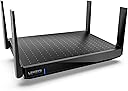
The Linksys Mesh WiFi 6 Router MR7500 delivers ultra-fast AX6600 speeds up to 6.6 Gbps with dual-band WiFi 6E technology, covering up to 2,700 sq.ft and supporting 55+ devices simultaneously. Featuring intelligent mesh technology and a dedicated 6 GHz band, it ensures low-latency, high-capacity connections ideal for streaming, gaming, and smart home integration. Managed easily via the Linksys app, this router is designed for professionals and tech-savvy households seeking reliable, future-ready WiFi.


| ASIN | B09DRDWXWF |
| Antenna Location | Home |
| Antenna Type | Fixed |
| Best Sellers Rank | #28,815 in Computers ( See Top 100 in Computers ) #530 in Routers |
| Brand | Linksys |
| Built-In Media | product, manual |
| Color | White |
| Compatible Devices | iPhone, Xbox, Television, Roku, Alexa, Apple TV, Laptop, Macbook, Nest |
| Connectivity Protocol | Wi-Fi |
| Connectivity Range | 2700 Square Feet |
| Connectivity Technology | Ethernet |
| Control Method | App |
| Controller Type | App Control |
| Coverage | 2,700 square feet |
| Customer Reviews | 4.4 4.4 out of 5 stars (496) |
| Data Transfer Rate | 6600 Megabits Per Second |
| Frequency | 6 GHz |
| Frequency Band Class | Dual-Band |
| Has Internet Connectivity | Yes |
| Is Modem Compatible | No |
| Item Dimensions L x W x H | 14L x 24.9W x 16H centimeters |
| Item Type Name | wi-fi router |
| Item Weight | 2 Pounds |
| LAN Port Bandwidth | 1000 Mbps |
| Manufacturer | Linksys |
| Maximum Upstream Data Transfer Rate | 6600 Megabits Per Second |
| Mfr Part Number | MR7500-AMZ |
| Model Name | MR7500 |
| Model Number | MR7500-AMZ |
| Number of Antennas | 4 |
| Number of Ports | 4 |
| Operating System | RouterOS |
| Other Special Features of the Product | WPS |
| RAM Memory Installed | 64 MB |
| Router Network Type | Wireless |
| Security Protocol | WPS |
| UPC | 745883819683 745883846061 |
| Unit Count | 1 Count |
| Warranty Description | 3.5 years |
| Wi-Fi Generation | Wi-Fi 6 |
| Wireless Compability | 802.11ax |
T**M
Good unit - meshing is difficult
The device is pretty good, it has good range and has increased our wifi output significantly from the old router. I now get 600+mbps. The issue is that I have lost so many hours of my life trying to mesh this new router with a few of my other linksys routers. The linksys support desk is super responsive but after my 10th service ticket I lost the will to live. I paid a guy to come and do it and after a few hours he worked it out... So my message is, if you think you can set this up on your own - think again !
M**L
I donโt suggest
Iโm using D-Link 853, this is less than that. Looking for better than current one but this was worst than that.
R**I
signal keeps disconnecting
with less than 30 days. the router signal started getting disconnected. very bad product ! needs to be returned
D**A
Actualice mi anterior Linksys por este equipo de 4 antenas, el equipo anterior comenzaba a batallar con 20 dispositivos conectados, este equipo tiene 40 dispositivos wifi conectados y no tiene problemas de desempeรฑo
M**R
I had a Linksys Velop wifi 5 mesh, running it in bridge mode to provide a large area with wifi coverage. The network was using an Asus router with it's wifi turned off as the only router, with the Velop mesh for all the access points. That worked well, except in bridge mode, the guest network actually wasn't separated from the primary network, so guest users could access devices on the primary network if they knew how to do that. And I got a new phone that supports WiFi 6. So I bought this router and successfully replaced my old router. The configuration went pretty smoothly. I had to do a factory reset on all the Velop nodes, essentially destroying the existing Velop wifi 5 mesh. Then connected the new router to the cable modem, and did the router setup using the Linksys app on my phone, to create the new main node for the new mesh. Then used the Linksys app to add the unconfigured nodes to the new mesh, one at a time. BTW if you are using hardwired backhauls (connecting the Velop nodes to the router using Ethernet cables) you need to not connect the cables when configuring the node - it has to be added to the mesh via wifi. Connect the cable after the node is in place, and then power cycle the node to get it to use the hardwired backhaul. The end result is a fast wifi 6 central router combined with a wifi 5 mesh for reaching out to a large area. The phone seamlessly switches from 6 to 5 when walking around, it does exactly what I had hoped for. Now that I'm not running bridge mode, the guest network is actually secure. The router does support a USB disk drive, which basically just worked when i plugged it in. Very happy. What I would like to see added would be more advanced control of the router. There is a local router control panel, which you get to via a web browser at the router's IP address. This provides some amount of configuration, but not as much as I would like. Asus provides much more in this area. I intend on replacing the Velop 5 nodes with Velop 6 nodes at some point, which will be an easy task. Overall an excellent product with an excellent outcome, and didn't need Linksys tech support to get it done.
N**H
Fast shipping. Accurate product description. Communication was fine. Overall excellent.
J**L
Aqui las razones por las que no lo recomiendo: 1. La frecuencia 6Ghz no funciona (probado con equipos con AX210 y AX411) 2. Los canales no pueden configurarse manualmente incluyendo los de la banda 160Mhz 3. Pobre interfaz de configuracion, abismal diferencia con la interfaz de los routers WRT 4. Forzoso a usar una app de celular para configurarlo por primera vez Siento nostalgia por aquellos viejos tiempos donde Linksys era autoridad en routers caseros, hoy, ni de cerca.
D**M
I've been a fan of Linksys for many years. I did IT work in the past and worked with other routers and have found that Linksys is best for reliability, set up and quality. My EA9500 was over 7 years old and still working perfectly, but I figured it was time to delve into a mesh system. I was using a main router and 2 'older' Linksys routers as 'bridge' routers. I hadn't really had any issues, except that all the equipment was over 10-15 years old. I did a lot of research and decided on the Hydra Pro 6e for my main router, and the Atlas Pro's as the 'child nodes'. I have a 2800 sq ft house (1st floor and basement), with my main router in the basement. I placed one child node in the master bedroom (wired), another in the living room and the 3rd in my garage, (both wireless). (It should be noted that with all the devices in my house, from cameras, to TV's, phones, etc., we have 37 devices). So far, I have no 'dead' areas and all devices show a strong signal. Setup was very easy - I logged into the router through the IP address to set up my cameras, and then used the app to finalize the settings. In the future, I may run CAT5e to the other nodes just for reliability. This seems to be a great combination and I would recommend it to anyone looking to get a mesh system.
Trustpilot
2 weeks ago
2 months ago